Everand: Audiobooks & Ebooks
- 37.14K
- 3.5
- Installs
- 10.00M
- Price
- Free

Screenshots

Analysis by Reviewed
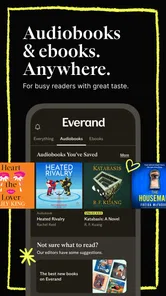
I like having one place to browse both ebooks and audiobooks, especially when my reading time is scattered across the day. Everand: Ebooks and Audiobooks is a reading and listening app from Scribd, Inc., and its appeal is straightforward: I can look for something to read when I have a quiet moment, then switch to listening when my hands are busy. It is free to install, with in-app purchases, and is rated for Everyone. For me, it works best as a flexible discovery tool rather than a promise that every book I want will always be available on demand.
A Bookworm's Dream Come True
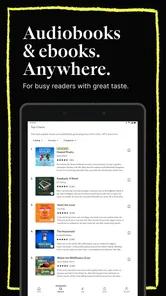
First off, let me just say that Everand offers a treasure trove of literary delights. As soon as you open the app, you're greeted with a sleek and user-friendly interface that makes it easy to navigate through their extensive library. Whether you're into thrillers, romance, sci-fi, or non-fiction, there's something here for everyone. And the best part? You have access to both ebooks and audiobooks, so whether you prefer reading on your screen or listening on the go, Everand has got you covered.
A Seamless Experience
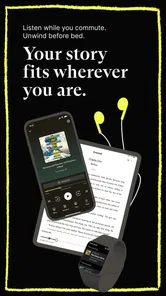
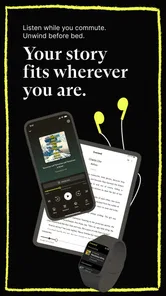
One thing that really impressed me about this app is its seamless integration across devices. I started reading an ebook on my tablet, and when I switched to my phone later, it picked up right where I left off. No more losing your page or trying to remember where you left off—it's like magic! Plus, the offline mode is a lifesaver for those times when you're stuck without Wi-Fi but still need to get your reading fix.
Another feature I absolutely adore is the customization options. You can tweak the font size, background color, and even the brightness level to suit your reading preferences. And for the audiobook fans out there, you can adjust the playback speed, which is perfect for those days when you want to breeze through a book or take it slow and savor every word.
Audiobook Lovers, Rejoice!
If you're someone who enjoys diving into a good story while multitasking, then the audiobook section of Everand is going to be your new favorite hangout. The selection is vast, and the narrators are top-notch, bringing each story to life with their captivating voices. Listening to a book while cooking dinner or going for a run has never been so enjoyable.
What really sets Everand apart, though, is its range of content. Alongside popular titles, the app offers material that can help me come across authors and stories I might not have searched for directly. That makes browsing worthwhile when I have time to explore, though I still check for a particular title before counting on the app for it.
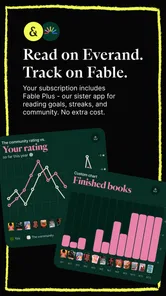
The community aspect can add another way to engage with a book. You can join discussions, share your thoughts, and get recommendations from fellow readers. I see this as an optional extra rather than a core part of the reading experience: useful if I want conversation, easy to ignore if I would rather read quietly.
More From Our News Desk

Weather by Xiaomi Review: Clear at a Glance, Less Clear Up Close

X Under Pressure: Can It Recover When Posting Goes Wrong?

Clash of Clans Is Won Between the Battles

Android Auto Makes the Case for Quieter Car Software

MobiOffice: Transforming Mobile Productivity with Seamless Integration

EA SPORTS FC™ Mobile Soccer: Redefining Mobile Sports Gaming
A Routine That Makes the Library Work
I get more out of a subscription library when I treat it as a place to explore, not just a checkout shelf for one planned title. Before a commute or a stretch of chores, I would shortlist a few likely reads, then download the ebook or audiobook I actually intend to use. That small habit matters: it avoids choosing in a hurry with a weak connection and gives me a backup if my mood changes. I also like keeping a short queue across formats, so a book that feels too dense to read after work can become a listening option during a walk.
For an everyday example, imagine a bus ride in the morning and dinner prep later. I can read a few pages while seated, then use the audiobook version when I am chopping vegetables, adjusting playback speed to suit the narrator and the task. Offline access is useful for the ride if service drops, but I would download material before leaving rather than assume I can fetch it at the last minute. This is a practical rhythm for people whose attention comes in small windows; it is less compelling if you mainly want a single specific bestseller and do not plan to explore anything else.
One small but useful decision is to pick the next title before the moment I expect to read. Browsing while walking out the door or waiting for a ride makes it easier to settle for something random, and it can be frustrating if connectivity is poor. I keep the shortlist deliberately small; too many options turn a quick reading break into another round of browsing. This habit also makes it easier to notice whether I am genuinely using the subscription or merely collecting titles I never open.
Settings and Shortcuts Worth Using
When I settle into an ebook, I change the font size and background to make longer sessions comfortable instead of squinting through the default presentation. I treat brightness as part of that setup too, especially when moving between a bright room and reading before bed. For audio, I test playback speed on a familiar passage rather than immediately choosing the fastest setting: a small change can save time without making dialogue hard to follow. These are simple adjustments, but making them once at the start of a session is easier than interrupting a chapter later.
The format switch is another useful habit, but it works best when I think about the job each format needs to do. Ebooks suit passages I want to pause over, while audio is easier during repetitive tasks. I would not assume every title offers the same experience in both formats, so I check the individual listing before building a routine around a particular book. Likewise, syncing across devices is handy for continuity, but I still give the app a moment to catch up when changing devices rather than opening both and rapidly jumping around.
For audio, I also match the speed to the material rather than using one setting for everything. A familiar nonfiction topic may be easy to follow a little faster, while a new character-heavy story can lose its rhythm if I push the pace. I make that choice at the start of a listening session and adjust if concentration slips. It is a modest way to keep listening comfortable instead of treating speed as a race.
Where It Fits Among Reading Apps
Compared with buying ebooks one at a time, a subscription library can be a better fit if I sample widely and often abandon a book that is not working for me. It lowers the friction of trying a new author, though that value depends on whether the available selection matches my interests. A dedicated audiobook service may be preferable if listening is almost all I do, while a library app or individual ebook store can make more sense for someone who wants a specific title or long-term ownership. Everand’s advantage is the combination of formats and discovery; its compromise is that subscription access is not the same as building a permanent personal collection.
I would recommend it most to curious readers who switch between reading and listening, enjoy browsing, and can make regular use of a subscription. It is less suited to someone who reads only occasionally, prefers to own each book outright, or needs a particular title regardless of what is currently offered. The app is free to download, but I would decide whether the subscription earns its place by testing my actual weekly habits, not by imagining an ideal reading routine. If I only open it once in a while, buying a book individually or borrowing one elsewhere may be the more sensible choice.
That comparison matters most when a reader has a clear priority. If I listen almost exclusively, an audiobook-focused option may make it easier to keep attention on narration and listening habits. If I want a specific ebook to keep, buying it or borrowing it through a library is more straightforward than relying on subscription availability. Everand is most compelling in the middle: I want to sample broadly, and I value having reading and listening in one place more than permanent ownership of every title.
What to Expect Before Settling In
A broad catalog and recommendations make discovery enjoyable, but they do not remove the need to check whether a particular book is accessible to you. I would search for a few authors and titles I already care about before committing to a month of regular use, then see whether the surrounding suggestions are genuinely appealing. This also answers a practical question: can it replace every other reading source? For many people, probably not. It is strongest as one flexible shelf among several, especially when a book is available in the format that fits the moment.
The app has been available since February 17, 2012, and version 15.23.1 requires OS 7.1 or later. It has passed 10 million installs, with a 3.7 average from around 617,000 ratings and roughly 37,000 written reviews. Those figures suggest a well-established app, but they cannot tell me whether the catalog matches my taste. The in-app purchase range is $0.99 to $19.99 per item, so I would review the subscription options and terms in the app before making it my main reading source.
A practical way to judge the fit is to search for several authors I already enjoy, not just one famous title, and then explore what the recommendations surface. If the results give me a few genuine alternatives, discovery may be part of the value. If I find myself searching for the same unavailable book repeatedly, I would use another source for that title rather than expecting one subscription library to cover everything. That check takes less effort than building a routine around an assumption.
The community features may add a social layer, but I would treat them as optional rather than the reason to install the app. If I want a focused reading experience, I can simply choose a title and get on with it; if I want discussion, I can use the in-app options when they suit me. That flexibility is welcome, though readers who prefer a completely solitary, minimalist reader may find extra discovery and social elements unnecessary. The important choice is not whether every feature is useful, but whether the core combination of browsing, ebooks, and audiobooks fits how you already spend your time.
Keeping Expectations Realistic
Everand works best for me when I see access and ownership as different things. With individual purchases, I choose a title and add it to a personal collection; with a subscription library, I get a convenient way to read what is available through the service. That distinction is easy to overlook when browsing feels similar. If a book matters enough that I want it as a lasting part of my collection, I would consider buying or borrowing it elsewhere rather than treating subscription access as permanent.
Another point worth weighing is attention. A large range of choices can make it tempting to spend the time I meant to read scrolling through recommendations. I avoid that by searching with an intention—an author, genre, or mood—and saving only a few candidates for later. This is not a special feature so much as a repeatable habit, but it makes the app feel more useful and less like an endless shelf. Readers who enjoy browsing for its own sake may not mind that trade-off; readers who want to open directly to one owned book may prefer a simpler reader.
If I am deciding whether to keep using it, I would ask myself two practical questions: did I open a book or start listening several times this week, and did the available selection give me something I wanted to continue? Those answers are more revealing than how many titles I saved. A subscription makes more sense when it changes my routine in a useful way; if I keep postponing reading or searching elsewhere for every book, it is not the right fit for me at that point.
My Verdict After Using It as a Habit
My honest recommendation is to approach Everand as a flexible reading companion, not a replacement for every book source you already use. The most satisfying pattern is to browse with a few interests in mind, save a short list, and choose the format that suits the next part of the day. That makes the combination of ebooks and audio feel purposeful instead of leaving me with an overwhelming library and no plan.
There is a real trade-off between convenient access and ownership, and the best choice depends on how often I read and how attached I am to particular titles. If I am a frequent browser who likes discovering something unexpected, the subscription model can make sense. If I want a quiet reader for books I already own, or only need one title, a dedicated ebook app, audiobook service, or individual purchase may be a better match. For readers willing to build a repeatable routine around it, Everand offers a useful way to keep stories close across different parts of the day.
Everand: Audiobooks & Ebooks Frequently Asked Questions
Who develops Everand, and what kind of app is it?
Everand is a Books & Reference app developed by Scribd, Inc. Its focus is a digital subscription for audiobooks, ebooks, and more, making it an option for people who want to read or listen through an app rather than rely only on physical books. The app is rated for Everyone, so it is presented for a general audience.
How much storage space should I allow for Everand?
The amount of space Everand uses can vary depending on your device and how much content you choose to download. If you plan to keep ebooks or audiobooks available offline, leave room for those files as well as the app itself. Checking your available storage before downloading and occasionally removing finished downloads can help keep your device from running low on space.
Is Everand free to download, and how does access work?
Everand is free to download, but its store summary describes the service as a subscription for audiobooks, ebooks, and more. The app also lists in-app purchases, so downloading it does not necessarily mean every title or feature is available without payment. Review the subscription and purchase details shown for your account before committing, and check that the available catalog suits what you want to read or hear.
What is Everand and what does it offer?
Everand is a user-friendly app designed for book lovers, offering an extensive library of ebooks and audiobooks across various genres. It provides users with easy access to thousands of titles, including bestsellers and classics, allowing them to read or listen to books anytime, anywhere. The app is perfect for those who enjoy reading on-the-go and prefer a digital library.
Is Everand available on both Android and iOS devices?
Yes, Everand is available for download on both Android and iOS platforms. Users can easily find the app on the Google Play Store for Android devices and the Apple App Store for iOS devices. This cross-platform availability ensures that users can enjoy their favorite books on any device they own.
Pros
- Vast library of ebooks and audiobooks.
- User-friendly interface for easy navigation.
- Offline access for reading on the go.
- Regular updates with new content.
- Integration with multiple devices.
Cons
- Limited free content available.
- Requires stable internet for streaming.
- Occasional app crashes reported.
- Some features locked behind paywall.
- Limited customization options.












