EPUB Reader for all books
- 448.00
- 4.2
- Installs
- 5.00M
- Price
- Free
Screenshots
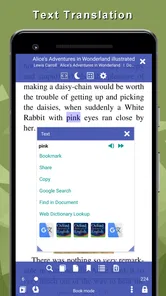
Analysis by Reviewed
I find a reader works best when it fits into an existing routine rather than asking me to rebuild my library around it. EPUB Reader for all books is most appealing if you already keep books as EPUB files and want a phone or tablet to handle the everyday act of reading. It is a free Books & Reference app from Librera, and its 4.5 average from around 22,000 ratings suggests it has found a broad audience. I would think of it as a flexible reading space, not a bookstore: the useful question is how comfortably it handles the books you already have.
A straightforward reading routine
My practical starting point would be to open one book, adjust the page until it feels comfortable, and read a few pages before changing anything else. That small test tells you more than browsing every menu at once. EPUB Reader is aimed at people who want to settle into a book without fuss, and it has attracted over five million installs. The app is free, rated for Everyone, and its current version is 9.0.17; it runs on Android 7.0 or later.
For an everyday example, I might save a book on my device before leaving home, open it while waiting for a train, and continue during a break without relying on an internet connection. The key habit is to check that the book itself is available locally before going offline. That simple preparation makes a reading app far more dependable when reception drops, and avoids discovering at the station that a title still needs to be downloaded.
When a file-based reader makes sense
The choice between this kind of reader and a retailer’s app often comes down to how you get books. With a store-centered alternative, finding and purchasing titles may be the main attraction, and the library can fill itself through that service. EPUB Reader makes more sense to me when I already have files and want a place to read them. That flexibility is useful for a personal collection, but it also means I need to bring the books and keep track of them myself.
If I receive an EPUB from a class, a reading group, or a friend, I would treat the first opening as a small compatibility check: make sure the file appears in the library and that its text displays comfortably before depending on it for a long session. This is a practical habit, not a claim that every EPUB is guaranteed to behave identically. If a book is central to a deadline or trip, testing it in advance is wiser than discovering a formatting problem when there is no time to switch readers.
Making the reader fit your habits
I find it easier to judge a reader after using it for an ordinary week than after spending an afternoon exploring every menu. I’d begin with one book, settle on a comfortable page style, and notice which small actions I repeat. That gives me a practical baseline for deciding what is worth adjusting next, rather than letting setup take over the time I meant to spend reading.
Settings worth checking
The first thing you'll notice about the EPUB Reader is its seamless interface. I mean, it's like the app just knows what you want. No more squinting at tiny text or getting lost in a sea of menus. The layout is super intuitive, letting you dive right into your favorite book without any fuss. Whether you're reading on an Android or an iOS device, the experience is consistently smooth.
More From Our News Desk

Weather by Xiaomi Review: Clear at a Glance, Less Clear Up Close

X Under Pressure: Can It Recover When Posting Goes Wrong?

Clash of Clans Is Won Between the Battles

Android Auto Makes the Case for Quieter Car Software

MobiOffice: Transforming Mobile Productivity with Seamless Integration

EA SPORTS FC™ Mobile Soccer: Redefining Mobile Sports Gaming
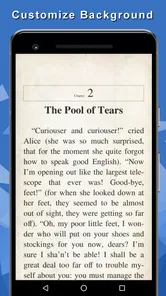
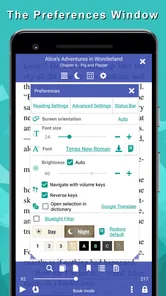
Customization is where a little patience pays off. Rather than repeatedly adjusting text in the middle of a chapter, I would set a comfortable size and background once, then read for a while before deciding whether another change actually helps. A brighter screen can be tiring late at night, while a softer-looking page may be less clear in daylight, so one setting is not necessarily right for every place. The practical trade-off is choice: tweaking can make reading feel personal, but endless experimenting can become its own distraction.
I also find it useful to make changes in isolation. If I adjust text size, spacing, and the page appearance all at once, I may not know which change made the book easier to read. A better approach is to alter one setting, read a page or two, and keep it only if it solves a real problem. That is especially helpful when moving between a phone and a larger screen, where the same text size can feel quite different.
Customization Galore
Now, let’s talk customization. We all have our quirks, right? Some like a bold font, some prefer a soothing sepia background, and others might need a larger text size. EPUB Reader totally gets this. The app is packed with options that let you tweak your reading experience to your heart's content. I found myself playing around with the settings way more than I should have, but hey, it's all part of making the app feel like your own personal library.
Faster patterns for a growing shelf
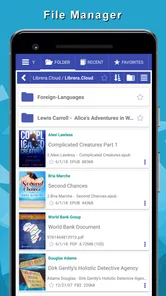
When a collection gets crowded, I would treat organization as a repeatable routine: decide on a small number of useful categories, file new books as they arrive, and use search when a title slips your mind. Collections and favorites make more sense when they reflect how you actually choose what to read—perhaps one group for books you are actively reading and another for titles to revisit—rather than trying to classify every book in several ways. This is a modest bit of setup that can save more time than repeatedly scrolling through a long shelf.
A good shortcut is to make the library serve the next decision, not to build a perfect catalogue. When I finish a book, I can remove it from an active-reading group or mark a likely next choice as a favorite, then stop. That leaves the shelf useful without turning reading into filing work. If I cannot remember a title, search is usually a more practical first move than creating increasingly detailed categories.
Library Management Made Easy
Having a digital library can be a bit daunting, especially if you're like me and have hundreds of books waiting to be read. But fear not! This app's library management is top-notch. You can organize your books by categories, create collections, or even mark your favorites. The search function is a lifesaver when you can't remember which book you wanted to read next.
Plus, the syncing feature ensures that your progress is saved across all your devices. It's like having a personal librarian who keeps everything in check for you. Trust me, once you get used to this level of organization, there's no going back.
What to expect when switching devices
Experienced readers often get the most from any reader by keeping the routine simple: settle the page settings, organize books as they are added, and use favorites to surface current choices. I would not assume every detail of a library behaves identically across devices, though. If you read on more than one device, check that your progress is where you expect it before relying on a handoff, especially before a trip. If seamless cross-device continuity is your main priority, compare that experience with a dedicated reading ecosystem you already use.
A useful way to avoid misplaced progress is to finish a session with a quick check of the current book and position, then confirm the same place appears on the other device before settling in there. That small routine matters more when switching devices is frequent than when one phone is your only reader. People who rarely change devices can keep things simpler and spend less time checking synchronization.
Where another reader may suit you better
The bigger limitation is that a flexible EPUB reader is not automatically the best home for every kind of reader. If you mainly want to discover and buy books inside one polished store, a retailer’s own reading app may feel more direct. If you prefer printed books, rely on audiobooks, or want a tightly curated service rather than managing files and shelves, this app may not match your routine. I would choose it for reading and organizing EPUBs, not as a substitute for every book-related service.
It may also be the wrong choice if the thought of importing, locating, and sorting files feels like extra homework. A store-first app can reduce that setup by keeping browsing and reading together, while a dedicated e-reader may be a better fit for someone who wants a separate reading device and a focused environment. The trade-off here is control versus convenience: EPUB Reader is appealing when you want to manage your own shelf, but less compelling when you want a service to make those decisions for you.
Offline access as a planned habit
One of my favorite features has to be the offline access. Imagine you're on a flight or somewhere with dodgy internet, and you're itching to read. This app has got your back. Once you've downloaded the books, you can read them anywhere, anytime, without a hint of Wi-Fi. It's like carrying a library in your pocket!
For a trip, I would prepare by opening the book while online and confirming that it is ready to read, then keep the phone charged and the file accessible. That workflow is more reliable than assuming an online library and a locally saved book are the same thing. It also highlights the app's sweet spot: carrying a personal reading shelf with you, rather than depending on a connection to decide what to read next.
This routine is useful beyond travel. A student can keep a course reading ready for a campus building with unreliable reception, or someone can set aside a book for a quiet lunch break without needing to browse online first. I would choose the next title before leaving, rather than expect a weak connection to be helpful at the moment I want to read. A little preparation is the price of having a dependable offline session.
Who should choose it
I would recommend giving it a try if you already have EPUB books, want to adjust how pages look, and prefer arranging your own library instead of browsing a store first. It can also suit someone who reads in short bursts: a few pages while commuting, a chapter at lunch, then another stretch at home. The combination of a customizable page and searchable shelves can make those small windows easier to use, particularly when you have several books on the go.
On the other hand, readers who want the simplest possible setup may prefer an app that automatically centers its experience on a single store or subscription. This reader asks you to take some responsibility for the books and their organization. That is a strength if you like control, but friction if you expect your entire reading life to appear ready-made as soon as you install an app.
For a first try, I would add one book I genuinely intend to read rather than importing a whole archive immediately. That lets me judge the page comfort, library workflow, and basic fit without creating a sorting project. If the routine feels natural after a few sessions, I can bring in more titles and organize them gradually. If the first book is awkward to manage, that is a useful sign that a store-based or more automated option may suit me better.
Mastering the everyday details
The first thing you'll notice about the EPUB Reader is its seamless interface. I mean, it's like the app just knows what you want. No more squinting at tiny text or getting lost in a sea of menus. The layout is super intuitive, letting you dive right into your favorite book without any fuss. Whether you're reading on an Android or an iOS device, the experience is consistently smooth.
For a calmer routine, I would separate setup time from reading time. I can choose a page style at home, keep a short list of current books, and avoid revisiting every option whenever I open the app. When a setting genuinely stops working—perhaps the room is much brighter or I am reading for longer than usual—I can make a deliberate adjustment. That turns customization into a tool rather than a reason to keep interrupting a chapter.
EPUB Reader is a reader for people who want a hands-on relationship with their books: bringing files in, shaping the page, and keeping a personal shelf in order. Its strongest fit is not necessarily the person with the largest collection, but the person willing to maintain a simple, repeatable routine. If I want a purchase-and-read experience with minimal decisions, I would look elsewhere; if I want to carry my EPUBs and decide how they are arranged, this approach makes sense.
In conclusion, if you're an avid reader like me, the EPUB Reader for all books is a game-changer. It's packed with features that cater to all your reading needs, from customization to library management. Whether you're on Android or iOS, this app will make your reading experience more enjoyable and convenient. So go ahead, give it a try, and let your inner bookworm rejoice!
EPUB Reader for all books Frequently Asked Questions
Can EPUB Reader remember my place when I return to a book?
A reading app is most useful when it makes it easy to pick up where you left off. EPUB Reader is designed as a dedicated place to open and read digital books, and its cloud synchronization supports continuing across devices with reading progress, bookmarks, notes, and highlights. That can be helpful if you move between devices, while readers who use just one device can still keep their books together in one app.
Can I bring books I already own into EPUB Reader?
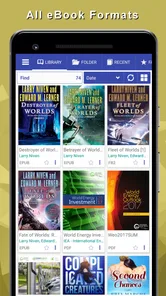
EPUB Reader is intended for reading digital books you already have, rather than limiting you to books obtained through a particular in-app shop. It supports several common eBook file types, including EPUB and PDF, so existing files may be opened directly in the app. If your library contains files in less familiar formats or uses copy protection, check compatibility and access rights before relying on it as your only reader.
Can EPUB Reader help organize a large personal book collection?
EPUB Reader is a book-reading app for bringing your digital reading into one place. If you already keep books in supported file formats, it can make them easier to open and read through a single app rather than switching between separate readers. The store describes it as a beautiful application for all the books you love, so it is aimed at readers who want a dedicated home for their eBooks.
Is EPUB Reader suitable for children and family use?
The app has an Everyone content rating, so it is presented as suitable for a broad audience. It is a Books & Reference app developed by Librera, and its purpose is reading digital books. As with any reading app, the material a family chooses to open is what determines whether a particular book is appropriate for a child, so parents can guide younger readers toward titles that suit their age.
What formats does EPUB Reader support?
EPUB Reader is designed to handle a variety of eBook formats beyond just EPUB. It supports formats such as PDF, MOBI, and AZW, making it versatile for users with diverse eBook collections. This ensures that no matter where you get your books from, you can likely read them in EPUB Reader without any compatibility issues.
Pros
- Supports various eBook formats.
- User-friendly interface design.
- Offline reading capability.
- Customizable reading settings.
- Fast and smooth performance.
Cons
- Limited cloud storage options.
- Ads in the free version.
- Occasional sync issues.
- No text-to-speech feature.
- Limited annotation tools.












