Easy Pose - 3D pose making app
- 5.90K
- 3.6
- Installs
- 10.00M
- Price
- Free
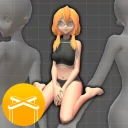
Screenshots
Analysis by Reviewed
Where I found the most friction with Easy Pose - 3D pose making app was not in the idea of posing a figure, but in turning a rough visual goal into a useful drawing reference. A model can be bent into a convincing shape, yet a pose that looks clear from one angle may hide an arm or make the weight of the body hard to read from another. I get better results when I decide what the drawing needs to communicate first, then adjust the camera and pose together rather than treating them as separate steps.
Start with a simple setup check
Before building a detailed scene, I recommend checking that the app is responsive on your device and that the controls feel comfortable. Easy Pose is free to download, and MadcatGames lists Android 5.1 as the minimum operating system. If a screen feels crowded or an adjustment seems awkward, try changing one part of the pose at a time instead of moving several joints in quick succession. That makes it easier to see which change caused an unexpected result and gives you a clearer route back.
The app is in the art and design category, but it works best as a reference aid rather than a drawing course. It can give you a posed figure to study; it cannot decide whether the gesture fits your character, story, or chosen style. I treat its output as a starting point, checking the silhouette and proportions with my own eye before I commit to a finished sketch.
Recover the pose without starting over
When a figure drifts away from the pose I had in mind, I find it more useful to fix the largest problem first: overall direction, balance, or the position of the limbs. Fine adjustments to a hand or head are easier once the broad gesture reads well. Preset poses can also be useful as a base to alter, rather than as finished answers; that approach saves time while keeping the result closer to the scene I actually want to draw.
For a multi-character composition, I work out each figure’s role before adding small details. One model might establish the action while another provides a clear reaction or counterpose. I then check the view from the intended camera angle, since a relationship that seems obvious while editing can become confusing in the final reference. This is a practical way to use the multiple-figure option without letting extra models make the scene harder to read.
Know when the problem is in the drawing brief
If a pose still feels wrong after adjustment, the app may not be the real issue. The reference could be asking one figure to show too many actions at once, or the camera angle might conceal the gesture you need. I sometimes simplify the idea into a clearer action before returning to the model. For anatomy study, a pose reference is helpful, but it should not be treated as proof that every joint position or body proportion is natural; careful observation and other references still matter.
That distinction also helps answer a common question: is this suitable for beginners? I think it can be, especially for someone who wants to explore poses without immediately drawing from imagination. But it will not replace learning how bodies move. Artists who need a finished illustration tool, detailed anatomy instruction, or a highly specific range of body representation may be better served by drawing software, anatomy resources, or additional references alongside it.
More From Our News Desk

Weather by Xiaomi Review: Clear at a Glance, Less Clear Up Close

X Under Pressure: Can It Recover When Posting Goes Wrong?

Clash of Clans Is Won Between the Battles

Android Auto Makes the Case for Quieter Car Software

MobiOffice: Transforming Mobile Productivity with Seamless Integration

EA SPORTS FC™ Mobile Soccer: Redefining Mobile Sports Gaming
Who will get the most from it?
A useful everyday example is planning a quick comic panel after work. I can set up two figures, use a preset as a starting point, adjust their gestures, then move the camera until the action reads at a glance. That is often less frustrating than repeatedly sketching the same difficult interaction from memory. For a single-character study, I can focus on a particular head tilt, hand position, or body angle instead of searching through unrelated image references.
Compared with a paper mannequin or a general drawing app, Easy Pose offers more direct control over the figure’s pose and viewpoint. A physical mannequin can be quick to reposition, but it may not offer the same fine adjustments; a drawing app gives more room to create the final artwork, but its blank canvas does not provide a posed 3D body by itself. I see Easy Pose as a focused middle step between finding a reference and making the drawing, not a replacement for either.
Getting Started with Ease
The first thing I noticed when I fired up Easy Pose was how intuitive it is. You know when you open an app, and you’re immediately hit with a million buttons and have no idea where to start? Yeah, this isn’t one of those. The interface is super clean and user-friendly. I didn’t feel overwhelmed at all, which is a huge win in my book.
Features That Stand Out
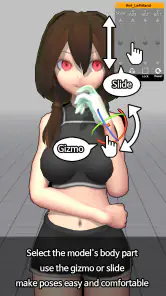
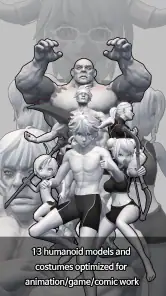
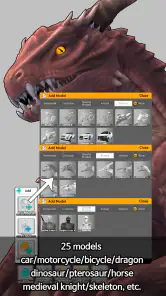
So, let’s talk about what makes this app so cool. The main feature is, of course, the 3D posing. You can manipulate models into any pose you need, which is perfect for artists who struggle with drawing from scratch. There’s a variety of models to choose from, including realistic human figures and more stylized characters. Plus, you can adjust the lighting and camera angles to get that perfect shot for your reference.
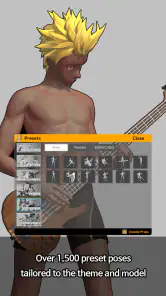
Another thing I love is the library of preset poses. If you’re in a hurry or just need some inspiration, you can choose from a ton of pre-made poses. It’s like having a digital mannequin that you can bend and twist to your heart’s content.
Flexibility and Control
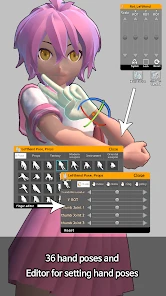
One of the things that really impressed me was how much control you have over the models. You can adjust every little detail, from the tilt of the head to the bend of a finger. This level of detail is amazing for artists who need specific poses for their work.
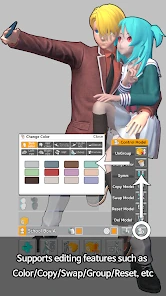
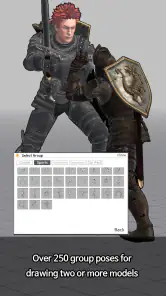
I also found the multi-model feature to be incredibly useful. You can pose several figures at once, which is great if you’re working on a scene with multiple characters. The app handles this smoothly, without any noticeable lag, even on my older device.
Room for Improvement
Now, it’s not all sunshine and rainbows. While Easy Pose is pretty fantastic, there are a couple of things I’d love to see improved. For starters, the free version of the app is quite limited. You get a taste of what it can do, but to really dive deep, you’ll need to cough up some cash for the premium version.
Additionally, while the app supports a variety of models, I’d love to see even more diversity in the body types and features available. It would make it even more inclusive for artists working on diverse projects.
It is rated for teens and has an average rating of 3.6 from around 96,000 ratings, with about 5.9 thousand written reviews. More than 10 million installs suggest it has reached a broad audience, though that alone does not tell me whether it fits a particular workflow. The current version is 1.6.10, and optional in-app purchases range from $2.99 to $12.99 per item. I would start with the free app and decide whether its limits actually interrupt my work before spending anything.
Use it as a reference, not a shortcut
One useful habit is to separate pose design from drawing decisions. I use the model to answer concrete questions: which way is the torso turning, where does the weight appear to fall, and is the reaching arm visible from the view I plan to draw? I then make deliberate choices about anatomy, clothing, expression, and style on the page. This keeps the 3D figure from dictating details that belong to the artwork rather than the reference.
For a study session, I would choose one question and keep the pose simple. If I am working on a seated figure, for example, I can focus on the relationship between the torso and legs instead of trying to solve the hands, clothing folds, and facial expression at the same time. A reference becomes much easier to use when it has a clear purpose. It also helps me notice when I have adjusted the model beyond what the drawing actually needs.
Small workflow choices that save time
When I need a pose quickly, I start with a preset that has roughly the right balance or direction, then alter only the parts that make it unsuitable. This is more efficient than trying to build a complex gesture from a neutral starting point. The trade-off is that a preset may carry a stance or limb arrangement that does not fit the action, so I still check the whole silhouette rather than polishing a mismatched hand position.
I also treat the camera as part of the pose, not a last-minute presentation choice. A small viewpoint change can clarify whether a forearm crosses the body or disappears behind it, and it can make a two-person interaction easier to read. Before drawing, I pause at the intended view and ask whether the gesture still communicates without explanation. If it does not, I change the staging instead of adding detail to an unclear reference.
Choosing the right companion tools
Easy Pose is most useful when the problem is spatial: how a body turns, how limbs relate, or how two figures occupy the same scene. A photo reference can show real anatomy, fabric, and lighting more faithfully, so I would prefer photos when those details are the main challenge. A paper mannequin is simpler for quick gesture planning, while a conventional drawing app is the better place to produce and finish the illustration. These options do different jobs, and using them together can be more effective than expecting one tool to cover everything.
For artists who work in a strongly stylized way, the model’s proportions may not match the visual language they want. I would still use it to understand direction and spacing, then exaggerate or simplify the result in the drawing. If exact real-world anatomy, a particular body type, or subtle facial expression is essential, a single posed model is not enough; I would bring in more appropriate references rather than forcing the app to answer a question it was not designed to settle.
When a rough result is not a technical failure
If the figure seems difficult to control, I would first slow down and make one adjustment at a time. If the pose looks wrong only from the chosen view, I would check whether a limb is hidden or whether the action is too complicated to read. And if the app itself feels unresponsive, I would close and reopen it and check that the device meets the Android operating-system requirement before rebuilding a detailed scene. These are modest checks, but they help distinguish a control problem from a reference-design problem.
There is also a useful stopping point: once the main gesture and camera are clear, more tweaking may not improve the drawing. I try not to spend the whole session perfecting a digital mannequin when a quick sketch can resolve the remaining choices. This is especially important for comics and storyboards, where readability and timing matter more than a technically elaborate pose. The app is there to support that decision, not to keep me away from the page.
Practical Verdict
Easy Pose makes the most sense for sketchers, comic artists, and learners who want a controllable human reference without arranging a live model every time. It is less compelling if you mainly need polished finished artwork, an anatomy lesson, or reference images of highly specific real-world bodies. For those jobs, a dedicated drawing program, structured anatomy material, or a broader collection of photo references may be a better companion or alternative.
My practical tip is to save the simplest useful version of a pose in your own drawing process: establish the silhouette, check the camera, and only then refine the hands and expression. That keeps the app from becoming a fiddly end in itself. I would also treat any awkward result as a cue to simplify the pose or change the viewpoint before assuming something is broken; an unclear brief or hidden limb can make a sound setup look wrong.
Final Thoughts
Overall, I’ve had a blast using Easy Pose - 3D pose making app. It’s a powerful tool that can really help bring your art to life, especially if you struggle with getting poses just right. While it’s not perfect, the pros far outweigh the cons, and I’d definitely recommend giving it a shot. Whether you’re a seasoned artist or just someone who loves to sketch in your free time, this app is definitely worth checking out!
Easy Pose - 3D pose making app Frequently Asked Questions
Can Easy Pose help me practice drawing anatomy and gesture?
Easy Pose is aimed at people who draw or are learning to draw, so its pose-making focus can be useful when practicing how a human figure moves and sits in a composition. You can create a pose with a 3D model and use it as a visual reference while sketching. It is a reference aid rather than a replacement for observing and practicing drawing yourself.
Can I use Easy Pose to create references for characters and comics?
Yes. Easy Pose is designed to help artists create human-body poses, and it can be relevant to character illustration, comics, and other drawing projects that need a figure reference. You can adjust a model’s pose to suit the scene you have in mind, then refer to it as you work. The app is most useful when you want to plan a pose before drawing.
Does Easy Pose work on my device?
Easy Pose is available for Android and iOS. On Android, it requires version 5.1 or later, so it is worth checking your device’s operating system before downloading. The app is intended for phones and tablets, giving artists a way to work with pose references on a portable screen. Easy Pose is an app in the Art & Design category, developed by MadcatGames.
Is Easy Pose free to download, and are there in-app purchases?
Easy Pose is free to download, so you can try its pose-making tools without paying upfront. It also offers in-app purchases, with items priced from $2.99 to $12.99. Consider whether you want to make an additional purchase before choosing paid content. The app’s free download makes it possible to explore it first and decide whether its features suit your drawing workflow.
What is Easy Pose and how can it be used?
Easy Pose is a 3D pose-making app designed for artists who want to create dynamic poses for their drawings or animations. It allows users to manipulate 3D models easily to achieve the desired pose. This app is particularly useful for illustrators, character designers, and comic book artists, as it provides a vast range of customizable options, including different body types, hairstyles, and outfits. Users can adjust each joint to create realistic poses, making it an excellent tool for improving drawing skills and creating detailed character designs.
Pros
- User-friendly interface for easy navigation.
- Wide variety of poses and models available.
- Customizable features for detailed posing.
- High-quality graphics and smooth performance.
- Regular updates with new content and features.
Cons
- Limited free content without purchase.
- In-app purchases can be costly.
- Requires internet for some features.
- Ads may interrupt the user experience.
- Complex poses may need adjustment.
- Category
- Art & Design
- Version
- 1.6.10