Dr. Blood Pressure: Diabetes
- 94.00
- 3.9
- Installs
- 5.00M
- Price
- Free
Screenshots


Analysis by Reviewed
I find Dr. Blood Pressure: Diabetes most useful when I treat it as a simple place to keep health notes, not as a doctor in my pocket. It is a free medical app from Healthy Care Technology AI Lab, and its focus on blood pressure and diabetes makes it relevant to people who want those records together. The key is to build a steady routine: enter readings consistently, keep the context with them, and use the record to support a conversation with a clinician.
Who benefits from a shared health journal
I can see this app suiting someone who already checks blood pressure or blood glucose with a separate device and wants a phone-based place to keep the results. The convenience is organizational: two health topics can sit within one routine, rather than being scattered between loose paper, a notes app, and memory. That is especially useful when a person is preparing for an appointment and wants to look back at a stretch of everyday readings instead of trying to recall them on the spot.
It may also help a family member who supports another adult with record-keeping, provided they agree on a simple process and respect the person’s privacy. One person can take a reading and another can enter it later, but that handoff is a point where mistakes can creep in. I would make the source and timing of each entry clear wherever the app allows notes, and avoid entering a value twice just because two people are trying to help.
On the other hand, it is not the right starting point for someone who has not been advised to monitor these measures and expects the app to tell them whether they have a condition. A log can help organize information; it cannot establish a diagnosis. If you are looking for a system that clinicians directly use to review records, or for readings to flow automatically from a particular monitor, compare that specific workflow before relying on this app.
Getting a useful first week of entries
Rather than filling the journal with a burst of readings on the first day and then abandoning it, I would start with the schedule recommended by my clinician or device instructions. Keeping to that plan makes entries more comparable and avoids turning tracking into a source of unnecessary worry. If I am unsure how often I should measure, I would ask the health professional managing my care rather than letting an app prompt determine the frequency.
A practical first-week check is to review whether I can tell what each entry means. I would make sure I am recording the correct kind of reading in the intended place, and that the date and timing make sense. If I use more than one device or help someone else keep their records, I would decide how to distinguish those situations before the journal grows. A little consistency at the start is easier than trying to reconstruct what a string of unlabeled numbers represents later.
It is also worth deciding what I want to get from the record. Maybe I want to show a clinician how readings vary across ordinary days, or remember a question about a medication or routine. That purpose can guide what context I write down and what I leave out. I would not treat every small change as a signal to act; the useful outcome is a clearer conversation, not self-directed treatment based on one entry.
More From Our News Desk

Weather by Xiaomi Review: Clear at a Glance, Less Clear Up Close

X Under Pressure: Can It Recover When Posting Goes Wrong?

Clash of Clans Is Won Between the Battles

Android Auto Makes the Case for Quieter Car Software

MobiOffice: Transforming Mobile Productivity with Seamless Integration

EA SPORTS FC™ Mobile Soccer: Redefining Mobile Sports Gaming
Your Health Companion
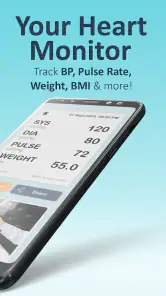
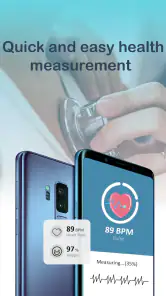
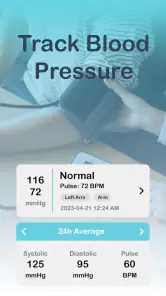
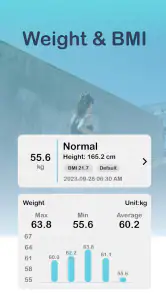
With Dr. Blood Pressure: Diabetes, you can say goodbye to the days of manually logging your health data. This app offers a seamless way to monitor your blood pressure and diabetes metrics all in one place. It's designed for those of us who crave simplicity yet need comprehensive health tracking. The interface feels intuitive, with easy navigation that doesn’t require a PhD to figure out.
A baseline routine that makes the record useful
The most dependable way to use a health journal is to make entries comparable. I’d choose a regular time that fits an existing habit, such as sitting down after breakfast or preparing for bed, rather than recording only when a reading seems surprising. If you use a blood pressure monitor or glucose meter, enter the actual result from that device; a phone app should not be treated as a substitute for a properly measured reading or medical equipment. A consistent pattern makes it easier to notice what deserves a question at your next appointment.
For a realistic example, imagine checking your pressure at home before a routine visit and keeping diabetes-related notes in the same period. Rather than trying to remember several readings from memory, you can use the app as a running journal and review the entries beforehand. If a number looks unusual, recording the circumstances in your own notes—such as whether you had just exercised or were feeling unwell—can help you explain the situation later. The app can organize your record, but interpretation and treatment decisions belong with a qualified health professional.
Features That Make Life Easier
One of the standout features is the ability to sync your data across devices. Whether you're using an Android or iOS device, your data is always at your fingertips. Plus, the app integrates with other health apps, allowing for a holistic view of your health. Imagine having all your health information, from blood pressure readings to glucose levels, in one organized app!
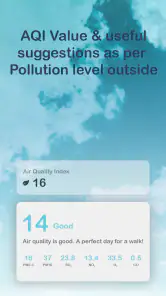
Moreover, the app provides personalized health insights and tips based on your data. It's like having a personal health coach who knows your numbers inside and out. You’ll receive reminders for medication, tips on maintaining a healthy lifestyle, and even alerts for when it's time to check your stats again.
Settings and habits worth checking
I would start by checking which reminders are actually useful for my routine, then keep only the prompts I can realistically follow. A reminder is helpful when it supports a measurement or medication plan already agreed with a clinician; it should not become a reason to change a dose or delay care. Before relying on any syncing or connection with another health app, I’d also check what the app currently offers on my device and confirm that the information is appearing as expected. That small check is more dependable than assuming every record has transferred correctly.
There is a practical trade-off in putting several kinds of health information in one place: it can save time, but only if the entries remain clear and current. I’d use a repeatable format and avoid mixing readings from different devices without noting which one produced them. If someone else helps manage the record, agreeing on who enters each measurement can prevent duplicate or missing entries. These are simple habits, but they make a journal more useful than a long stream of numbers.
Faster patterns without overcomplicating things
For quicker logging, I’d pair the app with an existing daily cue instead of waiting for motivation. Keep the measuring device and phone in a convenient place, take the measurement as directed by the device, and enter it soon afterward while the result is fresh. Reviewing the record at a regular interval can also be more manageable than scrolling through it every day without a specific question in mind. The aim is not to chase every fluctuation; it is to maintain a clear history you can discuss when needed.
This kind of workflow suits someone who wants a combined journal more than someone seeking a full clinical platform. A paper notebook can be preferable for people who dislike entering information on a phone, while a device-specific app may be a better fit if their priority is automatic capture from one particular monitor. Compared with those alternatives, the appeal here is having blood pressure and diabetes tracking in a single app, though convenience depends on whether its available tools match the equipment and habits you already use.
Making appointment preparation easier
A useful way to review a journal is to begin with a question, not with a hunt for a pattern. Before a visit, I might ask whether I have been following the agreed measuring schedule, whether I missed entries on particular days, or whether a change in routine is worth mentioning. That keeps the record practical and reduces the temptation to interpret every bump or dip alone. If a clinician asks for a particular time period or type of reading, I would follow that request rather than assuming a general summary will answer it.
I would also keep the phone charged and the record accessible before an appointment, rather than waiting until I am in the room to search through it. If the app’s current tools make reviewing entries awkward, a brief written list of questions can still help me use the appointment well. The app is most valuable as a prompt for accurate recall, not as proof that a certain result has a particular medical meaning.
Stay Motivated
Tracking your health can sometimes feel like a chore, but the app turns it into a motivating experience. The app uses a progress system that rewards you for meeting health targets, making it feel like a game rather than a task. It’s a clever way to keep you engaged and proactive about your health.
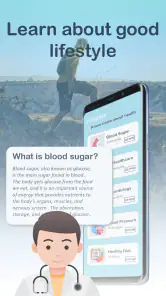
In addition to tracking, the app provides educational content to help you understand more about managing blood pressure and diabetes effectively. With articles and videos, you can learn at your own pace, making you not just a patient but a well-informed one.
When motivation tools need a light touch
I would treat progress cues as encouragement to keep a sensible routine, not as a scorecard for health. A missed entry does not mean that someone has failed, and a streak should never be more important than taking a measurement correctly or following professional advice. For people who become anxious when they see health numbers or feel pressured by daily tracking, a less frequent schedule set with a clinician may be kinder and more useful than constant checking.
The educational material can be a starting point for questions, but I would separate general reading from advice meant for my own circumstances. Someone managing both blood pressure and diabetes may have individual targets, medicines, and other health considerations. If a tip seems to conflict with a care plan, I would not use the app’s general guidance to overrule that plan; I would raise the issue with the professional who knows my history.
Where I’d draw the line
I would not rely on a phone app to diagnose a condition, verify a reading, or decide whether symptoms need urgent attention. Nor would I assume that educational tips or personalized prompts are a replacement for advice tailored to my medical history. People who need a regulated clinical record, automatic readings from a specific device, or a workflow shared directly with a care team should compare dedicated alternatives before settling on this journal. It is also worth remembering that although the app is free to download, it offers in-app purchases, so I’d check the purchase details before paying for anything.
The app is rated for Everyone, has an average rating of 3.9 from around 7,500 ratings, and has been installed over five million times. It was released on November 30, 2022, and version 2.1.1 supports Android 5.0 and later. Those details may help set expectations, but they do not establish that its tracking or advice is right for every person; I’d judge it by whether the current version works smoothly with my routine and whether I can keep entries accurate.
Privacy, access, and the practical trade-off
Health records are personal, so before making this the only place I keep important information, I would look through the app’s current privacy and account settings and decide what feels appropriate to enter. I would also think about whether I need access on more than one device and verify that any syncing behaves as I expect. Those checks matter more than assuming that an app’s convenience automatically makes it the best home for sensitive notes.
There is a difference between having information on a phone and having a durable record that is easy to share or preserve. If I need a copy for a clinician, I would first see what the app’s current version makes possible and test the process before an appointment. If it does not fit the way my care team wants information presented, I would use their preferred method instead of forcing a journal to serve as a formal medical record.
The free starting point makes it reasonable to explore whether the combined tracking approach fits, but the in-app purchase range runs from $2.99 to $59.99 per item. I would not assume that a paid option is necessary for basic suitability; I would check what a purchase unlocks and whether it addresses a real need in my routine. If the features I want are available elsewhere through a device I already own, paying for extras may not improve the record enough to justify the cost.
Final Thoughts
All in all, the app feels like an essential tool for anyone dealing with these health issues. It’s not just about tracking numbers; it’s about understanding and improving your health. So, if you’re looking for a comprehensive, user-friendly app to help manage your blood pressure and diabetes, this might just be your perfect match. It integrates smoothly into daily life, ensuring your health management is as stress-free as possible. Now, who wouldn’t want a health app that’s got your back?
My recommendation is more measured: I’d consider it if I wanted one place for recurring blood pressure and diabetes entries, and I was comfortable checking the results against the devices and care plan I already use. I’d skip it if I expected the app itself to measure blood pressure, make clinical decisions, or replace a clinician’s record system. Used as a consistent journal—with sensible reminders and realistic expectations—it can make everyday tracking easier without asking it to do a doctor’s job.
Dr. Blood Pressure: Diabetes Frequently Asked Questions
Is Dr. Blood Pressure: Diabetes a medical app or a replacement for professional care?
Dr. Blood Pressure: Diabetes is a medical app for recording and reviewing health information, including blood pressure and diabetes-related entries. It can help you organize measurements and keep track of your routine, but it should not replace a clinician’s advice, diagnosis, or treatment. If a reading concerns you or your symptoms change, contact a healthcare professional rather than relying on an app alone.
What features does Dr. Blood Pressure: Diabetes offer?
Dr. Blood Pressure: Diabetes is designed to help users monitor and manage their blood pressure and diabetes effectively. The app provides features such as tracking blood pressure readings, blood glucose levels, and medication schedules. It also offers reminders for medication, personalized health insights, and detailed analytics to help users stay on top of their health. Additionally, the app includes educational resources to better understand the conditions.
Is Dr. Blood Pressure: Diabetes free to use?
Dr. Blood Pressure: Diabetes is free to download, with in-app purchases ranging from $2.99 to $59.99 per item. Its core purpose is to help users get started with health tracking, while paid options may be available for additional features. Check the purchase details in the app before confirming anything, especially if you plan to use it regularly or share access with someone else.
How accurate is the data tracking in Dr. Blood Pressure: Diabetes?
The accuracy of data tracking in Dr. Blood Pressure: Diabetes largely depends on the user's consistency and precision in entering data. While the app uses algorithms to provide insights and analytics, it relies on user-entered information such as blood pressure readings and glucose levels. For best results, users should ensure they use reliable devices for measurement and input accurate data regularly.
Can I sync Dr. Blood Pressure: Diabetes with other health apps?
Yes, Dr. Blood Pressure: Diabetes is designed to be compatible with various health apps and devices. It can integrate with popular health apps to consolidate data for a comprehensive overview of your health. This feature allows users to synchronize their health information, making it easier to track overall health metrics and share data with healthcare providers if needed.
Pros
- Accurate blood pressure tracking
- Easy-to-read interface
- Customizable reminders
- Comprehensive health data
- Integrates with fitness apps
Cons
- Limited free features
- In-app ads can be intrusive
- Requires manual data entry
- No sync with medical devices
- Premium version is pricey
- Category
- Medical
- Version
- 2.1.1











