Customuse: Skins Maker Roblox
- 13.13K
- 4.7
- Installs
- 10.00M
- Price
- Free

Screenshots
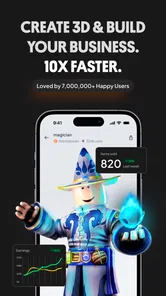
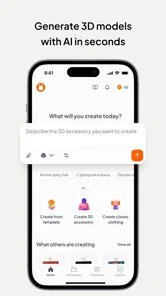
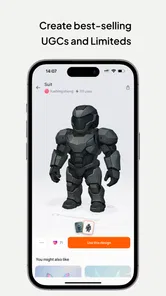
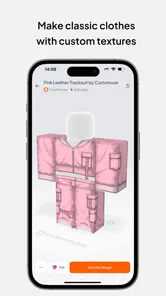
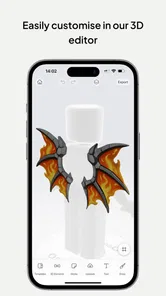
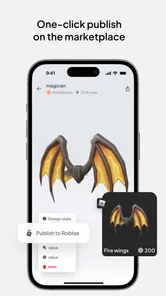
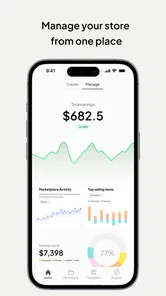
Analysis by Reviewed
If you’ve ever wandered through the pixelated realms of Roblox and wished you could add a personal touch to your avatar, then Customuse: Skins Maker Roblox is an appealing place to start. This art-and-design app is built around making clothes for Minecraft and Roblox, so its focus is narrower than a general drawing tool but more directly useful if your goal is wearable game designs. I like that clear purpose: you can open it with a specific creative task in mind rather than figuring out how to adapt a blank canvas.
The key question is whether you enjoy the making as much as the finished outfit. Customuse is most rewarding when you want to explore a look, make deliberate choices, and see how a design comes together—not when you simply want a new appearance with no creative steps. That distinction is worth keeping in mind before you download it, because the app is a design workspace rather than a shortcut for people who would rather pick from ready-made clothing.
What makes the focused workflow useful
The first thing that struck me about this app is its user-friendly interface. Seriously, even if you’re a complete newbie to skin designing, you’ll find yourself navigating through the options like a pro. It’s all about providing you the tools to express yourself in the digital world. From selecting colors to choosing patterns, every aspect of your avatar can be tailored to your liking.
One of the standout features of Customuse: Skins Maker Roblox is the vast array of templates available. Whether you want something simple or a bit more extravagant, the app’s got you covered. And let me tell you, playing around with these templates is half the fun! You can tweak and tinker until your creation is just right.
The practical benefit of a template is not just that it saves time. It gives you a concrete starting point, which makes it easier to judge the effect of a color or pattern choice than it would be on an empty page. I’d use that structure to test a few distinct directions rather than endlessly refining the first idea: a bold palette, a quieter one, and perhaps a theme built around a single visual detail. Comparing alternatives can reveal which version is readable and cohesive instead of merely busy.
There is also a useful creative trade-off here. A template can help a beginner get moving, but it can encourage designs to follow familiar shapes. If you want your clothes to feel less like a variation on a common look, treat the preset as scaffolding: keep the parts that help, and change the elements that make the result feel generic. That approach takes more attention than choosing a template and stopping, but it is where the personal character of a design tends to emerge.
Unleashing Your Creativity
One thing I’d keep in mind while designing is how a garment is viewed in actual play. It’s tempting to focus on tiny flourishes because they look satisfying close up, but contrast and a clear overall shape usually do more work when an avatar is seen at a distance. I’d zoom out or inspect the preview at a smaller scale before calling a design done. If the main idea disappears when reduced, simplify it rather than adding more detail.
More From Our News Desk

 Lark Player:Music Player & MP3
Switching to Lark Player: A Better Fit for Music Stored on Your Phone?
Lark Player makes sense if your music already lives on your phone. Here is what changes, what does not transfer by assumption, and how to test the switch without regret.

 Tile Master® - Matching Game
Tile Master Finds Its Place in the Gaps of a Noisy Phone
OS changes rarely transform a tile puzzle, but they reshape the small rituals around it. Tile Master’s appeal lies in how well its brief, tactile rounds fit the modern phone.

 Google Docs
 Shows What Mobile Writing Still Gets Wrong
Google Docs still makes a strong case for the shared document, but its real significance is how it exposes the gap between cloud convenience and genuinely capable mobile work.

 YouTube Studio
 Is Becoming a Creator’s Daily Control Room
As publishing turns into a daily, data-led habit, YouTube Studio is becoming the control room creators reach for between uploads—not another tool for making videos.

 Tiles Hop Music & Ball Game
Tiles Hop Review: When the Beat Is Clear, Every Miss Counts
Tiles Hop turns a simple bouncing-ball premise into a sharp test of timing. Its best design is immediate and readable; its weakest moments come when recovery feels less clear than the beat.

 Piano - Music Keyboard & Tiles
: Inviting Rhythm, Unproven Recovery
A tile-tapping piano game lives or dies by timing. This resilience-focused review separates what its format promises from what players still need to verify.
Latest News



From draft to something you can wear
Customization in games is nothing new, but this app takes it to the next level. What makes it a game changer is its integration with Roblox. You can seamlessly import your creations into the game, giving your avatar a fresh, new look in no time. Plus, the app frequently updates its library, so you’ll always have new styles to try out.
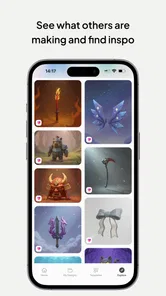
Another thing worth mentioning is the app’s community feature. You can share your designs with others and even get inspired by what fellow creators are making. It’s like a social network for skin designers, and honestly, the community vibe is just infectious. You’ll find yourself coming back not only to create but also to see what’s trending and what’s new.
That combination of creation and inspiration changes how I’d use the app. I wouldn’t browse other designs just to copy a finished look; I’d look for a technique, color pairing, or small styling idea that I could reinterpret. It gives you a prompt when you’re stuck, while still leaving room to make the final choice yours. If you share your own work, it also helps to decide what kind of feedback you want before posting: a reaction to the colors is different from advice on whether the whole outfit feels coherent.
For a realistic routine, imagine you have a few minutes before joining friends and want your avatar to fit a theme you’ve agreed on. Rather than trying to invent a complete outfit under time pressure, choose a suitable template, settle on one strong color direction, and make a few purposeful edits. You can save ambitious experiments for another session. This is a better fit for short bursts of creativity than expecting every quick edit to become a finished, carefully polished design.
Small decisions that improve the result
A practical way to get more from a clothing-design app is to begin with a look you can describe in one sentence: for example, a favorite color paired with a simple theme. Then make one change at a time. If you adjust several details together, it can be hard to tell which choice made the design work—or made it feel cluttered. I find that treating a template as a starting point, rather than a finished answer, is the best way to keep a creation personal.
It also helps to think about where the clothing will be seen. A design that looks striking in a close-up preview may read differently on a small avatar in a busy game. Before settling on a final version, take a moment to check the overall silhouette and whether the main colors still stand out. This small review step can save you from spending time polishing details that other players are unlikely to notice.
Another useful habit is to make a clear stopping rule before you begin. For example, decide that you are testing a palette or finishing one outfit concept, not perfecting every detail. That prevents the open-ended freedom of editing from turning into a loop of small changes with no clear improvement. If a change does not make the design easier to recognize or more pleasing to you, undoing it is a sensible design decision, not a failure.
When a different art tool is better
Compared with a general-purpose drawing app, Customuse is the more convenient choice when the end goal is clothing for a supported game, because its templates and game-focused workflow give you a more relevant place to begin. A drawing app may be better if you want complete control over a broad range of artwork or already have a detailed illustration process. I’d choose Customuse for quick outfit concepts and experimentation, not as a replacement for every kind of digital art.
That comparison also helps set expectations about control. A broad drawing program can suit someone who wants to work from a completely open canvas or use one tool for many kinds of illustration. Customuse is more specialized: the advantage is that the task stays centered on game clothing, while the compromise is that it is not the natural choice for unrelated artwork. If your main aim is a poster, a landscape, or a detailed standalone character illustration, I’d start in an art app built for those jobs instead.
There is still a difference between making a design and getting value from it in play. If your main interest is simply changing your avatar with ready-made options, creating your own clothes may feel like extra work. And if you expect every first attempt to look polished, the freedom to tweak a template can become a distraction: it’s easy to keep adjusting instead of deciding that a design is finished. I recommend setting a simple goal for each session, such as trying one palette or completing one outfit idea.
Who gets the most out of it
Customuse is a particularly good match for players who see avatar clothing as part of the fun of a game. It gives a curious beginner somewhere to start, while a more experienced maker can use templates as a way to work through concepts without beginning from a blank page. It can also suit a parent or older sibling helping a young player turn a vague idea—something colorful, spooky, sporty, or playful—into a set of choices they can discuss together.
It is less appealing if you do not enjoy visual decisions, if you only want to browse and wear finished outfits, or if you need a general illustration tool. The distinction matters because the app’s value is tied to your interest in designing, not just to the games it supports. If you know you tend to abandon creative projects once they require repeated small adjustments, try a short, simple design session first before committing time or money to a bigger idea.
For younger users, I’d make the creative part collaborative without taking over: ask what the outfit should feel like, offer a couple of color directions, and let them decide which one fits. The app is rated for Everyone, but an age rating does not replace a grown-up’s judgment about purchases or sharing. Keeping those choices visible makes the experience easier to guide while leaving the actual design decisions with the young creator.
A Useful Creative Routine
Picture having a few minutes before joining friends in a game and wanting your avatar to match a theme you’ve picked for the day. You could use that short session to explore a template, settle on a color direction, and make a focused change rather than trying to build an elaborate design from scratch. That makes the app useful not only for people planning a polished look, but also for players who enjoy small, personal experiments between ordinary gaming sessions.
If you’re creating for someone else, such as helping a younger player develop an outfit idea, I’d keep the process collaborative: ask what colors or mood they want, then let them choose between a couple of directions. That gives the design a clear purpose and makes the creative choices easier to explain. The app is rated for Everyone, which makes its audience broad, though younger users may still benefit from an adult’s help with purchases or sharing decisions.
What to know before installing
Customuse is free to download, with optional in-app purchases ranging from $1.99 to $59.99 per item. I’d explore the basic creative workflow before paying for anything, then decide whether an extra purchase would genuinely improve the way you use it. The app is developed by Customuse, has a 4.7 average from around 776,000 ratings, and has been installed over 5 million times. Those figures suggest that it has found a substantial audience, but they don’t tell you whether its design process suits your own style.
Those optional purchases are a reason to try the core experience first rather than assuming you need to spend to make something worthwhile. A sensible approach is to pick a small project, see how the editing feels, and only consider paying if you can name a specific benefit you want. That is especially helpful for families: agree on purchase decisions in advance, so the excitement of finishing a design does not turn into an unplanned expense.
The current version is 1.72.0, and it runs on Android 8.0 or later. If you’re choosing between a phone and a larger screen, the practical question is how comfortable you are making detailed visual adjustments on your device; a larger display can make it easier to inspect a design, while a phone is handy for quick edits. I’d also check a finished piece carefully before relying on it in-game, so you can catch any mismatch between what you intended and how the clothing appears once used.
That final check is useful even when a design looks right in the editor. A preview is a step in the process, not a guarantee that every detail will have the same impact in a game setting. I’d make one modest test design before spending a long session on a complex outfit. It lets you learn whether the creation-to-game routine suits you and whether the results meet your expectations, with less wasted effort if you decide the workflow is not for you.
My recommendation
I’d recommend Customuse to Roblox or Minecraft players who enjoy making their own looks and want a more guided starting point than a blank drawing canvas. It is especially appealing if you like testing color combinations, adapting templates, and getting ideas from other creators. If you mainly want to play, have no interest in design, or need a full-featured illustration studio for unrelated projects, you may be happier with a different option.
As an art-and-design app from Customuse, it has a clear niche rather than trying to be a universal creative studio. Its 4.7 average and audience of over 5 million installs show that plenty of people have given it a try, but the better measure for you is whether you enjoy the hands-on process. The free download makes a low-commitment trial possible, while the optional purchases are best approached only after you know what you want from the app.
In conclusion, Customuse: Skins Maker Roblox is not just an app; it’s a gateway to creative expression. Whether you’re a seasoned designer or someone just looking to add a personal touch to their avatar, this app has something for everyone. So go ahead, give it a try, and let your imagination run wild! I’d start with one simple outfit concept, see how the process feels, and decide from there whether making game clothing is the kind of creativity you want to return to.
Customuse: Skins Maker Roblox Frequently Asked Questions
Does Customuse: Skins Maker Roblox require an account to get started?
If you want to make game clothing and skins, consider whether you are comfortable setting up and using an account as part of your creative workflow. Customuse is an art and design app focused on Roblox and Minecraft clothing, so its main appeal is making designs rather than serving as a general-purpose drawing tool. Check the app’s setup screens after installing to see which options are available to you.
Can I use Customuse: Skins Maker Roblox without an internet connection?
An internet connection may be useful when exploring design resources or sharing creations, so think about where you plan to use the app before downloading. Customuse focuses on making clothing and skins for Roblox and Minecraft, and the experience may involve online services. If you expect to create while offline, check how the app behaves on your device before relying on it for that purpose.
Is Customuse: Skins Maker Roblox available for free, and are there paid options?
Customuse is free to download, which lets you try the creative experience without paying upfront. The app also offers in-app purchases, with prices ranging from $1.99 to $59.99 per item. Review each purchase screen before confirming anything, especially if a child will use the app, so you understand what is included and whether a payment is being made.
What devices can I use Customuse: Skins Maker Roblox on?
Customuse: Skins Maker Roblox is an app in the Art & Design category, and its minimum operating system requirement is version 8.0. Before downloading, check that your device meets that requirement and has enough space for the app. The app is free to download, so you can try its creative tools without paying upfront.
Is Customuse: Skins Maker Roblox only for Roblox designs?
The app’s name highlights Roblox skins, while its store summary also mentions Minecraft and Roblox clothes. That makes it relevant to users interested in creating designs for either of those games. If you are looking for an art app for unrelated projects, its focus on game clothing and skins may be an important consideration before you install it.
Pros
- Easy-to-use interface for creating skins.
- Wide variety of customization options.
- Seamless integration with Roblox.
- Regular updates with new features.
- Supports sharing creations with community.
Cons
- Limited free features available.
- Requires internet for full functionality.
- Occasional lag in the editor.
- In-app purchases can be costly.
- Some features are complex for beginners.