Cross Stitch Thread Organizer
- 116.00
- 4.6
- Installs
- 10.00K
- Price
- $2.99

Screenshots
Analysis by Reviewed
When I pick up an embroidery project away from my usual work area, I want to know what threads I own and which ones belong to the pattern without rummaging through boxes. Cross Stitch Thread Organizer is built around that practical problem: it gives stitchers a place to keep a record of their threads and projects. It’s a paid Art & Design app from IsegrimStitches, and its appeal is clearest if you enjoy planning your stash as much as working with it.
When a connection becomes part of the experience
Some of the app’s described conveniences involve information beyond a simple thread inventory: the wish list, for example, is paired with notifications about sales or deals on threads you want. That can help when I’m deciding whether to buy a shade now or wait, but it also means the app’s usefulness in that moment depends on receiving current offer information. I would treat those alerts as a nudge to check a purchase, not as a reason to plan a project around a guaranteed bargain.
That distinction matters because a thread catalog and a project record are useful for different reasons from timely shopping notices. I’d enter the colors I already own and assign project needs first; then the wish list can serve as a separate reminder of what I may want later. Keeping those jobs mentally distinct makes it easier to use the organizer as a dependable reference rather than expecting every part of it to behave like a live shop.
Useful away from the craft table
A realistic use for me would be checking my thread records while browsing a craft shop or sorting supplies before a weekend of stitching. If I’m unsure whether a project needs a shade I already have, a catalog organized by brand, color, and shade number gives me a better starting point than trying to remember a skein by sight. The color-matching tool is especially relevant when I’ve run short: I can look for a close substitute among threads I’ve recorded before buying another color.
For that workflow to pay off, I’d add threads as I acquire them rather than postponing the task until the collection has become difficult to reconstruct. Recording a shade number carefully is more useful than relying on a broad color label, particularly when two skeins look nearly identical under different lighting. I’d also review a project’s linked threads before leaving home; that small habit can prevent an avoidable extra purchase or a return trip.
Recovery, accuracy, and a sensible routine
Like any digital inventory, this one is only as trustworthy as the information I put into it. If I use a skein, finish it, or move it into another project, an old record can mislead me. My practical safeguard would be to update the project and collection when I sort supplies, rather than treating the catalog as an automatic count of what is physically in my stitching box. The app helps organize decisions; it cannot make an unrecorded change for me.
I’d also make a habit of checking a thread’s brand and shade number before using a suggested color match. A visual match is a useful shortcut, not a promise that two threads will look identical in the finished piece. Lighting, fabric, and neighboring colors can change how a shade appears, so for a prominent area I’d compare the actual skeins before committing. That is a small but important trade-off: quick digital guidance saves searching, while the final color choice still belongs in the real world.
More From Our News Desk

 Gmail
Gmail in a Busy Inbox: Who Benefits Most?
From first account to crowded workday, Gmail earns its place through dependable search and flexible sorting—but its best fit depends on how much inbox maintenance you can tolerate.

 Prime Video
Switching to Prime Video: What Changes in Your Viewing Routine
Prime Video can make a compelling second home for streaming, but switching means learning a different catalog, rental layer, and route from browsing to playback.

 Universal TV Remote Control
 Works Best as a Reliable Backup
A phone remote earns its place through quick setup and reliable habits. Here is how to get more from Universal TV Remote Control—and where its limits show.

 Weather - By Xiaomi
Weather by Xiaomi Review: Clear at a Glance, Less Clear Up Close
Xiaomi’s weather app makes everyday forecasts quick to scan, but its calm surface can leave useful details and recovery paths harder to find than they should be.

 X
X Under Pressure: Can It Recover When Posting Goes Wrong?
A resilience-focused review of X, examining setup, mistaken posts, interruptions, weak connections, and the gaps that matter when recovery needs to be dependable.

 Clash of Clans
 Is Won Between the Battles
Its raids are quick; its community is a long-term project of coordination, teaching, rivalry, and shared responsibility—with all the friction that entails.
Latest News



Who will get the most from it
This is a better fit for someone with a growing stash, several projects in rotation, or a habit of buying threads for patterns before starting them. A person who stitches occasionally with a small, neatly stored set may find a paper list or a basic notes app quicker. Those alternatives are flexible and familiar, but they do not offer the same focused combination of thread details, project links, color matching, and a wish list. I see the app as most valuable when remembering what belongs where has become a recurring nuisance.
It is also worth weighing the purchase against how often you will use the organizer. The app costs $2.99, so I’d be more inclined to recommend it to a regular stitcher than to someone who is only testing the hobby. It has a 4.6 average from 255 ratings, and 5K+ installs; those figures suggest an established audience, though the better test is whether you actually want to maintain a digital inventory. It is rated Everyone, and version 4.10 runs on Android 7.0 or later.
Making a thread inventory work for you
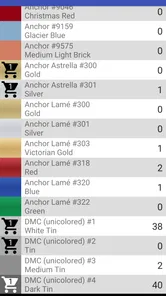
So, what exactly does the Cross Stitch Thread Organizer do? Picture this: you’ve got a massive collection of threads in every color imaginable, but organizing them feels like a nightmare. This app swoops in to save the day by allowing you to catalog your entire thread collection effortlessly. You can add threads by brand, color, and even shade number. It’s like having a personal assistant who’s always on top of your embroidery game.
A Color-Coded Wonderland
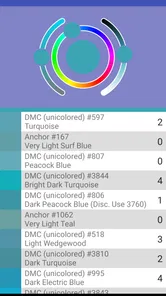
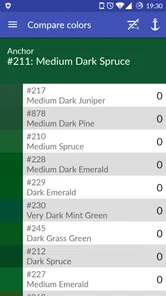
One of my favorite features has to be the color matching tool. Sometimes you might run out of a particular shade, and running to the craft store isn’t an option. The app lets you find the closest match available in your stash, saving you both time and hassle. It’s like having a digital color wheel at your fingertips. Plus, the visual appeal of seeing all your colors neatly organized is pure bliss for the eyes.
Keeping Track of Projects
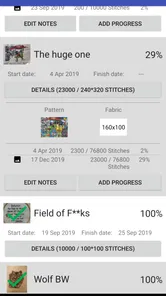
Another handy feature is the project management tool. If you’re like me and tend to juggle multiple projects at once, this is a lifesaver. You can link specific threads to individual projects, ensuring you never lose track of what you need for each one. It’s like having a crafty to-do list that keeps you organized and motivated. And let’s be honest, who doesn’t love ticking off items from a list?
Moreover, the app offers a way to create a wish list of threads you’re eyeing for future projects. It’s a fun way to plan ahead and keep your creative juices flowing. The app even sends you notifications when there are sales or deals on your desired threads. Talk about staying ahead of the game!
User-Friendly and Intuitive
What really sets this app apart is its user-friendly interface. Whether you’re tech-savvy or not, navigating through the app is a breeze. The developers have done an excellent job in making sure that everything is intuitive and easy to access. Plus, it’s available on both Android and iOS, so you’re covered no matter what device you use.
I find the strongest case for a dedicated organizer appears when several patterns draw from the same stash. Before beginning a new piece, I can check which recorded shades are already assigned elsewhere, then decide whether to buy another skein or adjust my plan. That overlap is easy to miss in a notebook, where project lists and inventory often live on separate pages. Linking threads to projects gives the information a practical context: a shade is not merely in the collection, but needed for a particular piece.
There is a trade-off to that convenience. If I keep multiple works in progress, I still need to decide what “available” means in my own system. A skein linked to one project might have enough thread left for another, but a simple record cannot replace checking the physical supply. I’d use project links to flag commitments, then verify quantities before relying on a shared skein. This is a useful habit for anyone who tends to start new patterns before finishing older ones.
A small routine that prevents shopping mistakes
For a practical shopping trip, I’d make a short pass through the relevant project before heading out: check the listed thread details, compare them with the skeins at home, and put any genuine gaps on the wish list. At the shop, the brand and shade number are more dependable identifiers than memory or a color impression on a phone screen. If I’m considering a substitute, the matching tool can narrow the choices, but I’d still compare the actual thread and pattern requirements before buying.
This approach also makes the app useful for planned purchases rather than impulse browsing. A wish list can separate “needed for the current pattern” from “interesting for a future idea,” which helps me avoid treating every tempting shade as urgent. The distinction is especially handy when a notification mentions a deal: a lower price only matters if the thread fits a project I genuinely expect to stitch. I’d rather let the organizer clarify my needs than let a sale dictate them.
Where it differs from paper and general notes
A paper inventory remains a sensible choice if you want something you can spread beside your supplies and edit with a pencil. A notes app may be quicker for a very small collection, especially if all you need is a few shade numbers. The specialist advantage here is the way the thread catalog, project connections, color matching, and wish list address cross-stitch decisions together. That focus is more useful than a generic checklist once the collection becomes hard to recall, but it also means this is not a broad craft journal or a substitute for pattern-reading tools.
I’d skip it if setting up and maintaining records feels like a chore you will avoid. An incomplete catalog can create false confidence: a shade may appear available even though it has been used up, or a project may still show a thread you have reassigned. In that case, a small physical box with labels could be more reliable because the system is visible at a glance. The app earns its place when I’m willing to keep the digital record close to reality.
Using it in short mobile moments
The most natural mobile use is not necessarily a long planning session. I can imagine checking a shade while waiting in a shop queue, or reviewing a project’s thread list during a spare moment before packing a stitching bag. For those quick checks to be useful, I’d make sure the relevant entries are already complete and clearly named. Trying to reconstruct a project while standing among shelves is exactly the sort of rushed task that leads to duplicate purchases.
For a weekend away, I’d treat the app as a planning aid before I pack rather than assume it can replace the contents of my kit. I would check the project assignments, gather the actual skeins, and then make a brief physical check that each one is present. This two-step routine catches a different kind of mistake from inventory upkeep: the app may say I own a shade, while the skein is sitting in another project bag at home. The digital record helps me plan; the final packing check handles the real-world handoff.
What to expect when information is out of date
If a notification or current deal does not arrive when expected, I would not let that interrupt the core organizing routine. Sales information is an extra reason to keep a wish list, not the foundation of a thread record. For important purchases, I’d check availability through the seller I intend to use and compare the exact shade details myself. That keeps a temporary network-dependent convenience separate from the lasting decisions about which colors a pattern needs.
I would also be cautious about making a major stash cleanup depend on a single uninterrupted session. Sorting skeins into manageable groups gives me a chance to verify entries as I go, and it is easier to correct a handful of mistakes than to audit an entire collection later. If I notice that the app and my physical supplies disagree, I’d trust the skeins in front of me, correct the record, and continue. That simple recovery rule prevents an old entry from turning into a repeated shopping error.
Who should choose another approach
Someone who mainly follows a pattern one project at a time may not need a separate catalog, particularly if the required threads arrive as a kit. Likewise, a stitcher who prefers handwritten notes, rarely buys extra colors, or dislikes maintaining digital lists may get more value from a paper card stored with each project. I would not choose this app expecting it to replace a pattern chart, teach embroidery, or make the physical work of sorting thread disappear. Its job is narrower and more useful when that narrow job matches a real frustration.
For regular stitchers with overlapping projects and a collection that is difficult to remember, the focused tools can make preparation less scattershot. The best results come from entering accurate shade details, linking threads thoughtfully, and updating records when supplies move. Those habits are not glamorous, but they are what turn a catalog from a colorful reference into something I can actually trust. If that sounds like a routine you would keep, the one-time decision to pay for a specialist tool is easier to justify; if not, simpler methods may serve you better.
A balanced recommendation
My overall view is that this app makes most sense as a practical companion for people who regularly cross-stitch and want their thread choices tied to their projects. It is not valuable simply because it stores a lot of entries; it becomes valuable when those entries answer everyday questions before a purchase or a stitching session. The 110 reviews show that people have shared detailed feedback as well as ratings, but I would still judge it by whether its workflow suits the way you organize supplies.
In conclusion, Cross Stitch Thread Organizer is a must-have for anyone serious about their embroidery hobby. It takes away the stress of managing your thread collection and projects, leaving you with more time to do what you love – creating beautiful art. So go ahead, give it a try, and watch your stitching experience transform into something magical.
Cross Stitch Thread Organizer Frequently Asked Questions
What kind of information can I organize in Cross Stitch Thread Organizer?
Cross Stitch Thread Organizer is an Art & Design app for keeping an overview of embroidery threads and projects. Its store summary highlights organizing threads, projects, and more, so it may be useful if you want a digital place to keep your stitching information together rather than relying only on handwritten notes. The app is developed by IsegrimStitches and is intended for cross-stitch enthusiasts.
What is Cross Stitch Thread Organizer and how does it work?
Cross Stitch Thread Organizer is a digital tool designed to help cross-stitch enthusiasts manage their thread collections efficiently. The app allows users to catalog their threads by brand, color, and type, making it easier to keep track of inventory and plan future projects. It also offers features like barcode scanning and inventory syncing across devices.
Is Cross Stitch Thread Organizer available for both Android and iOS devices?
Yes, Cross Stitch Thread Organizer is available for download on both Android and iOS platforms. Users can find it on the Google Play Store for Android devices and the Apple App Store for iOS devices. The app offers a seamless experience across both platforms, ensuring that users can manage their cross-stitch threads efficiently irrespective of their device.
Does Cross Stitch Thread Organizer support multiple brands and types of threads?
Absolutely, Cross Stitch Thread Organizer supports a wide range of thread brands and types, including popular ones like DMC, Anchor, and Madeira. Users can easily add their existing collection or new purchases to the app's database, ensuring they have a comprehensive view of their thread inventory, which helps in planning and executing cross-stitch projects.
Can I sync my thread inventory across multiple devices using Cross Stitch Thread Organizer?
Yes, the app allows users to sync their thread inventory across multiple devices. By creating an account within the app, users can ensure that their data is backed up in the cloud and accessible from any device. This feature is particularly useful for users who switch between devices or want to access their inventory on both tablets and smartphones.
Pros
- Easy to organize threads.
- User-friendly interface.
- Supports multiple categories.
- Syncs with cloud storage.
- Regular updates.
Cons
- No barcode scanner feature.
- Limited export options.
- Requires internet for syncing.
- Ads in free version.
- Occasional crashes.