Coconote - AI Note Taker
- 54.00
- 4.7
- Installs
- 500.00K
- Price
- Free

Screenshots

Analysis by Reviewed
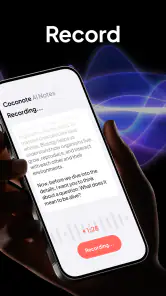
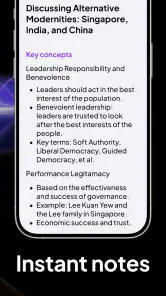
I tried Coconote - AI Note Taker as an education app with a simple promise: turn a recorded lecture into study material instead of leaving you with a wall of unfinished notes. Its approach is more ambitious than a standard voice recorder because the recording is meant to become notes, flashcards, quizzes, podcasts, and related revision material. That makes it interesting for students, trainees, and anyone who learns from spoken explanations, but it also means the quality of the result depends heavily on how clear, organized, and accurate the original lecture is.
The app is made by Quizlet Inc., a developer already associated with digital study tools. It is free to install, aimed at Everyone, and supports devices running OS 10 or newer. I found its strongest appeal in the moment after a class: rather than deciding later how to reorganize an hour of audio, I could use the recording as the starting point for several different ways to review the same subject.
Its public reception is encouraging, with a 4.7 average from around 5.3 thousand ratings and more than 500 thousand installs. The current version is 1.21, and the app was released on April 20, 2025. Those details suggest a relatively new product that has already attracted meaningful attention, while also reminding me that a newer tool deserves a little practical testing before becoming the only place I keep important study notes.
How the free starting point translates into value
There is a clear difference between downloading it and paying for it
The app is free, so the first step is accessible to students who want to see whether this recording-centered workflow suits them. That matters because the idea sounds useful in theory, but it changes the way you study. You need to record at the right time, check what was produced, and decide which generated materials are worth keeping. A free starting point lets you judge that process before treating it as part of your routine.
In-app purchases range from $2.49 to $189.99 per item. I would not treat the presence of those purchases as a reason to pay immediately. The sensible question is whether the free experience saves enough time or produces enough useful revision material for your particular classes. A student who attends occasional lectures may see little reason to spend more, while someone reviewing spoken lessons every day could place a higher value on a smoother or more extensive workflow if the available purchase matches that need.
The important value test is not “Can it make notes?” but “Are the notes good enough to study from after I check them?” Automatic conversion can reduce the boring first pass through a lecture, but it does not remove the need for judgment. If a generated summary misses a qualification, confuses a technical term, or gives too much attention to an example, the time saved can disappear during correction.
What the app gives you beyond a recording
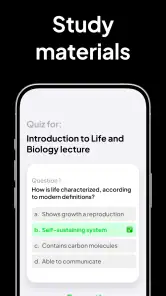
A normal recorder preserves the lecture and leaves the rest to you. Coconote is more useful when you want to move from listening to active recall. Notes can serve as a quick reference, flashcards can prompt memory, quizzes can expose weak areas, and a podcast-style version can offer another way to revisit a topic. I like this range because it recognizes that rereading is not the only way to learn.
More From Our News Desk

Clash of Clans Is Won Between the Battles

Android Auto Makes the Case for Quieter Car Software

MobiOffice: Transforming Mobile Productivity with Seamless Integration

EA SPORTS FC™ Mobile Soccer: Redefining Mobile Sports Gaming

How Microsoft OneDrive Became a Mobile Productivity Giant

How Google Translate Breaks Language Barriers Effortlessly
The practical advantage is the ability to create a small study loop from one class. I can first scan the notes to understand the broad structure, use flashcards to test definitions or key facts, then take a quiz without looking back at the source. If I still struggle, the recording remains available as the original context. That is more useful than a polished summary alone because it connects review with retrieval.
There is also a less obvious benefit for people who take incomplete notes. During a fast lecture, I often have to choose between listening carefully and writing everything down. A recording-based workflow can let me focus on the explanation while marking only a few personal reminders, such as a confusing formula or a question to ask later. The app then has a chance to provide the first organized draft, while my own marks preserve the details that matter most to me.
A realistic class-day workflow
Imagine a student attending a biology lecture while preparing for an exam. Instead of trying to transcribe every sentence, the student records the lesson, writes down the names of diagrams that need a closer look, and adds a short note when the teacher says a topic is likely to appear in an assessment. After class, the generated notes provide a navigable overview. The student then checks the sections connected to those personal reminders, turns the major terms into flashcards, and uses a quiz to see whether the material is understood without the lecture in front of them.
That workflow is more effective than pressing record and never returning to the file. My first practical tip is to add your own short markers during the lecture. Automated material can organize what was said, but your markers identify what was confusing, emphasized, or personally important. This combination gives the generated output a purpose instead of leaving it as a passive archive.
My second tip is to review the notes before trusting the flashcards. Flashcards built from an unclear or incomplete section can encourage memorization of a mistake. Spending a few minutes checking the source against the generated material is especially important for subjects with similar terms, exceptions, calculations, or names that sound alike.
Where the different study formats fit
The note view is best for orientation. I would use it soon after a lecture, while the structure is still familiar, to identify the main ideas and separate material that needs deeper work. Flashcards are better when the subject contains concise prompts and answers: terminology, dates, classifications, language vocabulary, or short conceptual distinctions. Quizzes are more useful when I want to test whether I can recognize and apply the ideas without simply rereading them.
The podcast option is an interesting alternative for low-attention review, such as revisiting a topic while walking. I would not use it as my only study method because listening can create a comfortable feeling of familiarity without proving that I can recall anything. Its best role is reinforcement after I have already examined the notes and attempted active recall.
This is one of the app’s more important trade-offs. Producing several formats from one lecture feels efficient, but each format supports a different kind of learning. The app can help create the materials; it cannot decide which format is appropriate for every subject or whether I have genuinely mastered the content.
Trade-offs that matter before making it part of your routine
Automatic notes still need human editing
The central convenience is also the central risk. A recorded lecture contains interruptions, incomplete sentences, references to a slide, classroom questions, and explanations that make sense only in context. Any automatic system working from that material may produce a neat-looking result that is less precise than the original. A clean layout can make errors harder to notice because it feels authoritative.
I would therefore treat the first generated version as a draft, not as a textbook. For a high-stakes subject, compare important claims with the recording, your course materials, or the teacher’s slides. This is not a minor precaution. If the app turns a nuanced explanation into a simple statement, the simplified version may be easier to memorize while being less accurate.
A useful editing habit is to divide the output into three groups: facts to memorize, ideas to understand, and questions that remain unresolved. Flashcards work well for the first group, quizzes can help with the second, and the third should lead you back to the recording or another trusted source. This prevents every generated sentence from being treated as the same kind of knowledge.
Recording is not the same as studying
There is a temptation to believe that capturing a lecture means the work is safely handled. In reality, a recording can become a digital pile that grows faster than you can review it. Coconote offers a way to transform that pile, but you still need a schedule. I would set a short post-class review rather than waiting until exam week, when checking every note and correcting every card becomes stressful.
The app is a weaker choice for someone who prefers handwritten diagrams, detailed mathematical derivations, or immediate annotation directly on slides. Spoken explanations can complement those approaches, but they cannot replace the visual structure of a diagram or the precision of writing out a multi-step solution. In those situations, I would use the app as a companion to a notebook rather than as the main record.
Audio conditions and lecture style affect the result
A quiet, clearly delivered lecture is a much better starting point than a room full of overlapping conversations or a speaker who frequently moves away from the recording device. The app’s usefulness naturally varies with what it can capture. If the teacher points to a board without describing the visual content, the resulting notes may preserve the words while losing the meaning of the gesture or diagram.
This leads to another practical tip: say or write down visual references in your own notes when they matter. A quick reminder such as “diagram showing the three stages” gives you a retrieval point later, even if the spoken recording does not fully explain what appeared on screen. I would also avoid relying on a generated summary for information that was only displayed and never spoken.
Privacy and classroom etiquette deserve attention
Before recording a class, meeting, interview, or training session, I would check the rules that apply in that setting and ask for permission when appropriate. The fact that an app can record does not automatically make every recording acceptable. Other people may be speaking, and educational institutions can have their own expectations about recordings.
This is particularly important when the lecture includes personal examples, confidential material, or contributions from classmates. A responsible workflow means recording only where it is allowed, keeping the material for its intended purpose, and avoiding casual sharing of generated notes or audio. That consideration does not cancel the app’s usefulness, but it should be part of the decision before the first recording begins.
How it compares with familiar alternatives
Compared with a basic voice recorder, Coconote offers a much more complete path from audio to revision. The recorder is simpler and may be preferable when you only need an original reference file, but it leaves transcription, organization, and study design to you. Coconote is the better fit when the goal is to turn a lecture into active study material rather than merely preserve it.
Compared with typing notes manually, the app reduces the pressure to capture every sentence. Manual notes remain better for selecting ideas in real time, drawing connections, and recording your own interpretation. I would choose manual note-taking when the class is discussion-heavy or when the act of writing helps me understand the subject. I would choose Coconote when the speaker covers a lot of material quickly and I want a searchable starting point for later review.
Compared with a conventional flashcard app, its distinctive advantage is the route into the cards: they can begin with a lecture instead of requiring me to build every prompt from an empty screen. A dedicated flashcard tool may still be better for a carefully curated long-term deck, especially when I want precise wording and a highly controlled repetition system. Coconote is more appealing at the beginning of the process, when turning raw class material into something usable is the main obstacle.
Compared with a handwritten notebook, it prioritizes speed and multiple output formats over personal interpretation. That is a meaningful trade. The app can prepare a useful draft quickly, but my notebook may contain the connections, sketches, and questions that make the lesson memorable. The strongest approach is not necessarily choosing one over the other: use the app to reduce mechanical work, then add your own understanding where automation is weakest.
Who is likely to get the most from it?
I would recommend trying it first if you attend lecture-based courses, professional training, language lessons, or educational talks where the spoken explanation carries most of the content. It is especially suitable for people who regularly leave class with incomplete notes and need a faster way to create a review plan. Students who learn well through a mixture of reading, listening, and self-testing can make good use of the different outputs.
It may also help people who miss a class and receive permission to record a make-up explanation, or learners who want to revisit a difficult topic in a less formal format. The podcast-style option can make repetition feel less demanding, while the quiz format gives a clearer signal than simply listening again.
I would be more cautious if you need exact professional transcription, work mainly with diagrams and equations, dislike reviewing automatically generated text, or have limited opportunities to record in a suitable environment. Someone who already takes excellent structured notes may find that checking and correcting the generated material takes longer than their existing method. In that case, a dedicated notebook, slide annotation tool, or carefully managed flashcard system may be the better investment of attention.
Is the paid side worth considering?
Because the app is free to start and individual in-app purchases span from $2.49 to $189.99, I would make the decision based on repeated personal use rather than the headline promise. First test whether the notes are accurate enough for your subjects, whether the generated formats actually change how you revise, and whether you return to the material after creating it. If those three things happen consistently, paid access may offer value for a frequent learner, depending on which purchase is presented and what it includes.
I would skip paying if the app mostly creates material that I never open, if my classes depend on visuals that recordings cannot capture, or if correction takes as long as writing my own notes. The highest-priced option should receive especially careful scrutiny because a large purchase only makes sense when the workflow becomes a regular, measurable part of your study life. The free entry point is useful precisely because it lets you make that judgment from experience.
My final recommendation
Coconote is worth trying when your main problem is turning spoken lessons into an organized review routine. I like the way one recording can lead to notes, flashcards, quizzes, and a podcast-style review, because it supports more than passive listening. The app feels most valuable when I use it as a first draft and then actively check, edit, and test myself.
I would not present it as a replacement for careful note-taking, trusted course materials, or subject-specific practice. Its output needs supervision, and its usefulness depends on recording conditions, lecture style, and whether you actually return to the generated material. Those limitations are manageable for the right user, but they are serious enough that some learners will be better served by a simpler recorder or a manual study system.
For an education app from Quizlet Inc. with a free starting point, an Everyone age rating, and a strong 4.7 average, it offers a compelling experiment for lecture-heavy learning. My buy-or-skip verdict is straightforward: try the free version if you often struggle to organize spoken content, keep your own markers and source checks in the workflow, and only consider an in-app purchase after the app has proved that it saves you time without weakening your understanding.
Coconote - AI Note Taker Frequently Asked Questions
Can Coconote turn a lecture recording into study materials?
Yes. Coconote is designed to transform recorded lectures and other spoken content into learning materials, including notes, flashcards, quizzes, and podcasts. These tools can give you different ways to revisit a topic after class, rather than relying on a single transcript. You can use the generated material as a study aid, while checking it against the original recording or course materials when accuracy matters.
Who makes Coconote, and what should I know before installing it?
Coconote is an education app developed by Quizlet Inc. It is free to download, with in-app purchases ranging from $2.49 to $189.99 per item, so some features or access may involve additional costs. The app is rated for Everyone and requires Android or iOS version 10 or later. Check that your device meets this requirement before installing.
What is Coconote - AI Note Taker and what can it do?
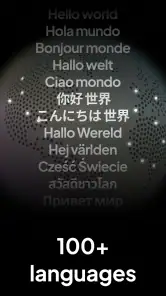
Coconote - AI Note Taker is an AI-powered productivity app designed to turn spoken conversations, meetings, lectures, interviews, and imported recordings into organized notes. After processing audio, it can generally produce transcriptions, summaries, key points, and other structured information, helping users review content without manually writing everything down. Its usefulness depends on audio quality, language support, and the specific features available in the current app version.
How accurate are Coconote’s transcriptions and AI-generated summaries?
Coconote can save considerable time, but its results should not be treated as perfectly accurate. Recognition may be affected by background noise, multiple people speaking at once, accents, technical vocabulary, poor microphone quality, or unclear audio. AI summaries can also omit context or misunderstand important details. For meetings, classes, interviews, or professional work, it is recommended to listen to the original recording and verify names, figures, quotations, and action items.
Does Coconote work with live recordings, uploaded audio, or video files?
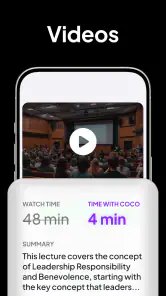
The app is intended for note-taking from spoken content, and availability may include recording audio directly, importing existing recordings, or processing supported video and file formats. However, supported sources and limits can vary by device, operating system, subscription level, and app update. Before downloading, users should check the current store listing and in-app documentation to confirm whether their preferred workflow—such as lectures, calls, podcasts, or uploaded files—is supported.
Pros
- Turns voice recordings into organized notes automatically.
- Supports quick summaries for meetings
- lectures
- and interviews.
- Search makes it easier to find details across saved notes.
- Can help users review long recordings without replaying everything.
- Useful for capturing ideas when typing is inconvenient.
Cons
- AI transcriptions may mishear accents
- names
- or technical terms.
- Processing recordings can take longer with lengthy audio files.
- Some advanced features may require a paid subscription.
- Sensitive recordings raise privacy and data-handling concerns.
- Results often need manual editing before they are fully accurate.
- Category
- Education
- Version
- 1.21












