Christmas Wallpaper
- 24.00
- 4.9
- Installs
- 10.00K
- Price
- Free

Screenshots







Analysis by Reviewed
As the holiday season approaches, there's nothing like getting into the festive spirit with a touch of seasonal flair on your phone. If you're like me and love to personalize every aspect of your device, then you might want to check out the Christmas Wallpaper app. Let me tell you, it’s like wrapping your phone in a cozy, festive sweater!
Where the connection becomes part of the experience
A wallpaper app can feel simple once an image is on the screen, but browsing and refreshing seasonal choices can depend on how steadily your phone can reach the app’s content. I’d treat this as something to explore when you have a reliable connection rather than assuming every image will be ready wherever you are. That matters on a commute or in a spot with weak reception: choose a background before you leave, and avoid relying on a last-minute refresh to set the mood.
For a practical routine, I’d browse at home, settle on a favorite, and check that it appears correctly on the screen before heading out. If you’re changing wallpapers during the day, do it when you have a moment to spare instead of while juggling messages or navigating. A seasonal background is a small pleasure, but it is not worth interrupting something more important to keep searching.
Deck the Halls with Digital Cheer
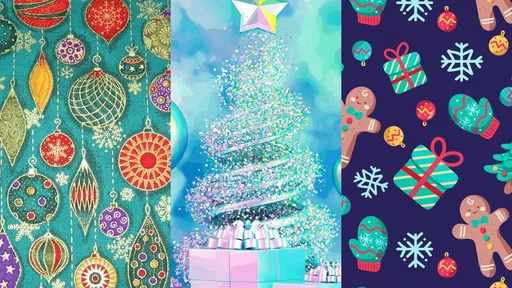
When I first opened the Christmas Wallpaper app, I was immediately greeted with a vibrant array of holiday-themed backgrounds. From jolly Santas and twinkling Christmas trees to serene winter landscapes, the variety is impressive. What really caught my eye was the high quality of the images. Each wallpaper is crisp and clear, making even the smallest details pop. It's like having a little piece of a winter wonderland right in your pocket!
Features that Sparkle
One of the features I absolutely love is the daily wallpaper update. Every day, the app surprises you with a new festive image, keeping your phone's look fresh and exciting throughout the holiday season. Plus, if you’re like me and can’t decide which wallpaper to stick with, the slideshow feature comes in handy. It cycles through your selected favorites, ensuring your screen always radiates festive cheer.
Another neat feature is the customization options. You can adjust the brightness and contrast to suit your taste, ensuring that your phone's display is always perfect, whether you're using it indoors by the fireplace or outside in the winter sun. It’s these little touches that make this app a standout in the crowded field of wallpaper apps.
Making it work on a busy phone
My useful tip is to judge a wallpaper in the context where you’ll actually see it. A detailed tree or bright holiday scene may look lovely on its own, yet compete with app icons and clock text on a busy home screen. I’d try a calmer image there and save more intricate artwork for the lock screen, where it can make an impression without making everyday navigation feel cluttered. Adjusting brightness and contrast can help, but subtle changes are usually easier on the eyes than pushing either setting too far.
More From Our News Desk

 Gmail
Gmail in a Busy Inbox: Who Benefits Most?
From first account to crowded workday, Gmail earns its place through dependable search and flexible sorting—but its best fit depends on how much inbox maintenance you can tolerate.

 Prime Video
Switching to Prime Video: What Changes in Your Viewing Routine
Prime Video can make a compelling second home for streaming, but switching means learning a different catalog, rental layer, and route from browsing to playback.

 Universal TV Remote Control
 Works Best as a Reliable Backup
A phone remote earns its place through quick setup and reliable habits. Here is how to get more from Universal TV Remote Control—and where its limits show.

 Weather - By Xiaomi
Weather by Xiaomi Review: Clear at a Glance, Less Clear Up Close
Xiaomi’s weather app makes everyday forecasts quick to scan, but its calm surface can leave useful details and recovery paths harder to find than they should be.

 X
X Under Pressure: Can It Recover When Posting Goes Wrong?
A resilience-focused review of X, examining setup, mistaken posts, interruptions, weak connections, and the gaps that matter when recovery needs to be dependable.

 Clash of Clans
 Is Won Between the Battles
Its raids are quick; its community is a long-term project of coordination, teaching, rivalry, and shared responsibility—with all the friction that entails.
Latest News



The slideshow is appealing if you enjoy variety, though a fixed image is the safer choice if you want a consistent look or need to recognize your icons quickly. Before relying on automatic changes, I’d check how the selected favorites behave on your device and whether the cycling suits your routine. If a fresh image doesn’t appear when expected, I’d first check the connection and reopen the app when convenient, then pick a favorite manually rather than assuming the display will change at a particular moment.
Choosing an image that fits how you use your phone
I’d also think about the kind of screen you look at most. Someone who checks the lock screen for the time and notifications may want a quieter scene with open space around the clock, while someone who mostly sees the home screen may care more about contrast behind a grid of icons. The same Christmas tree can feel inviting in a preview and become distracting once widgets and shortcuts cover it. I’d test a candidate in its real setting before settling on it for the season.
There’s a useful trade-off between novelty and legibility. A slideshow can make a phone feel more festive without requiring me to choose one image, but changing scenes can also mean the screen looks different each time I glance at it. That is fun on a personal device used casually; it may be less helpful on a phone where I rely on familiar visual cues or use the screen while working. A single favorite is less surprising, but it keeps the interface predictable.
Easy to Use, Hard to Resist
Downloading and navigating the app is a breeze. The user interface is intuitive, with categories clearly labeled for easy browsing. Whether you want something traditional like a nativity scene or something whimsical like cartoon reindeer, finding the perfect background is as easy as pie (or should I say, as easy as Christmas pudding?). Additionally, the app doesn’t bombard you with ads, which is a huge plus in my book. It keeps the experience smooth and enjoyable, allowing you to fully immerse yourself in the holiday spirit without interruptions.
Using it around changing network conditions
If I’m choosing a picture while out, I’d avoid treating a slow connection as a reason to tap repeatedly. Waiting for a page or image to finish is a better first move; repeated attempts can make a simple choice feel like work, especially when reception is fluctuating. If browsing stalls, I’d pause and return when the connection is steadier, rather than assuming the app or phone has stopped working.
That approach is especially practical when moving between Wi-Fi and mobile service. I’d make a selection when I have a reliable connection, then check that the phone is displaying the result before leaving that network. If the image does not show as expected, reopening the app later is a sensible recovery step; I wouldn’t keep switching settings or changing several wallpapers at once, because that makes it harder to tell whether the problem was the connection or the choice itself.
Who will enjoy it—and who may want another option
This is best suited to someone who wants an easy seasonal change rather than a complete phone makeover. UltDev’s art-and-design app is free, rated for Everyone, and has a 4.9 average from around 113 ratings, with over 10K installs. It was released on October 17, 2023, and version 1.1.2 requires Android 6.0 or later. Those details make it approachable for many Android users, while the limited, specifically Christmas focus is the main trade-off: anyone seeking year-round themes, their own image library, or extensive layout controls may be happier with a broader wallpaper app or the phone’s built-in wallpaper picker.
In an ordinary December morning, I’d choose a background over breakfast, check that the clock and icons remain easy to read, and leave it in place for the day. That’s a better fit than scrolling through options while walking or repeatedly changing the screen between errands. If you are trying to conserve mobile data, browse and make your choice on Wi-Fi where possible; image browsing and updates can use connectivity, so it is sensible not to assume that every part of the experience is available offline. A steady connection makes discovery smoother, while a chosen image gives you a simple way to avoid unnecessary browsing afterward.
Making a thoughtful choice without over-browsing
A small data-conscious habit is to browse with a clear idea of what you want: perhaps a traditional festive image, a playful one, or a calmer winter scene. That keeps the session focused instead of turning a quick seasonal change into repeated browsing. I’d also avoid making several adjustments simply to see what happens; pick a scene, check the brightness and contrast once, and give it a day before deciding whether it needs another tweak.
Compared with the wallpaper picker already built into a phone, this app is appealing when I specifically want Christmas-themed inspiration rather than a general collection of backgrounds. A broad wallpaper app may offer more styles and greater variety across the year, while the system picker may be more convenient if I already have a picture saved and just want to apply it. The choice depends on whether discovering seasonal artwork is the point or whether I simply need a tool to set an image I already own.
I would skip this app if my main goal were deep control over icon layouts, coordinated themes, or a collection that stays relevant in every season. It is also not the best choice for someone who expects to browse freely in places with unreliable reception or who wants to avoid using connectivity for discovery. For a person who enjoys a festive screen and is happy to make a considered selection when the connection is steady, those limits are easier to live with.
In a nutshell, the Christmas Wallpaper app is a delightful way to bring a bit of the holiday magic to your mobile device. Whether you’re a Christmas aficionado or just looking to add a little sparkle to your screen, this app is sure to do the trick. So go ahead, give it a whirl and let your phone join in the festive fun!
My verdict is that it works best as a cheerful, low-effort seasonal accent, not as a replacement for a full customization suite. If a picture takes time to load or the connection drops, I’d wait until service returns and try again rather than repeatedly refreshing; once a background is set, there’s no need to keep browsing unless you want another change. I’d recommend it to someone who likes Christmas imagery and appreciates a quick way to refresh a screen. If you prefer complete control over sources, year-round collections, or a carefully coordinated interface, a general-purpose wallpaper tool is likely the more practical choice.
Christmas Wallpaper Frequently Asked Questions
What devices can run Christmas Wallpaper?
Christmas Wallpaper is an Art & Design app from UltDev, and it supports devices running Android 6.0 or later. Before downloading, check that your device meets this requirement so installation goes smoothly. The app is free and has an Everyone content rating, making it suitable for a broad audience looking to add a seasonal touch to a compatible device.
What features does the Christmas Wallpaper app offer?
The Christmas Wallpaper app offers a wide variety of high-quality holiday-themed wallpapers to decorate your device. With options ranging from snowy landscapes to festive ornaments, the app allows for easy customization of your home and lock screens. Users can choose from static images or animated wallpapers to enhance the festive spirit.
Is the Christmas Wallpaper app free to use?
Yes, the Christmas Wallpaper app is free to download and use. However, some premium wallpapers and features might be locked behind a paywall, requiring in-app purchases. The free version still offers a generous selection of wallpapers, ensuring users can enjoy festive designs without cost.
Can I use the Christmas Wallpaper app offline?
Once downloaded, the wallpapers can be used offline. However, to access new wallpapers or updates, an internet connection is required. The app allows users to download their favorite wallpapers for offline use, so you can always have holiday cheer on your device, even without connectivity.
How often are new wallpapers added to the app?
The Christmas Wallpaper app frequently updates its collection, especially around the holiday season. New wallpapers are typically added weekly during this period, ensuring fresh content for users. This regular update schedule helps keep your device's look updated with the latest festive designs.
Pros
- High-quality festive images
- Easy to set up and use
- Regular updates for new designs
- Compatible with most devices
- Consumes minimal battery
Cons
- Ads can be intrusive
- Limited customization options
- May slow down older devices
- Some images require premium
- Occasional app crashes