Chatbooks Family Photo Books
- 6.76K
- 4.3
- Installs
- 1.00M
- Price
- Free

Screenshots
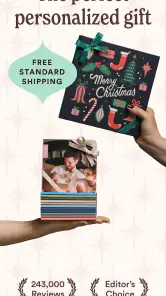
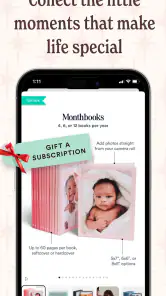

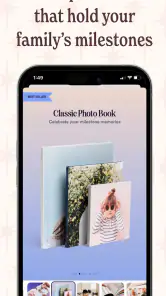
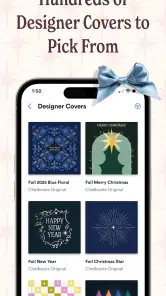
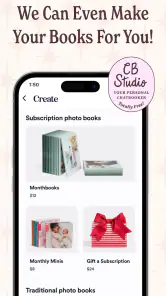


Analysis by Reviewed
I came to Chatbooks Family Photo Books with a simple question: would it make printing family photos feel easier than the usual cycle of forgetting, sorting, and never quite getting around to it? After using it as a photography app rather than treating it like a full photo editor, my answer is mostly yes. Its real appeal is turning everyday pictures into physical photo books without asking me to become a designer first.
That focus makes it different from a typical gallery, collage maker, or editing tool. I would not open it to fix exposure, remove distractions, or create an elaborate social post. I would open it when my camera roll has accumulated a useful story: a holiday, a birthday, a child’s school year, or several ordinary weeks that I want to remember away from the screen.
The app is free to install, and Chatbooks is the developer behind it. It belongs to the photography category, carries an Everyone age rating, and has built a sizeable audience, with over a million installs. Its average rating is 4.3 from around eighteen thousand ratings, alongside roughly six thousand eight hundred written reviews. Those figures suggest that the basic idea works for many people, although they do not remove the practical questions about workflow, customization, or whether a printed book suits your habits.
How the current experience fits into real family life
The strongest part of the experience is its clear purpose. Instead of presenting me with a blank page and a large collection of design controls, it encourages a more direct path from personal photos to a finished book. That matters when the problem is not a lack of pictures but a lack of time and attention.
A realistic example is a family weekend away. I might take dozens of photos, return home, and lose interest after the first evening of sorting. With this app, I can treat the camera roll as the starting point for a small visual record. The useful shift is psychological: I am not trying to make a perfect album for a public audience. I am preserving a manageable chapter of family life.
That makes it particularly appealing to parents, grandparents, couples, and anyone who wants a tangible record of ordinary moments. A book of messy breakfasts, playground visits, pets, and short trips can be more meaningful than a carefully staged collection of the year’s “best” images. The app’s everyday-memory angle is not just a description; it is the reason the service can work when traditional album projects feel too demanding.
I also like that the concept covers more than vacations. Special occasions are an obvious fit, but the quieter use case is stronger in my opinion. A monthly or seasonal habit can prevent photos from disappearing into an endless camera roll. The result does not need to represent an entire year. A smaller, focused book is easier to finish and easier to revisit.
The workflow is friendlier than starting with a blank design
My main test for a photo-book app is how quickly it helps me make decisions. Every extra choice can become a reason to postpone the project: page size, backgrounds, typography, layouts, captions, cropping, and image order. Chatbooks Family Photo Books is most convincing when it keeps the emphasis on selecting memories rather than decorating every page.
That simplicity is also a trade-off. People who enjoy complete control may find a guided photo-book workflow restrictive compared with a dedicated design application. If I want a highly art-directed book with carefully balanced white space, unusual typography, or a precise page-by-page narrative, I would probably prefer a tool built around manual composition.
For most family projects, though, reducing design decisions is a strength. I can spend my energy choosing which images actually belong together. A useful tip is to decide on the story before opening the app: “our beach weekend,” “the first months with a new pet,” or “grandparents’ visits.” That prevents a book from becoming a random dump of every photo taken during a period.
Another practical habit is to remove near-duplicates first. Phone cameras make it easy to capture several almost identical frames, and including all of them weakens the rhythm of a printed book. I get a better result when I keep one expression, one wide scene, and one detail rather than five versions of the same moment.
Where it sits beside ordinary alternatives
The usual alternative is doing nothing: leaving photos in the phone’s gallery and trusting that I will find them later. That costs no extra effort or money, but it also means the memories remain buried among screenshots, downloads, and work images. Chatbooks addresses that specific problem by giving selected photos a physical destination.
Another alternative is a general photo-printing service. Those services can be better when I want individual prints, larger wall pieces, or a wider range of physical products. They may also suit someone who already knows exactly how the final layout should look. Chatbooks feels more focused on a repeatable family-book habit than on being a complete print laboratory.
Manual design software is the better choice for a creative project where every page matters. I would use that route for a portfolio, a formal wedding album, or a gift requiring exact visual control. I would choose Chatbooks when the priority is finishing something personal without spending an entire afternoon learning a layout system.
Cloud galleries and shared albums solve a different problem. They make photos available to relatives and keep them synchronized across devices, but they still require a screen and an internet-connected habit. A printed book has a slower, more deliberate quality. The app is valuable when I want the memory to exist outside the phone, not merely to be organized inside it.
What the current version means for existing users
The current version is 5.17.6, and the app has been available since September 15, 2014. That long presence matters because a photo-book service is more useful when it can become part of a routine rather than a one-time experiment. Existing users are likely to care less about novelty than about whether selecting photos, arranging a project, and returning to family memories remains straightforward.
I would approach the current release with a practical mindset. A version number can indicate ongoing maintenance, but it is not a promise that every part of the experience will match a user’s preferred workflow. Before beginning a large project, I would make a small test book or start with a limited set of photos. That is a sensible way to learn the editing flow and discover whether the available control is enough for my expectations.
For someone who already has older books or an established routine, the main benefit of staying with the app is consistency. A familiar process lowers the barrier to making the next book. The risk is becoming dependent on a particular presentation style that may not satisfy users who want increasingly sophisticated layouts. In other words, the app’s evolution appears most useful when it preserves convenience rather than trying to compete with professional design software.
I also recommend keeping the original images organized outside the app. Even when a service is convenient, I would not treat it as my only archive. I keep important photos in my normal device or cloud backup system, then use the app as the place where selected memories become a book. That separation makes the workflow safer and gives me freedom to reuse the same images elsewhere.
Small decisions that noticeably improve the result
The first is to build around a story, not a date range. “Our summer” can become too broad, while “the week the cousins visited” gives the selection a natural beginning and end. This makes the book easier to edit and gives repeated images a purpose instead of leaving the final sequence feeling accidental.
The second is to mix context with emotion. I try to include a few wide photos that explain where we were, then close-ups and imperfect candid moments that explain why the day mattered. A book made only of posed portraits can feel flat; one made only of scenery can feel impersonal. The strongest pages usually connect a person to a place or activity.
The third is to review crops with printed viewing in mind. A phone screen can hide how much of a face or object disappears when an image is placed into a layout. I look for subjects near the edges and avoid relying on tiny details. If a photo’s important information is already small, it may work better as part of a broader sequence than as the main image on a page.
A fourth useful approach is to make a “people first” selection before worrying about chronology. I choose the photos that show relationships, expressions, and gestures, then arrange them into a loose sequence. This produces a more personal book than simply sorting everything by capture time, especially when the camera roll includes unrelated errands and duplicate shots.
Questions I would consider before committing
Is it suitable for someone who rarely prints photos? Yes, if the main obstacle is effort. The app is designed around making the transition from phone images to photo books less intimidating. I would begin with one modest project rather than promising myself a permanent monthly routine. If the finished book feels meaningful, the habit can grow naturally.
Is it the right choice for a professional photographer? Usually not as a primary tool. A professional may need exact color handling, precise sequencing, advanced typography, and detailed control over every page. The appeal here is convenience and family storytelling, not a replacement for a professional publishing workflow.
Can it replace a shared family gallery? No, not in the same way. A gallery is better for quickly sending a large number of current photos to relatives. A photo book is better for slowing down, selecting the important moments, and creating something that can be held and revisited. I see the two formats as complementary rather than interchangeable.
Should I use it for a gift? It can make sense when the recipient values personal memories more than elaborate presentation. I would be careful with the selection and avoid filling the book with images only I understand. Adding variety—people, places, small details, and a few funny imperfections—makes the result feel considered rather than merely exported.
What about someone who wants complete creative freedom? That user should probably look elsewhere. The convenience that helps a busy parent finish a book can feel like a limitation to a designer. The best match depends on whether I want the app to make decisions easier or whether I want it to give me more decisions.
Remaining gaps and sensible expectations
The biggest limitation is the tension between speed and control. A streamlined photo-book service cannot satisfy every user who wants a custom editorial object. I may occasionally wish to adjust a page more precisely, change the visual balance, or rescue an image that does not fit neatly into the available structure. Those moments are not necessarily flaws for the intended audience, but they are important before I start a demanding project.
There is also a difference between having many photos and having a coherent book. The app can help with production, but it cannot decide which family moments will matter to me years from now. I still need to curate. If I select images simply because they are recent or technically sharp, the result may look tidy without feeling personal.
Another gap is that physical memories require more commitment than digital ones. A gallery lets me delete, reorder, and share instantly. A book asks me to make choices and accept a finished sequence. That permanence is part of the appeal, but it also means I should review names, faces, dates, and image order before finalizing anything.
I would also avoid judging the app solely by how quickly the first project starts. The real test is whether I can return to it after a busy month and still understand my unfinished work. A family-memory tool has to fit imperfect routines. If the process feels like another large administrative task, I may stop using it regardless of how attractive the final book could be.
What I would watch as the product continues
For future use, I would pay attention to how the app balances automation with user control. The best direction would preserve the quick path for casual family books while giving experienced users a little more room to refine important projects. That does not mean turning it into complex desktop publishing software; it means making the simple workflow dependable and the occasional custom request less frustrating.
I would also watch how well it supports long-term habits. The most valuable improvement would be anything that helps me turn scattered camera-roll moments into regular, manageable projects without creating pressure to document every day. A good family photo service should encourage preservation, not make people feel guilty about the photos they have not yet organized.
The app’s established history and current 5.17.6 release make it reasonable to view it as an ongoing product rather than a disposable novelty. Still, I separate that evidence from expectation: continued usefulness depends on whether the experience remains easy for newcomers while respecting the needs of people who have already built a collection of books.
My final view is positive, with a clear qualification. I recommend Chatbooks Family Photo Books to anyone who has meaningful photos trapped on a phone and wants a practical route to printed family memories. It is especially good for casual projects, recurring family chapters, and people who would rather choose photos than design every page from scratch.
I would skip it in favor of a more advanced design or printing service if exact control, professional presentation, or individual print products matters more than convenience. For me, its value comes from removing just enough friction to make finishing possible. The best reason to use it is not that it makes photos look impressive; it makes ordinary memories easier to keep.
Pros
- Simple way to turn phone photos into printed family albums.
- Automatic photo organization can save time when creating books.
- Useful gift option for grandparents and extended family.
- Recurring subscriptions help keep family memories updated.
- Printed books offer a screen-free way to revisit special moments.
Cons
- Printing and shipping costs can become expensive over time.
- Customization options may feel limited for design-focused users.
- Photo quality depends heavily on the originals stored on your phone.
- Delivery times may vary depending on location and current demand.
- A subscription may be unnecessary for users who create books rarely.

- Category
- Photography
- Version
- 5.17.6











