Castle - Make and Play
- 2.15K
- 4.6
- Installs
- 10.00M
- Price
- Free

Screenshots
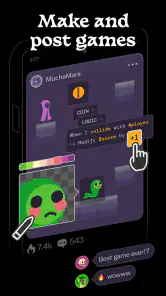
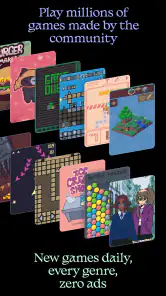
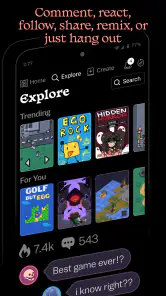
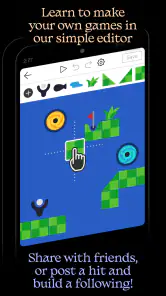
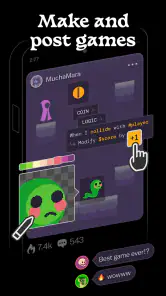
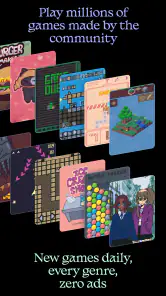
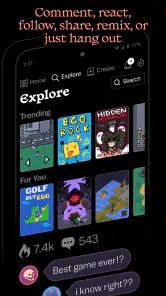
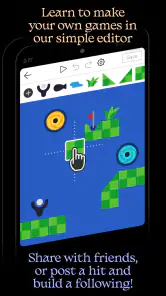
Analysis by Reviewed
I’d choose Castle when I want more than a ready-made mobile game but don’t want to start with a formal game-development tool. Its appeal is the back-and-forth between exploring other people’s creations and trying to make something of my own. That makes it a better fit for curious players who enjoy experimenting than for someone who only wants a polished game to pick up and finish.
What you should want from a creative app
Before installing, I’d ask myself whether I enjoy the process of tinkering as much as the finished result. Castle is an art-and-design app from Monterey's Coast, Inc., built around creative play and a community of user-made experiences. It occupies an unusual middle ground: unlike a drawing app centered on static images, its creations are meant to be played; unlike a conventional game library, it invites you to make as well as browse.
That distinction matters if you have limited time. If you want something instantly entertaining, exploring other people’s work may be the easiest starting point. If you like the idea of testing an idea, noticing what feels unclear, and making a small revision, the creation side may keep you interested longer. I’d treat the app as a place for lightweight experiments rather than assume that every session needs to produce a finished project.
A practical first visit is to browse a few creations before attempting your own. Pay attention to what makes you want to keep playing: a clear idea, an unexpected interaction, or simply a distinctive style. That gives you a starting point without asking you to invent a whole concept at once. For a casual evening, I could see trying a few community creations, then spending a short while on a modest experiment inspired by one of them.
Craft Your Own Adventure
The best part about Castle - Make and Play is how it puts the power of creation right at your fingertips. Whether you're into designing intricate levels or just want to play around with some fun concepts, this app has got you covered. Why stick to pre-made games when you can create your own? It's like having a mini game development studio in your pocket!
From designing picturesque landscapes to creating challenging puzzles, the possibilities here are endless. I found myself lost for hours, tweaking my designs and testing them out. And the best part? You don't need to be a coding wizard to make something amazing. The app is incredibly intuitive, guiding you step by step as you bring your ideas to life.
A practical way to find your creative rhythm
My advice is to treat the first creation as a sketch, not a showcase. Pick one idea, test it, and adjust it after playing; that simple loop is more useful than trying to plan every detail before you begin. If friends are involved, ask them to try the creation without explaining how it works. Their first reaction can reveal where your design is confusing, which is the sort of feedback you won’t get by repeatedly testing it yourself.
More From Our News Desk

Weather by Xiaomi Review: Clear at a Glance, Less Clear Up Close

X Under Pressure: Can It Recover When Posting Goes Wrong?

Clash of Clans Is Won Between the Battles

Android Auto Makes the Case for Quieter Car Software

MobiOffice: Transforming Mobile Productivity with Seamless Integration

EA SPORTS FC™ Mobile Soccer: Redefining Mobile Sports Gaming
There is a trade-off here: an easy starting point does not mean every idea will come together instantly. Designing something others can understand takes experimentation, and the social side can make sharing feel more exposed than creating privately. I’d keep early attempts small and share only when I’m comfortable with them. If your main goal is professional-grade game development or a tightly controlled solo design tool, a dedicated creation app is likely a better fit.
One useful habit is to give each experiment a single purpose. If you are trying out a puzzle idea, focus on whether the challenge reads clearly; if you are exploring a visual theme, avoid adding unrelated ideas just because they seem fun. Keeping the goal narrow makes it easier to decide what to change after a test. It also helps you learn which parts of making you enjoy, rather than judging yourself by whether a first attempt feels complete.
For a low-pressure routine, I’d work in short passes: sketch the central idea, play it once, then make one change. That reduces the temptation to keep tweaking without learning anything. If you return later, you can compare the experience in your memory with the version you last tested and decide whether the change helped. This approach is especially handy when an idea is promising but still too rough to share confidently.
Play and Share
Once you've crafted your masterpiece, it's time to share it with the world! The social aspect of Castle - Make and Play is what truly sets it apart. You can easily upload your creations and let others experience your genius. And trust me, there's nothing quite like seeing how people react to your work. It's a thrill every time someone leaves a comment or a like on your game.
But it's not just about creating; it's about exploring too. The app features a vast library of user-generated content, so you can spend hours discovering new games and experiences. It's like having a never-ending supply of entertainment, all tailored to your tastes and interests. Plus, you can follow your favorite creators and stay updated with their latest works.
The social element is most valuable when you use it deliberately. Following creators whose work you genuinely enjoy can turn browsing into a source of inspiration instead of an endless scroll. You can look for patterns in what holds your attention, then borrow the broad lesson—not someone else’s exact idea—for your own experiment. I also wouldn’t treat likes or comments as a complete verdict: a small audience response can be encouraging, but it does not necessarily tell you whether a creation works for every player.
If you are sharing for the first time, think about what kind of reaction you want. A friend trying a creation privately can give you useful clarity about whether the instructions or interactions make sense; a public post may be better when you are ready for a wider mix of responses. Keeping those purposes separate can make feedback easier to use and make the social side feel less intimidating.
How it compares, and what to expect
Compared with standard mobile games, the appeal here is not just playing a finished experience: you can move between exploring and making. Compared with art apps, the emphasis is less on producing a static picture and more on creating something people can interact with. That makes Castle a distinctive middle ground, though it may not replace either kind of app if you want deep, conventional gameplay or a focused drawing workspace.
For discovery, I’d follow creators whose work genuinely interests me rather than trying to browse everything. That gives the social feed a clearer purpose and can help you spot design choices worth learning from. The flip side is that community content can vary in style and quality, so not every creation will be a match. If you prefer a curated set of professionally made games, a traditional game store or single-title game may be more satisfying.
The trade-off is not simply “creative” versus “not creative.” A dedicated art tool makes more sense when your goal is a polished illustration or a controlled visual workflow. A conventional game is the clearer choice when you want a consistent experience designed around a specific style of play. Castle is strongest when the making and browsing are both part of the fun, and the open-ended nature of community creations is something you enjoy rather than a nuisance.
It also helps to set expectations about discovery: a large range of user-made work can mean variety, but variety is not the same as consistent quality. I’d approach the library as a place to find occasional surprises, not as a guarantee that every pick will be compelling. When I have a particular mood in mind, a known game or a focused creative app is likely to get me there more directly. When I want to wander and see what sparks an idea, Castle has the more interesting role.
Cost, access, and everyday fit
Castle is free to download, with optional in-app purchases listed from $0.99 to $9.99 per item. I’d begin without spending and see whether creating and exploring become part of your routine before considering any purchase. The app is rated Teen, so it is sensible for families to review that age guidance and decide whether the social, user-created environment suits the intended player.
It has an average rating of 4.6 from around 115,000 ratings and more than 10 million installs, which suggests that its create-and-play approach has found a broad audience. The current version is 225.0, and it supports devices running Android 7.0 or later. Those details make it easier to judge basic compatibility, but the more important question is whether you enjoy switching between making things and seeing what other people have made.
For an everyday example, imagine having a few spare minutes after school or work. You could open the app to play something made by another user, save a mental note about what made it enjoyable, and later try a small version of that idea yourself. That is a more realistic way to get value from a creative social app than expecting a long, uninterrupted session every time. If the brief break turns into a longer tinkering session, that is a bonus rather than a requirement.
For families, I would make the Teen age guidance part of the decision rather than assume that every community app suits every younger user. The shared, user-created setting is part of the experience, so it is worth discussing how the intended player will browse and interact. Adults who prefer to keep creative work private may also find that the social emphasis is less appealing, even if they like making playful ideas.
On cost, the sensible approach is to explore the free experience first. Optional purchases can be considered only if you know what you want from them and have already decided the app fits your habits. I would not spend simply because I hoped a purchase would turn casual interest into a lasting hobby; the more important test is whether I naturally return to create, play, or discover.
What changes when you make it a habit
Castle’s strongest use case is not necessarily one big project. It can work better as a small creative ritual: explore an idea, make a rough version, and return when you feel like improving it. That pace suits people who enjoy learning by trying things, especially those who find a blank canvas easier to face when they have seen examples first. It is less suited to anyone who needs a precise, uninterrupted workflow or a clear endpoint for every session.
One trade-off of alternating between playing and making is that browsing can consume the time you intended to spend creating. I’d decide before opening the app whether I’m there to explore or to work on an idea, even if I leave room to switch later. A simple intention helps keep inspiration useful instead of letting the discovery side crowd out the creative one.
Another helpful boundary is to judge a creation by one question at a time. Ask whether the central idea is understandable, whether it is enjoyable to try, or whether its presentation fits the mood you wanted. Trying to solve all three at once can make feedback feel vague. This is a general design habit, but it fits Castle particularly well because the point is to make an interactive experience that another person can encounter without your explanation.
Who should try it—and who may prefer something else
I’d recommend Castle to people who are curious about making playful, interactive work and who also like seeing how other people approach the same broad challenge. It is a good match for a casual creator who wants to test ideas without first committing to a professional tool, and for a player who likes community-made surprises as much as familiar, polished games. It can also be a useful change of pace for someone who usually draws but wants to think about how an audience might interact with an idea.
I’d skip it if your priority is a deep single-player game, a carefully curated catalogue, or a traditional art workspace with detailed control over finished images. I would also hesitate if public sharing and user-generated material are things you actively want to avoid. In those cases, choosing an app designed around private creation or a specific game experience is not settling; it is matching the tool to the job.
There is little reason to decide based on an imagined commitment. Since the app is free to download, you can first test whether browsing and making feel enjoyable together, then decide whether it deserves space in your regular rotation. The key question is not whether you can produce something impressive immediately; it is whether trying, playing, and refining feels rewarding enough that you want to come back.
Endless Fun Awaits
One of the things I adore about this app is its commitment to community and creativity. Whether you're a budding designer or just someone who loves to play, there's something here for everyone. The developers have done an excellent job fostering a welcoming environment where creativity thrives.
In conclusion, Castle - Make and Play is more than just an app; it's a gateway to a world of endless possibilities. If you're looking for a fun, engaging way to express yourself and connect with others, this is definitely worth checking out. So, why wait? Dive into the magic of creation and play today!
Castle - Make and Play Frequently Asked Questions
What devices and operating systems can I use Castle - Make and Play on?
Castle - Make and Play is available as an app for devices running Android 7.0 or later. Before downloading, check that your device meets this requirement and has enough available storage for the app. The app is listed in the Art & Design category, and its focus on making and playing user-created games makes it relevant to both creative and gaming interests.
What is Castle - Make and Play?
Castle - Make and Play is a creative sandbox app that allows users to design, build, and explore their own virtual worlds. It offers a platform for creativity where you can craft games, interactive stories, and art. Whether you're an aspiring game developer or just love to create, this app provides tools to unleash your imagination. Its social approach brings creating and playing together in one place.
Can I play games made by others on Castle?
Yes, Castle - Make and Play allows users to not only create their own games but also explore and play thousands of games made by other users. The community-driven platform offers a wide variety of genres and styles, ensuring there's something for everyone to enjoy and get inspired by. It can be a good choice if you want to browse other creations as well as make your own.
Is Castle suitable for all ages?
Castle - Make and Play is designed to be accessible for users of all ages. Its intuitive interface and diverse content make it suitable for kids, teens, and adults alike. The app has a Teen content rating, so parents should consider that rating when deciding whether it is appropriate for a younger user. Its creative tools and user-made content may appeal to a range of ages.
Do I need coding skills to create games in Castle?
No, you do not need any coding skills to create games in Castle - Make and Play. The app provides simple, drag-and-drop tools that make game development accessible to everyone. Whether you're a beginner or an experienced creator, you can design complex worlds and games without writing a single line of code. This makes it approachable for users who want to experiment with game creation without first learning programming.
Pros
- User-friendly interface
- Great for creativity
- Multiplayer options
- Wide variety of tools
- Frequent updates
Cons
- Occasional bugs
- Performance lag on older devices
- Limited free content
- Requires internet
- Complex for beginners
- Category
- Art & Design
- Version
- 225.0











