Canvas Student
- 27.91K
- 4.6
- Installs
- 10.00M
- Price
- Free

Screenshots
Analysis by Reviewed
I find Canvas Student most useful as a mobile way to keep course work visible between classes, rather than as a replacement for a full study setup. It is an education app from Instructure, and its central strength is bringing course details into one place so I can check what needs attention without opening a laptop. That convenience matters most when I have a short break, a commute, or a deadline to verify.
A course hub that keeps work in view
Canvas is built around courses, so the app makes most sense when your school or instructor already uses the Canvas learning platform. Instead of piecing together course announcements, deadlines, and grades from separate messages, I can use the mobile app as a regular checkpoint. It does not make the work itself disappear, but it can reduce the mental load of remembering where each class keeps its information.
That focus also sets expectations: this is not a general note-taking app or a standalone course provider. If your classes do not use Canvas, installing it will not give you course materials to browse. For students whose courses do rely on it, the app is free, rated for Everyone, and has a 4.6 average from around 218,000 ratings, with more than 10 million installs. It has been available since December 22, 2012, and version 8.3.0 supports devices running Android 9 or later.
Navigating the Interface
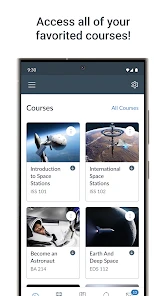
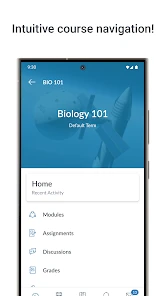
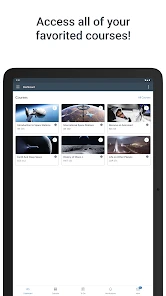
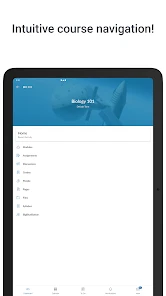
First off, the Canvas Student app is pretty intuitive. When you first open it, you're greeted with a clean, straightforward interface. No clutter, just what you need right at your fingertips. The dashboard is your command center; you can see all your courses in one place, which is super helpful if you're juggling multiple classes. The color-coding for each course is a nifty feature that makes it easy to quickly identify what’s what.
Assignments and Grades
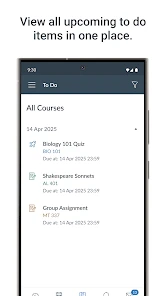
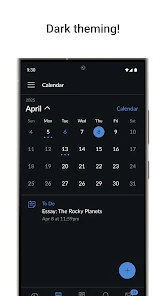
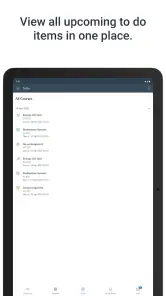
This is where the app truly shines. You can view all your assignments, along with their due dates, in the "To Do" list. It’s like having a personal assistant reminding you of what needs to be done and when. What's more, you can even submit assignments directly through the app. No more scrambling to find a computer at the last minute! Plus, the ability to see your grades as soon as they’re posted keeps you on top of your academic performance.
A useful habit is to check the task list at the start of a study session, then open each assignment in its course before you begin. The list helps me spot what is coming up, while the course page gives the context needed to avoid working from a deadline alone. For a file submission, I would also confirm that the upload has finished and that the course shows the submitted work; a quick check is more reassuring than assuming a tap completed the process.
Communication Made Easy
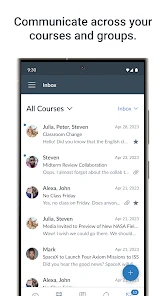
Staying in touch with professors and classmates is crucial, and the app makes this a breeze. You can send messages, participate in discussions, and even join video conferences. It’s like having a university in your pocket. And if you ever miss a lecture, no worries! Many courses offer recorded lectures that you can access anytime.
More From Our News Desk

Clash of Clans Is Won Between the Battles

Android Auto Makes the Case for Quieter Car Software

MobiOffice: Transforming Mobile Productivity with Seamless Integration

EA SPORTS FC™ Mobile Soccer: Redefining Mobile Sports Gaming

How Microsoft OneDrive Became a Mobile Productivity Giant

How Google Translate Breaks Language Barriers Effortlessly
In practice, I would treat messages and course discussions as useful channels, but not assume every instructor uses them in the same way. A class may rely on announcements for time-sensitive changes while another expects students to follow a discussion thread. Checking the course’s usual communication pattern early can prevent a missed update. For longer writing, detailed file work, or comparing several readings side by side, I still prefer a computer; the phone is better for checking in and handling a focused task.
Customization and Notifications
One of the features I appreciate is the level of customization the app offers. You can adjust notification settings to ensure you’re alerted about the things that matter most, like assignment due dates or new grades. This personalized approach helps in keeping distractions to a minimum while staying informed about crucial updates.
I would start with only the alerts that affect planning, then adjust once I know how much each course communicates. Too many notifications can turn a helpful reminder into background noise, while muting everything makes the app less useful as a quick monitor. The right balance depends on the class: a course with frequent announcements may deserve closer attention than one where updates are occasional.
Where the mobile approach fits
Compared with checking Canvas through a browser, the app is convenient for quick checks and task follow-through: see what is due, open a course, and act without rebuilding the same routine each time. A browser on a laptop remains the better choice when I need a larger screen, want to manage several documents, or am doing sustained writing. A paper planner can still work well for someone who prefers a single handwritten overview, but it will not reflect course changes unless that person keeps transferring them manually.
A realistic use case is a student leaving a lecture with a few minutes before the next class. They can check the course feed for an updated instruction, notice an approaching deadline in the task list, and decide what to tackle during the evening. That is a modest workflow, but it is exactly where a course companion earns its space: it supports small decisions throughout the day rather than trying to become the whole study environment.
Who will get the most from it
I’d recommend it to students whose instructors actively use Canvas and who want a portable way to keep deadlines, course communication, and grades within reach. It is especially helpful for someone balancing several classes, provided they still use a larger device when an assignment demands careful editing. Students should also check how their own courses organize materials, since a tidy app cannot compensate for a course that puts key instructions in unexpected places.
It is less compelling for learners whose institution uses another platform, or for anyone seeking a self-contained lesson library rather than access to existing classes. The app’s usefulness follows the teaching setup: when Canvas is the class hub, mobile access is practical; when it is not, a school’s chosen platform or a personal planner is the more sensible option. That dependence is the main trade-off, not a flaw that better notification settings can fix.
Making the course hub work for you
The most useful way to approach the app is as a dependable overview, not as proof that every course task is already under control. I’d use the dashboard to orient myself, then open the relevant course whenever an assignment’s instructions or a teacher’s post might change how I plan. This small distinction matters: a deadline tells me when something is due, but the course itself is where I should verify what the work involves and how it is expected to be submitted.
For a busy week, I would make a brief pass through each course at the start of the week, then rely on the task list for daily reminders. That helps catch work that may be described in a course announcement or discussion rather than understood from a date alone. It also limits needless app-checking. The point is not to keep refreshing the screen; it is to use a short review to turn scattered class activity into a manageable plan.
Students sharing a device or switching between phone and computer should think about where they do each kind of work. The phone is convenient for noticing an update or checking a grade while away from a desk. A computer is more comfortable for drafting, organizing files, and reviewing a complicated prompt. Treating those as complementary settings avoids the frustrating expectation that every school task should feel equally easy on a small screen.
Everyday trade-offs and alternatives
Compared with a school portal viewed in a mobile browser, a dedicated student app makes routine course checks feel more direct, especially when I want to move from a general overview into a specific class. A browser can still be preferable if I already have several tabs open or need to move between course pages and other study resources. Neither choice changes the course structure; the better one depends on whether I value a quick, focused check or the flexibility of a larger browsing session.
A calendar or paper planner can be a useful companion, but I would avoid copying every course detail into it. I’d transfer only the dates that shape my week, such as major deadlines, and return to the course for the full instructions. That reduces duplicate maintenance and the risk of trusting an old handwritten entry after a course update. Canvas Student is strongest when it remains the live reference and a planner is used only for personal planning.
There is also a practical limit to relying on reminders: notifications can call attention to activity, but they cannot decide what deserves priority or explain an assignment’s requirements. When several classes are active, I still need to review the actual work and make my own plan. If a student wants one app to teach a subject from scratch, generate a complete study schedule, or replace instructor-provided course materials, this is not the right fit. Its role is access to courses that already exist.
A sensible fit for students
Canvas Student is a good choice for someone who wants course information close at hand and whose instructors consistently use Canvas. It is particularly practical for commuters, students moving between classes, and anyone who benefits from checking a due date or announcement in a spare moment. Its education focus is clear, and Instructure’s platform gives the app a defined job rather than asking it to double as a general-purpose notebook or learning library.
I would be more cautious if a course uses Canvas only occasionally or places important instructions across several channels. In that situation, the app may still help, but it will not automatically create a reliable routine; students need to learn where each instructor posts the information that matters. Likewise, someone who prefers to do all schoolwork on a computer may have little reason to make the mobile app a central part of their setup. It works best as a companion, not a requirement for every learning style.
In conclusion, the Canvas Student app is more than just a tool; it's a companion for the modern student. It simplifies the online learning experience by centralizing everything you need in one app. Whether it’s checking grades, submitting assignments, or communicating with instructors, the app has got you covered. So, if you’re looking to streamline your educational journey, give Canvas Student a try. It might just be the support system you didn’t know you needed.
Canvas Student Frequently Asked Questions
Can I use Canvas Student if my school does not use Canvas?
Canvas Student is built to connect students with courses hosted on Canvas, rather than provide lessons or classes independently. If your school or institution uses another learning platform, downloading this app will not give you access to those courses. Before installing it, check which platform your institution uses and whether you have a Canvas account linked to your studies.
Is Canvas Student intended for students, or can parents and instructors use it too?
Canvas Student is designed primarily for learners who need to access their Canvas courses. Its student-focused tools bring course materials, assignments, grades, discussions, and schedules together in one place. Parents and instructors may have different needs or account roles, so students should use the account and app access their institution recommends for their own coursework.
Does Canvas Student replace a computer or the Canvas website?
Canvas Student is a convenient way to keep up with coursework from a mobile device, especially when you want to check materials, deadlines, or course updates while away from a computer. It works as a companion for Canvas learning rather than a separate course provider. Whether it can handle every task you need depends on your institution’s course setup and the activity involved.
Will Canvas Student show courses from every school in one place?
The app displays courses associated with the Canvas account you use to sign in. If you study with more than one institution, access depends on how those institutions manage Canvas accounts and course enrollment. Before relying on the app as a central hub, confirm that your relevant courses are connected to the account you plan to use.
What languages and accessibility options are available in Canvas Student?
Canvas Student is an education app for accessing course content and activities on a mobile device. The experience may depend on your device settings, the course materials, and how your institution has configured Canvas. If you rely on a particular language or accessibility feature, check the app and your institution’s Canvas support resources before making it your primary way to complete coursework.
Pros
- User-friendly interface
- Supports multiple file formats
- Real-time notifications
- Offline access
- Integration with other tools
Cons
- Limited customization
- Occasional sync issues
- Requires stable internet
- Interface can be cluttered
- Limited support for older devices
- Category
- Education
- Version
- 8.3.0