Canvas Parent
- 1.25K
- 4.3
- Installs
- 500.00K
- Price
- Free

Screenshots
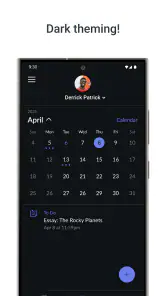
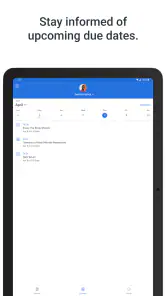
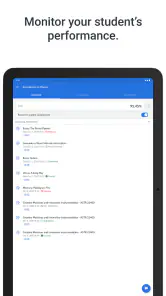
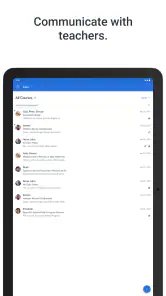
Analysis by Reviewed
Keeping track of a child’s school life can be surprisingly difficult when information is spread across classroom conversations, paper notices, separate emails, and changing deadlines. Canvas Parent takes a narrower, more useful approach: it gives parents a clearer view of education already organized through Canvas. I found its main value in reducing the need to guess what is happening at school, especially when a child is busy, forgetful, or not very talkative about assignments.
This is a free education app from Instructure, aimed at parents and guardians rather than students. It is available for Everyone, has passed half a million installs, and holds an average rating of 4.3 from roughly 4.6K ratings. Those figures suggest a well-established tool, but they do not mean it will be equally useful for every family. Its usefulness depends heavily on whether the child’s school and teachers actively use Canvas and keep course information current.
Seeing schoolwork without taking over
The central capability is visibility. Rather than becoming another classroom or a replacement for the student account, Canvas Parent lets me look at the academic information connected to my child’s education from a parent-focused perspective. That distinction matters. I am not trying to complete an assignment, submit work, or act as the student. I am trying to understand what needs attention and when.
In practice, this changes the tone of a school conversation. Instead of asking a vague question such as “Do you have homework?”, I can refer to a particular course or upcoming task and ask whether anything is unclear. That makes the app more useful as a prompt for communication than as a tool for supervision. The strongest benefit is not simply seeing more information; it is having a better starting point for a calm, specific conversation.
I also like that the app fits a common parent routine: checking school information briefly rather than opening a full learning-management system and trying to interpret it from scratch. A quick glance can help me decide whether I need to ask a question, set aside time for schoolwork, or leave the child alone to manage the task independently.
The real strength is timely context, not control. Parents who expect a complete report card, detailed teaching explanation, or direct access to every part of a student’s workflow may find the experience less comprehensive than expected. Canvas Parent works best when I treat it as a window into the learning platform, not as a replacement for speaking with the child, teacher, or school.
What the parent view changes day to day
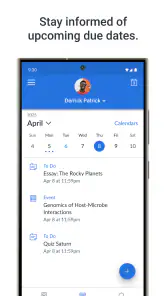
The app is most helpful when information needs to be checked at the right moment. A parent may hear that a child has several school commitments but not know which one is urgent. Looking through the available course information can turn that uncertainty into a practical plan for the evening. It can also help reveal when a child is managing well and does not need repeated reminders.
More From Our News Desk

Clash of Clans Is Won Between the Battles

Android Auto Makes the Case for Quieter Car Software

MobiOffice: Transforming Mobile Productivity with Seamless Integration

EA SPORTS FC™ Mobile Soccer: Redefining Mobile Sports Gaming

How Microsoft OneDrive Became a Mobile Productivity Giant

How Google Translate Breaks Language Barriers Effortlessly
That last point is important. A parent dashboard can easily become a reason to monitor constantly, but I think the healthier use is occasional and purposeful. I would check when a deadline is approaching, when my child says something is missing, or when a change in the school routine creates confusion. Used that way, the app supports independence instead of replacing it.
There is also a useful difference between visibility and intervention. Canvas Parent can help me notice a possible problem, but noticing is not the same as knowing why it happened. A missing task might reflect an unfinished assignment, a teacher update, an incorrect understanding, or a simple communication issue. The app can point me toward a question; it cannot provide the whole explanation by itself.
How I would use it in a normal school week
Imagine a child comes home on a weekday afternoon and says that nothing important is due, but the family has already noticed that the evening is unusually busy. I would open the parent app, review the relevant course information, and use what I see to ask a focused question. If a task appears unfamiliar, I would ask the child to explain it rather than immediately taking over. If the schedule looks clear, I would avoid creating stress simply because the app is available.
That workflow shows the app’s practical value. It is not about spending a long time inside the platform. It is about using a small amount of information to make a better decision at home. A second useful habit is checking before contacting a teacher. If the question concerns a listed course item, the parent and child may be able to resolve it together. If the information is unclear or appears outdated, then a teacher or school contact becomes the appropriate next step.
For families with more than one child using Canvas, the parent perspective can also be more convenient than relying on each student to explain everything separately. The trade-off is that the parent must still pay attention to which child and course the information belongs to. A quick glance is only helpful when it is followed by careful reading.
Where the app fits beside familiar alternatives
The usual alternatives are school emails, paper planners, messaging a child, or logging into a student-facing learning platform. Each option has a weakness. Emails can be scattered, planners depend on consistent handwriting and updating, and a child’s memory may not capture every change. A full student platform may contain more detail but can feel awkward for a parent who only wants a timely overview.
Canvas Parent sits between those choices. It is more structured than relying on conversation alone, while being more parent-oriented than navigating the student experience. That makes it a sensible companion when the school has already chosen Canvas. It is not a universal family organizer, though, and it should not be judged as one. If a school communicates mainly through another platform, this app may add little to the routine.
It is also worth separating the app from the quality of the school’s Canvas setup. If teachers post clear, current information, the parent view becomes genuinely useful. If course pages are inconsistent or rarely updated, the app cannot repair that weakness. This is one of the most important trade-offs: the software can improve access to information, but it cannot guarantee that the information is complete or timely.
The best scenario for Canvas Parent
I think the strongest fit is a family whose child attends a school that uses Canvas regularly and whose parent wants awareness without sitting beside the student during every task. It is particularly practical when a child is learning to manage deadlines but still benefits from an occasional nudge. The parent can check the situation, ask a more informed question, and then let the student do the work.
It can also help during periods when routines are unsettled. A new term, a change in workload, or several courses with different expectations can make ordinary verbal updates unreliable. Having a central place to inspect the child’s school activity gives the household a shared reference point. I would still encourage the child to maintain their own habits, because parental visibility should support responsibility rather than become the responsibility itself.
Another good scenario is a parent who cannot attend every school conversation or remember every detail from a meeting. A quick review can make later discussions more concrete. Instead of asking the child to repeat an entire week, the parent can focus on the course or task that needs attention. That saves time and can reduce unnecessary tension.
Limitations parents should understand
The first limitation is dependence on school adoption. Canvas Parent makes sense only when the child’s educational environment is connected to Canvas in a meaningful way. Installing it before checking that point may lead to disappointment. Even when the school uses Canvas, the experience can vary according to how consistently individual courses are maintained.
The second limitation is interpretation. A parent may see an item but still need the student’s explanation. Educational platforms contain classroom context that is not always obvious from a short title or status. I would avoid treating every visible change as a crisis. The app is better at showing where to look than at telling me what a situation means.
There is also a privacy and independence trade-off in any parent-view system. Families should agree on how often the app will be checked and what happens after a concern appears. Constant checking can make a student feel watched, while never checking defeats the purpose. I would use it as a shared support tool, not as a silent surveillance habit.
Parents seeking extensive planning tools, broad family scheduling, or a replacement for direct school communication should look elsewhere or keep another tool alongside it. Canvas Parent is deliberately tied to the Canvas learning environment. That focus is its advantage when the platform is central to school life, but it is also why the app is not a complete education-management solution for every household.
Small habits that make the parent view more useful
One practical habit is to check with a question in mind. Looking without a purpose can create information overload, especially when several courses appear together. Before opening the app, I would decide whether I am checking an upcoming task, investigating something my child mentioned, or preparing for a conversation with the school.
A second habit is to compare what appears in the app with what the child understands. If the two do not match, that difference is useful information, not proof that one person is wrong. It may reveal a misunderstanding that can be cleared up early. This is a more constructive use of the app than immediately assuming that a visible item has been ignored.
A third insight is to use the app to decide when not to intervene. If the information is clear and the child has a plan, I would step back. The parent view is most valuable when it helps me choose the right level of involvement. Sometimes the best result of checking is reassurance, followed by leaving the student to continue independently.
Finally, I would treat unusual or unclear information as a reason to verify, not as a final judgment. A parent-facing view can make schoolwork easier to discuss, but it does not replace the teacher’s explanation or the child’s experience in class. That restraint prevents a useful visibility tool from becoming a source of avoidable conflict.
Who will benefit most from it
Canvas Parent is a good choice for parents who want a practical view of their child’s Canvas-based education and prefer short, focused check-ins over chasing information through several channels. It is especially suitable for families supporting a student who is gaining independence but still needs help spotting priorities.
It is less suitable for someone whose school does not use Canvas consistently, or for a parent expecting a full communication hub that covers every school announcement and family task. It may also disappoint users who want to manage coursework directly rather than observe and discuss it. In those cases, the student’s own school tools or another communication method may be more appropriate.
In my experience, the app earns its place when the parent view leads to better conversations. The rating of 4.3 from about 4.6K ratings reflects solid appeal, while the app’s free price makes trying it low-risk when the school already relies on Canvas. Instructure has kept the product focused enough to be approachable, but that focus means its value is closely tied to the school’s setup and the family’s expectations.
My final take
Canvas Parent does one job well: it helps parents stay informed about a child’s education without requiring them to become the student. The best result is not more monitoring; it is less uncertainty. I can use the information to ask a better question, notice a developing issue, or decide that no intervention is needed.
The app was released on August 10, 2016, and its current version is 4.14.0, with a minimum operating-system requirement of 9. It remains a free Everyone-rated education app from Instructure. Those details make it accessible to many families, but the deciding question is simpler: does your child’s school keep its Canvas courses active and understandable?
If the answer is yes, I would recommend giving it a try and setting clear boundaries around how it is used. If the answer is no, the app cannot create the missing school information, and a direct conversation with the school will be more useful. For the right family, though, its focused visibility can turn a confusing school week into a manageable one.
Canvas Parent Frequently Asked Questions
Who is Canvas Parent designed for?
Canvas Parent is intended for parents and guardians who want a convenient way to follow a child’s education through Canvas. It is an Education app developed by Instructure, and its focus is on giving families a quick view of school-related information. It works as a companion to the school’s Canvas setup rather than as a separate learning platform for students.
What is Canvas Parent used for?
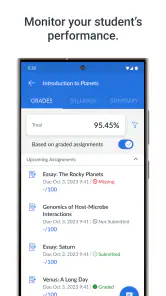
Canvas Parent is a companion app for parents and guardians whose children use Canvas through their school. After signing in, you can view upcoming assignments, course announcements, grades, submission details, and calendar events. It is designed to help families stay informed about schoolwork without replacing the student’s main Canvas account or the teacher’s official communication channels.
How do I connect Canvas Parent to my child’s school account?
To use Canvas Parent, your school or district must support parent observer access in Canvas. You generally create or sign in to a parent account, then link it using information provided by the school, such as a pairing code or an invitation. The exact process can vary by institution, so contacting the school’s Canvas administrator is the best option if you cannot find the required code or invitation.
Can parents see grades, assignments, and teacher feedback in Canvas Parent?
Yes, Canvas Parent commonly allows guardians to review a student’s course grades, assignment due dates, submission status, announcements, and some teacher feedback. However, the information available depends on how the school has configured Canvas and what permissions your observer account has. Certain course materials, private conversations, or detailed student activity may not be visible to parents.
Does Canvas Parent send notifications about homework and grades?
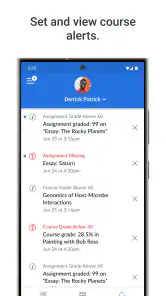
Canvas Parent can provide notifications for selected events, such as new announcements, assignment changes, due dates, grades, or submission updates. Notification availability and timing depend on both the app settings and the school’s Canvas configuration. After installation, it is worth reviewing notification preferences carefully, because receiving too many alerts—or disabling important ones—can make it harder to follow your child’s progress.
Pros
- Quick access to grades
- assignments
- attendance
- and school updates
- Supports multiple children from one parent account
- Push notifications help track important classroom activity
- Clean interface makes essential information easy to find
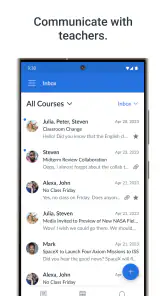
- Messaging tools can simplify communication with teachers and staff
Cons
- Features depend on the school’s Canvas setup and enabled integrations
- Some updates may arrive later than information shown on the web version
- Frequent notifications can become overwhelming without careful settings
- Limited control over assignment details compared with a student account
- Requires an active institution-linked Canvas account to be useful
- Category
- Education
- Version
- 4.14.0












