Canon Camera Connect
- 6.57K
- 4.3
- Installs
- 10.00M
- Price
- Free

Screenshots
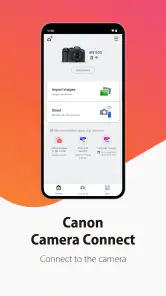
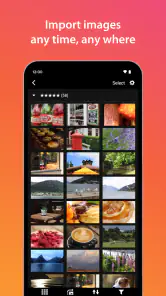

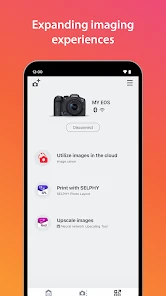
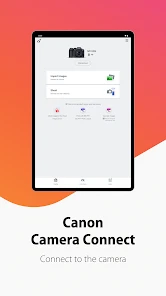
Analysis by Reviewed
Before I rely on a camera-phone connection for a trip or a family event, I like to test it with one simple task at home. That gives me a feel for the pairing process and helps me see whether the app fits the way I actually take pictures. Canon Camera Connect is a free photography app from Canon Inc. for working with compatible Canon cameras over a wireless connection. It suits people who want to move images to a phone or use the phone while shooting, rather than replace a full desktop photo workflow. The app is rated for Everyone, and its broad reach—over 10 million installs and an average rating of 4.3 from around 304,000 ratings—suggests it is a familiar companion for many Canon owners.
What to expect from a camera companion
I think of this as a practical bridge between camera and phone, not as a photo editor or a general camera app. Its value is clearest when you already take pictures with a Canon camera and want to review, transfer, or control a shot without handling the camera directly. If your main goal is to edit images, organize a large library, or transfer files from many camera brands, your phone’s photo tools or a broader editing app may be a better fit.
That distinction helps set expectations: the app depends on a compatible Canon camera and a working wireless connection. It does not make every camera behave identically, so I would check the camera’s own wireless options before planning a particular workflow. Canon has kept this app available since January 5, 2015, and the long-running role is easy to understand: it adds a convenient phone connection to the camera you already use.
Who should use it—and who may prefer another route
I’d recommend it first to Canon owners who want to share a small selection of camera photos without waiting to get home to a computer. It also makes sense for someone who enjoys composing carefully but wants the phone to act as a viewing and control point. If you only take pictures with your phone, or your cameras are from several manufacturers, this app is unlikely to become a central part of your routine.
The usual alternatives solve different problems. A card reader or cable is often the more direct choice when I need to move a large batch of files, while a desktop workflow is better for sorting and editing a whole shoot. A phone’s built-in photo app is useful once images are already there, but it cannot provide the same camera-specific connection. I see this app as a convenient middle step: not the best tool for every transfer, but a useful one when I want to choose a few images or use the phone during capture.
Getting from installation to a useful first connection
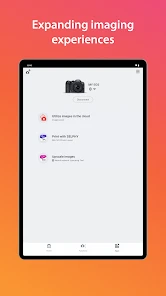
Setting up the Canon Camera Connect app is as easy as pie. Once you download it, just fire up the app and turn on your camera’s Wi-Fi or Bluetooth. The app guides you through pairing both devices, and in no time, they’re talking to each other like old pals. It’s user-friendly, and even if you’re not tech-savvy, you’ll find your way around.
Make the first session simple
For a first try, I’d do the pairing at home rather than in the middle of a busy outing. Keep the camera nearby, follow the prompts on both devices, and wait until the connection is established before opening other camera controls. If the phone does not seem to find the camera, I would check that wireless communication is enabled on the camera and restart the pairing flow rather than repeatedly tapping around in the app. That small reset is often a more sensible troubleshooting step than assuming the camera or phone is faulty.
More From Our News Desk

Weather by Xiaomi Review: Clear at a Glance, Less Clear Up Close

X Under Pressure: Can It Recover When Posting Goes Wrong?

Clash of Clans Is Won Between the Battles

Android Auto Makes the Case for Quieter Car Software

MobiOffice: Transforming Mobile Productivity with Seamless Integration

EA SPORTS FC™ Mobile Soccer: Redefining Mobile Sports Gaming
One practical point is to treat the camera and phone as a pair that needs a quick rehearsal, not as a connection I can assume will work perfectly the first time in every place. Menu names and available connection options can differ by camera, so I would follow the instructions shown on the camera itself rather than searching for a single universal sequence. If I plan to use the app away from home, I also make sure I know how to get back to ordinary camera operation after disconnecting; that avoids wasting the first minutes of an outing retracing setup steps.
Once connected, choose one straightforward goal: transfer a single image or test remote shooting. Doing one task first makes it easier to tell whether the connection is working and what the app is asking you to do. It also gives you a low-pressure chance to learn where the camera’s wireless settings live before you need them outdoors.
A first successful shot, then a useful transfer
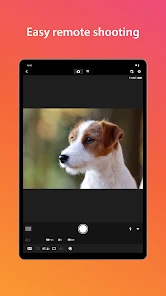
One of the coolest features is the remote live view shooting. Imagine setting your camera on a tripod and using your phone as a remote control to snap photos. It’s a game changer, especially for those perfect group shots or epic selfies. Plus, you can adjust settings like focus and exposure directly from your phone. How cool is that?
For a family picture, I’d frame everyone first, place the camera securely, then step into the group and make small framing or focus adjustments from the phone. This is more dependable than setting a timer and hoping everyone is ready at the same moment. It is also useful for a quiet indoor subject: you can avoid touching the camera at the instant of capture, which helps when even a small bump would spoil careful framing.
A less obvious use is checking composition when the camera is positioned somewhere awkward, such as low to the ground for a child or pet, or safely out of arm’s reach for a self-portrait. Live view can save repeated crouching and repositioning. I would still secure the camera carefully and treat the phone as a convenience rather than a reason to place the camera somewhere unstable. Remote control helps with access; it does not remove the need to watch the physical setup.
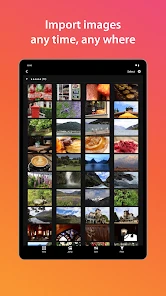
Transferring images is a breeze. Whether you're on a beach or at a café, sharing your latest snaps on social media is just a few taps away. And let's not forget the GPS function—tagging locations on your photos is a sweet touch for those of us who love reliving travel memories.
Choosing what to transfer and when
For a casual day out, I find the strongest workflow is selective: take the pictures on the camera, review them when there is a quiet moment, and move only the frame I actually want to share. That keeps the phone from becoming an unnecessary second copy of every shot and makes the wireless link feel purposeful. If I am deciding between several similar frames, checking them on the phone can also help me pick one while the scene is still fresh in my mind.
Location tagging is most useful when I have a clear habit for it. I would enable or test the relevant location workflow before a trip, then check a transferred image afterward to make sure the result is what I expect. It is a small detail, but it can make a travel archive easier to revisit later. I would not count on it as a substitute for a deliberate backup, especially if the photos matter beyond quick sharing.
Where the convenience has limits
I’ve used the app both indoors and outdoors, and it’s been a reliable companion. The live view is particularly useful when you’re shooting something that requires precision. The app does have its quirks, though. Sometimes the connection can be a bit finicky, especially if you're trying to connect in a crowded area with lots of Wi-Fi signals. But hey, it’s not a deal-breaker.
In practice, I would not make a wireless transfer the only plan for an urgent job or a long day when every image needs to be backed up immediately. A cable, card reader, or computer-based workflow can be more predictable for bulk handling, while the phone connection is better for selecting a few pictures to share or check on the go. If a transfer stalls, I would try again when the connection is calmer rather than repeatedly sending the same files and creating confusion about what has arrived.
Another point worth planning around is the difference between a quick handoff and a complete working archive. Sending a favorite image to a phone is convenient; moving a full shoot, checking every file, and keeping several copies safe are separate jobs. For an important event, I would keep the memory card and use a more deliberate backup routine later rather than treating a successful phone transfer as proof that everything is safely stored.
Battery consumption is another thing to keep in mind. Running the app and Wi-Fi on your camera can drain your batteries faster than usual, so it’s wise to carry extras if you’re out for a long day of shooting.
Who will get the most from it?
This app makes the most sense for a Canon owner who takes occasional pictures for family, travel, or social sharing and wants a quick path from camera to phone. A useful everyday example is a day trip: take the full set of photos on the camera, pick a favorite during a café stop, and send that one to your phone while the memory is fresh. For a photographer who mainly edits on a computer, or someone who wants one app to connect cameras from several brands, the phone’s built-in transfer options or a card reader may be less fiddly.
It is also a good fit for a person who likes to be in group photos instead of always taking them. A tripod, a careful composition, and the phone’s remote view can make the process less awkward, particularly when there is no one nearby to help. I would test the framing and connection before everyone gathers, though; spending a few minutes learning the controls beforehand is kinder to the group than troubleshooting while they wait.
People often wonder whether it replaces a dedicated editing app. I would not treat it that way: its appeal is the camera connection and the practical tasks around shooting and moving images. Nor would I assume every wireless control is available with every Canon body; the camera’s own menus and supported functions shape what you can do. Before a planned remote shoot, it is worth testing the exact camera-phone combination once, so you know how the controls behave and whether the live view suits your framing.
My experience
I’ve used the app both indoors and outdoors, and it’s been a reliable companion. The live view is particularly useful when you’re shooting something that requires precision. The app does have its quirks, though. Sometimes the connection can be a bit finicky, especially if you're trying to connect in a crowded area with lots of Wi-Fi signals. But hey, it’s not a deal-breaker.
Battery consumption is another thing to keep in mind. Running the app and Wi-Fi on your camera can drain your batteries faster than usual, so it’s wise to carry extras if you’re out for a long day of shooting.
My recommendation
My practical advice is to decide in advance what you want the connection to do. For a remote group shot, test live view and framing at home; for sharing, practice transferring one image; for a day of serious photography, plan on a card reader or computer afterward. That simple choice keeps the app in its strongest role and makes its occasional wireless friction easier to manage.
If you are choosing whether to install it, the key question is not whether it can replace every camera or editing tool, but whether you own a compatible Canon camera and would benefit from a phone link. For that specific job, I find the idea useful and the setup approachable once you have tried it calmly. If you rarely move pictures off the camera or prefer to do all your work at a computer, you may not open it often.
The Final Verdict
Overall, the Canon Camera Connect app is a handy tool for anyone who loves photography and wants to make the most out of their Canon gear. It’s intuitive, packed with useful features, and enhances the overall shooting experience. While it has its minor hiccups, the convenience it offers far outweighs them. So, if you’re a Canon user, this app is a must-have in your digital toolkit.
Canon Camera Connect Frequently Asked Questions
Can I use Canon Camera Connect to transfer photos while traveling without mobile data?
Canon Camera Connect is designed to use images from your Canon camera via Wi-Fi, so transferring photos does not necessarily depend on a mobile-data connection. The camera and phone need to establish a compatible wireless connection, and the exact setup can vary by camera model. This can be useful when you want to review or move images while away from home.
Can I use Canon Camera Connect to share photos directly from my camera?
The app can transfer images from a compatible Canon camera to your mobile device, making it easier to review them and share them using other apps on your phone or tablet. The wireless connection is between the camera and mobile device, so you can prepare images without first connecting the camera to a computer. Available transfer options can depend on the camera model.
Is Canon Camera Connect suitable for beginners who have never connected a camera to a phone?
The app is intended to connect a Canon camera with a smartphone or tablet, and its pairing process includes on-screen instructions. Beginners may find it straightforward once they know which wireless options their camera supports. Because menus and connection steps vary between camera models, checking the camera’s manual can help if the first attempt does not go as expected.
What is Canon Camera Connect and what devices are compatible with it?
Canon Camera Connect is a mobile application designed to enable seamless wireless connectivity between your Canon camera and your smartphone or tablet. It allows you to transfer photos and videos, remotely control your camera, and adjust camera settings from your mobile device. The app is compatible with both Android and iOS devices, but it's important to check the compatibility of your specific Canon camera model as not all models support this app.
How can I connect my Canon camera to the Canon Camera Connect app?
Connecting your Canon camera to the Canon Camera Connect app involves a few simple steps. First, ensure that Wi-Fi or Bluetooth is enabled on your camera. Then, open the app on your mobile device and select your camera from the list of available devices. Follow the on-screen instructions to pair your devices. It's recommended to consult the user manual or Canon's support website for detailed instructions specific to your camera model.
Pros
- Easy wireless photo transfer
- User-friendly interface
- Remote camera control
- Compatible with most Canon models
- Quick setup process
Cons
- Requires Canon account
- Limited editing features
- Consumes battery quickly
- Occasional app crashes
- Needs stable Wi-Fi connection
- Category
- Photography
- Version
- Varies with device












