Canon PRINT
- 57.74K
- 4.6
- Installs
- 50.00M
- Price
- Free

Screenshots
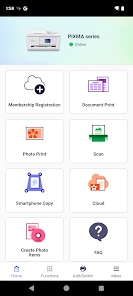
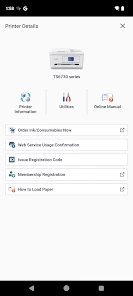
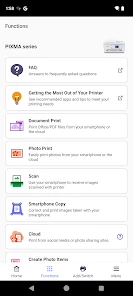
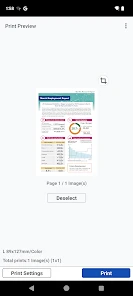
Analysis by Reviewed
I think the best way to judge a printer companion app is by the moment you need it: a form due today, a page to take to an appointment, or a photo you want on paper without moving it to a computer first. Canon PRINT is made for that practical gap between a phone and a Canon printer. It is a free tools app from Canon Inc., and its long presence on mobile makes it feel like a familiar utility rather than a new printing experiment.
When the phone is already where the file lives
The app’s value is less about replacing every way of printing and more about removing an awkward handoff. If a document arrives on my phone, I can keep it there through printing rather than forwarding it to an email account, finding a laptop, and locating the same file again. That can make a real difference for a school permission form or travel document that needs a signature before it goes back into a digital workflow.
There is a useful trade-off here: a phone is convenient, but it is not always the best place to make detailed print decisions. I would use the app for a page or a modest document when speed matters, and switch to a computer for jobs where layout, margins, or a large number of pages need close attention. The app is most persuasive when it shortens the route to a straightforward task, not when it is asked to replace every desktop printing control.
Small habits that prevent avoidable mistakes
For a deadline-driven print, I’d open the file and check the page count before sending it. Email attachments and downloaded forms can include instruction pages or duplicate copies that are easy to overlook on a small screen. If I’m printing a photo, I’d start with one copy rather than a batch, especially if color appearance matters. A quick test is a modest extra step, but it can save paper and ink when the result is not what I expected.
For scanning, I find it helpful to place the paper flat and check the saved image before sharing it. A receipt may be readable at a glance but still have a clipped edge or faint total; a signed form needs the signature visible and the surrounding text legible. That last review is particularly worthwhile when the scan will be used as a record rather than just a quick reference.
How it fits beside other printing options
Compared with a printer’s own panel, a phone app is a better fit when the document or photo is already on the phone, and when I want the scan back on that same device. The panel can still be the more direct route for a quick copy when I’m standing next to the printer. Emailing a file to myself or transferring it to a computer works too, but it adds steps; a desktop print dialog remains preferable when I need more deliberate control over a complex job.
The important boundary is the printer itself. This is a Canon companion, not a general hub for every printer in a home or office. If you use a different brand, or regularly switch among several brands, a manufacturer-neutral method or the printer makers’ own separate apps may suit you better. I would check that the exact Canon printer is supported before relying on the app for a time-sensitive task.
More From Our News Desk

Weather by Xiaomi Review: Clear at a Glance, Less Clear Up Close

X Under Pressure: Can It Recover When Posting Goes Wrong?

Clash of Clans Is Won Between the Battles

Android Auto Makes the Case for Quieter Car Software

MobiOffice: Transforming Mobile Productivity with Seamless Integration

EA SPORTS FC™ Mobile Soccer: Redefining Mobile Sports Gaming
Getting a phone and printer working together
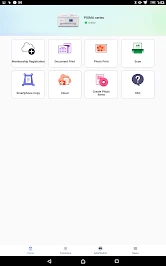
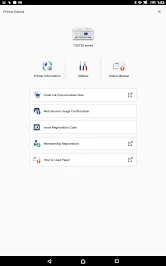
Setting up the Canon PRINT app was a breeze, even for tech rookies like myself. After downloading it from the app store, I connected it to my Canon printer in just a few taps. The app guides you through the process with clear instructions, and before you know it, your printer is ready to roll. It supports a wide range of Canon printers, so you're likely covered.
Where mobile printing earns its place
One of the standout features is the wireless printing capability. Gone are the days of tangled wires and frantic searches for that elusive USB cable. With Canon PRINT, I can print photos and documents directly from my phone, which is a huge time-saver. Plus, it supports various file formats, so whether it's a PDF or a JPEG, you’re in good hands.
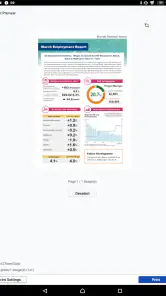
That convenience is most useful when the document is already on your phone. For example, if I receive a form while away from my desk, I can get it onto paper without first emailing it to myself or opening a laptop. I’d still check the preview and page selection before sending a multi-page file; a quick look can prevent wasted paper if a message thread or extra page is included. For occasional single pages, this is simpler than using a computer. For large, carefully formatted jobs, a desktop print dialog may offer more control.
Another feature I love is the ability to scan documents straight to my device. Need to send a signed contract back to the office? No problem. The app allows me to scan and save documents in a snap. It’s like having a portable office in your pocket.
Scanning, quality, and everyday trade-offs
Scanning is especially handy for receipts, signed pages, and paperwork that I need to keep with a digital record. I’d use it to capture a page and send it onward, but I wouldn’t treat a phone-based printer app as a replacement for a dedicated document-management workflow when I need searchable archives or careful batch organization. A useful habit is to check the saved scan before sharing it: edges, small print, and signatures are easier to catch on screen than after a recipient points them out.
Now, let’s talk about the quality. I was genuinely impressed with how well the app managed to preserve the details in photos. The colors were vibrant, and the text documents were crisp and clear. It felt like I had a mini professional printing setup right at home.
In terms of performance, the app runs smoothly without hitches. Whether you're navigating through its options or processing a batch of print jobs, Canon PRINT handles it all with ease. It’s efficient and reliable, which is exactly what you want when you're rushing against time.
Who will get the most from it
This is a sensible choice if you already own a compatible Canon printer and often move between phone-based documents and paper. A household can use it for school forms, travel paperwork, or a photo needed at short notice; someone who prints only from a computer may not gain much by adding another app. Before relying on it for an urgent job, I’d pair the printer and phone while there’s time to troubleshoot, then do a small test print. That separates connection trouble from a document issue when the deadline is close.
Compared with sending files through email or transferring them to a computer, printing from the phone cuts out a step. A printer’s built-in controls can be enough for a simple copy, but the app is more convenient when the original file or image is on the phone and when I want a scan returned there. It remains tied to Canon hardware, though, so it is not the right choice if your printer is from another brand or if you want one app to manage a mixed collection of printers.
A mature utility, with practical limits
Canon PRINT was released on July 21, 2013, and its staying power is reflected in an average rating of 4.6 from around 787,000 ratings, alongside more than 50 million installs. It is rated for Everyone. Those figures suggest a widely used companion, not a guarantee that every printer, phone, or home network will behave identically. In practice, the key question is whether your particular Canon printer is supported and reachable from the device you plan to use.
Its age makes the app feel established, but I would not treat a long-running product as proof that every setup behaves the same way today. Printer models, phones, and home networks differ, so existing users should judge it by their own routine: can they locate the printer, send the kind of file they use, and retrieve a scan without extra work? If the answer is yes, there may be little reason to change a reliable habit. If connection trouble becomes frequent, checking the printer’s readiness and the phone’s network is a sensible first step before reinstalling or changing workflows.
What to expect from a companion app over time
For someone who already uses it, the main benefit is continuity: familiar access to printing and scanning from a phone, without needing to relearn a new route for common household paperwork. For a new user, I’d treat the first setup as a practical test rather than assume that a broad printer range automatically means every model is covered. Confirm the printer works with your device before depending on it for a form that has to be printed that day.
What I would watch is not a promised future feature, but whether the app continues to suit the jobs I actually have. If my needs shift toward searchable archives, batch handling, or precise layout work, I’d add a more specialized document workflow or use a computer for those tasks. If I mostly print a page from my phone and occasionally scan one back, the app’s focused role is a better match than an elaborate all-purpose system.
The main trade-off is that a smooth app cannot fix a printer that is offline, out of paper, or otherwise not ready. If a job does not appear, I’d first check that the printer and phone are connected to the expected network and that the printer itself is ready, rather than repeatedly tapping print. For color-sensitive photos or lengthy jobs, I’d also use a test page before committing to a larger batch. These small checks make the app more dependable without pretending it replaces the printer’s own maintenance needs.
Final thoughts
To wrap things up, the Canon PRINT app is an invaluable tool for anyone who frequently deals with printing tasks. It simplifies the whole process, making printing, scanning, and even copying a walk in the park. The app is intuitive, powerful, and a real game-changer for both personal and professional use. If you own a Canon printer, do yourself a favor and give this app a try. You won’t regret it.
My recommendation is strongest for people who keep a Canon printer at home and want their phone to be a practical route to paper and scans. If you are choosing a printer, check compatibility before building your routine around the app; if you rarely print, the printer’s own controls or a computer may be enough. I’d also watch how well it fits your everyday connection and document habits over time. A companion app is valuable when it removes friction from a task you actually do, and that is where this one makes sense.
Canon PRINT Frequently Asked Questions
Can I set up my Canon printer from my phone with Canon PRINT?
Canon PRINT is intended to connect a mobile device with a compatible Canon printer, making it useful when you want to handle printer tasks without starting from a computer. The exact setup steps can depend on your printer and phone, so have the printer ready and follow the app’s connection instructions. Checking model compatibility before downloading can help you avoid setup frustration.
Can Canon PRINT handle both photos and documents?
Canon PRINT is designed as a companion app for a Canon printer, and it can be useful for everyday printing needs involving documents and photos. The available options may vary according to the printer model and the file or image you choose. If you mainly want to print from a phone or tablet, the app offers a mobile route rather than requiring a computer for every job.
Can I use Canon PRINT on an Android phone or an iPhone?
Canon PRINT is a companion app for Canon printers and is available for Android and iOS devices. It is intended for use from a compatible phone or tablet, so you can manage printing from a mobile device rather than relying on a computer. Before downloading, make sure your device can access the relevant app store and that your printer model works with Canon PRINT.
Who makes Canon PRINT, and is it free to download?
Canon PRINT is developed by Canon Inc. and is free to download. The app is for people who want to use a Canon printer from a mobile device, but downloading it does not cover the separate supplies needed for printing, such as ink and paper. You can check the app’s compatibility with your printer before installing it so you know whether it fits your setup.
What is Canon PRINT and what can I do with it?
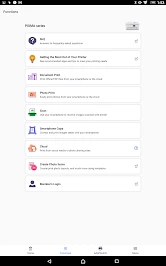
Canon PRINT is a mobile application designed for iOS and Android devices that allows users to print, scan, and copy documents and photos directly from their smartphones or tablets. It supports a wide range of Canon printers and offers functionalities such as wireless printing, scanning to cloud services, checking printer status, and managing printer settings. This app is particularly useful for users looking to streamline their printing process without the need for a computer.
Pros
- Easy wireless printing setup
- Supports multiple file formats
- User-friendly interface
- Remote printing capabilities
- High-quality print output
Cons
- Requires Canon account for full features
- Limited cloud service integration
- Occasional connectivity issues
- App size is relatively large
- No advanced editing tools
- Category
- Tools
- Version
- Varies with device









