Breaking News: Local & Alerts
- 3.47K
- 4.5
- Installs
- 10.00M
- Price
- Free

Screenshots




Analysis by Reviewed
I judge a news app not only by how quickly it brings stories to my screen, but by whether I can make sensible choices about what I see and how often I’m interrupted. Breaking News: Local & Alerts is a free news app from Beloud.com, aimed at people who want nearby coverage alongside wider headlines. I’d treat it as a convenient way to keep an eye on the day, rather than as a replacement for careful reporting or a single trusted local newsroom.
Choosing it for a particular kind of news day
I find this app easiest to recommend to someone who wants a quick, broad picture: what is being reported nearby, what is developing, and whether weather may affect the day. That combination is most helpful when I have a few spare minutes, not when I need a deeply researched answer. If I am following a complex issue over several days, I would add reporting from a publication with a clear beat and return to its fuller articles for background.
There is a useful distinction between wanting to know that something is happening and wanting to understand why. A short update can help me decide whether a story deserves more of my time, but it cannot do all the work of explanation. I try to use the feed as a sorting step: notice a relevant topic, open the story, then seek fuller context before drawing a conclusion or passing it along.
Where this app fits in a news routine
The appeal is the mix of local coverage, breaking stories, and weather information in one place. That can be useful when I’m checking what is happening around home before leaving, or when a developing story makes me want a quick overview without opening several separate news sites. The trade-off is that a fast feed is best for awareness, not necessarily for depth: when a story matters, I still want to read the original reporting and compare how different outlets explain it.
Compared with a newspaper’s own app, a general news feed can be more convenient for scanning across topics, while a publisher’s app may be the better choice when I want that newsroom’s full coverage and editorial context. A dedicated weather app is usually a more focused tool for planning around conditions. I see this app as the middle ground: handy for a quick check, but not the only source I’d rely on for decisions that need detail.
Trust starts with choices, not assumptions
News alerts can feel personal because they arrive on a device I carry everywhere. I prefer to decide deliberately whether notifications suit my routine, rather than allowing every headline to compete for attention. If I’m trying to focus, keeping alerts limited or turning them off at the device level is a straightforward way to reduce interruptions; I can still open the app when I choose to catch up.
I also avoid treating a headline notification as a complete account of an event. A concise alert is a prompt to investigate, not proof that I have the full picture. For sensitive or fast-changing stories, I open the article, check its context, and look for confirmation from sources I already trust. That habit matters with any breaking-news service, especially when a short notification can leave out important qualifications.
More From Our News Desk

Weather by Xiaomi Review: Clear at a Glance, Less Clear Up Close

X Under Pressure: Can It Recover When Posting Goes Wrong?

Clash of Clans Is Won Between the Battles

Android Auto Makes the Case for Quieter Car Software

MobiOffice: Transforming Mobile Productivity with Seamless Integration

EA SPORTS FC™ Mobile Soccer: Redefining Mobile Sports Gaming
Make a quick check more useful
One practical habit is to give local headlines a specific job instead of browsing without a reason. Before heading out, I can look for items that might affect a route, a meeting, or plans with someone nearby. If nothing seems relevant, I can close the app rather than continuing to scroll just because more stories are available. This keeps a news check short and makes the feed serve my day instead of setting its pace.
When a headline matters, I find it helpful to separate the immediate question from the broader one. “Could this affect me today?” is a quick check; “What led to this, and what happens next?” calls for more reporting. Treating those as different tasks prevents a brief local update from being mistaken for a complete explanation, and it gives me a clear point at which to switch to a newsroom or an official source.
Useful habits for local coverage
To get more value from neighborhood news, I’d check the feed at a time when I can read rather than just glance at a banner. For example, before a commute, I can scan local items and weather, then follow up on anything that could change my route or plans. I wouldn’t assume that a news feed replaces official notices for urgent safety instructions; for those, I’d use the relevant local authority’s channel.
It’s also worth being selective about what earns attention. If a story is only loosely relevant, I can leave it for later rather than letting a stream of updates dictate my day. On the other hand, someone who moves between neighborhoods, commutes, or keeps up with family in another area may find a broad local-news view more useful than a feed focused on just one publisher.
What to expect from its controls
For a trust-conscious reader, the concrete choice I can describe is the one around notifications: I can decide whether to receive them, and I can use device-level controls to quiet them. That is a meaningful form of control over interruptions, but it should not be confused with control over every aspect of the feed. I would test the app at my own pace and pay attention to the choices it presents on screen before deciding how much of my routine to build around it.
I would also take a moment to review the permissions Android asks for when installing or using the app, and grant only what makes sense for the functions I intend to use. Permission prompts are not a substitute for understanding an app’s data practices, and I would not infer those practices from the fact that a feature is useful. If a requested access does not seem relevant to what I am trying to do, I would pause and reconsider rather than approve it automatically.
That careful approach is especially sensible with any service that draws attention to location-related news. A nearby story can be useful without making me assume how the app determines what is nearby or how any information is handled. I look for the explanation and choices shown by the app itself, and I avoid granting access simply because a prompt appears. When I only want a broad scan, I can also use the app as a reader and decide for myself whether any location-related choice is necessary.
The First Impression
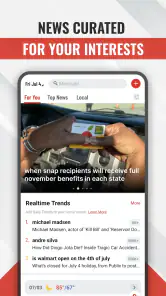
As soon as I fired up the Breaking News: Local & Alerts app, I was greeted with a clean and intuitive interface. No clutter, no unnecessary tabs – just straightforward news delivery. The app’s design makes it easy for anyone, tech-savvy or not, to navigate through the multitude of articles available. The developers clearly prioritized user experience, which is always a win in my book.
Features that Stand Out
Now, let’s get into the nitty-gritty of what makes this app tick. One of the standout features is the ability to customize your news feed. Whether you're into politics, sports, or tech, this app has got you covered. I was particularly impressed by the local news section, which keeps me in the loop about what's happening in my neighborhood.
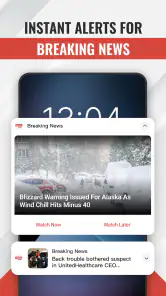
Another feature worth mentioning is the real-time alerts. Imagine sipping your morning coffee and getting instant updates about significant events as they unfold. It’s a game-changer for those of us who like to stay informed without constantly refreshing news websites.
User Experience
Using the app is a breeze, thanks to its quick load times and smooth transitions between articles. I haven’t encountered any major bugs or crashes, which is a relief when you're relying on an app for daily updates.
Moreover, the app's developers have done a fantastic job with the push notifications. They're timely and relevant, without being overwhelming. Trust me, nobody likes an app that bombards you with alerts every other minute.
Room for Improvement
No app is perfect, and while Breaking News: Local & Alerts shines in many areas, there’s always room for improvement. One feature I’d love to see in future updates is a more robust search function. Sometimes it's a bit tricky to find specific articles, especially when you're in a hurry.
Additionally, while the app does a decent job of displaying images and videos, there's still some work to be done to enhance the multimedia experience. But hey, these are minor gripes in an otherwise stellar app.
A sensible everyday workflow
For me, the strongest use case is a small routine rather than constant monitoring. I might open the app while having breakfast, scan the local feed, and note whether a story could affect my plans. If something looks important, I read beyond the headline and check another reliable source before acting. Then I leave the app until I have a reason to return. That approach makes the combined feed useful without turning a phone into a running news ticker.
Someone who travels across town or has family in another neighborhood may use the same check differently: a broader local view can help them notice stories outside the area they usually follow. The trade-off is that a wider spread of coverage can bring in items that are not personally relevant. I would be selective about which topics I follow and avoid treating every alert as a task that needs an immediate response.
If you are deciding whether to install it, a few practical questions are worth asking yourself. Do you want a single place to scan nearby developments, or do you prefer going directly to a chosen newspaper? Are weather notes enough for a quick awareness check, or do you need detailed forecasts and planning tools? And will notifications help you, or pull you away from work and rest? The answers point to whether this app is a useful companion or an unnecessary extra.
How I’d decide whether it suits you
I’d recommend trying it if you want a free, quick way to scan local headlines and breaking developments, and you’re comfortable treating a feed as a starting point rather than a final authority. Its broad appeal is reflected in its 4.5 average from around 555,000 ratings, and it has been installed over 10 million times. It is rated for Everyone, runs on Android 6.0 or later, and version 11.1.22 is the current release. Those details make it accessible to many Android users, though they don’t tell me whether its editorial approach will match every reader’s preferences.
If I were choosing an alternative, I would match the tool to the task. A local publisher’s app makes more sense when I want one newsroom’s reporting and continuing coverage; a dedicated weather service is better when forecasts are the main reason I am checking my phone. For a quick cross-topic scan, this app has a useful role. Its category is News & Magazines, and the combination is most compelling when convenience matters more than having one publication’s complete editorial experience.
Beloud.com is the developer behind the app, which is free to use. I would still make my own judgement about the content and the choices presented during setup rather than treating popularity as a guarantee of fit. It has around 3,500 written reviews alongside its larger rating base, but what matters to me is whether its local coverage is relevant to my area, whether the feed is readable on my device, and whether I can keep alerts at a level that suits my day.
If you mainly want in-depth analysis, a carefully curated publication, or a highly specialized weather tool, I’d choose a dedicated service instead of expecting one general app to do everything. I’d also skip push alerts if interruptions make it harder to concentrate; opening the feed on my own schedule is a calmer way to use a news app. The most useful question to ask yourself is whether a combined local-and-breaking feed saves you time without making you feel obliged to follow every update.
Final Thoughts
So, would I recommend the Breaking News: Local & Alerts app? Absolutely. It’s a reliable and efficient way to keep your finger on the pulse of current events. Whether you're a news junkie or just someone who likes to stay informed, this app is worth checking out.
In a world where information is power, having a tool that delivers it seamlessly is invaluable. So go ahead, give it a whirl and see how it fits into your daily routine. You might just find it's the news app you never knew you needed.
A cautious recommendation
My recommendation comes with a boundary: I would use this as a convenient discovery and awareness tool, not as the final word on urgent events or complicated news. For a commute, a neighborhood check, or a quick look at what is developing, it can save the effort of opening several sources. For emergencies, I would turn to official instructions; for consequential claims, I would seek fuller reporting and corroboration.
I would also make the notification decision deliberately, review permission prompts instead of accepting them by reflex, and revisit the app’s visible options if my needs change. With those habits, the combination of local items, wider breaking stories, and weather can be useful without asking me to surrender my attention or judgement. If that measured role is what you want from a news app, I think it is worth trying; if you need a specialist source, I would choose one built around that need instead.
Breaking News: Local & Alerts Frequently Asked Questions
What is the current version of Breaking News: Local & Alerts?
Breaking News: Local & Alerts is currently on version 11.1.22. If you are deciding whether to install it, checking that your device can run this version is a sensible first step. The app focuses on local news, breaking news, and neighborhood weather forecasts, making it an option for people who want news updates alongside the rest of their mobile reading.
Who develops Breaking News: Local & Alerts?
Breaking News: Local & Alerts is developed by Beloud.com. It is a news app built around local and breaking coverage, with weather forecasts from your neighborhood also part of its focus. Knowing the developer can help you distinguish it from other apps with similar names when browsing for a news service to install.
What is the app’s main focus?
The app’s central purpose is to help you keep up with local news, breaking news, and weather forecasts from your neighborhood. That makes it most relevant if you want nearby updates as well as reports about unfolding events. The specific stories you see can change with current events, so the experience is shaped by what is happening and the news that reaches your feed.
Is Breaking News: Local & Alerts suitable for all ages?
The app is rated Everyone, making it suitable for a broad audience. It focuses on local news, breaking news, and weather forecasts, so the topics and reports you encounter can vary with current events. If you are choosing it for a child, consider that news coverage may include serious or upsetting events, as is common with news apps.
What is Breaking News: Local & Alerts app?
Breaking News: Local & Alerts is a mobile application designed to keep you informed with the latest local and global news. The app provides real-time alerts and updates on significant events, ensuring you are always up-to-date with current happenings. It's an essential tool for news enthusiasts who want to stay informed on the go. It is developed by Beloud.com and is available in the News & Magazines category.
Pros
- Timely notifications of breaking news.
- Customizable news categories.
- Local news coverage included.
- User-friendly interface.
- Offline reading mode available.
Cons
- Ads can be intrusive.
- Limited international news coverage.
- Occasional app crashes.
- Requires frequent updates.
- Limited customization for alerts.
- Category
- News & Magazines
- Version
- 11.1.22












