Beauty Camera - Makeup Camera
- 4.00
- 4.6
- Installs
- 100.00K
- Price
- Free

Screenshots
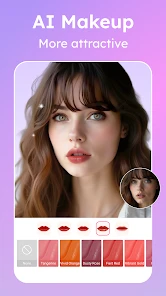
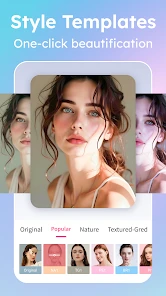
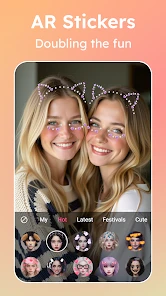
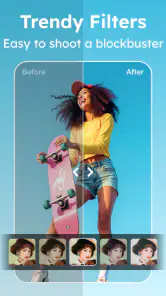
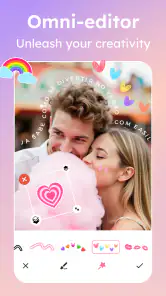
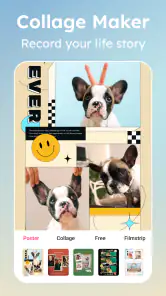
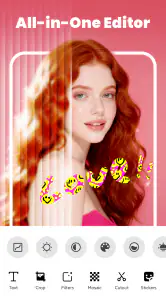
Analysis by Reviewed
Beauty Camera - Makeup Camera is a beauty-editing app for the moment when a quick selfie needs a little polish, but a full desktop-style editing session would be overkill. I like the idea of keeping makeup effects, decorative stickers, filters, and AI-assisted editing together: it gives you several ways to shape a photo without requiring you to build the look from scratch. The key is treating it as a creative shortcut rather than expecting every effect to suit every face or lighting condition.
What the editing experience is best suited to
In the beauty-app category, the strongest reason to try Beauty Camera - Makeup Camera is its mix of portrait-focused touches and playful decoration. You can aim for a more finished selfie with makeup and filters, or shift toward something more expressive with stickers. That range makes it useful for casual social posts, profile pictures, and experimenting with different moods, rather than only correcting a single flaw.
I would start with the lightest edit that solves the problem. If a photo already looks good, a filter or a small makeup adjustment is usually a better first move than stacking several effects. Heavy processing can make skin look less natural and can pull attention away from the person in the picture. Stickers have the opposite trade-off: they are deliberately visible, so they work best when the goal is playful rather than realistic.
The AI editor is another reason the app may appeal to someone who wants a faster route to a polished result. AI tools can be convenient when you do not want to make every adjustment manually, but I would still inspect the finished image before sharing it. Automated edits are a starting point, not a guarantee that a result will match your taste. Check whether makeup edges, facial details, and the overall tone still look right at normal viewing size.
A practical workflow for a better selfie
For an everyday portrait, I would choose a photo with even light before opening the editor. An app can adjust the appearance of an image, but it cannot reliably make poor lighting look like flattering natural light without changing the image more noticeably. Then I would compare the original and edited versions as I go, adding one type of effect at a time. This makes it easier to tell whether a filter is improving the picture or simply making it more dramatic.
A useful, less obvious habit is to make a restrained version first and a more stylized version second. The restrained edit is more likely to work as a profile photo or a picture sent to family; the bolder one may suit a story or a themed post. Keeping those goals separate prevents a fun sticker-heavy edit from becoming the only version you have when you later want something natural.
Another practical tip is to review the image at the size where people will actually see it. A makeup effect that looks convincing in a small preview can appear too strong when you zoom in, while a tiny change may disappear on a phone screen. If you are editing for a social post, check the crop as well as the effect: a sticker near an edge can be cut off, and a face positioned too close to the border may feel cramped after posting.
More From Our News Desk

Weather by Xiaomi Review: Clear at a Glance, Less Clear Up Close

X Under Pressure: Can It Recover When Posting Goes Wrong?

Clash of Clans Is Won Between the Battles

Android Auto Makes the Case for Quieter Car Software

MobiOffice: Transforming Mobile Productivity with Seamless Integration

EA SPORTS FC™ Mobile Soccer: Redefining Mobile Sports Gaming
Speed expectations and moments that demand more
I would approach the app as a tool for short editing sessions, not as a promise of instant results on every device. Simple edits are naturally less demanding than exploring multiple filters, trying different makeup looks, adding stickers, and revising the same image repeatedly. The more effects you test, the more time you will spend judging the choices, even if the app itself feels responsive.
Video is a different kind of task from a single selfie. The app’s presentation includes video alongside photo-oriented editing, but working with moving footage involves more material to review and more chances for an effect to look inconsistent from one moment to the next. I would use a short clip first, check the result from beginning to end, and avoid committing to an elaborate look until I know it suits the footage. A filter that flatters one frame may not feel right throughout a clip.
For a realistic everyday scenario, imagine taking a quick selfie before meeting friends. I would pick the clearest shot, use a mild filter or makeup treatment, and stop once the image looks like me on a good day. If I had more time later, I might make a second version with stickers for a more playful message. That two-pass approach is more reliable than trying to turn one hurried edit into a natural portrait, a novelty image, and a polished video all at once.
Reliability, revisions, and keeping control
Beauty editing is subjective, so reliability here is less about finding one perfect automatic result and more about being able to make choices deliberately. I would not assume that an AI-assisted suggestion is automatically the most flattering option. Look at the image as a whole: if the effect draws attention to itself, reduces the natural feel of the portrait, or clashes with the lighting, dial back the idea and try a simpler treatment.
It also helps to think in reversible steps. Before making a series of changes, decide what you want the finished photo to do: soften the mood, add a makeup look, or make the image funny. Changing one thing at a time makes it easier to recover from an edit that goes too far, because you can identify which choice caused the problem instead of starting over without knowing why.
For important photos, I would keep the original available and treat the edited copy as a separate creative version. That is a useful safeguard in any editor, especially when a strong filter or decorative element changes the character of the picture. It also lets you compare the result honestly instead of relying on memory of how the unedited image looked.
The app has an average rating of 4.6 from around 1.5 thousand ratings, and it has passed 100 thousand installs. Those figures suggest that it has found an audience, but they cannot tell you whether its particular effects match your taste. I would use them as context, then judge the app by a few edits with your own photos and the kind of look you actually want.
Device fit, cost, and who should look elsewhere
Mobile Minds Dev lists the app as free to install, with optional in-app purchases ranging from $1.99 to $19.99 per item. That makes it reasonable to explore without paying at the outset, but I would check what an effect or editing option costs before getting attached to it. If you only need occasional basic selfie adjustments, there may be no reason to buy anything; if a paid item is central to your intended look, decide whether it is worth the cost before building a workflow around it.
The app is rated for Everyone and its listed minimum operating system is Android 6.0. It is currently version 1.3.0. Those details help establish basic compatibility, but they do not guarantee the same feel on every phone. If your device is older or already struggles with other camera and editing apps, keep your first session simple and see how it handles a single image before trying a more involved editing session.
When using any effects-heavy editor, I also find it sensible to avoid multitasking through a large editing session if the phone is already busy. Close tasks you do not need, start with one photo, and see whether the experience stays comfortable. That is not a claim that this app is unusually demanding; it is a practical way to distinguish an app issue from a device that is under pressure. If a session does not behave as expected, reopening the app and trying one uncomplicated edit is a sensible first recovery step.
This is not my first choice for someone who wants precise, layer-by-layer control over every detail, or for a photographer whose priority is preserving a completely untouched look. A more manual photo editor is better when exact retouching and fine adjustments matter more than quick beauty effects. Likewise, someone who dislikes filters, makeup overlays, and decorative stickers may find the app’s central appeal irrelevant rather than useful.
How it compares with familiar alternatives
Compared with a basic photo editor, Beauty Camera is more directly focused on selfies and beauty styling. That focus can save time if your goal is to try makeup, filters, or stickers without searching through unrelated editing controls. The trade-off is that a general-purpose editor may be a better fit for cropping, tonal adjustments, and broader image work when beauty effects are not the point.
Compared with editing solely inside a social platform, a dedicated beauty app gives you a separate place to experiment before deciding where to share a result. That separation is useful if you want to prepare a clean portrait and a more playful variation from the same photo. On the other hand, if you only need a quick one-tap look for an occasional post, switching between apps may feel like unnecessary friction.
There is also a personal-style trade-off. A strong beauty treatment can make a selfie feel finished, but the more effects you combine, the less the picture may resemble the moment you captured. I would choose this app when I want an intentional, visibly styled result; I would choose a lighter editor or leave the photo alone when authenticity matters more than polish.
My performance verdict
Beauty Camera - Makeup Camera makes sense for people who regularly take selfies and want a compact place to explore beauty effects, stickers, filters, and AI-assisted edits. Its best use is a short, deliberate session: start with a good photo, test one treatment, check the result at full size, and keep the original for comparison. That workflow is more likely to produce an image you still like later than piling on effects in search of a perfect look.
I would recommend giving it a try if you enjoy experimenting with portrait styles and are comfortable deciding for yourself when an edit has gone far enough. I would skip it if you need detailed professional controls, want every effect to be free, or prefer photos to remain untouched. Its free starting point, Everyone rating, and broad set of selfie-oriented ideas make it approachable, while optional purchases and the subjective nature of beauty filters are reasons to explore thoughtfully rather than assume it will suit every user.
My overall view is positive but measured: this is a focused option for quick, creative selfie work, not a replacement for every photo editor or a guarantee of effortless results. Keep edits purposeful, test demanding tasks on your own device, and let the original image guide how far you go. If those habits fit the way you like to make pictures, the app can be a handy addition to your phone.
Who will get the most from it
I see the clearest fit for someone who enjoys making casual portraits feel a little more intentional, but does not want to learn a complex editing workflow. It is also handy when one photo needs two different moods: a subtle version for a profile image and a sticker-led version to send to friends. If you tend to edit only landscapes, product shots, or images where accurate color matters more than portrait styling, a general photo editor is likely the more useful everyday choice.
One small workflow adjustment can make the app easier to judge: pick the photo first, decide where you plan to use it, and only then browse effects. That avoids choosing a dramatic look simply because it catches your eye in the moment. For a work profile, for example, I would keep the treatment understated and inspect the face at full size; for a casual message, I would be more willing to use a visible sticker or stronger style.
Making a sensible first test
When trying it for the first time, I would use a photo that is clear but not especially important. That gives you room to see how its makeup, filter, sticker, and AI-assisted options affect your own features without feeling pressured to rescue a treasured image. Try one change, pause, and compare it with the original before adding another. This simple test also helps answer a practical question: whether the app’s idea of “polished” matches yours.
For a busy day, I would avoid beginning with a long video or a batch of experiments. Make one still-image edit, check that the result looks right after saving or sharing it through your usual process, and then decide whether a longer session is worth your time. If you care most about an unaltered appearance, or need dependable fine control for a carefully planned portrait, the better choice is to use a more manual editor or skip beauty processing altogether.
Beauty Camera - Makeup Camera Frequently Asked Questions
What is Beauty Camera - Makeup Camera used for?
Beauty Camera - Makeup Camera is a photo-editing app for enhancing selfies and portraits. It typically offers tools such as skin smoothing, blemish correction, makeup effects, filters, and facial adjustments, though the available features can vary by app version and device. Before downloading, check the store listing and screenshots to confirm that its editing tools match what you want.
Can I use Beauty Camera - Makeup Camera to apply makeup effects to a photo?
The app is intended to provide makeup-style effects for portraits, which may include options such as lipstick, eye makeup, or other beauty enhancements. Results depend on the photo, lighting, and the app’s available controls; effects may look more or less natural depending on how strongly they are applied. Review the current feature list and recent user feedback before relying on a specific effect.
Is Beauty Camera - Makeup Camera free to download and use?
The price and payment model can vary by version, region, and app store. An app may be free to install while offering paid features, subscriptions, advertising, or in-app purchases. Check the Google Play Store or Apple App Store listing for the latest price and purchase details, and review any subscription terms carefully before confirming a payment.
Does Beauty Camera - Makeup Camera require an internet connection?
Basic photo capture or editing may work offline if the relevant tools are built into the app, but some features—such as downloading filters, accessing online content, viewing ads, or syncing edits—may require a connection. Exact requirements can change between versions. If offline editing matters to you, check the app description and test the features you need before traveling or working without internet access.
What should I check about privacy before uploading photos to Beauty Camera - Makeup Camera?
Portraits can contain sensitive personal information, so review the app’s privacy policy and the permissions requested during setup. Check whether photos are processed on your device or uploaded to a service, and look for details about data collection, retention, and sharing. You can also limit access to selected photos where your device allows it and avoid granting permissions that are not needed.
Pros
- Offers makeup effects and beauty filters for quick photo touch-ups.
- Easy-to-use tools make it approachable for casual users.
- Lets you preview different looks before saving a photo.
- Useful for enhancing selfies without separate editing software.
- A range of effects can add variety to portraits and social posts.
Cons
- Some features or effects may require in-app purchases.
- Beauty filters can make photos look overly edited if applied heavily.
- Results may vary depending on lighting and camera quality.
- Ads may interrupt editing in the free version.
- Saving or sharing edited images may require access to your photos.
- Category
- Beauty
- Version
- 1.3.0













