Asana: Where work connects
- 3.08K
- 4.0
- Installs
- 5.00M
- Price
- Free

Screenshots
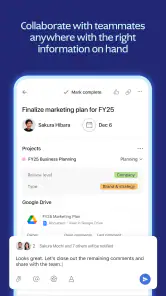
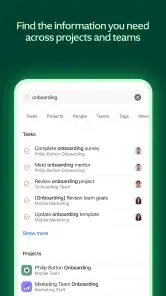

Analysis by Reviewed
For people who need to coordinate work but find crowded project apps tiring to navigate, Asana is worth a closer look. I find it most useful when tasks have owners, next steps, and a shared place for discussion; it is less compelling as a simple personal checklist. The app is made by Asana, Inc. and sits in the business category. It is free, rated for Everyone, and has an average rating of 4.0 from around 45,000 ratings, with more than 5 million installs. Those figures suggest a widely used tool, but the real question is whether its structure fits the way you work.
Choosing a workflow that stays manageable
One thing I would decide before inviting a team is what belongs in a task at all. Asana works best when the task represents an outcome someone can recognize as finished, rather than every small thought that arises along the way. A request such as “prepare the client handout” can hold the owner, discussion, and smaller steps; a flood of separate tasks for every sentence edit can make the project harder to scan. This distinction is especially helpful for people who find dense lists tiring: fewer meaningful entries are easier to review than a stream of tiny updates.
I would also choose a simple rule for where decisions go. If one person approves a draft in a task discussion and another gives the same instruction in chat, the team now has two competing records. Keeping decisions that affect the work with the relevant task makes later handoffs easier, but it depends on colleagues actually following the convention. Asana can give a team a shared structure; it cannot resolve unclear ownership or prevent people from continuing to work in disconnected channels.
Finding your way around the work
Ever found yourself buried under a mountain of tasks, wishing there was a magical way to organize your work life? Enter Asana, the app that's like a personal assistant on your smartphone. It's that one tool you didn't know you needed until you tried it. Let me walk you through my experience with it.
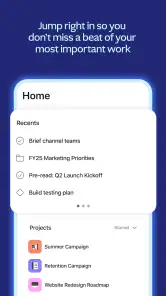
As a mobile app, Asana asks you to move between projects, tasks, and conversations rather than keeping everything in one flat list. That distinction matters for readability: a team member can open a task and see its purpose, discussion, and related work together instead of hunting through separate messages. I’d keep task titles concrete and front-load the action, such as “review draft” rather than “draft,” so a compact list remains easier to scan. When a project is busy, breaking work into smaller tasks also makes the next action clearer than relying on one long description.
Getting Started with Asana
First things first, setting up Asana is a breeze. You download it, create an account, and boom, you're ready to roll. The interface is super intuitive. I mean, even if you're not the most tech-savvy person out there, you'll feel right at home navigating through the app. It's like the app holds your hand and gently guides you through the setup process.
For someone who benefits from a predictable routine, I’d begin with one project and a few clearly named tasks, then learn the app’s organization gradually. That is easier to maintain than recreating every department’s workflow on day one. The current version is 8.74.7, and the app’s history goes back to its release on February 27, 2013; what matters in daily use is that a new user can start with a small, understandable workspace instead of treating setup as a major migration.
More From Our News Desk

Weather by Xiaomi Review: Clear at a Glance, Less Clear Up Close

X Under Pressure: Can It Recover When Posting Goes Wrong?

Clash of Clans Is Won Between the Battles

Android Auto Makes the Case for Quieter Car Software

MobiOffice: Transforming Mobile Productivity with Seamless Integration

EA SPORTS FC™ Mobile Soccer: Redefining Mobile Sports Gaming
Features that Stand Out
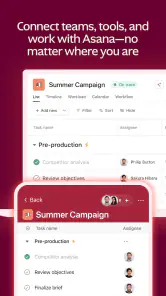
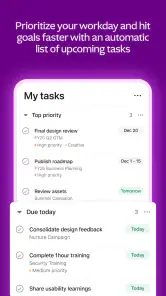
What I love about Asana is its versatility. Whether you're managing a small team or coordinating a larger project, it's got you covered. The task management feature is top-notch. You can create tasks, set deadlines, assign them to team members, and even add subtasks. It's like having a digital to-do list that actually keeps you on track.
One useful habit is to make ownership explicit: assign a task to the person responsible and use subtasks only when they represent genuinely separate steps. Otherwise, a project can become a maze of tiny items that takes more effort to maintain than to finish. For a weekly campaign, for example, I’d separate drafting, review, and publishing so the handoff is visible, while keeping minor edits in the parent task’s discussion. That gives a team a clearer view without turning every thought into another checkbox.
And let's not forget about the project timelines. This feature gives you a bird's eye view of your entire project, helping you spot potential bottlenecks before they even become a problem. It's like having a crystal ball but for your work life.
A timeline is most helpful when the team has agreed on dates and dependencies; it cannot make uncertain estimates reliable by itself. I’d use it to notice that review is scheduled after a launch date, then confirm the sequence with the people involved. If your work changes constantly and deadlines are only rough guesses, a simpler board or shared list may be easier to keep honest than a polished-looking schedule.
Collaboration Made Easy
Collaboration is where Asana really shines. You can comment on tasks, upload files, and even integrate it with other tools like Slack and Google Drive. It's like having a virtual office where everyone is on the same page. No more endless email threads or missed messages. Just pure, unadulterated teamwork.
For an everyday example, imagine a small team preparing a client presentation. One person owns the outline, another adds research, and a reviewer leaves feedback on the relevant task rather than sending a separate email chain. I’d agree on one rule early: decisions that affect delivery belong in the task discussion, while quick chat stays in the team’s usual messaging tool. This makes the project easier to follow later, though it does require people to consistently use the shared workspace.
User Experience
The user experience is smooth as butter. The design is clean, and everything is where you'd expect it to be. No clutter, no unnecessary buttons. Just a straightforward app that does what it's supposed to do. Plus, it's available on both Android and iOS, so no one's left out in the cold.
On a phone, touch navigation is convenient for checking progress or adding a short update between meetings, but I would not choose it for every kind of project maintenance. Reorganizing a large body of work or writing detailed plans can be more comfortable on a larger screen. If you have limited dexterity or rely on assistive technology, try the actual actions you depend on—such as assigning a task, editing a date, and reading a long discussion—before moving essential work into the app. A tidy visual layout alone does not guarantee that every interaction will suit every person.
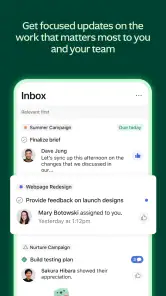
Oh, and did I mention the notifications? They are subtle yet effective, like a gentle nudge reminding you of what's next on your list. It's like having a personal secretary, minus the coffee-making duties.
Notifications work best when they point to something you genuinely need to act on. I’d review which project updates deserve an interruption and avoid treating every change as urgent; otherwise, reminders can become background noise. For workers who cannot check their phone freely, a team agreement about task ownership and due dates is more dependable than assuming everyone will see an alert at the right moment.
Using it across different days and devices
A practical test is whether the app helps when you have only a short window to check in. A person moving between appointments may need to confirm who owns a task, read a brief update, or leave a note without reopening a long conversation. I would prepare the project so those details are easy to find: clear task names, a named owner, and a concise description of what is needed next. That setup makes quick checks less dependent on remembering the full backstory.
For work that involves extended writing or many changes, I would treat the phone as a companion rather than the only workspace. It is useful for a quick status check, but editing a complicated plan on a small screen can become tedious. Teams should also consider whether everyone can access the app comfortably during their working day; a process that assumes instant responses from phone notifications will not suit people with different schedules, sensory needs, or limited opportunities to use a device.
Who will get the most from it
I’d recommend Asana to teams that coordinate work across people and need a visible trail from assignment to discussion to completion. It can also suit a freelancer working with clients, provided both sides are willing to keep decisions and deliverables in the same place. Someone who only wants a private shopping list, or who dislikes maintaining project structure, may be happier with a basic notes or to-do app. Compared with a spreadsheet, Asana gives tasks clearer ownership and conversation; compared with a chat app, it keeps work from disappearing in a fast-moving stream. The trade-off is that it asks everyone to adopt the same habits.
It is particularly useful when work has several handoffs but does not require a specialist planning system. A small nonprofit organizing an event, for instance, could keep venue arrangements, copy review, and volunteer coordination in one project, with each item assigned to someone. A solo worker may still benefit when a client needs visibility into progress, but a personal list may be quicker if there are no collaborators and no need to preserve a discussion trail. The best choice depends less on the number of tasks than on whether shared responsibility is part of the job.
Compared with a spreadsheet, Asana is easier to use when an item needs a responsible person and a place for context, while a spreadsheet can be more comfortable for people who think in rows, columns, and custom calculations. Compared with a chat-first workflow, tasks make ownership and follow-up more visible, though they require people to pause and record decisions. If the team already has a reliable, lightweight system that everyone uses, switching just to gain another interface may create more work than it removes.
When another approach is kinder
Asana is not a substitute for every communication channel or every planning style. If a team’s work is mostly urgent, unplanned requests, a shared task system can feel like extra administration unless someone is responsible for keeping it current. If colleagues have different needs around reading, attention, movement, or sensory load, I’d agree on a low-friction convention: concise task names, limited notifications, and decisions recorded in one predictable place. The app can support that routine, but the team still has to make it inclusive and workable.
There is also a real maintenance cost. A project that is meticulously structured at the start can become misleading if owners change, dates slip, or completed work is never cleared from the active view. I would schedule a brief review as part of the team’s normal routine: check what is still active, update responsibility, and remove stale items. This is not glamorous, but it is what keeps a shared project from becoming another source of uncertainty. If nobody can take responsibility for that upkeep, a simpler shared list may be the more honest option.
Before committing to a team workflow, I would test a complete everyday sequence rather than only browsing the project: create a task, assign it, add the information a colleague needs, respond to a question, and mark the work complete. This reveals whether the steps feel manageable on the devices people actually use. It also helps answer a practical question: can a new teammate understand what to do without someone explaining every item? If the answer is no, clearer names and a simpler project structure may solve the problem better than adding more process.
Inclusive use takes more than a tidy screen
Asana’s task-centered organization can help people who need written context rather than instructions delivered only in a meeting. A task can make the expected action and conversation easier to revisit, and a consistent naming style reduces the effort of scanning. But this benefit depends on how the team writes. Long, unstructured descriptions, unexplained abbreviations, and frequent changes to conventions can make the same workspace difficult to use. I’d ask teammates what information they need to act, then keep it near the task rather than expecting everyone to infer it.
People also differ in how they handle alerts and visual activity. Some appreciate a reminder; others find repeated prompts distracting or cannot respond immediately. The team should distinguish between genuinely time-sensitive work and ordinary progress updates, and avoid using an alert as a substitute for a clear deadline or direct conversation. If a task is urgent, say what action is needed and by when. That makes expectations clearer for everyone and reduces the pressure to monitor every notification continuously.
For accessibility needs, I would be careful not to assume that a clean design settles the question. A person may need to enlarge text, use assistive technology, reduce interruptions, or complete work with limited touch input. Their experience can depend on the device and the exact task, so it is sensible to try the actions that matter before relying on the app for essential work. A team can make the workflow more flexible by allowing updates through agreed alternatives and by not treating immediate mobile activity as proof of commitment.
Final Thoughts
In a world where time is money, Asana is a lifesaver. It's the app that brings order to chaos, helping you manage your tasks like a pro. Whether you're a solo freelancer or part of a bustling team, Asana has something to offer. So, why not give it a try and see how it transforms your work life? Trust me, you won't regret it.
My recommendation is more measured: start with one real project, invite only the people who need to contribute, and decide where updates belong before adding more workflow. That small trial will show whether the task-centered approach genuinely reduces missed handoffs or simply adds another place to check. I find Asana strongest when a team values clear responsibility and can keep its shared workspace current; if accessibility needs, frequent interruptions, or a preference for informal planning make that routine uncomfortable, choose a simpler tool or test the workflow carefully first.
Asana: Where work connects Frequently Asked Questions
Can I use Asana to coordinate work across a team?
Yes. Asana is designed to bring work, teams, and goals together, with tasks and projects organized in one place. It can help team members see what needs attention and coordinate their contributions. The app is aimed at business use, so it is most relevant when you want a shared way to organize work rather than a personal entertainment app.
Does Asana support both tasks and larger projects?
Asana brings tasks, projects, and goals together, so it can be used to organize individual pieces of work as well as broader team efforts. You can create tasks, assign them, set deadlines, and monitor progress, helping people understand how their work fits into a project. The mobile app is useful for keeping track of those activities when you are away from a desk.
Is Asana free to download, and what should I know about its cost?
Asana is free to download, and it can be useful for getting started with organizing work and projects. The app is made for business coordination, bringing tasks, projects, and goals together in one place. Asana also offers several pricing plans for different needs, including a free basic plan and paid options with additional capabilities. Check the plan details in the app or store before choosing what suits your team.
Which devices can run the Asana app?
Asana is available as a mobile app for Android and iOS. On iOS, the minimum operating system requirement is version 11, so it is worth checking your device settings before downloading. The mobile experience is intended to help you keep up with team work while away from a desk, including creating tasks, managing projects, and collaborating with colleagues.
What is Asana and how does it help in project management?
Asana is a versatile project management tool that allows teams to organize, track, and manage their work. It's designed to improve collaboration by connecting team members and streamlining workflows. You can create projects, assign tasks, set deadlines, and monitor progress in real-time, ensuring everyone stays aligned and productive. It's particularly beneficial for remote teams or those with complex project needs.
Pros
- User-friendly interface
- Effective task management
- Integrates with other tools
- Customizable workflows
- Real-time collaboration
Cons
- Limited offline functionality
- Can be overwhelming for new users
- Some features require premium
- Mobile app lacks some features
- Occasional notification overload
- Category
- Business
- Version
- 8.74.7











