American Airlines
- 19.25K
- 4.5
- Installs
- 10.00M
- Price
- Free

Screenshots




Analysis by Reviewed
When a trip involves more than one person, the phone holding the booking can quietly become the household’s travel desk. I find the American Airlines app most useful in that role: it keeps flight tasks close at hand for the traveler, while giving companions a clear point of coordination before and during airport day. It is a free travel app from American Airlines, Inc., and its focus is the airline’s own journeys rather than being a general-purpose trip planner.
One traveler’s phone, everyone’s plans
Picture a parent traveling with a child while another family member drives them to the airport. The traveler can keep the booking and boarding pass on their own device, then share the relevant departure details verbally or through the household’s usual messaging channel. That division is practical: the person flying handles airline actions, while the person helping can coordinate pickup without needing to operate the account.
I would not treat one shared phone as the ideal setup for a group. A digital pass is convenient when the traveler has their device ready, but a companion who needs to travel separately should have their own access to the appropriate trip details. Before leaving home, I’d check that each passenger knows who is carrying which pass and where the group will meet if plans shift. That small conversation can prevent a last-minute scramble at the terminal.
Keep account access personal
The app’s account-based setup makes a useful boundary worth keeping: use the traveler’s own login rather than passing around credentials just so everyone can check the itinerary. One person can manage the booking and communicate changes, while others can receive the information they need without being signed into the account. This is especially sensible on a shared household tablet or a phone that several people use.
For a family trip, I’d also decide in advance whose device is the reliable one for travel-day tasks. A child may be able to follow along with a parent’s screen, but the adult should remain responsible for checking the booking and presenting the required pass. If a device is handed to someone else to look at the itinerary, I’d stay nearby rather than treating the app as a shared family account.
Getting Started with the American Airlines App
First things first, downloading and installing the American Airlines app is a breeze. It's available on both Android and iOS, so no matter what kind of smartphone you have, you're covered. Once you've got it on your phone, the setup is pretty straightforward. Just log in with your AAdvantage account details, and you're good to go!
Features That Make Flying Easier
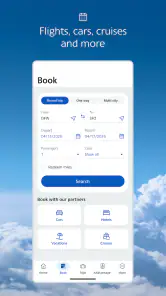
One of the standout features of this app is the ability to manage your bookings right from your phone. You can search for flights, book them, and even choose your seats. It’s super convenient to have all your travel details in one place. Plus, if you need to make any changes, you can do so without the hassle of calling customer service.
More From Our News Desk

Weather by Xiaomi Review: Clear at a Glance, Less Clear Up Close

X Under Pressure: Can It Recover When Posting Goes Wrong?

Clash of Clans Is Won Between the Battles

Android Auto Makes the Case for Quieter Car Software

MobiOffice: Transforming Mobile Productivity with Seamless Integration

EA SPORTS FC™ Mobile Soccer: Redefining Mobile Sports Gaming
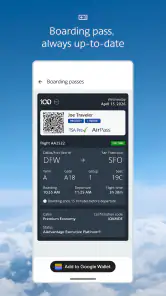
Another cool feature is the boarding pass function. Gone are the days of fumbling around with paper tickets. Just show your digital boarding pass at the gate, and you're all set to board. It's a small thing, but it makes the whole airport experience a tad less stressful.
Making the app useful before travel day
I would install it well before departure rather than waiting until I reach the airport. That gives me time to sign in, find the reservation, and confirm I can get back to the trip screen without rushing. If I am helping someone else prepare, I would have them locate their own pass and booking details while still at home. The goal is not to make every traveler an app expert; it is to avoid discovering a login or navigation problem at the security line.
For a household using more than one phone, it helps to agree on a simple division of labor. The person whose booking is tied to the account can keep an eye on the itinerary, while a companion can handle practical tasks such as confirming the pickup plan or telling the driver about a delay. I would avoid relying on a screenshot as the only record of a pass or schedule: it is easy to find later, but it cannot reflect a change that happened after it was captured.
Keeping Track of Your Travel Plans
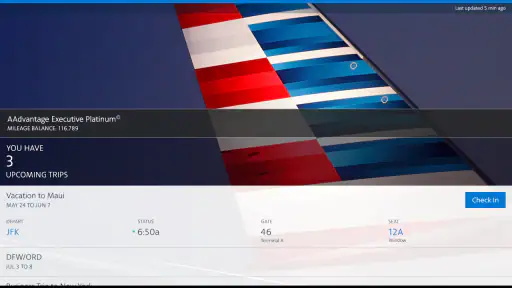
The app does a fantastic job of keeping you updated. You'll get notifications about gate changes, delays, and even baggage claim information. This real-time info is crucial, especially when you're navigating a busy airport. Trust me; it's saved me from a few potential headaches.
For those of you who love to rack up miles, the app lets you track your AAdvantage miles and see how close you are to that next reward. It's a nice motivator to keep flying with American Airlines.
Coordination when plans change
For a family meeting someone at arrivals, I’d use the app’s flight updates as the traveler’s source of truth, then pass along the latest timing to the person waiting. That is more useful than relying on an old screenshot of the itinerary, particularly if a gate or schedule changes. Notifications help, but I still recommend opening the trip details yourself when an update matters; a notification is a prompt to check, not a substitute for understanding the new plan.
There is a trade-off here: the app is tailored to American Airlines travel, while a general airline-search or itinerary app may be better for comparing several carriers or keeping unrelated reservations together. I’d use those tools for broad planning, then turn to this one for the airline-specific parts of the journey. If you are not flying American, its focused approach gives you little reason to make it your main travel app.
Small workflow choices that reduce airport friction
One useful habit is to check the trip shortly before setting off, then check again when an important notification arrives. That separates routine preparation from responding to a change, and it makes it less likely that a traveler will mistake an earlier plan for the current one. If a relative is driving, I would send them only the detail they need—such as the revised arrival timing—instead of asking them to follow the account or interpret every airline update.
The mileage view also serves a different purpose from the booking tools. I see it as a quick way for a frequent American flyer to keep rewards progress in sight, not as a reason by itself to choose a particular flight. For someone who flies only occasionally, it may be nice to have but will not change the core value of the app: handling that airline’s trip information in one place.
Age, trust, and practical limits
The app is rated for Everyone, but that does not mean a child needs to manage an adult’s airline account. I’d keep sign-in and booking decisions with the responsible traveler, and let younger passengers follow the plan with help. This is a sensible arrangement for a shared device too: the app can support coordination, but households still need to decide who owns the account and who is responsible for checking the trip.
American Airlines has a 4.5 average from around 109,000 ratings, and more than 10 million installs. Those figures suggest it is widely used, though popularity does not remove the need to check details yourself. The app is free, and its current version is 2025.32; it supports Android 8.0 and later. I’d consider it a strong fit for people who fly this airline and want bookings, passes, and trip updates close together. Occasional travelers can still benefit, but someone who prefers printed documents or rarely uses a phone at the airport may be happier keeping a paper backup.
What I would not rely on it to do
I would not make it the only planning tool for a complicated trip with several airlines or different kinds of transport. Its airline-specific focus is useful once an American Airlines reservation is part of the picture, but a broader travel organizer is usually more convenient when I need one view of a mixed itinerary. Likewise, when comparing fares, I would start with a service that makes it easy to look across carriers rather than expecting this app to be a neutral comparison desk.
Nor would I assume that a phone notification settles every question about a changed plan. If an update affects when someone should leave home or where the group should meet, I would open the trip details and make sure I understand what changed before relaying it. That extra check is a small effort, but it matters when several people are coordinating around one traveler’s schedule.
My Personal Experience
Using the app has genuinely enhanced my travel experience. I remember a trip where there was a last-minute gate change. Thanks to the app, I got the notification early and avoided a mad dash across the terminal. Little things like that really add up, and they make me appreciate the app even more.
Now, if I had to nitpick, I'd say the app could be a bit more intuitive in some areas. Navigating through the settings can be a bit clunky at times, but once you get the hang of it, it's not too bad.
Who should make it the household travel companion?
My practical tip is to prepare before the airport rush: sign in, locate the trip, make sure the traveler knows where the pass appears, and agree who will communicate changes to anyone helping with transport. If several people are flying on the same reservation, check each person’s details rather than assuming one person’s screen is enough for everyone. That simple division of responsibility is more reliable than trying to sort out accounts and passes while boarding is underway.
For a household that regularly books American Airlines, this app can reduce the back-and-forth of finding confirmation details and checking the latest travel information. It is less compelling as a shared organizer for a family whose trips span airlines, trains, and hotels; a broader itinerary tool may keep that mixed travel in one place, while this app remains useful for American-specific tasks. If your main need is comparing fares across carriers, use a comparison service for that decision and come back here when you have an American Airlines booking to manage.
Who will get the most from it—and who may prefer another tool
I’d recommend it most readily to travelers who already choose American Airlines and want a direct way to keep an eye on their own reservation. It also makes sense for a relative who regularly helps someone get to or from the airport: the flyer can check the airline’s trip information, then pass along the timing that affects the pickup. That is a more manageable arrangement than asking the helper to learn a separate account and take responsibility for the booking.
Someone who takes only a rare trip can still find it useful, especially for having a boarding pass and itinerary on the phone. But if paper is more comfortable, or if the traveler does not want to depend on a smartphone during the journey, the app need not replace printed travel details. I would keep a backup plan that suits the person traveling, rather than treating digital access as mandatory for everyone in a household.
Final Thoughts
All in all, the American Airlines app is a solid companion for anyone flying with them. It simplifies the travel process and keeps everything you need right at your fingertips. Whether you're booking flights, checking in, or tracking your miles, this app has got your back.
So, if you're planning a trip soon, give the app a shot. It might just make your journey a tad easier and more enjoyable. Safe travels, everyone!
American Airlines Frequently Asked Questions
Can I use the American Airlines app to plan a trip before I have a reservation?
The app is designed to bring flight information and common travel tasks together, and it includes tools for booking flights. That makes it useful even when you are still planning, rather than only after you have a ticket. You can also explore travel deals from your mobile device. The app is free to download, so you can install it and see whether its travel tools suit the way you plan.
Can I check in and access my boarding pass in the American Airlines app?
Yes. The app lets you check in and view your boarding pass, keeping these common trip tasks available on your phone. You can also download your boarding pass so it can be accessed offline later. Other trip tools include viewing flight information and receiving updates, making the app useful before departure as well as while you are managing your travel.
Is the American Airlines app suitable for first-time flyers, or is it mainly for frequent travelers?
The app is useful for both occasional and frequent travelers. Its travel tools bring flight information and common trip tasks together in one place, so you do not need to be a regular flyer to find it helpful. Frequent travelers may also appreciate the AAdvantage account features. The app is free to download and is rated for Everyone.
What features does the American Airlines app offer?
The American Airlines app provides a range of features designed to make your travel experience smoother and more convenient. Users can book flights, check in, view boarding passes, and receive real-time flight updates. Additionally, the app allows you to select seats, track your AAdvantage miles, explore travel deals, and access airport maps, all from your mobile device.
Is the American Airlines app free to use?
Yes, the American Airlines app is free to download and use. Available for both Android and iOS devices, the app does not charge any subscription fees. However, keep in mind that standard data charges from your mobile carrier may apply when using the app, especially during the booking and check-in processes.
Pros
- Wide range of destinations.
- User-friendly interface.
- Frequent flyer rewards.
- Efficient check-in process.
- Reliable flight schedules.
Cons
- Inconsistent in-flight service.
- Limited in-flight entertainment.
- Occasional flight delays.
- High baggage fees.
- App glitches occasionally.
- Category
- Travel & Local
- Version
- 2025.32