AI Product Video - VideoMagic
- 52.00
- 4.1
- Installs
- 100.00K
- Price
- Free

Screenshots



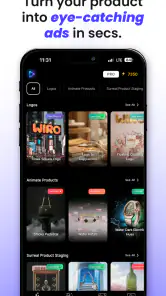

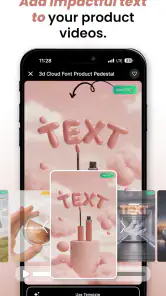
Analysis by Reviewed
Turning a product photo into something that feels ready for social media is usually more work than it sounds. I have to choose a background, frame the item, decide how it should move, and then make sure the result remains understandable on a small screen. AI Product Video - VideoMagic approaches that problem as a photography app from BIVEX, focused on transforming still product images into short AI-assisted videos. In my experience, its main appeal is not replacing a complete video editor; it is reducing the distance between a clean product image and a more attention-grabbing visual.
The app is free to install and suitable for Everyone, although it includes optional purchases ranging from $7.99 to $279.99 per item. That pricing detail matters because a casual user and a small seller may have very different expectations once they move beyond basic experimentation. The app has reached over 100 thousand installs and holds a 4.1 average from around 6.2 thousand ratings, which suggests that many people find the central idea useful while leaving room for a few practical frustrations.
I looked at it less like a novelty camera effect and more like a tool someone might use while listing handmade goods, preparing a small campaign, or making a product post feel less static. The most important question is not whether AI can create movement. It can. The better question is whether the result is readable, controllable, and accessible enough for the person creating it and for the people watching it.
How the app feels to read and navigate
A focused starting point for product imagery
The short description is simply “VideoMagic,” while the broader promise is turning product photos into high-quality AI videos. That gives the app a fairly clear identity: it is not trying to be a general photo library, a full timeline editor, or a broad social network. I found that focus helpful because a product-photo workflow benefits from fewer distractions. When an app has one obvious job, the first useful decision should be easy to find: select an image and begin shaping the result.
For readability, the quality of the original image makes a major difference. A product photographed against a clean, uncluttered background is easier for an automated system to interpret than an item surrounded by hands, packaging scraps, or similar objects. This is not merely a visual-quality tip. It also helps people who need a clear preview to judge whether the generated motion has preserved the product correctly. If the starting image is confusing, the finished clip becomes harder to inspect, regardless of how attractive the animation looks.
I recommend preparing the source photo before opening the app. Crop out unnecessary surroundings, keep the main object large enough to recognize, and avoid placing important labels near the edge. This creates a more reliable visual baseline and makes later checking less tiring. It is one of the simplest ways to reduce the amount of interpretation required from both the AI and the person reviewing its output.
Why visual clarity matters more than visual drama
AI-generated product movement can be tempting to judge by its first impressive moment. A slow reveal, a floating object, or a shifting perspective may look polished at a glance. However, a seller usually needs the viewer to understand the item, not just admire the effect. I pay close attention to whether the product remains recognizable throughout the clip, whether its proportions seem stable, and whether a label or small feature becomes distorted during motion.
This is where the app works best as a quick visual conversion tool rather than a replacement for careful art direction. If the product has a simple silhouette, a strong color contrast, and one clear selling point, an AI video can make the image feel more alive without demanding a complex setup. If the item depends on fine print, accurate texture, or exact shape, I would treat the generated result as a draft and keep the original photo nearby for comparison.
For users with visual fatigue, fast or decorative movement can make evaluation harder. I find it more practical to inspect the clip at a reduced pace when possible, pause on key frames, and compare the result with the source image. That workflow is slower than accepting the first generation, but it catches errors that are easy to miss when the animation is designed to impress immediately.
Navigation for different attention needs
A focused interface can support people who prefer a short, predictable sequence, especially when they are working from a phone. It can also be useful for a seller who has only a few minutes between customer messages or while preparing a listing. The app’s photography orientation means the task begins with something concrete: an image of an item, rather than an empty video timeline that demands many creative decisions at once.
At the same time, AI tools can be less comfortable for people who want every step explained before committing to a result. Generated output is not always predictable, so a user may need to learn through previews and revisions. I would not recommend treating the first result as final. A more readable process is to change one visual decision at a time, inspect what changed, and keep the version that communicates the product most clearly.
That approach also benefits users who find dense controls difficult to scan. Instead of trying to understand every available option, begin with the simplest suitable image, create a baseline video, and then make only purposeful adjustments. The app becomes easier to evaluate when each attempt has a clear reason behind it.
Motor, sensory, and situational considerations
Reducing manual editing can be a real advantage
The strongest accessibility-related benefit I see is the reduction in hands-on editing. Traditional product-video creation can involve repeated trimming, keyframe placement, layer management, text positioning, and precise dragging. Those actions may be tiring or difficult for someone with limited dexterity, hand pain, tremors, or a small phone screen. By starting from a still product image and asking AI to create motion, VideoMagic can remove some of that precision work.
That does not mean the process is effortless. Choosing a good source image, reviewing the generated result, and deciding whether the product has been represented honestly still require attention. However, the balance shifts from constant manual construction toward selection and quality control. For me, that is a meaningful difference: the app is most helpful when the user has a clear product photo but does not want to build an animation frame by frame.
A practical workflow is to photograph several versions of the item first, then choose the image with the strongest contrast and the least visual clutter. This avoids repeated cropping and repositioning inside the creative process. It also gives users who find fine motor adjustments challenging a better chance of getting a usable result without endless small corrections.
Motion can help attention, but it can also distract
Video is not automatically more accessible than a still image. Movement may attract attention for viewers who overlook static posts, but it can also be uncomfortable for people sensitive to animation, rapid changes, or visual clutter. I would use restrained motion for products that need careful inspection. A gentle presentation is usually more useful than an aggressive effect that makes the item appear to jump, spin, or change shape too quickly.
There is also a communication issue. If the video relies only on movement and does not preserve a clear view of the product, viewers with visual processing difficulties may struggle to understand what they are seeing. A still image should remain part of the overall content strategy, even when the AI video is the more eye-catching asset. I would publish or share both whenever the product’s details matter.
For people who are sensitive to sound, the safest habit is to review the finished clip with attention to the visual result first and avoid assuming that an animated product video should carry a loud or busy presentation. The app’s defining purpose is visual transformation, so the product itself should remain the focus rather than unnecessary sensory decoration.
Useful in short, imperfect working conditions
One realistic scenario is a small seller preparing a listing at a kitchen table while packaging orders. They may have one good photo, limited time, and no desire to learn a desktop editor. A tool like this can turn that photo into a more dynamic asset before the listing goes live. The benefit is not only speed; it is the ability to work from a phone without setting up a full production workflow.
Another scenario is a craft maker who can photograph products comfortably but finds timeline editing physically demanding. The app may let that person focus on staging and photography, where their control is strongest, while delegating the movement stage to AI. I would still reserve time for checking the result, particularly if the item has delicate edges, reflective surfaces, or small decorative details.
It can also suit someone who is not confident with conventional video software. A timeline editor offers more control, but that control comes with a steeper learning curve and more gestures. VideoMagic is more attractive when the priority is producing a presentable visual quickly rather than mastering every aspect of motion design.
Where conventional alternatives remain stronger
A standard photo editor is usually better when the goal is precise retouching, color correction, background cleanup, or accurate text placement. A conventional video editor is better when I need exact timing, multiple scenes, voice-over, captions, branded layouts, or a repeatable sequence across many products. Those tools may demand more manual work, but they provide clearer control over the final frame.
VideoMagic makes more sense between those two extremes: more engaging than a single photograph, but less involved than producing a finished commercial. I would choose it for quick product teasers, marketplace experiments, and social posts where a small amount of motion can improve visibility. I would choose a traditional editor for a campaign that requires strict brand consistency or where every visual detail must remain unchanged.
Remaining barriers before making it part of a workflow
AI convenience still requires human checking
The biggest limitation is inherent in the format. An AI-generated video may create an appealing interpretation rather than a perfectly faithful demonstration. That distinction is harmless for a decorative product teaser, but it matters for items whose shape, finish, operation, or printed information must be represented accurately.
I would never use the first generated clip as the only product reference. Check the beginning, middle, and end for changes in the object’s outline. Look at reflective surfaces, transparent parts, logos, handles, and thin components. If a feature appears to bend, disappear, or become unusually smooth, use the original photograph alongside the video or switch to a manually controlled production method.
This review step can be challenging for anyone who depends on a slower pace, magnification, or a stable frame to compare details. It is worth treating the video as a draft that needs inspection, not as a guaranteed photographic record. That mindset prevents the app’s convenience from becoming a source of misleading product presentation.
Cost expectations deserve attention
The app is free, which makes it easy to test the basic idea before deciding whether it fits your work. Optional purchases, however, extend from $7.99 to $279.99 per item. I would approach those options carefully and identify the exact value I need before paying. A person making one occasional post has a different cost calculation from a seller producing product content regularly.
Because the purchase range is wide, I would not assume that installing the app means every useful workflow is included at no cost. Start with a low-risk test using a product that is easy to evaluate. Decide whether the generated style is genuinely useful for your audience, not merely attractive in the preview. This is especially important for small businesses, where a polished-looking asset still needs to lead to better communication or sales to justify added expense.
The app’s current version is 2.2.5, and it runs on Android 7.0 or later. That broad operating-system reach can help people using older compatible devices, but the experience may still depend on the phone’s screen, performance, storage, and ability to handle generated media comfortably. I would keep the source photo and final export organized, particularly if the device is also used for customer communication and order management.
Not every user needs an AI video
Some sellers should skip this app. If your products depend on exact color matching, technical diagrams, tiny text, or a demonstration of real physical behavior, an AI transformation may introduce more uncertainty than value. A carefully lit photograph, a manually edited clip, or a real recording can communicate those qualities more honestly.
I would also skip it when the intended audience prefers calm, information-first content and the animation does not add meaning. Motion can make a post more noticeable, but attention is not the same as understanding. If the product is already clear in a well-composed image, the extra visual layer may be unnecessary.
On the other hand, people who sell visually simple objects, create frequent social content, or feel blocked by conventional editing are the best match. The app is particularly promising when the user’s main obstacle is turning a finished photo into something more dynamic, not when the obstacle is producing a technically exact video.
Tips for a more inclusive result
I would create a still-first workflow: keep the original image visible in your project folder, generate the animation, and compare the two before sharing. This supports viewers who need a stable reference and protects against small AI changes that become obvious only after publication.
I would also choose high-contrast staging, avoid placing the product against a similar-colored background, and keep the key feature near the visual center. These choices improve recognition for people viewing on small screens or in distracting environments. They also reduce the amount of correction needed after generation.
Finally, make the video one part of the message rather than the entire message. Pair it with plain-language product information and a still image when possible. That gives viewers more than one way to understand the item and makes the content useful even when motion is reduced, ignored, or uncomfortable.
My inclusive verdict on VideoMagic
VideoMagic is most convincing as a low-friction bridge between product photography and short-form video. I like it for sellers and creators who already have a decent image but do not want to wrestle with a full editing timeline. Its value is strongest when the product is visually simple, the desired result is promotional rather than technical, and the user is willing to review the generated clip instead of accepting it blindly.
From an inclusive-use perspective, reducing precise editing gestures is a genuine strength. It may make product-video creation more approachable for people with limited dexterity, limited editing experience, or a workflow built around a phone. Its focused purpose can also reduce cognitive load compared with opening a general editor filled with tracks, layers, and controls.
Still, the app does not remove every barrier. AI output can require careful visual checking, motion may not suit every viewer, and the optional purchase range means regular use should be judged against a realistic budget. People who need exact visual fidelity, robust captions, detailed timing, or full control over every frame will probably be happier with a conventional editor.
BIVEX has positioned this Photography app around a practical idea, and the result is useful when that idea matches the task. I would recommend trying it with one uncomplicated product, comparing the generated video with the source photo, and deciding whether the movement improves understanding rather than simply adding spectacle. With that cautious workflow, the free entry point makes experimentation reasonable. For my own recommendation, it is a good shortcut for accessible product teasers, but not a universal replacement for photography, manual editing, or a real product demonstration.
Pros
- Creates polished product videos quickly with AI assistance.
- Useful templates help small businesses present products professionally.
- Supports engaging visuals for social media marketing campaigns.
- Reduces the need for advanced video-editing experience.
- Can speed up testing of different promotional video concepts.
Cons
- AI-generated results may require manual corrections or refinements.
- Some templates can make videos look similar to competitors’ content.
- Export quality and options may depend on the selected plan.
- Processing times can vary for complex or high-resolution projects.
- Creative control may be limited compared with professional editors.

- Category
- Photography
- Version
- 2.2.5











