AI Photo Magic Editor
- 32.00
- 3.6
- Installs
- 10.00M
- Price
- Free

Screenshots

Analysis by Reviewed
I’m drawn to photo editors that can solve a specific problem quickly: tidy a portrait, rescue a distracting background, or turn an ordinary image into something more imaginative. AI Photo Magic Editor, from Protean Studios, is built around that kind of transformation. My first impression is that it is most appealing when I have a clear change in mind, rather than when I want a full photography workspace for every step from shooting to organizing.
What feels useful in the first week
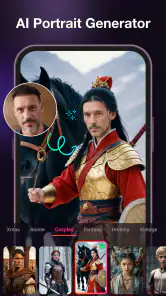
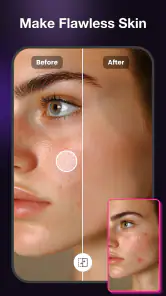
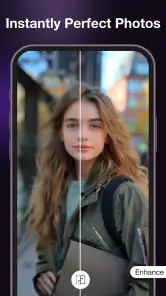
The app’s photography focus is easy to understand: it offers AI-assisted ways to retouch faces, change backgrounds, and make art from photos. That gives a newcomer several satisfying experiments to try without needing to learn a conventional editing workflow first. I can start with a portrait, see whether a touch-up improves it, then try a more expressive transformation on another image.
In everyday use, that range matters because editing goals vary. A family snapshot may call for a restrained cleanup, while a profile picture might benefit from a different setting behind the subject. An artistic version of the same photo is a separate choice, not necessarily a better one. I would treat each effect as a tool for a particular purpose instead of applying a dramatic look just because it is available.
The strongest reason to try it is the short path from an ordinary photo to a noticeably different result. AI Photo Magic Editor is free, and its Everyone age rating makes it broadly accessible. It has a 3.6 average from around 11,000 ratings, alongside over 10 million installs. Those figures suggest a widely tried app, but they are not a substitute for checking whether its results suit your own taste.
A useful first-week test is to edit the same image in two different ways. For example, try a subtle portrait retouch, then a background replacement, and compare both with the untouched original. That simple check helps reveal whether an edit still looks like you, whether the cutout feels convincing, and whether the result fits the place you plan to share it. I find that comparison more informative than judging a single edited image in isolation.
Choose the edit before choosing the effect
Before making changes, I would decide where the finished picture is going. A small profile image has different needs from a photo meant to be viewed full-size. A background that looks charming in a quick preview can become distracting when enlarged, while heavy face adjustments can feel unnatural in a close-up. Starting with the intended use keeps experimentation from turning into a string of edits with no clear purpose.
For a casual social post, a changed setting or stylized treatment may be the point. For a work profile or a picture shared with family, restraint is usually safer. I’d keep an untouched copy available and compare it with the result before sharing. That is especially worthwhile when the app changes a face or separates a person from the background, because small changes around hair, glasses, or edges can affect whether the image feels believable.
Where it fits beside other photo apps
Compared with a traditional editor, this app’s appeal is the emphasis on AI-driven transformations rather than a broad, hands-on toolkit. If I want to adjust a photo carefully, making several precise changes and keeping close control over the result, a conventional editor may be a better fit. If I mainly want to explore a portrait touch-up, a new backdrop, or an art-like treatment without building the effect from scratch, AI Photo Magic Editor is the more natural option.
It is also different from a camera app: its central value is changing an image after it has been taken, not helping me compose a shot in the moment. I would not replace a photo library or a general-purpose editor with it automatically. Instead, I’d keep it as a specialist tool if those particular transformations become part of my routine.
What remains useful after the novelty
Month-to-month value comes from repeatable jobs
The first few dramatic edits can be entertaining, but novelty alone rarely earns a permanent place on my phone. I’d judge this app by whether it keeps solving recurring tasks: making a usable portrait from a picture with a distracting setting, preparing a more polished image for a profile, or creating a stylized version of a photo for a post. If I only want to try an unusual effect once, I may not return often enough for it to become a regular tool.
A realistic everyday scenario is taking a quick indoor portrait before heading out, then noticing that a busy room competes with the person in the frame. A background replacement can help redirect attention, while a light retouch may address a small distraction. I would stop there unless the image has a clear creative purpose. Layering a strong background change with an equally strong face edit can make a casual photo look less like a snapshot and more like an artificial composite, which may not be the intended result.
Another practical use is making a set of related images feel more consistent. If I am preparing several portraits for a small personal project, I can use the same general editing approach rather than giving every image a different visual treatment. The trade-off is that consistency depends on my judgement: I should inspect each result, because an effect that works on one photo may not suit another pose, lighting condition, or background. Reusing an approach is helpful; applying it blindly is not.
For a creative hobby, the art-making side may provide more lasting variety than simple cleanup. It gives a familiar image a different purpose, which can be useful for a playful post or a personal experiment. But if my regular work involves detailed compositing, exact color control, or many carefully coordinated layers, I would use a more comprehensive editor. The app makes sense as a quick transformation tool, not as a promise that every kind of photo work can be handled equally well.
Keep the workflow light to avoid maintenance
AI Photo Magic Editor runs on Android with a minimum OS requirement of 8.0, and the current version is 1.2.0. Protean Studios develops it. For a person deciding whether to install it, the practical question is less about collecting an editor and more about whether its particular tools solve a job often enough to justify keeping it handy.
I would keep maintenance simple: save or retain the original image, make one purposeful change at a time, and review the finished picture at the size where it will be used. That workflow reduces the chance of losing the natural character of a photo through successive tweaks. It also makes it easier to undo a choice mentally, even if I am comparing versions outside the editing process.
For portraits, a useful check is to look at the face and the edges of the subject separately. A retouch may look pleasing at a glance but become too strong in a close crop; a new background may seem convincing until the outline around hair draws attention. These are not reasons to avoid AI editing. They are reasons to treat the result as a draft that deserves a quick inspection rather than an automatic final.
I’d also avoid turning every ordinary photo into a project. The app is more likely to earn repeat use if I open it with a question—“Can I make this portrait clearer?” or “Would a different setting help?”—instead of browsing effects without a goal. That habit keeps the editing session short and helps preserve the parts of the original image that already work.
When experimentation starts to feel tiring
The same features that make the app fun can become a source of fatigue. If I repeatedly test treatments without knowing what I want, the result may be a pile of versions rather than one image I am happy to share. Face editing can also invite overcorrection: smoothing away every detail may remove the natural expression that made the photo appealing in the first place.
Background replacement has its own trade-off. It can make a portrait more focused, but a new setting changes the mood and context of the picture. If the edit is meant to represent a real place or moment accurately, changing that setting may be the wrong choice. For a playful image or a clearly stylized post, the freedom is useful; for a documentary family photo, preserving the original scene may matter more.
One question people often have is whether this should be their only photo editor. In my view, only if their needs stay close to the app’s central strengths. It is a reasonable companion for AI-powered portrait and background changes, but someone who wants extensive manual adjustment or a dependable all-purpose editing environment should keep looking at alternatives. The two kinds of apps solve overlapping but not identical problems.
Another sensible question is whether every edit will be ready to share without review. I would not assume so. AI transformations are most useful when I check the result, especially around faces and subject outlines, and decide whether the change looks right for its audience. That small review step is part of using the app well, not a sign that the tool has failed.
Who should keep it, and who can skip it
I’d recommend giving it a try if you regularly edit portraits, enjoy experimenting with altered backgrounds, or want a quick route from a camera photo to a more imaginative image. It is also a good candidate for occasional use if you have a specific picture that needs a visual change and do not want to begin with a complex manual workflow.
I would skip it if I rarely alter photos, strongly prefer natural images, or need fine-grained control over every adjustment. It may also be the wrong choice if I expect one app to manage my entire photography routine. A specialist tool earns space through repeat use, and there is no reason to keep one just because its first few transformations are entertaining.
After the initial excitement fades, AI Photo Magic Editor’s lasting value depends on whether its face retouching, background changes, and artistic treatments solve real jobs for you. I like its focused, approachable idea, but I would use it selectively and inspect each result rather than treating AI changes as automatically finished. With over 10 million installs, it has clearly reached a broad audience; my own recommendation is more specific: keep it if you return to these transformations, and choose a traditional editor when precision and control matter more.
AI Photo Magic Editor Frequently Asked Questions
What is AI Photo Magic Editor, and what can it do?
AI Photo Magic Editor is a photo-editing app designed to use artificial-intelligence features to help transform and enhance images. Depending on the tools available in your version, you may be able to apply creative effects, improve a photo’s appearance, or make edits with less manual work than in a traditional editor. Check the app listing and in-app feature descriptions before downloading, since tools can vary by version and platform.
Is AI Photo Magic Editor free to download and use?
The app may be available to download at no initial cost, but that does not necessarily mean every feature is free. Some editing tools, effects, exports, or other options may require a subscription, a one-time purchase, or in-app credits. Review the store listing for current pricing and read the subscription terms carefully before confirming a purchase, especially if a free trial is offered and renews automatically.
Do I need an internet connection to edit photos?
Some editing tasks may work directly on your device, while AI-powered tools can require an internet connection to process images on a remote service. Availability may also depend on the specific feature and app version. If you plan to edit while travelling or have limited data, check whether the app identifies online-only tools, and consider testing the features you need while connected to Wi-Fi.
What happens to the photos I upload or edit in the app?
Photo handling can differ depending on how the app processes each feature. Images may be stored locally, uploaded for online processing, or retained according to the developer’s privacy practices. Before using the editor with personal or sensitive pictures, read its privacy policy and the data-safety information on the relevant app store. Also check whether you can delete uploaded content or your account data.
Which devices support AI Photo Magic Editor, and can I share edited images?
Compatibility depends on the app’s current requirements, your operating-system version, and the device you use. Confirm that your phone or tablet meets the minimum requirements shown in the Google Play or Apple App Store listing before downloading. Edited images may offer save or sharing options, but supported formats, export quality, and available destinations can vary, so check those options in the app before relying on them.
Pros
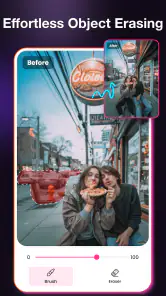
- Quickly removes unwanted objects and distractions from photos.
- AI-powered editing can simplify complex touch-ups for beginners.
- Useful for enhancing portraits and social media images.
- Edits can help give older or dull photos a fresher look.
- A convenient option for making quick adjustments on a phone.
Cons
- AI results may look uneven around fine details or busy backgrounds.
- Some editing tools may require a paid upgrade or subscription.
- Processing quality and speed can vary between devices.
- Results may not match the original lighting or texture perfectly.
- Uploading personal photos may raise privacy concerns; check its policy.

- Category
- Photography
- Version
- 1.2.0











