AI Photo Generator-Enhance Pic
- 29.00
- 3.6
- Installs
- 1.00M
- Price
- Free

Screenshots
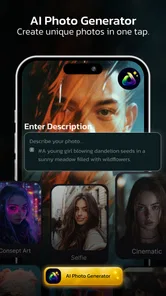
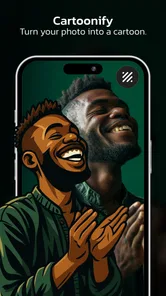
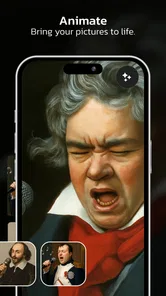
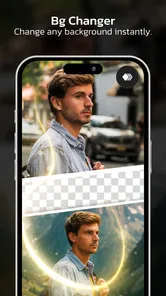
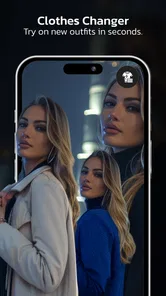
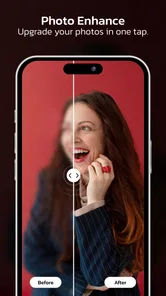
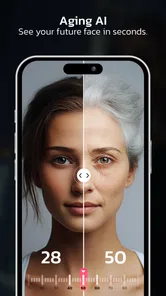
Analysis by Reviewed
I’d approach AI Photo Generator-Enhance Pic as a quick creative tool rather than a full photo-editing studio. Its appeal is the chance to make portraits, experiment with face swaps, and try AI-led image treatments without first learning a complicated editing workflow. That makes it interesting if you want to play with a selfie or create a more eye-catching profile image. It is less compelling if your main goal is careful, repeatable editing with precise control over every detail.
The app is a free photography app from Dijital Elma, with optional in-app purchases. It is rated for Everyone, and its audience is broad: casual users can explore its creative tools, while anyone who regularly edits photos will want to judge it by how much control and consistency they need. The useful question is not simply whether AI effects look impressive, but whether the results suit the particular photo and purpose you have in mind.
Choosing it for the job you actually have
Before opening an AI photo app, I find it helps to decide what “better” means for the image. A playful portrait for a chat profile has different demands from a professional headshot, a family photo, or a product image. For the first kind of task, an unexpected style can be part of the fun. For the others, likeness, natural skin texture, and faithful details often matter more than a dramatic transformation.
AI Photo Generator-Enhance Pic is most appealing when you want to explore rather than perform precise retouching. Its focus on portraits and face swaps points toward creative changes, not just the familiar work of cropping, adjusting brightness, or tidying a small blemish. If you usually open an editor to make a single photo look more polished, consider whether you want a conventional adjustment or a result that may reinterpret the image.
That distinction also helps set expectations. AI-generated treatments can make a portrait feel more distinctive, but they can change the character of the original in ways you did not intend. A useful result is not automatically a faithful one. I would keep the original photo and treat the edited version as a separate creative option, especially for images that matter to you.
When its creative approach is a good fit
The strongest use case is a low-stakes portrait where experimentation is welcome: a selfie for a social profile, an image for a group chat, or a playful variation to share with friends. The app’s stated focus makes that kind of quick, visual exploration a more natural fit than detailed work on landscapes, documents, or product photography.
There is also a practical advantage to trying a creative tool on one image before committing to a whole batch. Start with a well-lit photo in which the face is easy to see, then compare the result with the untouched original. This simple check can reveal whether the effect preserves the features you care about or changes them too much. A flattering transformation that no longer looks like you may be entertaining, but it is not necessarily the right profile picture.
More From Our News Desk

Weather by Xiaomi Review: Clear at a Glance, Less Clear Up Close

X Under Pressure: Can It Recover When Posting Goes Wrong?

Clash of Clans Is Won Between the Battles

Android Auto Makes the Case for Quieter Car Software

MobiOffice: Transforming Mobile Productivity with Seamless Integration

EA SPORTS FC™ Mobile Soccer: Redefining Mobile Sports Gaming
For a realistic everyday scenario, imagine choosing a new portrait for a social account before meeting friends. I would first select a clear, recent picture, try a single treatment, and check the image at the small size where people will actually see it. If the face looks convincing at that size, the result may work well. If the eyes, hairline, or expression feel unlike the original, I would return to the photo rather than keep piling on edits.
Face swapping is another reason someone might choose this app, but it is best approached as a playful effect rather than a dependable way to create a believable composite. Images with similar angles and lighting are generally easier to compare fairly than photos taken under very different conditions. That is a useful selection tip, not a promise that every pair will blend naturally. For anything intended to represent a real event or person accurately, I would avoid presenting an altered image as an untouched photograph.
What to inspect before keeping a result
Do not judge an edit only by the central face. Look around the edges of the hair, ears, jaw, and clothing, where a transformation can be more noticeable than it is at first glance. Then check whether the background still makes sense and whether the expression feels right. This quick review is especially worthwhile when an image will be used beyond a private joke or a casual post.
A second useful test is to compare the edit at two viewing sizes: enlarged enough to spot awkward details, then reduced to the size people will see on a phone screen. A tiny irregularity may disappear in a thumbnail, while an overly altered expression can remain obvious. Keeping both checks in mind helps distinguish a fun effect from an image you will genuinely want to use.
I would also avoid treating one successful result as proof that every portrait will work equally well. A face partly hidden by hair, a strong side angle, or an expression that changes the visible features can make creative editing less predictable. If the first photo disappoints, trying a clearer image is a more sensible next step than assuming the app can rescue any source material.
How it compares with familiar alternatives
Compared with a traditional photo editor, this app’s attraction is creative transformation rather than predictable manual adjustment. Conventional editors are usually the better choice when you want to crop exactly, correct exposure, preserve a natural appearance, or make the same change consistently across several pictures. Their controls are also easier to reason about: if you adjust brightness, you know what kind of change you are asking for.
Compared with a social network’s built-in effects, a dedicated AI photo app may be more tempting when you want to work on a portrait before posting it or explore an image outside the context of a particular platform. But a built-in camera filter can be more convenient when speed is the priority and you only want a light visual change. The choice comes down to whether you value a more exploratory portrait workflow or an effect applied in the moment.
For face swaps specifically, a specialist tool focused on compositing may be preferable if you need careful alignment or repeated results for a project. This app makes more sense for casual experimentation than for a workflow where every output needs to match a strict brief. I would not choose it as a substitute for a desktop editor when exact selection, detailed masking, or controlled layers are central to the task.
Free to try, with a reason to watch spending
The app is free to download, but it also offers in-app purchases ranging from $1.49 to $29.99 per item. That spread makes it worth checking what a paid option actually provides before buying. I would first decide whether the free experience produces a result I want to keep, then consider a purchase only if a specific limitation is getting in the way of a real use case.
In particular, avoid paying just because an effect looks promising in a preview. Try the app with the kind of photo you expect to use, inspect the finished image, and make sure the workflow suits you. A purchase is easier to justify when you have a repeat need—such as regularly making creative portraits—than when you are curious about a single experiment.
The app has a 3.6 average from around 755 ratings, and it has passed one million installs. Those figures suggest a sizable audience and a mixed response, rather than a reason to assume it will suit everyone. I would use that as a prompt to test it with modest expectations: the concept may appeal to you even if the results, controls, or value do not become part of your regular routine.
Compatibility, upkeep, and the switching question
The current version is 1.3.6, and the app requires Android 7.0 or later. It was released on November 27, 2024, so it is a relatively recent addition to the photography-app landscape. If you are comparing it with an editor you already use, the main switching cost is not learning a long technical workflow; it is deciding whether a new creative approach gives you something your existing tools do not.
That is why I would not replace a dependable everyday editor just to try AI portrait effects. Keep your current option for reliable cropping and corrections, and use this app when you specifically want to experiment with a face-focused result. This split approach is often more sensible than expecting one app to handle routine fixes, creative transformations, and meticulous finishing equally well.
The app is rated for Everyone, which makes its intended audience broad, but that does not mean every result is appropriate for every context. A humorous face swap can be fine among friends and still be a poor choice for a work profile or a formal family image. The judgment call belongs to the person sharing it: be clear when a picture has been altered, particularly if someone might otherwise mistake it for a straightforward photograph.
Making a fair first test
If you are unsure whether the app belongs in your regular toolkit, I would treat the first session as a small trial rather than a makeover project. Choose one photo you are comfortable experimenting with, decide what you want the result to do, and assess it against that goal. This keeps curiosity from turning into a long series of edits that gradually moves the image away from the person or moment you wanted to show.
It is also worth separating two questions that are easy to blur together: “Is this entertaining?” and “Would I use this picture?” A face treatment can be fun to explore even if the output is too stylized for a profile. If you are testing for a practical purpose, save time by judging the image in that context—at the size and in the setting where it will appear—rather than treating novelty as proof of usefulness.
For a shared portrait, I would be especially selective about the source and the finished image. A friend may enjoy a silly variation in a private chat but not want the same edit used publicly. Asking before sharing is a simple courtesy, and it matters more when a face swap or strong transformation could be mistaken for a genuine photograph. The app can make an image playful; it cannot decide whether that use is appropriate.
Who is likely to keep using it
I can see this being most worthwhile for people who enjoy trying new looks on portraits and do not need every result to be uniform. If you make occasional profile pictures, want an amusing image for a conversation, or like comparing a real photo with a more imaginative version, the focused approach may be a welcome change from editors built around sliders and cleanup tools.
On the other hand, I would skip it if your priority is a faithful record of an important moment, consistent edits across a collection, or precise control over individual parts of an image. It is also not my first pick for someone who wants to fix lighting without changing the person’s appearance. Those jobs call for a more conventional editor, where the intended adjustment is easier to predict and repeat.
There is a middle ground for people who already use a general-purpose editor: keep that app for dependable corrections and open this one only when you specifically want to explore a portrait transformation. That arrangement avoids the cost of switching your whole routine and makes it easier to judge whether the creative results add something you actually value. If they do not, there is no need to force the app into a role it was not chosen for.
My recommendation
I’d recommend AI Photo Generator-Enhance Pic to someone who enjoys trying creative portrait effects and wants an easy place to experiment with face-focused edits. Its strongest case is a casual, expressive image where a surprising result is welcome and perfection is not the point. The free starting point makes it reasonable to test, provided you keep the optional purchase range in mind and check the output before spending.
I would skip it if you need precise retouching, a natural-looking correction every time, or dependable batch work. A conventional editor is a better fit for controlled adjustments, while a specialist compositing workflow is more suitable when alignment and consistency matter. For everyone else, the best approach is simple: start with a clear portrait, compare the result carefully with the original, and keep the effect only if it still feels like an image you would genuinely use.
AI Photo Generator-Enhance Pic Frequently Asked Questions
What is AI Photo Generator-Enhance Pic used for?
AI Photo Generator-Enhance Pic is designed to help users create or improve images with artificial-intelligence-powered editing tools. Depending on the features available in your version, you may be able to enhance photo quality, adjust portraits, apply visual styles, or generate creative results from an image or text prompt. Check the app listing and in-app descriptions to confirm which tools are currently included.
Is AI Photo Generator-Enhance Pic free to download and use?
The app may be available to download without an upfront charge, but that does not necessarily mean every feature is free. AI image tools commonly place some effects, exports, or additional generations behind in-app purchases or a subscription, and free use may have limits. Before starting a trial or paying, review the current store listing, pricing, renewal terms, and cancellation instructions for your device.
Do I need an internet connection to use the AI photo features?
Many AI photo-generation and enhancement tools rely on remote processing, so an internet connection may be needed to submit an image or prompt and receive the finished result. Some basic editing functions could work locally, but this can vary by app version and feature. If you plan to use the app while travelling or with limited data, check its requirements and test the tools on a reliable connection first.
What happens to the photos I upload to AI Photo Generator-Enhance Pic?
To process an image, the app may need access to selected photos and may transmit them to an online service. The exact handling of uploads, generated images, and account information depends on the developer’s privacy policy and the permissions you grant. Review the policy before sharing sensitive or identifiable pictures, and use your device settings to limit photo access where that option is available.
Is AI Photo Generator-Enhance Pic suitable for beginners, and what should I check before installing it?
AI photo apps are generally aimed at users who want quick results without learning a complex editing workflow, though the controls and output quality can differ between versions. Before installing, confirm that the app supports your Android or iOS version, read recent user reviews, and check its storage, photo-access, and network requirements. Try a non-sensitive test image first to see whether the results suit your needs.
Pros
- Creates AI-generated images from text prompts.
- Can enhance existing photos with AI tools.
- Offers creative effects for varied visual styles.
- Easy to experiment with different image ideas.
- Useful for quick edits without advanced photo skills.
Cons
- Generated results may not match the prompt precisely.
- Some features or exports may require a subscription.
- Processing can take longer when servers are busy.
- Image quality may vary depending on the source photo.
- Check privacy terms before uploading personal images.











