AI Photo Editor: Art Studio
- 0.00
- 0.0
- Installs
- 100.00K
- Price
- Free

Screenshots
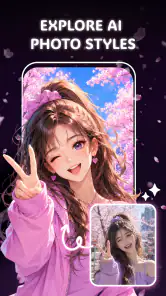
Analysis by Reviewed
Passing a phone around the kitchen table to fix a picture sounds simple until everyone wants a different result. One person wants a distracting object gone, another wants a cleaner background, and someone else would rather turn the photo into AI art. AI Photo Editor: Art Studio is aimed at that kind of quick, visual experimentation: it is a free photography app from Leilani Rogers that brings several AI-assisted edits together. I like the breadth of that idea, though a shared device also makes it worth thinking about who is editing which photo and where the finished image will go.
One phone, several different photo jobs
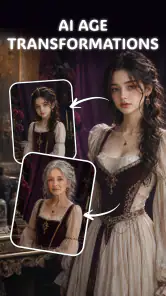
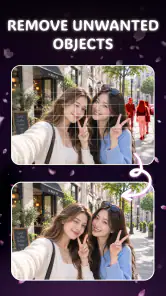
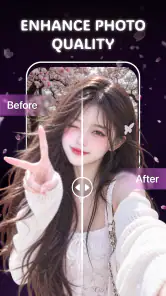
The app’s appeal is easiest to understand through an everyday example. Imagine a family taking a group photo at home, only to notice a cluttered counter or an unwanted item in the background. A conventional editor might let you crop the picture, adjust its appearance, or blur the scene, but this app is designed for more direct changes: removing objects, changing backgrounds, enhancing an image, or making an AI-generated artistic version.
Those are useful options to have close together. Instead of treating a photo as something that can only be brightened or cropped, AI Photo Editor: Art Studio invites you to consider whether the scene itself should change. That can save time when the goal is a playful image or a cleaner-looking snapshot, rather than a faithful record of exactly what was in the frame.
In a shared-device situation, I would make one edit at a time and show the result before moving on. That keeps the process easy to follow for someone who has not used an AI editor before, and it prevents a casual experiment from becoming a confusing chain of changes. The app’s range is most helpful when each person has a clear idea of what they want to try.
Different edits suit different expectations
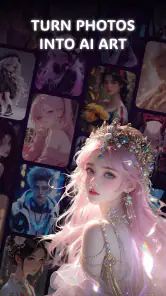
Object removal is the natural choice for a small distraction, such as a stray item on a table. Background replacement is a bigger intervention: it can change the mood of a portrait, but it also changes the context the photo communicates. Enhancement is the more restrained route when you want to improve the existing image without inventing a new scene. AI art, by contrast, is best treated as a creative reinterpretation rather than a realistic correction.
That distinction matters in a household because people may not agree on what counts as “fixed.” A child might prefer a dramatic artistic version, while another family member wants the original photo left recognizable. I find it helpful to decide which goal matters before editing. If preserving the moment is important, keep an untouched copy and use the edited version as an additional interpretation.
Compared with a basic phone gallery editor, this app is more ambitious because it focuses on AI-driven changes rather than only familiar adjustments. Compared with a specialized retouching tool, its range may be more convenient for casual users, but a dedicated editor can be a better fit when you need precise control over edges, layers, or repeatable professional results. The right choice depends less on the number of options than on how exact the final image needs to be.
Set a simple boundary before handing over the phone
When several people use the same device, the practical question is not only what the app can edit but whose photo is currently open. Before passing the phone to someone else, I would close or move away from images that are personal, sensitive, or simply not meant for a group activity. That is a sensible habit for any photo editor, especially one where experimenting can quickly transform an ordinary picture into something unexpected.
I would also keep the original image separate from the experiment. If an edit changes a face, removes an important object, or produces an artificial-looking edge, having the original available makes it easy to start again. This is particularly useful when multiple people take turns: one person can try a background change while the next can compare it with an untouched version rather than inheriting a result they did not choose.
For a shared phone, agree on a small routine: choose the photo, say what change you are attempting, make that single change, and check the result together. This is not a special app feature; it is simply a way to avoid accidental edits and disagreements. It also makes AI editing easier to understand, because everyone can see what the tool changed and decide whether that change suits the picture.
There is another useful boundary around images of other people. Removing a bystander or replacing a setting may seem harmless, but edited photos can give a misleading impression if they are presented as unaltered. For a family scrapbook or a joke among friends, the context is usually clear. For a profile, announcement, or image intended to document an event, I would be more cautious and make sure the edited result is not mistaken for a literal record.
Coordination matters more than a shared account assumption
AI Photo Editor: Art Studio is a single photography app, but that does not mean every person using one device should treat the photo library as a communal space. I would not assume that the app separates people’s work or provides household management tools. If several people take turns, agree on where finished pictures belong and who is allowed to make changes to the originals.
A practical workflow is to let one person select the source image, then ask the others to suggest one edit each. That keeps a group session from turning into a series of contradictory changes. For example, one person can decide whether the picture should be enhanced, while another can weigh in on whether a background replacement feels appropriate. If the group cannot agree, save the idea for a duplicate rather than altering the only copy everyone values.
This approach also helps when the phone belongs to one person but is used by others. The owner can choose which photos are appropriate to share, while guests or family members can still participate in a low-stakes creative activity. I would avoid handing over the whole gallery just to make one edit; selecting a specific image first is a clearer and more respectful boundary.
Age rating is not the same as a family policy
The app is rated for Everyone, which makes its basic audience broad, but that rating does not answer every household question. Adults may still want to guide younger users through edits involving faces, identity, or images of other people. AI changes can look convincing at a glance, so it is useful to explain that a polished result is not necessarily an accurate one.
For younger users, I would start with a photo that is not private and an edit that is easy to judge, such as removing a small background distraction or trying a clearly imaginative style. Then compare the result with the original. That simple exercise turns the app into a chance to talk about image editing without assuming that every generated or altered detail is true.
Because the app’s listed minimum operating-system requirement is version 7.0, compatibility is worth checking on older devices before making it part of a family routine. Its current version is 1.0.0, so I would approach it as a relatively early release and pay attention to whether the editing experience suits the device and the family’s expectations. It is free to download, which makes a casual trial easier, but the value still depends on whether the particular edits produce results you actually want to keep.
Where it can disappoint, and when another editor is better
AI editing is convenient, but convenience does not guarantee a clean result. Object removal can leave a patch that looks unnatural, especially when the object overlaps a patterned surface or an important part of a person. Background changes can also make hair, clothing, or fine edges look less convincing than the main subject. I would inspect the whole image at full size before sharing it, rather than judging only the thumbnail.
There is a trade-off between speed and control. A broad AI tool is attractive when you want to try several kinds of transformation without switching apps. If you need pixel-level retouching, consistent product photos, or a carefully documented image, a conventional editor with more manual control is likely the safer choice. And if you only need to crop or rotate a picture, your phone’s built-in editor may be quicker than opening a separate app.
AI Photo Editor: Art Studio has reached over 100,000 installs, but popularity alone cannot tell you whether its particular output style will suit your photos. I would test it first on a nonessential image, especially before relying on it for a portrait or an important family picture. A few minutes of comparison can reveal whether its edits feel natural enough for your purpose or whether you prefer a more hands-on tool.
My household verdict
I would recommend AI Photo Editor: Art Studio to people who want a free, approachable way to try several AI photo changes on a phone, particularly when the aim is creative play or a quick cleanup. Its combination of object removal, background changes, enhancement, and art-style transformation makes it more versatile than a simple crop-and-filter editor. The strongest use case is an informal one: choose an ordinary photo, make a clearly defined change, and decide together whether the result improves it.
I would be more hesitant to make it the default editor for a household that needs strict separation between users, careful control over original files, or highly accurate retouching. In those situations, a more manual tool—or simply keeping edits to one person’s own device and photos—may be a better fit. The app is rated for Everyone, but thoughtful supervision and clear sharing boundaries still matter when younger users or other people’s images are involved.
For me, the best way to use it is as a creative side tool rather than a replacement for every photo workflow. Keep the original, work on a selected image, and check the details before sending the result anywhere. With those habits, this photography app can make shared editing fun without confusing an imaginative transformation with the untouched moment.
AI Photo Editor: Art Studio Frequently Asked Questions
What is AI Photo Editor: Art Studio?
AI Photo Editor: Art Studio is a photo-editing app designed to use artificial intelligence to transform and enhance images. Depending on the tools available in your version, you may be able to apply artistic effects, adjust a portrait, or create a different visual style from a photo. Check the app listing for its current feature set, since tools can vary by version and platform.
Is AI Photo Editor: Art Studio free to download and use?
The app may be free to download, but some features or continued use could require in-app purchases, a subscription, or credits. Before starting an edit, review the app’s store listing and any payment prompts carefully so you understand what is included at no cost. Also check whether a free trial renews automatically and how to cancel it if you do not wish to continue.
How do I edit a photo with AI Photo Editor: Art Studio?
Typically, you begin by selecting a photo from your device or taking a new one, then choose an available editing or AI effect and follow the on-screen instructions. Results can depend on image quality, lighting, and the selected style, so try a clear, well-lit image for best results. Save or export the finished image using the options shown in the app.
Does AI Photo Editor: Art Studio upload my photos, and is it safe to use?
AI editing may involve processing images on your device, on a remote server, or through a combination of both; the app’s privacy policy should explain how your photos and related data are handled. Before granting access, review the requested permissions and the developer’s privacy disclosures. Avoid uploading sensitive images unless you are comfortable with the stated storage, processing, and deletion practices.
Can I use AI Photo Editor: Art Studio on Android and iPhone, and share edited images?
Availability and compatibility depend on the version offered in your country and the requirements listed for your device. Check the Google Play or Apple App Store page for supported operating systems and device details before downloading. The app may offer ways to save or share completed images, but export options, image quality, and any restrictions can vary, so confirm these in the app.
Pros
- Offers AI-powered tools for quickly transforming photos into artwork.
- A straightforward editing workflow suits casual users.
- Creative effects can help give portraits and photos a distinctive look.
- Lets users experiment with different visual styles without advanced editing skills.
- Useful for creating images to share on social media.
Cons
- AI results may vary
- so some images need several attempts.
- Fine control over individual edits may be limited.
- Some features or effects may require a paid upgrade.
- Processing can take longer with large or detailed photos.
- Check export options carefully
- as image quality may depend on settings.

- Category
- Photography
- Version
- 1.0.0











