AI Math Scanner: Maths Solver
- 2.00K
- 4.3
- Installs
- 10.00M
- Price
- Free
Screenshots
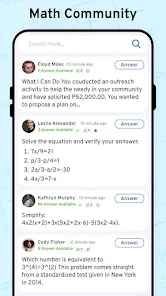
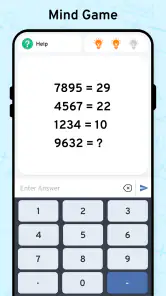
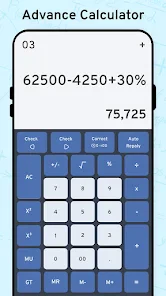
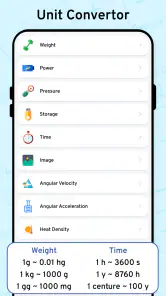
Analysis by Reviewed
I reach for AI Math Scanner: Maths Solver when I want a quick way to bring a printed or handwritten math problem onto my phone and work through it. The camera-first approach can be handy when typing a long equation would be tedious, but it works best as a learning aid rather than an answer machine. I still check whether the problem was read correctly and whether the reasoning makes sense before relying on a result.
Where a scan can go wrong
The biggest practical snag with any camera-based solver is getting a clean reading of the question. A tilted page, faint pencil marks, cramped writing, or symbols that sit close together can make an expression harder to interpret. If the result looks surprising, I first compare the equation shown by the app with the one on the page; a misread minus sign or exponent can change everything.
I also treat a plausible-looking answer with care. A solution is useful only if it matches the exact question, including brackets, units, and any conditions. For schoolwork, I use the working to understand the method, then try a similar problem without help. That small check tells me more than copying an answer ever could.
Simple checks before relying on it
For a smoother attempt, I hold the phone steady, keep the full problem in view, and avoid shadows across the writing. With handwritten work, leaving a little space between symbols makes the expression easier to distinguish. If a scan is unclear, I reposition the camera or write the problem more legibly rather than repeatedly accepting a result that does not fit.
It is also worth checking that the phone can run the app: the current version is 19.1 and it requires Android 8.0 or later. The app is free to install, with in-app purchases ranging from $1.99 to $94.99 per item, so I would check any purchase screen carefully before continuing. It is rated for Everyone, and Vasundhara Infotech LLP is the developer.
Scan and Solve: The Magic Begins
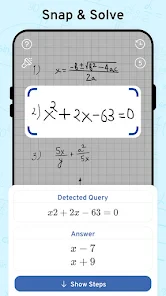
Imagine this: You're stuck on a complex algebraic equation or a tricky calculus problem. All you need to do is whip out your phone, open the AI Math Scanner, and let the magic happen. With a simple scan, this app deciphers and provides solutions to your math conundrums. It's like having a math genius on speed dial, ready to help at any moment.
Simplicity Meets Functionality
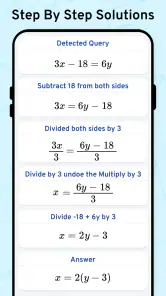
One of the first things you'll notice about the app is its user-friendly interface. Navigating through it feels like a breeze, and even if you're not tech-savvy, you'll find it pretty straightforward. Just point, shoot, and let the AI do its thing. The app not only solves the problems but also gives step-by-step explanations, helping you understand the process. It's like having a tutor who doesn't mind repeating themselves until you get it.
More From Our News Desk

Weather by Xiaomi Review: Clear at a Glance, Less Clear Up Close

X Under Pressure: Can It Recover When Posting Goes Wrong?

Clash of Clans Is Won Between the Battles

Android Auto Makes the Case for Quieter Car Software

MobiOffice: Transforming Mobile Productivity with Seamless Integration

EA SPORTS FC™ Mobile Soccer: Redefining Mobile Sports Gaming
Why It's More Than Just a Calculator
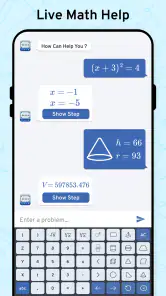
Unlike your traditional calculator, the AI Math Scanner is equipped to handle a variety of mathematical problems. From basic arithmetic to advanced calculus, it covers a wide spectrum. Furthermore, it supports multiple languages, which means math students from different parts of the world can benefit from it. It's a global math-solving companion!
Learning Made Fun
Let's face it: Math can be a bit daunting. But with this app, learning becomes engaging and less of a chore. By breaking down complex problems into manageable steps, it encourages learning and comprehension. It's not just about getting the right answer; it's about understanding the journey to it.
That makes it most useful for a student who already has a question to solve and wants help following the steps, rather than someone looking for a structured course with lessons and practice plans. If I were helping a younger learner, I would ask them to explain each step in their own words before moving on. For independent revision, I would cover the displayed result, attempt the calculation, and then compare methods.
Choosing the right tool for the job
Compared with a basic calculator, a camera solver saves time entering a long expression and can make a worked solution easier to inspect. A calculator is still the better choice for quick arithmetic or repeated calculations where I already know what to enter. A textbook or teacher is a stronger option when I need a full explanation of a topic, corrections to my approach, or practice beyond one scanned question.
A realistic use is checking homework after an evening study session: I can scan one equation that has stalled me, inspect the working, and then redo it on paper without looking. For a whole worksheet, though, scanning every item can slow down the session and encourage dependence. I would choose a few representative problems, use the explanations to spot a pattern, and finish the rest myself.
Putting the steps to work
When I use a worked solution, I try not to read it from top to bottom like a recipe. I pause after each line and ask what changed: was a term moved, an operation applied to both sides, or an expression simplified? That habit helps me catch a step I would not have thought of and makes it easier to decide whether the method fits the question, instead of memorizing a sequence that only works once.
There is also a useful way to handle a problem with several parts. I would scan the individual equation I am stuck on, rather than assume that one image will communicate the whole worksheet or the teacher’s instructions. After checking the result, I would write down the key transformation in my own words. This creates a small personal reference without turning the app into a substitute for doing the assignment.
If I am helping someone else study, I would let them hold the phone and explain what they think the scan has captured before looking at the solution. That makes recognition errors easier to spot and keeps the learner involved. It is a simple trade-off: the app can reduce the time spent entering notation, but the student still needs to do the thinking that builds confidence.
When a useful scan needs a second attempt
Not every failed attempt calls for starting over. I first narrow down what may have gone wrong: if the captured expression differs from the page, I improve the image or rewrite the notation; if it matches but the output feels inconsistent, I check the algebra separately. Changing one thing at a time is more helpful than repeatedly taking nearly identical scans, because it shows whether the issue was legibility or the mathematics itself.
For a handwritten fraction, for instance, I would make the numerator and denominator distinct and keep the fraction bar clear. For an exponent, I would leave enough room above the main term so it cannot be mistaken for an ordinary number. These are not guarantees of perfect recognition, but they are practical ways to give a camera-based solver a clearer expression to work with.
I would also keep an eye on the boundary of the question. A cropped minus sign, a missing bracket, or an instruction such as “solve for” can change what a correct answer means. If the scan captures only the central equation, I check the original page for conditions and units before using the result. That final comparison is especially worthwhile when the answer will be handed in or used in another calculation.
Choosing a study routine that fits
The app suits short, targeted moments of uncertainty better than a long, uninterrupted study session. If I am revising a topic, I might use it to inspect one example, close it, and then work through a fresh question from class notes. That gives me a quick model of a possible method while leaving the practice itself to me. Students who need a sequenced course, regular exercises, or a teacher to notice repeated mistakes will get more from a dedicated learning resource.
It can also be a practical option for a parent or study partner who remembers the answer but not the method. Rather than give a learner the result, I can use the worked steps as a prompt and ask them to explain why each line follows. If the explanation does not match the notation on the page, that is a reason to stop and inspect the setup rather than press on simply because the output looks polished.
For people who prefer paper, I would keep a notebook beside the phone and copy only the important reasoning, not every displayed line. The screen is convenient for checking a snag, but handwritten working makes it easier to compare the original problem with each transformation. This small adjustment also reduces the temptation to treat a solved screen as the end of the study task.
When the app is not the cause
If a scan does not produce a useful result, the problem may be the image or the notation rather than the app itself. I would rewrite an ambiguous expression with clearer spacing, check whether a fraction bar or exponent is visible, and try again with the page flatter and better lit. If the expression is already clear but the answer still seems off, I would verify it independently with a calculator or by substituting the result back into the original equation.
The app is less suitable when a problem depends on a diagram, a lengthy written explanation, or context that is not captured by the equation alone. In those cases, I would use a teacher, class notes, or a subject-specific learning resource rather than expect a camera scan to understand the full assignment. The 4.3 average from around 133,000 ratings and more than 10 million installs suggest it has reached many learners, but popularity does not replace checking the mathematics in front of me.
Some apparent app problems can also come from the question itself. A textbook may use a symbol or convention that is unfamiliar, or the exercise may expect an answer in a particular form. If the result seems mathematically equivalent but looks different from a class example, I would check whether it can be simplified or rewritten as requested. A solver’s output is not automatically formatted the way a teacher expects.
For a word problem, I would separate the job into two stages: translate the written situation into an equation myself, then use a scan only if I need help checking that equation’s solution. The interpretation is often the harder part, and a camera pointed at the page cannot replace deciding what the quantities mean. This is one reason I would not choose the app as my only support for a topic that relies heavily on reading, diagrams, or explanations.
The Verdict: A Must-Have for Students
In a world where technology is rapidly advancing, having tools that make learning easier is essential. The AI Math Scanner: Maths Solver is not just an app; it's a learning companion. Whether you're a student struggling with homework or someone looking to polish your math skills, this app is a game-changer. So, next time you find yourself in a math jam, remember there's a solution just a scan away.
My recommendation is more measured: it is a useful free starting point for students who want to inspect a scanned problem and learn from a worked solution, provided they verify what was recognized and resist copying answers blindly. It was released on June 20, 2019, and its Education focus makes sense for that kind of study support. If you prefer entering numbers yourself, need feedback on an entire lesson, or work mainly from diagrams and word problems, a conventional calculator or human tutor will fit better. Used selectively, this app can make a frustrating homework pause more productive.
The app is free to start with, which makes it easy to try for a specific question, but the in-app purchase range is broad enough that I would decide in advance whether I actually need anything beyond the free use. I would not tap through a purchase prompt just to reach a solution without first reading what it offers and what it costs. For occasional homework checks, a free starting point may be all some students need; someone planning frequent use should judge that against their own study routine.
Overall, I would recommend it to learners who benefit from seeing a math problem turned into a worked example and who are willing to verify the scan. I would skip it as a primary tool if I needed a full course, diagnosis of my mistakes over time, or help interpreting a complicated diagram. Used with a pencil, a second check, and a little restraint, it can make a stuck moment more manageable without doing the learning on my behalf.
AI Math Scanner: Maths Solver Frequently Asked Questions
Can AI Math Scanner: Maths Solver show the steps behind an answer?
Yes. AI Math Scanner: Maths Solver is designed to provide step-by-step solutions after recognizing a problem from a camera scan. This can make it useful for checking how an answer was reached, rather than only seeing a final result. Treat the explanation as a learning aid: follow each step and compare it with the methods taught in class so you can understand and practice the process yourself.
What should I do if the camera does not recognize my math problem?
The app relies on a camera image to recognize a math question, so start with a clear, well-lit view and make sure the full problem is in frame. Check that symbols and numbers are readable, then try capturing the question again. If the result still looks incorrect, review the recognized expression before relying on its solution; an unclear scan can affect what the app attempts to solve.
Is AI Math Scanner: Maths Solver useful for studying and homework?
It can be a practical study companion when you want to check a math problem or review a solution. Scanning a question and following the explanation may help you spot a mistake or understand a procedure, but simply copying an answer will not build the same skills as working through the problem. Use the app to support practice and verify your understanding.
Does AI Math Scanner: Maths Solver need an internet connection to work?
The app uses AI to recognize and solve math problems scanned with a phone camera. Whether you are studying at home or away from a reliable connection, check that the app is ready to process a problem before relying on it. Its central purpose is to turn a captured math question into a solution, so clear access to the camera and a readable image are important.
What is AI Math Scanner: Maths Solver and how does it work?
AI Math Scanner: Maths Solver is a mobile application designed to help users solve mathematical problems by simply scanning the equations with their phone's camera. It utilizes advanced AI algorithms to recognize the mathematical symbols and numbers, providing step-by-step solutions. The app supports a wide range of math topics, from basic arithmetic to complex calculus, making it a versatile tool for students and math enthusiasts alike.
Pros
- Quickly solves complex math problems
- User-friendly interface for all ages
- Supports multiple math topics
- Provides step-by-step solutions
- Enhances learning with detailed explanations
Cons
- Requires internet connection for full features
- Limited offline functionality
- Ads can be distracting
- May struggle with handwritten inputs
- Subscription needed for premium features
- Category
- Education
- Version
- 19.1












