Add Watermark on Photos
- 4.57K
- 4.8
- Installs
- 5.00M
- Price
- Free

Screenshots
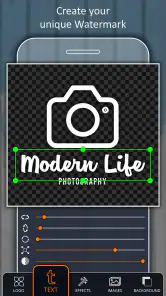






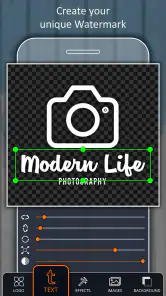
Analysis by Reviewed
When I first opened Add Watermark on Photos, I understood the appeal immediately: it focuses on one practical photography task instead of trying to become a complete image editor. If you regularly publish pictures online, send previews to clients, share artwork, or simply want your name visible on an image, adding a watermark can be useful. The app’s short description is direct, and my experience matched that promise. It is built around placing text or branding on photos, then preparing those images for sharing.
That narrow purpose is also the reason I found it easy to judge. There is no need to learn a complicated editing workflow before getting started. I could approach it as a quick utility rather than a creative studio. It is a free photography app from Simply Entertaining Apps, available for users on Android 7.0 or later, with an Everyone content rating. The current version is 6.6, and its broad compatibility makes it relevant even if you are using an older phone.
The bigger question, though, is whether a watermark tool deserves a permanent place on your phone after the first few experiments. A simple app can be valuable when it solves a repeated problem, but it can also become clutter once the novelty disappears. I looked at it from that angle: how useful it feels during the first week, whether it supports a lasting habit, and how much effort it adds to an ordinary photo workflow.
From quick experiment to a repeatable photo habit
Why the first week feels productive
The first sessions are satisfying because the result is visible right away. Take a normal photo, add an identifying mark, and the image becomes more suitable for public sharing. That immediate transformation is especially helpful for people who have started posting photos but do not yet have a consistent way to identify their work.
I can also see the appeal for small businesses and independent creators. A baker sharing product photos, a photographer sending sample images, or an artist showing an illustration may want a visible name without opening a desktop editor. A watermark will not stop every kind of misuse, but it can make ownership clearer and discourage casual reposting without attribution. That is a realistic benefit, as long as you treat it as identification rather than complete protection.
The app works best when the watermark is considered part of the image’s presentation. A mark that is too large competes with the subject, while one that is too faint may be pointless. My practical advice is to begin with a restrained placement and inspect the photo at the size people will actually see it. A watermark that looks subtle on a large phone screen can become nearly invisible in a small social media preview.
Another useful first-week habit is to prepare a few consistent versions for different situations. A full, prominent mark may make sense on an unfinished client preview, while a smaller corner mark is less distracting on a finished personal photo. The app is more useful when you approach it as a repeatable presentation tool instead of adding random text at the last moment.
Who gets the most from it
This is a good fit for users who need a focused way to label images without learning a broad editing suite. Casual photographers, online sellers, hobby artists, event photographers, and people sharing original designs can all find a practical reason to keep it installed. It is also approachable for someone who wants to protect a family photo or travel image with a name, date, or short note before sending it around.
The free entry point matters here. You can test whether watermarking belongs in your routine without committing to a paid editor first. The app has an average rating of 4.8 from around 191 thousand ratings, and it has passed five million installs, which suggests that many people find this focused job worthwhile. Those figures do not replace personal testing, but they do make the app easier to consider when you want a well-known solution rather than an obscure utility.
It is less suitable for someone who needs advanced retouching, layered design, detailed color correction, or a complete social publishing workflow. If your watermarking needs are only occasional, your phone’s existing editor may be enough for a single image. Likewise, if you already use a professional design application with saved templates and batch export, switching to a separate tool may add an unnecessary step.
A realistic everyday workflow
Imagine that I photograph a set of handmade products in the morning and need to send previews to a customer before the evening. I would not want to finish every image perfectly before receiving feedback, so I could mark the previews with my name or business identity. That tells the recipient which images are drafts and makes it less convenient for the pictures to circulate as if they were final files.
For that workflow, consistency matters more than decoration. I would use the same wording and a similar position across the set, then compare the watermarked images before sending them. The important step is not merely adding a mark; it is checking that the mark does not cover the product, important facial details, or a visually meaningful edge. A watermark placed automatically or quickly still needs human judgment.
A second scenario is sharing artwork in a community group. I might want the signature visible enough to identify the creator but not so dominant that it turns the post into an advertisement. In that case, I would prepare a smaller version for public previews and keep the original file separate. This is one of the app’s practical trade-offs: it can help establish ownership, but the user still has to decide how much of the image should be sacrificed for visibility.
What changes after the first month
After the initial excitement fades, the app’s value depends on repetition. I would keep it installed if I regularly share original images or send previews, because the task returns often enough to justify a dedicated tool. If I only take personal snapshots, the need becomes much weaker. A utility earns lasting space when it removes friction from something I already do, not when it creates a new habit I rarely need.
The strongest long-term use is a simple pre-sharing checkpoint: before an image leaves my phone, I ask whether it needs identification, whether the mark is readable, and whether the exported result is still visually clean. That routine can prevent inconsistent branding and reduce the chance of accidentally distributing an unmarked preview. The app becomes part of the publishing process rather than a novelty used for a few test pictures.
There is also a useful distinction between public and private images. I would not watermark every photograph automatically. Family pictures, private documents, and images intended only for a close friend may look worse with an unnecessary label. For public work, previews, and portfolio material, the mark has a clearer purpose. Keeping that distinction prevents the app from turning ordinary photo sharing into extra maintenance.
The app is free to download, while in-app purchases range from $4.99 to $19.99 per item. That makes it sensible to evaluate the free experience first and only consider spending if the workflow genuinely becomes part of your routine. I would not pay simply because the idea is appealing; I would wait until I knew how often I used it and whether its available options fit my preferred style.
Where long-term convenience meets maintenance
The hidden work is not the watermark itself
Adding a mark may take only a moment, but maintaining a good watermarking routine requires more attention. I have to choose wording, placement, size, and contrast for each type of image. A position that works on a landscape photo may cover the subject in a portrait. A pale mark may work on a dark background but disappear against a bright sky. The tool can simplify placement, but it cannot make those design decisions for me.
This is the first non-obvious trade-off: a watermark improves identification only when it remains legible across changing photos. If I use one fixed style without checking the background, I may get a collection of images where the mark is technically present but practically useless. I would rather spend a few extra seconds reviewing the result than assume that one setting works everywhere.
The second trade-off concerns the original file. I would keep an unmarked original whenever possible and treat the watermarked image as a sharing copy. That gives me flexibility later, especially if I want to change the position, update a name, or create a cleaner version for a different audience. Overwriting the only copy can create unnecessary work and may force me to edit the image again from scratch.
A third useful habit is separating preview images from final images. A strong watermark can be appropriate while a client is reviewing a draft, but the delivered version may need a lighter treatment or no mark at all, depending on the agreement. Using the same heavy watermark for every purpose can make otherwise polished work feel unfinished. The app supports the task, but a sensible file workflow determines whether it remains convenient.
Where fatigue begins
The main source of fatigue is repetition without a clear payoff. If I add a watermark to every photo merely because the app makes it easy, I eventually spend time protecting images that never needed protection. That is when a focused utility starts feeling like an obligation. The best long-term approach is selective use: watermark images that are public, valuable, commissioned, or likely to be reused.
Another possible frustration is switching between apps. I may take a photo in one application, adjust it in another, add the mark here, and then share it elsewhere. For a single image, that chain is manageable. For a large set, it can feel slower than using an editor that already includes text or branding tools. This is where the app’s specialization cuts both ways: its focused purpose keeps it approachable, but it may not replace a broader workflow.
Users who need advanced batch processing should think carefully before making it the center of a professional system. A dedicated watermark app can be convenient for occasional groups of pictures, but professionals may prefer a desktop or full-featured mobile editor with reusable templates, export controls, and asset management. I would choose this app for speed and accessibility, not as a substitute for a complete production environment.
There is also a visual fatigue problem. Repeatedly placing the same prominent mark can make a feed look less polished, especially when the watermark becomes more noticeable than the photograph. I recommend testing the image at thumbnail size and at normal viewing size. If the first thing I notice is the label rather than the subject, the mark is probably doing too much.
How it compares with familiar alternatives
The usual alternative is the built-in photo editor. That option is attractive when I need to label one image quickly and already have a suitable text tool. It avoids installing another app and may be enough for private sharing. However, a dedicated watermark utility makes more sense when watermarking is a recurring task and I want the process to feel separate from ordinary cropping or brightness adjustments.
A general mobile design app is another alternative. It may offer more control over fonts, layouts, graphics, and branding, which is better for posters, product cards, or carefully designed social posts. The cost is complexity. If all I want is a visible ownership mark on a photo, opening a full design workspace can be excessive. This app is more appealing when the image is already finished and the remaining job is simply to identify it.
Desktop photo software is stronger for high-volume professional work and detailed control. It is the better choice when I need a repeatable studio pipeline, extensive corrections, or precise output management. The phone-based approach wins when the photos are already on the device and I need to prepare them immediately. That convenience is the app’s clearest long-term advantage.
In other words, I would not call it the universal best option for watermarking. I would call it a practical middle ground: more focused than a general editor, less demanding than a professional desktop workflow, and easier to justify than a large design suite when the job is limited to photos.
What to check before committing
Before making it part of my routine, I would test several kinds of images rather than only one attractive sample. I would try a bright outdoor photo, a dark indoor photo, a portrait, and an image with important details near the edges. This quickly reveals whether my chosen mark remains readable without becoming distracting.
I would also decide what the watermark is meant to accomplish. A name or handle is useful for attribution. A business identity may be useful for previews. A long warning message can consume too much of the image and still fail to provide real protection. Defining the purpose first leads to better choices than adjusting the mark until it merely looks noticeable.
Finally, I would check the saved result before deleting or replacing the original. The important question is not only whether the watermark appears, but whether the finished image still looks right after sharing or viewing it at a smaller size. That small review step prevents many avoidable mistakes and keeps the app from becoming a source of rework.
My long-term verdict
Add Watermark on Photos earns lasting space when watermarking is a repeated part of your photo routine, not when it is treated as a novelty. I like its focused identity, free starting point, broad Android compatibility, and suitability for quick public previews. The Everyone rating also makes it an approachable choice for a wide range of users, from casual photographers to independent creators.
Its limitations are tied to the same simplicity that makes it attractive. It is not the right replacement for a full photo editor, a professional design system, or a carefully managed desktop pipeline. It also cannot decide whether a watermark improves a particular image, and it cannot remove the need to preserve originals and review the final composition. Those responsibilities remain with me.
Still, I would recommend trying it if you often share original photos and want a straightforward way to identify them before they leave your phone. The app has been available since January 17, 2018, and its sustained presence, current version 6.6, and large user base make it feel like an established utility rather than a temporary experiment. I would skip it if I watermark only once in a while or already have a smooth workflow in another editor.
My final recommendation is simple: install it, test it on the kinds of images you actually publish, and judge it by the time it saves after the first week. If it helps you mark previews consistently without damaging the look of your photos, it can become a useful small step in your publishing habit. If it merely adds another stop between taking a picture and sharing it, your existing editor is probably the better choice.
Pros
- Supports batch watermarking for editing several photos at once.
- Offers adjustable watermark opacity
- size
- and placement.
- Can use custom text
- logos
- or image-based watermarks.
- Useful for protecting photos before sharing them online.
- Simple interface makes basic watermarking quick to learn.
Cons
- Some advanced editing tools may require an in-app purchase.
- Large batches can take longer on older phones.
- Exported images may lose quality depending on chosen settings.
- Limited font and design options compared with full photo editors.
- Watermarks can be difficult to position precisely on small screens.

- Category
- Photography
- Version
- 6.6











