ABCmouse Classic
- 27.98K
- 3.7
- Installs
- 10.00M
- Price
- Free

Screenshots




Analysis by Reviewed
With several young children sharing one tablet, learning apps can quickly turn into a small household negotiation: whose turn is it, where did we leave off, and is this activity a good fit for the child holding the device? I find ABCmouse – Kids Learning Games most useful when an adult treats it as a planned activity rather than an all-purpose screen-time solution. Its appeal is the mix of playful lessons and a learning path, but the family routine around it matters just as much as the app itself.
Making one shared device work
For a realistic after-school routine, I’d set aside a short turn while one child has the tablet, then let another use it later with an adult helping them find an appropriate activity. That simple handoff is easier than asking several children to navigate at once. If siblings have very different reading or number skills, I’d avoid assuming that the same lesson will suit both; the age range is broad, and a two-year-old and an eight-year-old are at very different stages.
A useful tip is to agree on a stopping point before opening the app. A guided sequence can make it tempting to continue to the next activity, so choosing a natural endpoint helps prevent a quick learning session from becoming an open-ended one. I’d also sit nearby at first, especially with a younger child, to see whether the navigation and activity level are comfortable without constant help.
For a busy household, this works best when the tablet is treated as a shared resource with a simple routine, not as a self-managing babysitter. One child can finish a chosen activity, hand the device to an adult, and let that adult help the next child begin. That pause also gives everyone a chance to put the tablet down between turns rather than letting a queue of children turn into one long stretch of screen time.
Accounts, turns, and parent involvement
On a shared tablet, I’d establish who is using the app before a session and check the selected child’s progress afterward. That makes it easier to connect what a child did with what they are practicing, instead of treating a completed activity as proof of mastery. The app’s progress tracking can support that conversation, but it works best as a prompt for a parent to ask what felt easy or tricky, not as a substitute for watching the child learn.
Parents considering it will also want to know how access works over time. The app is free to download, while in-app purchases range from $9.95 to $79.99 per item, so I’d review purchase choices with the adult who manages the device before handing it to a child. That small bit of preparation is especially worthwhile on a shared family device, where children may have different expectations about what they can open or continue.
I’d keep the adult’s role clear: the app can provide activities and show progress, while a parent decides when a session starts, which child is using it, and when it is time to stop. That distinction matters if caregivers share responsibility. Agreeing on the routine outside the app avoids asking a young child to make decisions about purchases or to resolve disagreements about whose turn comes next.
More From Our News Desk

 Bolt: Request a Ride
Bolt and the Shift from One-Tap Rides to More Legible Trips
Bolt shows how ride-hailing is shifting from a one-tap taxi request toward a more legible, choice-driven trip, while leaving the hardest questions of price and reliability unresolved.

 Farm Land - Farming life game
Farm Land Review: A Small Island Farm with a Satisfying Loop
A bright, breezy island farm turns a few quick chores into a satisfying cycle of planting, harvesting, expanding, and deciding what to build next.

 Android Auto
’s Community Takes Shape in the Passenger Seat
Its most valuable network is not a public feed but a shared set of routes, voice habits, app integrations, and advice that make driving less isolating—and sometimes more complicated.

 My Talking Angela
 Makes the Virtual Pet Feel Personal
A polished pet-raising game built on small rituals, playful customization, and a character who gives everyday screen time a surprisingly personal rhythm.

 Google Translate
 Review: A Pocket Tool for the Small Frictions of Travel
From menus and signs to quick conversations, Google Translate earns its place by cutting the little delays that make unfamiliar language feel like a barrier.

 Shazam: Find Music & Concerts
Shazam’s Best Trick Is Turning a Song Into a Night Out
A few seconds of recognition can settle an argument, rescue a half-remembered chorus, and point toward a live show. Shazam’s real trick is what happens after the match.
Latest News



A Fun Way to Learn
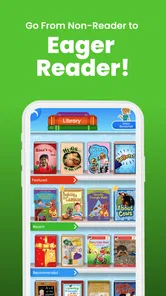
When I first downloaded ABCmouse – Kids Learning Games, I was immediately struck by its colorful and inviting interface. It’s like stepping into a vibrant virtual classroom that beckons kids to explore. The app is designed for children aged 2-8, and it’s packed with a variety of games and activities that cover everything from reading and math to art and music. Honestly, it’s like having a comprehensive curriculum at your fingertips.
Engaging Content Galore
One of the things that stood out to me was the sheer amount of content available. With over 850 lessons and more than 10,000 individual learning activities, your child will never run out of things to do. The lessons are well-structured and progress in a logical sequence, which helps to build a solid foundation in multiple subjects. Plus, the interactive nature of the games keeps kids engaged, making learning feel more like playtime.
That breadth is helpful when a child wants variety, but it also means I wouldn’t leave a young learner to choose endlessly without guidance. I’d steer the session toward a subject they are practicing at home, then let them pick among a few suitable activities. This keeps the app’s range from feeling like a maze and gives a parent a natural way to connect on-screen play with everyday learning, such as spotting letters on a cereal box or counting toys during cleanup.
For a child who is beginning to recognize letters, I’d use a short activity as a starting point, then look for the same letter in a book or on packaging around the kitchen. With counting, the follow-up could be sorting a small group of toys or counting steps together. The point is not to turn every session into a lesson plan; it is to check whether the child can carry an idea beyond the screen. That little transfer is more informative than simply asking whether they enjoyed the game.
Navigation Made Easy
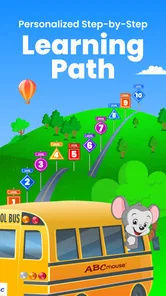
I know what you’re thinking—“How complicated is it to navigate?” Well, fear not! The app is super user-friendly. Even the littlest ones can find their way around with ease. There’s a guided learning path that takes kids from one activity to the next, ensuring they’re continually moving forward in their educational journey. Plus, parents can track their child’s progress, which is a nifty feature if you ask me.
In practice, I’d use that path when I want a more structured session, and give a child more choice when the goal is simply to explore. Those are different jobs: a sequence can help keep learning purposeful, while free selection may be better for a short reward or a child who is curious about a particular topic. If a child repeatedly needs an adult to redirect them, that is a sign to shorten the session or choose an activity together rather than expecting the app to manage attention on its own.
One useful way to avoid aimless tapping is to choose the session’s purpose before opening the app: follow the path for guided practice, or let the child select a topic when curiosity is the goal. I would not treat either approach as automatically better. A child who is still learning how to use a tablet may need an adult beside them, while a more confident child may be able to make a limited choice independently. In both cases, a clear ending helps the activity fit into the rest of the day.
Customizable Experience
Another cool aspect of ABCmouse is its customization options. Each child gets to create their own avatar, which adds a personal touch. The app also adjusts the difficulty of the activities based on your child’s performance, ensuring that they’re always challenged but never overwhelmed. It’s like having a personalized tutor in your pocket!
The adjustment can make practice feel more approachable, but I’d still pay attention to how a child responds. A learner who is tired, frustrated, or already confident may need a parent to choose a different activity or pause, rather than simply continuing through the path. For two children taking turns, separate attention to each child’s progress is more useful than comparing their activity histories; the aim is to notice what each one is ready to practice next.
Personalization is not the same as knowing what a child needs in every moment. If an activity feels too easy or too difficult, I’d use that reaction as a reason to pause and talk, rather than expecting the app’s adjustment to settle the question on its own. A child may be tired, distracted, or simply more interested in another subject that day. The parent can keep the session comfortable by changing direction or ending it without turning progress into a contest between siblings.
Who will get the most from it
I’d recommend this education app to families looking for a playful way to add reading, math, art, and music activities to a young child’s routine. Age of Learning, Inc. develops it, and its Everyone rating reflects a broad audience rather than a guarantee that every activity suits every child without adult judgment. It has a 3.7 average from around 94,000 ratings and over 10 million installs, so it is widely used, though those figures don’t tell me whether its approach will fit a particular household.
Compared with a single-purpose alphabet or counting app, its breadth is a clear advantage if a child benefits from switching subjects within one learning environment. A library book, hands-on counting game, or focused phonics activity may be a better choice when you want a screen-free break or need to target one specific skill closely. I would skip it if a family wants a completely free experience with no in-app purchase decisions, or if a child does better with direct adult teaching and physical materials than with guided screen activities.
It is also a better fit for families who are willing to take an active role than for someone seeking a set-it-and-forget-it learning tool. A child who enjoys choosing among several subjects may appreciate the variety, while a learner who needs repeated practice on one narrow skill might benefit more from a focused activity and direct feedback from an adult. If your household already has a routine built around books, conversation, and hands-on play, this can be an occasional screen-based addition rather than a replacement for those activities.
The broad age span is another reason to judge fit child by child. A toddler may need help getting settled and understanding what to do, while an older child may be more interested in following a sequence independently. If siblings share the device, I’d avoid measuring them against one another: different starting points and interests make their activity histories poor grounds for comparison. The useful question is whether each child is engaged and can talk about something they tried.
Practical expectations for parents
The app is free to download, and its current version is 8.71.0; it requires iOS or Android 7.0 or later. It was released on March 6, 2014, and has accumulated around 28,000 written reviews. I’d treat the purchase range as a reason to check the available choices before a child starts exploring, not as a reason to assume that every family needs to pay. Since the app’s value depends on how often a child actually uses its lessons, I’d first see whether its style and routine suit your household.
For a child who enjoys colorful activities and benefits from a clear next step, the guided path and range of subjects can make a short session easier to start. For a parent, the most useful habit is to review progress occasionally and ask the child to explain or demonstrate something they practiced. That turns an app session into a conversation, and it helps reveal whether the activity is building understanding or merely holding attention.
Before deciding whether it belongs in your regular routine, I’d think about three practical questions: will an adult be available to help younger users, can the family agree on a stopping point, and is there room in the household’s screen-time choices for an app that offers a wide range rather than one narrowly defined skill? If the answers are mostly yes, trying a few short sessions makes sense. If the child resists the format or needs a highly specific learning approach, books, physical activities, or one-on-one teaching may be a better use of that time.
Families with more than one caregiver can make the handoff smoother by agreeing on a basic plan: who helps the child choose, how they decide a session is finished, and who checks purchase choices on the device. This is not about adding rules for their own sake. It keeps expectations steady when a child moves between adults, and it reduces the chance that one caregiver assumes another has already reviewed what the child is opening.
Overall, I see its strongest use as a flexible, parent-supported part of a young child’s learning routine. The combination of subjects gives it more room to match a child’s changing interests than a basic letter or number game, but that same range asks the adult to guide choices and keep expectations realistic. It can make practice inviting; it cannot replace attention, conversation, or the value of trying an idea away from the tablet.
In conclusion, ABCmouse – Kids Learning Games is a fantastic tool for fostering a love of learning in young children. Its blend of educational content and playful design makes it a standout choice for parents looking to supplement their child’s education. So, if you’re ready to embark on a learning adventure with your little one, give ABCmouse a try. Who knows, you might just find yourself joining in on the fun too!
ABCmouse Classic Frequently Asked Questions
Is ABCmouse available on both Android and iOS?
ABCmouse is a learning app for mobile devices, and it is also accessible on computers. Before installing it on an Android phone or tablet, check that the device runs Android 7.0 or later. The app is intended for young learners, so parents may want to explore it together with their child and decide which device is most comfortable for lessons and activities.
What does ABCmouse include besides games?
ABCmouse is more than a collection of games: its activities are intended to support early learning through a variety of formats. Children can encounter lessons and educational activities as they explore the app, making it possible to vary the experience rather than relying on one type of task. Parents can try different activities with their child to see which formats hold their attention.
Is ABCmouse suitable for children who are just beginning to learn?
ABCmouse is an education app aimed at children ages 2 to 8, so it can be a starting point for early learning as well as a resource for children developing basic skills. Its activities span several subjects and are designed for young learners. Parents can explore the app with their child and see whether its format and lessons fit the child’s interests and learning needs.
What devices and operating systems can I use to access ABCmouse?
ABCmouse is available for phones and tablets, and its learning experience can also be accessed on computers. On mobile devices, it requires Android 7.0 or later, making it worth checking the device’s operating system before downloading. Families using more than one compatible device can make use of the app across those screens, which can be helpful when children learn at home or while travelling.
What age group is ABCmouse – Kids Learning Games suitable for?
ABCmouse is designed for children between the ages of 2 and 8 years old. It offers a comprehensive curriculum that covers essential subjects such as reading, math, science, and art. The app tailors its content to match the learning needs of each age group, ensuring that educational activities are both engaging and appropriate for young learners.
Pros
- Engaging educational content
- Wide range of subjects covered
- Interactive learning experience
- Child-friendly interface
- Regular content updates
Cons
- Requires subscription
- Internet connection needed
- Limited offline access
- Can be overwhelming for kids
- Some content may be repetitive