3D Modeling App: Sculpt & Draw
- 268.00
- 4.0
- Installs
- 10.00M
- Price
- Free

Screenshots
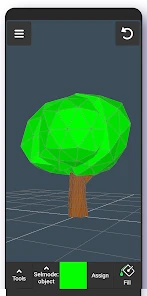
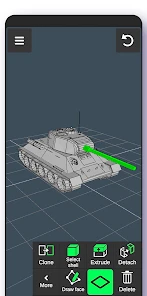
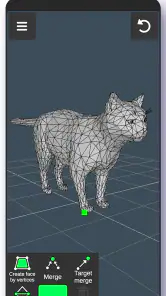
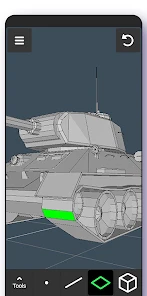
Analysis by Reviewed
When I judge a creative app, I look at the choices it gives me while I’m making something, not just at how impressive a finished model might look. With a 3D art tool, that includes how I approach a project, what I choose to put into it, and whether I feel comfortable experimenting. 3D Modeling App: Sculpt & Draw is a free art-and-design app from 3D Modeling Apps. Its 4.0 average comes from around 12,000 ratings, and it has been installed over 10 million times. That is useful context, but popularity alone cannot tell me whether it fits your particular way of working.
What I would check before settling in
The app is rated for Everyone and its current version is 1.20.7, for Android 6.0 and up. It is free to install, with in-app purchases ranging from $0.99 to $34.99 per item. I’d keep that distinction in mind before building a project around a paid option: the free starting point lowers the barrier to trying it, while purchases mean I would check the price shown in the app before committing to anything. It was released on August 20, 2024, so I’d also make sure the version available on my device is current before relying on a particular workflow.
Where personal choices matter
For me, trust is most practical at the point where I decide what to make and what to share. A rough creature sketch or a product mock-up may be harmless, while a model based on a client brief, a child’s drawing, or an unreleased design deserves more care. I would avoid putting sensitive material into any creative tool unless I had checked its visible prompts and choices myself. That is not a claim about this app’s data practices; it is a sensible habit whenever creative work could reveal something personal.
I’d approach the app as a place to explore shapes and practice, rather than assume it is a complete professional pipeline. If I were preparing work for a client or another 3D program, I would test the actual export and handoff options with a small, disposable model first. That lets me see whether the result fits my needs before investing hours in a detailed piece. It also keeps the decision in my hands: I can start with a simple test, then decide whether the app deserves a place in a more serious workflow.
Making 3D ideas on a mobile screen
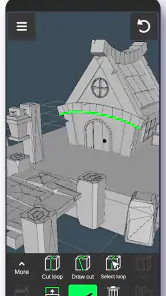
When I first opened the 3D Modeling App: Sculpt & Draw, I was immediately impressed by its sleek and intuitive interface. You know that feeling when you open an app and everything just feels right? Yeah, that’s what I’m talking about! The developers have done a great job making it user-friendly, even for those who might be new to 3D modeling.
Tools and features in practice
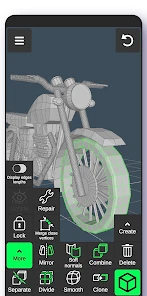
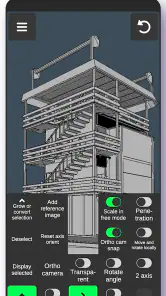
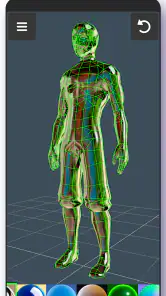
One of the standout features of this app is its range of tools. Whether you want to sculpt intricate details or draw broad strokes, there is room to try different approaches. I found myself experimenting with textures and shapes, and before I knew it, I had spent hours just playing around. That freedom is most useful when I have an idea but haven’t decided exactly what it should become.
Another useful feature is the ability to work with layers. This is handy when I want to separate a model’s basic form from later additions. The app also supports a variety of file formats, which can help when I want to export a creation or share it with someone. I would still test a small file first: “supports a variety” is a good starting point, but a format only helps if the receiving app handles the result the way I need.
More From Our News Desk

Weather by Xiaomi Review: Clear at a Glance, Less Clear Up Close

X Under Pressure: Can It Recover When Posting Goes Wrong?

Clash of Clans Is Won Between the Battles

Android Auto Makes the Case for Quieter Car Software

MobiOffice: Transforming Mobile Productivity with Seamless Integration

EA SPORTS FC™ Mobile Soccer: Redefining Mobile Sports Gaming
Performance and the mobile trade-off
Performance-wise, the app runs smoothly on Android and iOS devices. I didn’t experience any lag, even when working on more complex models. The app is designed to handle high-poly counts, which may appeal to artists who want room for detail. In practice, I would still let the device and project decide how far to push that capability; a phone-sized workspace is convenient, but it does not make every demanding task comfortable.
I also appreciated the real-time feedback and rendering. It’s like having a small 3D studio in my pocket: I can check how an idea reads as I change it rather than waiting until I’m back at a desk. That makes quick sessions feel productive. For careful finishing, though, I would pay attention to how easily I can select and adjust details on my screen, and switch to a larger setup if precision starts becoming frustrating.
Getting past the first learning curve
The app feels approachable, but that does not mean 3D modeling becomes effortless on the first try. A newcomer still has to learn how a shape changes when viewed from different angles and how to make a form feel balanced rather than flat. The app includes tutorials and tips, which I found helpful as a way into the process. I’d use them alongside a small personal exercise instead of trying to memorize every tool before making anything.
A useful habit is to rotate the model often while blocking out its main shape. It is easy to make a front view look convincing and only notice later that the object is too thin, uneven, or oddly proportioned from the side. I’d work from broad forms toward smaller details, checking the silhouette from several directions before adding surface work. That simple order can save time because it catches structural problems before they become harder to revise.
A sensible first project
If I were introducing a friend to the app, I’d suggest starting with a small object that has a clear silhouette, such as a toy-like fruit or a simple desk ornament. I’d block out the main volume first, rotate it often, and postpone tiny details until the overall shape reads well from several angles. That sequence matters: on a small screen, it is easy to overwork one view and miss a lopsided form. A short session making a few variations is more useful than trying to finish a complex character immediately.
Layers also make a good testing ground rather than just a way to add depth. I’d keep broad shape changes separate from surface decoration where possible, so I can compare the clean base with the more finished pass and undo experiments without rebuilding the whole piece. The trade-off is that extra structure takes discipline; if every small change becomes its own layer, the project can become harder to manage. A light, deliberate layer plan is usually more helpful than treating layers as a place to save every impulse.
Everyday projects that suit the app
One realistic use is turning a quick doodle into a rough 3D concept during a spare moment. I might sketch a small desk accessory, build its basic volume, and rotate it to see whether the idea makes sense beyond the original view. That is not the same as producing a final manufacturing model, but it can answer an early creative question: does this form look appealing from more than one angle? For brainstorming, that kind of check can be more valuable than polishing details too soon.
I would also use it for visual variations. If I were making a mascot or a fantasy prop, I could save a simple base and try a few different proportions or surface treatments, keeping the experiments organized rather than committing to the first pass. The practical tip is to decide what each layer is for before adding more: one for the main shape and another for decoration is easier to review than a stack of unexplained edits. That workflow makes the app’s layers useful for comparison, not just accumulation.
Who is likely to enjoy it
I think the best fit is someone who wants to learn how three-dimensional forms behave, sketch an idea visually, or enjoy a hands-on creative break without first setting up a desktop workstation. For example, during a commute or a quiet evening, I could rough out a mascot shape, then revisit it later to refine its proportions. The drawing and sculpting focus makes that kind of playful iteration more appealing than a tool centered on technical drafting.
It can also suit an artist who already works in 3D and wants a convenient place to explore an early shape away from a desk. I would treat it as a companion for roughing out ideas, not assume that every project can begin and end on a phone. That distinction matters if you are deciding whether to install it as a creative sketchbook or expecting it to replace software you already rely on for detailed production.
When another kind of tool is better
It is less suited to someone who needs precise engineering dimensions, a tightly controlled production pipeline, or a guaranteed route from a phone-made model to a specific professional application. In those cases, a desktop 3D package or a specialist CAD tool is the better choice. Compared with a basic 2D drawing app, this one asks me to think about volume and viewpoint; compared with full desktop modeling software, a mobile app is naturally better approached as a convenient sketching and practice space, not an automatic replacement.
There is a middle ground, too. If all I need is a polished flat illustration, a 2D app is likely to be quicker and less distracting. If I need exact measurements or a dependable handoff into a production workflow, I would start in a tool built for those requirements. This app makes more sense when the question is visual and exploratory: what if this shape were rounder, taller, or viewed from another side? Choosing it for that job keeps expectations aligned with its creative focus.
Checking purchases and exports before committing
The app is free to install, so I would begin with a modest test and only consider an in-app purchase if a specific option is clearly worth its listed price. I would not pay simply because I had already spent time on a project; instead, I’d identify what the paid choice changes for my own use and decide whether I need it. That small pause is especially useful when experimenting, because it separates curiosity about a feature from a genuine workflow need.
For exporting, I’d make a tiny sample model, save it in the format I intend to use, and open that file in the destination before doing detailed work. I’d check whether the shape and visible details carry over in a usable way, then repeat the test with a slightly more involved piece if the first result looks promising. This is a low-cost way to answer whether a handoff is practical without risking a project that took hours to build.
Keeping sensitive work under your control
My cautious approach is to make the first project something I would be comfortable using for a test, rather than a confidential client concept or personal reference. While setting up and using any creative app, I’d read prompts when they appear and make deliberate choices about what I grant or share. I would not treat a pleasant interface or a large audience as proof of a particular data practice; for sensitive work, I would rely on the choices actually shown to me and my own comfort with them.
This is also a good reason to separate experimentation from important work. A disposable practice model lets me learn the tools and check saving or exporting without bringing private material into the process. If I later decide to use the app for something more personal, I can do so with a clearer understanding of my own workflow and the visible controls I encountered, rather than making that decision in the middle of a rushed project.
Questions I would answer before a longer project
Can I use it without paying? The app is free to install, so I would begin with a modest test and only consider an in-app purchase if a specific option is clearly worth its listed price. Is it suitable for a first-time modeler? I’d say yes for learning through experimentation, while keeping expectations realistic: the existing tutorials and tips can help, but 3D still takes practice. Can I move work elsewhere? The app supports several file formats, though I’d verify that a small export opens as expected in the destination before building a project around that handoff.
I would also think about screen size and the kind of work I’m doing. A phone is convenient for quick edits and trying silhouettes, but careful detail work can feel more demanding when the model and controls share a compact display. If a session starts turning into pixel-level correction, I’d pause and continue on a larger setup if my workflow allows it. That is a practical limit of mobile creation, not a reason to dismiss the app’s usefulness for early ideas.
My cautious verdict
In conclusion, the 3D Modeling App: Sculpt & Draw is a promising option for beginners and artists who want to explore forms on a mobile device. Its sculpting, drawing, layers, and file-format support give me useful ways to experiment, while the small-screen workflow and the need to test exports make it less convincing as a stand-alone professional pipeline. I’d recommend trying it with a simple, non-sensitive project first, then deciding whether its tools and any paid options match your needs. If your priority is playful 3D practice and quick concept work, it is worth a look; if you need precise CAD or a tightly controlled desktop workflow, I’d choose a more specialized tool instead.
3D Modeling App: Sculpt & Draw Frequently Asked Questions
Is 3D Modeling App: Sculpt & Draw free to download?
Yes, 3D Modeling App: Sculpt & Draw is free to download, so you can try its 3D modeling tools without paying upfront. The app also offers in-app purchases, with items priced from $0.99 to $34.99. You can begin with the free experience and decide whether any optional purchases suit the way you want to create.
What are the main features of the 3D Modeling App: Sculpt & Draw?
The 3D Modeling App: Sculpt & Draw offers a range of features designed for both beginners and professional artists. Users can create complex 3D models with ease, utilizing tools like sculpting, texturing, and rendering. The app supports multi-touch gestures, allowing for intuitive model manipulation. Additionally, users can export their creations in various formats for use in other software.
Is the 3D Modeling App: Sculpt & Draw suitable for beginners?
Yes, the app is designed to be user-friendly for beginners while also offering advanced tools for experienced users. It includes tutorials and a help section to guide new users through the basics of 3D modeling. The interface is intuitive, making it easier for beginners to navigate and start creating their first 3D models without feeling overwhelmed.
What devices are compatible with the 3D Modeling App: Sculpt & Draw?
The 3D Modeling App: Sculpt & Draw is compatible with most modern Android and iOS devices. It requires a device with a minimum of 3GB RAM and a recent operating system version to ensure smooth operation. For an optimal experience, it is recommended to use devices with a larger screen size, such as tablets, to better handle the app's complex features.
Does the 3D Modeling App: Sculpt & Draw offer any community features?
Yes, the app includes community features that allow users to share their creations and receive feedback from other artists. Users can join groups, participate in challenges, and collaborate on projects. This fosters a sense of community and helps users learn from each other, improving their skills and gaining inspiration from the work of others.
Pros
- Intuitive interface for easy navigation
- Wide range of modeling tools available
- Supports various file formats for export
- Real-time rendering feature
- Cross-platform compatibility
Cons
- Steep learning curve for beginners
- Occasional app crashes reported
- Limited free version features
- High resource consumption
- In-app purchases required for full access
- Category
- Art & Design
- Version
- 1.20.7