Pocket Piano
- 195.00
- 4.4
- Installs
- 10.00M
- Price
- Free

Screenshots
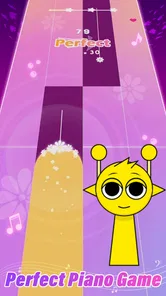
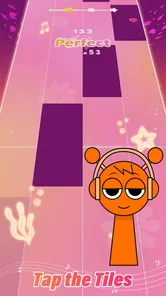
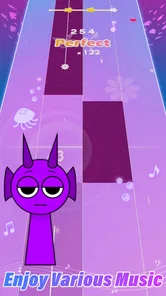
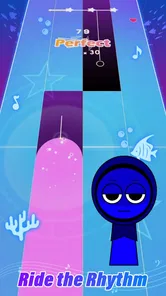
Analysis by Reviewed
I judge a rhythm game by how quickly it gives me a reason to listen closely, rather than simply tap without thinking. Pocket Piano: Rhythm Music Game aims for that sweet spot: music sets the pace, and your fingers have to keep up. It is a casual mobile game from SYNTHJOY GAMES, free to start, with a Teen content rating. The appeal is easy to understand, but the right choice depends on whether you want a light music challenge or a deeper instrument experience.
What I would decide before downloading
The most useful question is what you want from a music game. If you enjoy matching taps to a track and trying to improve your timing, this is a more direct fit than a traditional piano-learning app. It is also easier to pick up for a short break than a rhythm game built around longer sessions or a complicated control scheme. The game has a 4.6 average from around 7,100 ratings and has passed 5 million installs, which suggests plenty of players have tried it, though those figures alone cannot tell you whether its style will suit you.
Its short description calls it “Pocket Piano,” and that captures the compact, approachable idea better than any promise of serious piano instruction. I would come to it for a quick music-focused challenge, not to learn proper fingering, read notation, or replace lessons. That distinction matters: tapping along can sharpen attention to timing, but it is not the same as practicing an instrument.
Who gets the most from a short rhythm session
I think this kind of game is especially appealing if you already enjoy pop music and like having a small, repeatable challenge to fill a spare moment. You do not need to approach it as a musician. The useful skill is paying attention: hearing where the beat lands, keeping your taps controlled, and noticing when rushing makes a run less accurate. That gives a casual player something to work on without turning the game into a course.
It can also work as a low-pressure way to share a music game with a teenager, since its content rating is Teen. I would still treat that rating as a guide rather than a substitute for checking whether a particular game fits your household’s preferences. For an adult, it is an easy recommendation to a friend who likes rhythm challenges but does not want to learn a complex control layout before the fun begins.
On a normal day, I would use it while waiting for a takeaway order or sitting through a few minutes between appointments. I would pick one track, play once to get a feel for its rhythm, then try again with a specific goal such as staying relaxed or avoiding early taps. That second attempt is more informative than immediately chasing a leaderboard position: it tells me whether the core interaction itself is satisfying.
The Magic of Music at Your Fingertips
So, here's the deal: imagine being able to play a piano without having a grand piano occupying half of your living room. Sounds like a dream, right? Well, Pocket Piano: Rhythm Music Game makes this dream a reality. This app transforms your smartphone into a virtual piano that feels surprisingly real. The keys are responsive, and the sound quality is top-notch, making it a joy to play.
More From Our News Desk

Weather by Xiaomi Review: Clear at a Glance, Less Clear Up Close

X Under Pressure: Can It Recover When Posting Goes Wrong?

Clash of Clans Is Won Between the Battles

Android Auto Makes the Case for Quieter Car Software

MobiOffice: Transforming Mobile Productivity with Seamless Integration

EA SPORTS FC™ Mobile Soccer: Redefining Mobile Sports Gaming
Gameplay that Hits the Right Notes
This app is not just about mindlessly tapping on keys. Oh no, it’s way more engaging! You get to play along with a variety of songs, from classical masterpieces to modern hits. The game challenges you to hit the right notes in sync with the music, and trust me, it can get pretty addictive. You start off easy, but as you progress, the levels become more challenging, pushing your reflexes and timing to the limit. It's like having a mini concert in your hands!
One of the coolest features is the leaderboard. You can compete with friends or players from around the world to see who can achieve the highest score. It adds a competitive edge that keeps you coming back for more. Plus, the thrill of beating your own high score is unmatched!
Making practice feel less like a grind
A practical way to get more from the music-game format is to separate learning a track from competing on it. On a first run, I would listen for the pulse and accept that I may miss notes while figuring out the pattern. On a replay, I would focus on one adjustment—such as not tapping ahead of the beat—instead of trying to fix everything at once. That keeps each attempt purposeful and makes a better score feel like evidence of improved control, not just luck.
If a song feels difficult, I would take a short pause rather than replay it repeatedly while frustrated. Rhythm games can make small timing errors feel more consequential than they are, especially when you are concentrating on a score. Coming back with fresh attention is often a better test of whether the chart is becoming familiar. This is also a sensible way to decide whether the challenge suits you: if repeating a track is satisfying, the loop is working; if it quickly feels like a chore, the game may not be your kind of music break.
Choosing the right moment to play
A practical way to enjoy a tap-to-the-beat game is to treat each attempt as a focused mini-session. On a commute, during a wait, or in a quiet moment between tasks, I would start with a song that feels manageable, then replay it to concentrate on cleaner timing rather than chasing a score immediately. That makes the challenge feel less frustrating and gives you a clearer sense of whether you are improving. If you are somewhere noisy, headphones can help you follow the beat; if you need to stay aware of people around you, keep the sound low and rely on the visual cues.
There is a useful trade-off in the leaderboard element. It can turn a casual session into a reason to practice a track again, especially if you enjoy comparing scores. But players who dislike rankings may find that competition distracts from the music itself. I would use the score as a personal benchmark first: repeat a song after a break and see whether your timing feels steadier. That keeps the game rewarding even when you are not trying to beat another player.
What the leaderboard can—and cannot—do for you
A ranking gives a clear target, but it does not tell you why one attempt felt better than another. If you care about improving, I would pay attention to the feel of a run as well as its result: did I hear the beat more clearly, or did I simply tap faster and hope? That small distinction helps keep competition in perspective. A leaderboard can make a familiar song worth revisiting, but it is not a substitute for feedback from a teacher or a structured way to study music.
It is also worth deciding whether you want a social contest or a private challenge. If comparing results motivates you, the leaderboard gives the game a reason to revisit a track. If you would rather relax without seeing performance as a ranking, set your own target, such as finishing a session feeling more settled than when you started. That approach makes the game usable even when you have no interest in competing with friends or other players.
Visuals and User Experience
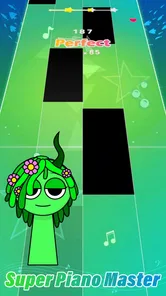
The app is visually appealing, with a clean interface that's easy to navigate. The design is sleek and modern, which enhances the overall user experience. The developers have done a fantastic job of incorporating bright and vibrant colors that make the app visually stimulating without being overwhelming.
What's more, the app runs smoothly without any annoying lags, which is crucial when you're trying to hit that perfect note. The seamless performance ensures that you can fully immerse yourself in the music without any interruptions.
Small-screen play and the limits of a phone
A phone makes this style of play convenient, but it is still a small touch surface. I would hold the device securely and keep my hands relaxed, especially during a longer run; tense fingers make quick, accurate taps harder. If you usually play with a large tablet or prefer physical keys, a phone-based rhythm game may feel cramped rather than freeing. The compact format is a strength for a quick session, not a replacement for a full keyboard.
Sound matters too. In a quiet room, the music can give you a clear timing reference; in a busy place, competing noise may make it harder to stay locked in. Headphones are a practical option when you can use them safely, while keeping the volume modest and remaining aware of your surroundings. For a short wait in a public space, I would choose a comfortable volume and stop if I needed to pay attention to an announcement or conversation.
How it compares with other music games
Compared with a conventional piano app, the main attraction here is the game-like focus on timing and scoring rather than open-ended practice. A rhythm title built around other instruments or a denser chart style may suit players who want more complexity, while a music-learning tool is the better pick for structured lessons. Pocket Piano sits between those expectations: it is approachable enough for a casual player, but still asks for attention as the pace and difficulty rise. I would skip it if your priority is a full keyboard layout, detailed music theory, or a serious practice routine.
Compared with rhythm games that ask players to master elaborate controls, its tap-focused premise is easier to understand at a glance. That simplicity can be a real advantage when you have only a short break and do not want to study mechanics first. The trade-off is that players seeking a demanding, instrument-specific challenge may prefer a game with more complex patterns or a dedicated controller. I would choose based on the kind of concentration I want: quick timing and replayability here, deeper control elsewhere.
The same distinction applies to music-learning apps. If your goal is to build a practice habit around technique, reading, or lessons, a dedicated learning tool is the more suitable category. A rhythm game can help you notice pulse and timing, but success at tapping along does not prove that you can play a piano piece. I would treat Pocket Piano as entertainment with a musical focus, not as a shortcut to instrument skills.
Cost, commitment, and deciding whether to keep it
The game is free to download, so the first decision is whether its basic play loop holds your attention. Optional in-app purchases cost from $0.99 to $29.99 per item. I would set a personal spending boundary before browsing any purchase options, then give the free experience a fair try across several short sessions. If you are only curious, there is no need to treat spending as part of the test; first work out whether you actually want to return to the game.
There is a small cost to switching from another rhythm game: your existing habits may not map perfectly to a different control style or song selection. I would not uninstall a game you already enjoy just because this one sounds appealing. Instead, use Pocket Piano as a side-by-side trial during a spare moment. If its quick, song-led sessions fit your routine better, keep it; if you prefer a more demanding chart or a clearer training path, return to the option that serves that goal.
The current version is 0.5.2, and it supports Android 5.1 or later, so anyone using an older phone should check compatibility before trying it. It has reached a broad audience, but popularity is only a starting point. The meaningful test is whether the controls feel comfortable on your device and whether you enjoy replaying a song enough to make the game part of your own routine.
Final Thoughts
To sum it up, Pocket Piano: Rhythm Music Game is a fantastic app for anyone who loves music and gaming. It's a fun way to improve your musical skills while enjoying some friendly competition. Whether you're a seasoned pianist or someone who just wants to have a bit of fun, this app is worth checking out. So go ahead, download it, and let your musical journey begin!
My recommendation is for people who want an accessible rhythm game they can dip into without treating every session like practice. It is less convincing for someone expecting authentic piano training or a deep, carefully controlled instrument simulator. If you are undecided, start free, try a few sessions in different settings, and see whether replaying songs feels enjoyable rather than like homework. That is the clearest test of whether this pocket-sized music challenge belongs in your regular rotation.
I would also skip it if you mainly want uninterrupted listening, since the appeal here comes from actively following the music rather than using a game as a passive soundtrack. Likewise, a player who dislikes score-chasing may find the competitive layer less inviting, though treating scores as a private benchmark can soften that pressure. The best fit is someone who enjoys brief, hands-on challenges and is happy to judge progress by feel as well as results.
For me, the deciding question is simple: after a few sessions, do I want to replay a song because I enjoy getting its rhythm right? If yes, the free entry makes it an easy game to keep around for spare moments. If I am looking for lessons, a full piano interface, or more involved rhythm mechanics, I would choose a different kind of app instead. That is a clear, practical boundary, and it makes this a straightforward recommendation for the right player.
Pocket Piano Frequently Asked Questions
Is Pocket Piano free to download, and are there optional purchases?
Pocket Piano is free to download, so you can try its music-focused rhythm gameplay without paying upfront. It also offers in-app purchases, with individual items priced from $0.99 to $29.99. These are optional, but it is worth checking purchase details before confirming anything, particularly if a child will be playing on your device.
What kind of game is Pocket Piano, and who developed it?
Pocket Piano is a music game from SYNTHJOY GAMES built around tapping along to pop songs. Its store description presents it as a pocket rhythm game, so the focus is on following the music and enjoying a quick, song-based challenge rather than learning piano technique. It may appeal to players who like casual games that put timing and musical tracks at the center.
What is the main objective of Pocket Piano: Rhythm Music Game?
Pocket Piano: Rhythm Music Game is designed to provide a fun and engaging musical experience where players tap along to the rhythm of popular songs. The main objective is to hit the correct notes as they descend on the screen, achieving high scores and unlocking new songs and challenges to enhance your musical skills.
Can I play Pocket Piano: Rhythm Music Game offline?
Yes, Pocket Piano: Rhythm Music Game offers offline play, allowing you to enjoy the game without an internet connection. This feature makes it convenient for users to enjoy their favorite tunes and improve their rhythm skills anywhere, anytime, without worrying about data usage or connectivity issues.
Are there in-app purchases in Pocket Piano: Rhythm Music Game?
Yes, Pocket Piano: Rhythm Music Game includes in-app purchases that allow players to unlock additional songs, themes, and other features. While the game is free to download and play, these optional purchases can enhance the gaming experience by providing access to exclusive content and customization options.
Pros
- Engaging and interactive rhythm gameplay.
- Wide variety of music tracks available.
- User-friendly interface for easy navigation.
- Regular updates with new content.
- Supports offline play for convenience.
Cons
- In-app purchases can be expensive.
- Limited features in free version.
- Occasional ads disrupt gameplay.
- Requires significant storage space.
- May experience minor lag on older devices.













