Fillwords: Word Search Puzzles
- 2.04K
- 4.9
- Installs
- 10.00M
- Price
- Free
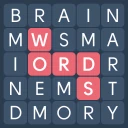
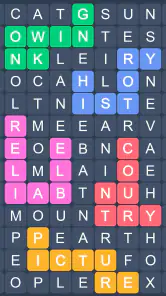
Screenshots
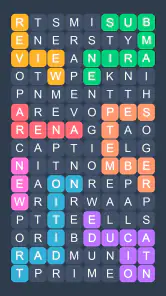
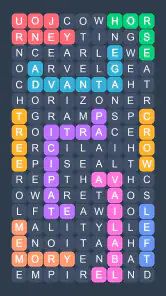
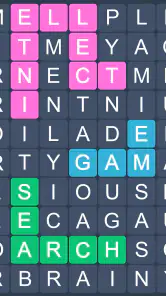
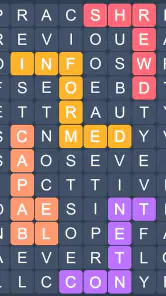
Analysis by Reviewed
I find that word-search games make their best case in small, ordinary gaps: waiting for an appointment, winding down before bed, or taking a screen break that still gives your mind something to do. Fillwords: Word Search Puzzles aims for that pocket of attention with letter-finding challenges and a logic-puzzle feel. Its first-week appeal is easy to understand: the rules are approachable, the activity is quiet, and you can pick it up without planning a long session.
That simplicity is also the real test. A puzzle can be pleasant on day one and still become another app I forget about. I’d judge Fillwords less by whether it is exciting every time I open it and more by whether its basic loop stays satisfying, whether it fits a routine, and whether its limitations become irritating. For casual players who like scanning letters and spotting patterns, it has a clear reason to earn a place on a phone; for anyone seeking a demanding, story-led game, it is a different sort of proposition.
Why the first puzzles are easy to return to
The central pleasure is focused and immediate: look over a field of letters, recognize a word, and keep going. Unlike a conventional crossword, this style does not ask me to solve a clue before I can act. That makes it a comfortable choice when I have only a few minutes or when I want a puzzle without a steep learning curve. The game is described as playable offline, which is especially useful for travel or places where I would rather not rely on a connection.
There is a satisfying middle ground between searching randomly and solving a formal logic problem. I can scan systematically, moving across rows and columns, or let a familiar word shape catch my eye. That shift between deliberate checking and sudden recognition is what gives a short session its rhythm. If you tend to enjoy word searches but want them to feel a little more like a puzzle than a printed page, the format is a natural fit.
A practical way to play is to avoid sweeping your eyes over the whole board at once. I get better results by choosing a starting corner, checking likely letter pairs, then moving methodically through the remaining space. This is not a special in-game feature; it is a simple habit that reduces missed words and makes the activity feel less like visual rummaging. It can also help if you are playing while tired and find that a crowded letter grid blurs together.
The game is free to download, with optional in-app purchases priced from $0.99 to $49.99 per item. That range is worth noticing before you hand a device to a child or tap through purchase prompts casually. The game carries an Everyone age rating, but that is not the same as a guarantee that every purchase decision will suit every household. I would check the purchase settings on a shared device and treat spending as optional rather than necessary to enjoy a word-search game.
A good fit for short, low-pressure sessions
One realistic use is a commute when I am seated and can give the screen a little attention. I can complete a brief puzzle, put the phone away, and return to whatever I was doing without needing to remember a plot or manage a complicated run. The same quality works during a quiet break at home: it gives my attention a single task, which can feel more restful than jumping between messages and social feeds.
More From Our News Desk

Weather by Xiaomi Review: Clear at a Glance, Less Clear Up Close

X Under Pressure: Can It Recover When Posting Goes Wrong?

Clash of Clans Is Won Between the Battles

Android Auto Makes the Case for Quieter Car Software

MobiOffice: Transforming Mobile Productivity with Seamless Integration

EA SPORTS FC™ Mobile Soccer: Redefining Mobile Sports Gaming
There is a trade-off, though. A letter grid asks for visual concentration, so it is not the best choice when I need to keep my eyes on my surroundings, move around, or listen closely to someone. Nor would I recommend it as a substitute for a deeper brain-training routine if your goal is varied, structured practice. Its appeal is modest and specific: word spotting and logic in a compact, low-pressure form.
What keeps the routine useful after the novelty
Malpa Games is the developer, and Fillwords has been available since January 11, 2017. Its longevity is a useful context, but age alone does not tell me whether I will keep playing. More persuasive is the large audience around it: the game has over 10 million installs, a 4.9 average rating, and around 559,000 ratings. Those figures suggest broad appeal, though they cannot predict whether its particular puzzle style will suit your habits.
For recurring value, I would make the game a deliberate substitute for a specific moment rather than expecting it to become a daily ritual by itself. For instance, opening it during a short wait instead of scrolling aimlessly gives the puzzles a dependable role. Offline play strengthens that use case: I can keep the routine in places with unreliable service, rather than saving it only for times when I am connected. If you mainly play at home with a stable connection, that advantage matters less.
The key question after the first week is whether finding words continues to feel rewarding once the basic mechanic is familiar. Fillwords does not need to surprise me with a new genre to remain useful; a small puzzle can earn repeat visits through convenience. But if you need each session to introduce a new system, a changing story, or increasingly varied kinds of challenge, a straightforward word-search game may run out of appeal sooner. I would think of it as a dependable casual option, not a game that must become a major hobby.
Compared with paper word searches, a phone version is easier to carry and can be used in spare moments without bringing a book along. Compared with crossword apps, it asks less of your vocabulary knowledge and clue-solving ability, but also offers less of that satisfying “I worked out the clue” moment. Compared with fast arcade games, it is calmer and less dependent on reflexes. Choosing among them comes down to the mental texture you want: visual scanning here, language clues in a crossword, or speed and reaction in an action game.
How much upkeep it asks of you
The maintenance burden appears low in the everyday sense: this is a game for opening, solving, and closing, rather than one that requires a group, a scheduled session, or a long chain of tasks to remember. Its current version is 1.69.7, and it requires Android 8.0 or later. Those details help Android users judge basic compatibility, while the game is also presented for iOS. I would still check the relevant store page on my own device before installing, since compatibility depends on the device and operating system in use.
Low upkeep does not mean there is nothing to manage. On a phone that already has too many distractions, another game can become clutter unless it has a clear place in your routine. I would keep it for moments when I genuinely want a small puzzle and remove it if I find myself opening it automatically without enjoying the session. The optional purchase range is another reason to be intentional: if you only want a free, occasional word search, decide that upfront and avoid treating paid items as a requirement.
One useful personal boundary is to stop after a satisfying puzzle rather than continuing just because the next one is available. That keeps a relaxing activity from turning into time-filling by default. It also makes it easier to notice whether you are returning because the letter search itself is enjoyable, or simply because the app is already open. For a game whose strength is simplicity, that distinction matters more than elaborate tracking or a complicated play schedule.
Where repetition can start to wear thin
The same clear loop that makes the game approachable can become its main source of fatigue. If you solve word searches often, letter-finding may begin to feel repetitive, especially when you are in the mood for broader variety. This is a limitation of the format rather than a reason to dismiss it. I would not choose Fillwords as my only game if I wanted a range of mechanics, competitive pressure, or a narrative to pull me forward.
There is also a difference between “relaxing” and “effortless.” Searching a grid still needs attention, and prolonged screen use can make that kind of visual task tiring. If I notice myself repeatedly losing my place or scanning without focus, I would take a break instead of forcing another round. Players who prefer audio-led, tactile, or physically active pastimes may also find that a screen-based letter puzzle does not offer the kind of rest they are looking for.
Because its purchase options span from $0.99 to $49.99 per item, I would be cautious about assuming every item is a small, incidental expense. That does not mean spending is required; it means the range deserves a moment of attention if you are budgeting carefully or setting up a child’s device. For a purely occasional player, the sensible question is whether the free experience already meets the need. If it does, there is no reason to buy something simply to make the app feel more complete.
Who should keep it installed
I would recommend Fillwords to someone who enjoys word searches, wants a puzzle that is easy to understand, and values being able to play offline. It is particularly suitable for brief breaks, quiet evenings, and travel downtime when a complicated game would feel like too much effort. Its Everyone rating makes it broadly accessible, while the in-app purchases still call for ordinary care on shared devices.
I would steer away from it if your ideal game depends on story, multiplayer competition, a constant stream of different mechanics, or demanding progression. A crossword may be a better match if you want clues and vocabulary to drive the challenge; a puzzle game with several distinct modes may suit you better if repetition is what makes you lose interest. Fillwords is at its strongest when you want precisely what it offers: a compact word-search activity, not a whole entertainment platform.
Making it fit an ordinary routine
For a more useful trial, I would give it a specific job for a few days: a seated wait, a quiet pause after lunch, or a short wind-down before putting the phone away. That makes it easier to judge whether the puzzles genuinely suit the moment. If I find myself wanting to continue when the break is over, that is a better sign of lasting appeal than simply opening the game often out of habit.
It also helps to choose the right alternative for the kind of attention you have available. When I want to work through clues and draw on word knowledge, a crossword offers more deliberate reasoning; when I have only a brief pause and want a lighter task, Fillwords is easier to enter. If my eyes are tired, neither a letter grid nor a screen-based crossword is ideal, and stepping away from the phone is the better choice.
After the novelty fades, I think it can earn lasting space—but only as a small, useful habit. Its appeal rests on convenience, offline access, and a focused letter-search loop, not on dramatic reinvention. With a 4.9 average across around 559,000 ratings, it is clearly popular, yet my recommendation is still conditional: try it if this quiet style of puzzle sounds enjoyable, keep it if it continues to fit your breaks, and move on if you need more variety. Its best long-term value is being easy to return to without demanding much from you.
For me, that is a worthwhile role for a casual word game. It does not need to occupy every spare moment; it only needs to make a few of them feel pleasantly focused. If you want that kind of low-maintenance diversion, Fillwords: Word Search Puzzles is a reasonable choice. If you are hoping for a deep, changing challenge that holds your attention for long sessions, I would look elsewhere rather than expecting a simple word-search format to become something it is not.
Fillwords: Word Search Puzzles Frequently Asked Questions
What is Fillwords: Word Search Puzzles?
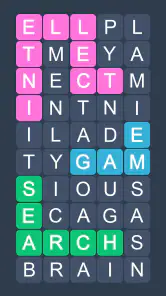
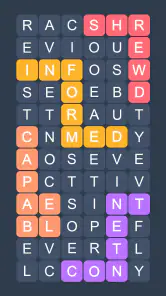
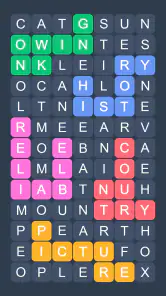
Fillwords: Word Search Puzzles is a casual word game built around finding hidden words in a grid of letters. Rather than simply highlighting words in a conventional word-search layout, you connect neighboring letters to complete each answer and fill the board. It is designed for short, relaxed play sessions, with puzzles that can also give you a light vocabulary and pattern-recognition challenge.
How do you play Fillwords: Word Search Puzzles?
Each puzzle presents a grid and a set of words or clues to find. You trace a path through adjacent letters to spell an answer, and completed words are added to the puzzle’s filled-in design. The exact arrangement and difficulty can vary by level, so careful scanning helps. If you get stuck, check whether the game offers hints, and use them sparingly if you want to preserve the challenge.
Is Fillwords: Word Search Puzzles free to download and play?
The game may be available to download without an upfront purchase, but free-to-play apps can include advertising, optional purchases, or other monetization features. These details may differ between Android and iOS, and can change with updates or by region. Before downloading, check the store listing for current pricing and in-app purchase information, and review the app’s settings if you want to manage ads or spending.
Can I play Fillwords: Word Search Puzzles offline?
Some word puzzles may work without an internet connection once the relevant game content is installed, but features such as advertisements, rewards, cloud saves, or new level downloads may require connectivity. Offline availability can also depend on the app version and device. If playing without internet matters to you, try opening a puzzle in airplane mode after installation rather than assuming every mode or feature will remain available.
Is Fillwords: Word Search Puzzles suitable for children, and what should I check before downloading?
The word-search format is generally approachable for players who can read the language used in the puzzles, and it may suit families looking for a simple brain-teaser. However, age ratings and the presence of ads or in-app purchases can vary by store and region. Check the current listing and privacy information before installing, especially on a child’s device, and use parental controls where appropriate.
Pros
- Simple rules make it easy to start playing without a lengthy tutorial.
- Word searches provide a relaxing way to pass a few minutes.
- A wide range of puzzles offers variety for regular play.
- Finding words can help exercise spelling and visual attention.
- The familiar format suits both casual players and puzzle fans.
Cons
- Some puzzles may feel repetitive after extended play.
- Small letters can be difficult to read on compact screens.
- Later levels may require more time and patience to complete.
- Hints can reduce the challenge for players seeking a tougher game.
- Gameplay may be less appealing to those who prefer interactive puzzles.
- Category
- Word
- Version
- 1.69.7













