Zutobi: Permit & Driving Prep
- 3.46K
- 4.5
- Installs
- 1.00M
- Price
- Free

Screenshots
Analysis by Reviewed
When I’m preparing for a permit test, my biggest challenge is usually turning scattered study time into a routine I can stick with. That is where Zutobi: Permit & Driving Prep can fit: it is an education app from Zutobi built around learning for the written test and getting ready for driving practice. I’d use it as a study companion, not as a substitute for the official handbook, local licensing guidance, or time behind the wheel.
Choosing the right starting point
Before opening a study app, I’d first work out what I’m preparing for: a learner’s permit, a written knowledge test, or the early stages of supervised practice. Those goals overlap, but they are not identical. Someone facing a written exam needs a dependable way to review road rules, while a new driver also needs patient instruction and real experience in the car. Zutobi can support both parts of the process, but it is most useful when I know which part I need help with today.
I’d also identify the licensing rules that apply where I live. Permit requirements and test formats can vary by location, so a general study routine should sit alongside the relevant local handbook and licensing authority guidance. This is a practical first step, not busywork: it helps me avoid spending time confidently learning material that does not match my exam or local rules.
The app is free to download, which makes it easy to try as part of that routine without making it the only source I rely on. Its Everyone 10+ content rating is useful context for families deciding whether it is appropriate for a younger learner. I’d still have a parent or instructor help connect app-based study to the local process and to what is safe during actual driving practice.
Why Zutobi Stands Out
When I first downloaded Zutobi, I was curious to see if it could really make a difference in my driving prep routine. Spoiler alert: it did. The app is designed to make learning not just effective but also fun. I mean, who knew studying for a driving test could be engaging?
Starting with a manageable study routine
The practical way I’d approach a session is to open the app when I have a short gap—before class, during a quiet break, or while waiting for a ride—and work through a small amount of material rather than trying to cram everything at once. That makes it easier to notice which topics need another pass. If your test is coming up, I’d still set aside a separate block of time to check your local requirements, since rules and exam formats can depend on where you live.
A useful routine is not simply “open the app whenever I remember.” I’d attach practice to a moment that already happens most days, such as a quiet stretch after dinner, and stop when my attention starts to fade. Short, focused sessions make it easier to think about why a rule works instead of rushing through questions to finish. If I am tired or distracted, I would rather pause and return later than mistake tapping through material for learning it.
More From Our News Desk

Clash of Clans Is Won Between the Battles

Android Auto Makes the Case for Quieter Car Software

MobiOffice: Transforming Mobile Productivity with Seamless Integration

EA SPORTS FC™ Mobile Soccer: Redefining Mobile Sports Gaming

How Microsoft OneDrive Became a Mobile Productivity Giant

How Google Translate Breaks Language Barriers Effortlessly
Interactive Learning at Its Best
The app's interface is super user-friendly, which means you won't find yourself lost in a maze of confusing menus. Instead, you're greeted with a series of bite-sized lessons that are easy to digest. These lessons are not just about reading; they involve interactive quizzes that test your knowledge as you go. It's like having a personal driving instructor right in your pocket!
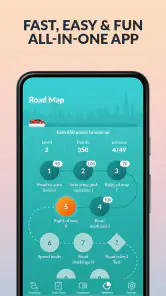
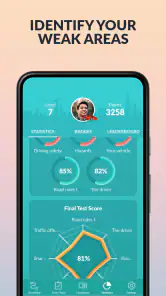
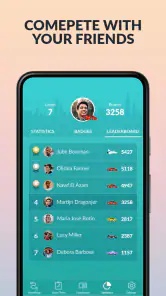
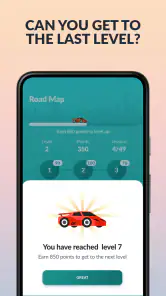
What really caught my eye is the app's use of gamification. Earning points and leveling up adds a playful twist to the whole learning process, making it less of a chore and more of a game. Plus, the progress tracker is a neat little feature that shows you exactly where you stand. You can literally track your journey from a rookie to a pro!
That playful structure is a real advantage for someone who struggles to begin studying, but I would keep the incentives in their proper place. A streak or level can nudge me to return; it cannot tell me whether I understand a tricky right-of-way situation well enough to explain it without hints. I’d use progress as a reminder of consistency, not as a substitute for checking my understanding.
Making practice useful, not just frequent
For a more deliberate workflow, I’d treat a missed question as a prompt to explain the rule in my own words, then revisit that subject later instead of immediately tapping through another quiz. This small habit helps separate understanding from lucky guessing. The points and progress indicators can encourage consistency, but I wouldn’t use a high score alone as proof that I’m ready; being able to explain why an answer is correct matters more than clearing a streak.
One practical tip is to keep a brief list of questions that remain confusing, written in plain language rather than copied as answer choices. For example, I might note, “I’m unsure who has priority when these road users arrive together,” then compare the rule with the official handbook or ask an instructor. That makes the app part of a learning loop: practice, identify uncertainty, verify, and revisit. It also prevents me from repeatedly answering the same kind of question by recognizing its wording without understanding the underlying rule.
A realistic routine might be to study a few lessons after dinner, note the topics that still feel uncertain, and bring those questions to a parent, instructor, or other experienced driver before a supervised practice drive. That handoff is important: a quiz can help you recognize a rule, but it cannot show how to judge a gap in traffic or respond calmly to a changing road. I’d use the app to prepare questions for the person riding with me, then pay attention to how the rule applies in real conditions.
From screen practice to the passenger seat
The handoff from studying to driving is where I’d be most deliberate. I would not try to learn a new road situation for the first time while already in a demanding traffic environment. Instead, I’d discuss the relevant rule before setting off, let the supervising driver choose a suitable place to practise, and treat the app as preparation rather than live guidance. The person supervising can observe decisions and offer feedback in a way a quiz cannot.
For a learner who feels nervous, this division of jobs can make practice feel less overwhelming. The app can help bring vocabulary and rules to mind; the supervising driver can help with timing, awareness, and calm responses. Afterward, I’d write down one situation that felt confusing and revisit the related study material. That gives the next session a clear purpose without pretending that digital practice can replace experience.
Content That's Got You Covered
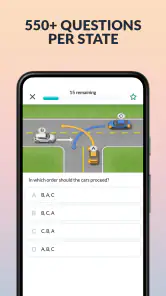
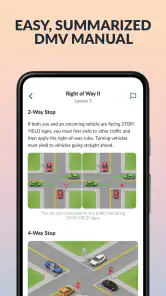
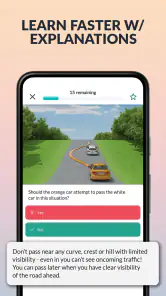
One thing I genuinely appreciate about Zutobi is the depth of content it offers. Whether you're prepping for a permit test or a full-fledged driving exam, the app covers all bases. The questions are modeled on real tests, so you get a feel of what to expect. And the visual aids? Top-notch! Diagrams and illustrations break down complex concepts, making them easier to understand.
Visual explanations can be especially helpful when a written rule is difficult to picture. I’d use a diagram to slow down and identify what each road user is doing, rather than immediately guessing from a familiar phrase. That habit encourages me to connect the rule to a situation. Still, passing a quiz on a diagram does not prove I can recognize the same conditions quickly on a real road; that part needs safe, supervised practice.
Another highlight is the app's up-to-date info. Regulations and rules often change, and Zutobi does a great job of keeping its content current. You won't have to worry about studying outdated material, which is a huge relief.
Even when an app is maintained, I would cross-check anything that has a direct effect on my local test or legal obligations. The safest workflow is to use Zutobi for regular review and use local official material to settle location-specific questions. This matters most close to exam day, when it is tempting to assume that a familiar practice question covers every detail of the local test.
How it compares with other ways to prepare
Compared with a printed handbook alone, the app offers a more interactive way to check what I remember and fit review into small pockets of time. A handbook, however, can be easier for a careful, uninterrupted read and remains important for confirming local requirements. Compared with a classroom or one-to-one instructor, the app is convenient for independent review, but it cannot notice confusion in my voice, adapt its explanation to a conversation, or watch what I do behind the wheel.
I would not frame the choice as app versus handbook versus instructor. They solve different problems. Zutobi is a good fit when I want structured practice and a nudge to study regularly; official material is the better authority for local rules; an instructor or experienced supervising driver is the better choice for feedback on actual driving. Someone who already has a strong study system and only needs authoritative local details may be better served by starting with the handbook. Someone who needs personal coaching should not expect an app to provide it.
Where a study app helps—and where it doesn’t
Compared with studying only from a printed handbook, short lessons and quizzes make it easier for me to fit practice into spare moments and check whether I’ve understood a topic. Compared with learning entirely through an instructor, though, an app cannot watch my driving or correct a real-world mistake. I see the strongest use case as combining the two: use Zutobi for review, then rely on official local materials and supervised practice for details and skills that need hands-on feedback.
It may be less suitable if you already know you learn best from a full-length book, need someone to explain every question in person, or are looking for a tool that teaches the physical act of driving by itself. I’d also avoid treating practice questions as a guarantee of what will appear on your exam. Use them to build familiarity, but verify local rules through the relevant licensing authority before test day.
There is also a difference between feeling familiar with a topic and being ready to use it under pressure. Repeated quiz practice can make the screen feel comfortable, while a busy intersection or an unfamiliar sign can still demand attention and judgment. I’d be cautious about doing so much app practice that I neglect rest, official materials, or time with a supervisor. The best preparation is balanced, and the app is one part of it.
Zutobi is free to download, with optional in-app purchases ranging from $0.99 to $99.99 per item, so I’d check what is included before paying for anything. It has a 4.5 average from 36K ratings, 3.5K reviews, and over 1M installs. It is rated Everyone 10+, runs on Android 7.0 or later, and version 4.5.49 is the current version. Those details make it easy to judge whether it suits your device and comfort level, but they don’t change the main point: steady review works best when paired with local guidance and actual practice.
The developer is Zutobi, and the app has been available since June 22, 2018. For me, the purchase question is less about whether a paid option exists and more about whether it addresses a specific need in my own preparation. I’d first use the free experience to see whether the lesson style helps me study, then read the in-app purchase details carefully before spending. I would not pay simply because an exam is approaching; a clear understanding of what is included matters more than urgency.
It is also worth checking device compatibility before building a routine around an app. Zutobi requires Android 7.0 or later, so I would confirm that an older phone meets that requirement. If the app does not suit a learner’s device or study habits, a local handbook and a planned discussion with an instructor can still provide a practical preparation route. No single tool needs to carry the entire process.
Who will get the most from it
I think the strongest match is a learner who wants a more engaging way to review, benefits from short study sessions, and is willing to verify local details rather than treating practice material as the final authority. It can also help a parent or supervising driver turn a vague “study more” reminder into a conversation about specific rules the learner finds difficult. The app is less compelling for someone who wants only in-person teaching or expects a digital course to create driving confidence without practice.
If your exam date is close, I’d use the app to locate weak areas, not as a reason to race through every lesson. If the date is farther away, a steady routine gives you room to revisit uncertain subjects and connect them to supervised practice. Either way, the useful outcome is not merely a completed session; it is being able to explain a rule and recognize when you need to ask someone qualified to clarify it.
Final Thoughts
If you're on the lookout for a reliable, fun, and comprehensive way to prepare for your driving test, Zutobi: Permit & Driving Prep is definitely worth checking out. It's not just about passing the test; it's about becoming a confident, knowledgeable driver. So, go ahead, give it a try, and take the stress out of your driving prep. Safe driving!
My recommendation comes with one clear condition: use it as a companion, not as a promise that a score will translate directly into safe driving or a passing result. For regular review, a learner who likes interactive practice may find it easier to return to than a handbook alone. For exact local requirements or hands-on feedback, another source is essential. If you keep those roles straight, Zutobi can help make preparation feel more organized and give your conversations with a supervisor a useful starting point.
Zutobi: Permit & Driving Prep Frequently Asked Questions
Does Zutobi: Permit & Driving Prep help with both the written permit test and practical driving preparation?
Zutobi’s focus is driving-test preparation, and its store summary describes it as a way to prepare for a permit test and master behind-the-wheel training. The app combines study materials and practice with learning modules, making it relevant to learners who want to review driving topics alongside test-style questions. It can support preparation, but it should not replace responsible driving instruction.
Is Zutobi: Permit & Driving Prep suitable for someone who has never studied driving rules before?
The app is designed for people preparing for a driving permit test or studying driving-related material, so it can be useful for learners who are beginning their preparation as well as those reviewing what they already know. Its learning modules and explanations are intended to make the material easier to work through. The app is an educational aid, not a substitute for responsible driving instruction.
Is Zutobi: Permit & Driving Prep free to download, and are there in-app purchases?
Zutobi: Permit & Driving Prep is a free educational app, so users can download it without paying upfront. It also offers in-app purchases, with prices ranging from $0.99 to $99.99 per item. The free option and paid purchases are worth considering before you begin: you can start exploring the app, then decide whether any optional purchase fits your study needs.
What is the Zutobi app and what does it offer?
Zutobi is a comprehensive educational app designed to help users prepare for their driving permit tests. It offers a range of study materials, including practice tests, detailed explanations, and engaging learning modules. The app is suitable for learners of all ages and covers various types of driving licenses, including car, motorcycle, and commercial. Its user-friendly interface and gamified learning experience make studying more effective and enjoyable.
How does the Zutobi app enhance learning for driving tests?
Zutobi enhances learning by providing a gamified experience where users earn points and badges as they progress. The app includes practice tests that mimic real driving test conditions, allowing users to familiarize themselves with the format and types of questions they might encounter. Detailed explanations and visual aids accompany each question, helping users understand the reasoning behind correct answers, thereby reinforcing their knowledge and boosting confidence.
Pros
- Comprehensive driving test materials.
- User-friendly interface.
- Engaging quizzes and challenges.
- Regularly updated content.
- Supports various states and countries.
Cons
- Some features require premium access.
- Occasional app crashes reported.
- Limited offline functionality.
- Ads in free version can be intrusive.
- Initial setup can be time-consuming.
- Category
- Education
- Version
- 4.5.49











