Yousician: Learn & Play Guitar
- 38.06K
- 4.4
- Installs
- 50.00M
- Price
- Free

Screenshots



Analysis by Reviewed
If you're anything like me and have always dreamt of strumming your way to guitar greatness, then Yousician: Learn Guitar & Bass might just be the app to turn that dream into reality. This app promises to be your personal music tutor, available at your fingertips 24/7. But does it live up to the hype? Let’s dive into the world of Yousician and see what it’s all about.
Getting Started with Yousician
First things first, downloading and setting up Yousician: Learn Guitar & Bass was a breeze. Available on both Android and iOS, the app welcomes you with a user-friendly interface that is as inviting as a warm cup of coffee on a rainy day. After a quick sign-up process, you're asked about your experience level, whether you’re a complete newbie or someone who’s already got a few chords under their belt.
As an education app from Yousician Ltd., it sits somewhere between a video course and private lessons: you work through guided material, but the app listens while you play and responds to what it hears. That makes it especially useful when you want structure without having to arrange a lesson around someone else’s schedule. It is free to start, with in-app purchases ranging from $1.99 to $209.99 per item, so I’d check what access is included before committing to a paid option. The app is rated for Everyone, and its current version is 5.20.0, with Android 8.0 as the minimum OS requirement.
How the listening-based lessons help
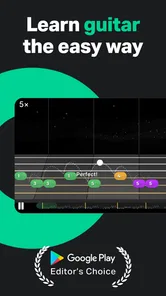
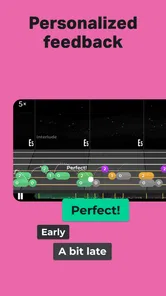
The coolest feature of Yousician is its interactive learning system. The app listens to you play and provides instant feedback on your performance. It's almost like having a music teacher in your pocket, without the awkwardness of playing in front of someone. The lessons are designed to be engaging and are structured in a way that keeps you motivated to progress through different levels.
That feedback is most useful when I treat it as a guide rather than a verdict. A phone or tablet can hear whether notes are landing, but it cannot fully judge relaxed posture, hand tension, or the quality of a musical phrase. If a note is repeatedly marked wrong, I’d first check tuning and make sure the device can hear the instrument clearly, then slow down and isolate the movement rather than rushing through the same passage. This small routine helps turn a score into a practical clue instead of a reason to get frustrated.
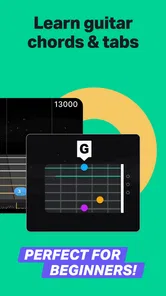
Whether you're learning guitar, bass, or even the ukulele, Yousician covers all the bases. The exercises range from simple chord progressions to more complex finger-picking techniques. And guess what? The app includes a wide variety of songs across different genres to keep things interesting. So, whether you’re into rock, jazz, or pop, there’s something for everyone.
For a realistic daily routine, I’d use a short session after work: tune up, repeat one exercise that still feels awkward, then finish with a song section I enjoy. That order gives practice a clear purpose without making the whole evening feel like homework. If I only have a few minutes, I’d focus on one small transition between chords rather than trying to complete a long lesson while distracted. The app’s song-based approach can make repetition less dry, but it still takes patience to build finger strength and clean changes; progress won’t come just from tapping through activities.
More From Our News Desk

Weather by Xiaomi Review: Clear at a Glance, Less Clear Up Close

X Under Pressure: Can It Recover When Posting Goes Wrong?

Clash of Clans Is Won Between the Battles

Android Auto Makes the Case for Quieter Car Software

MobiOffice: Transforming Mobile Productivity with Seamless Integration

EA SPORTS FC™ Mobile Soccer: Redefining Mobile Sports Gaming
Making practice more deliberate
One of the standout features of Yousician is its practice mode. You can slow down the tempo of any song or exercise, making it easier to learn tricky sections without missing a beat. This feature is a game-changer for beginners like me who need a little extra time to nail down the basics before moving on.
Slowing a passage is more than a beginner convenience. I find it works best to repeat a manageable fragment slowly until the movement feels consistent, then raise the pace gradually. If I keep missing the same change, I stop and check which finger or string is causing the trouble instead of replaying the whole section at speed. The trade-off is that app-guided practice can encourage chasing correct notes and scores; I’d occasionally play without the screen so I can listen for timing and tone on my own.
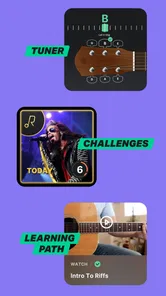
Another highlight is the weekly challenge, where you can compete with other users worldwide. It adds that extra layer of motivation and lets you see how you stack up against fellow learners. Plus, who doesn't love a little friendly competition?
The challenge is a useful nudge if a little public comparison keeps you practising, but it is not the best measure of whether your playing is improving. I’d treat it as a reason to pick up the instrument, not as a ranking to worry over. Compared with free video tutorials, Yousician offers more immediate, play-along feedback and a clearer sequence of exercises; videos can be easier when you want to watch a technique closely or choose your own material. Compared with an in-person teacher, the app is convenient and repeatable, while a teacher can notice physical habits and tailor advice in ways a listening app cannot.
Practical fit, costs, and expectations
I’d recommend Yousician most to beginners who want a guided path, and to returning players who need a regular practice habit or a way to revisit fundamentals. It is also a sensible choice for someone who feels self-conscious playing in front of another person at first. If you already know what you want to learn and prefer to follow a particular guitarist’s demonstrations, a video lesson or a teacher may suit you better. Likewise, if you want detailed feedback on technique, posture, or musical expression, I would not rely on an app alone.
For anyone wondering whether it works without a paid plan, the app is free to download, but in-app purchases are available, so the amount of learning access you get may depend on the option you choose. I’d try the available lessons and make sure the format suits my practice before spending. Yousician has an average rating of 4.5 from around 515,000 ratings, with more than 10 million installs; that popularity is reassuring, though it cannot tell you whether its teaching style fits your instrument, goals, or patience level. It was released on May 26, 2015, and has accumulated around 38,000 written reviews.
One practical question is what to do when the app seems not to hear a note correctly. I’d first make sure the instrument is in tune, give the phone a clear view of the sound rather than placing it beside other noise, and try the passage again at a slower pace. If recognition still feels inconsistent, the lesson may be more useful as a timing and repetition guide than as a precise judge of every detail. That is a sensible limit to keep in mind: the app responds to what it detects, not to everything a human teacher would notice.
It also helps to decide what success means before opening a lesson. A beginner might aim to change between two chords without stopping; a returning player might use a short practice to rebuild consistency. Those targets are more actionable than treating every score as a final grade. I would keep a small note of the section that needs work, then return to it next time instead of restarting at the beginning whenever practice feels difficult.
Where it belongs in a learning routine
As an alternative to a traditional lesson, the app is strongest for regular, self-directed repetition. You can practise at a convenient time and get an immediate cue when the app hears a missed note, which is valuable when no teacher is present. But that convenience comes with a trade-off: it cannot watch how your wrist moves or explain why a phrase sounds stiff. I’d pair it with occasional human guidance if technique is a concern, rather than expecting one tool to cover every part of learning an instrument.
Against a lesson video, the difference is less about which format is universally better and more about what I need in that moment. A video is helpful when I want to pause and closely observe a hand shape or explore a specific song chosen independently. Yousician is more useful when I want a sequence to follow and a response while I play. A beginner who feels overwhelmed by a huge choice of online tutorials may appreciate that direction; a focused player who already has a teacher’s plan may find the app’s pathway less relevant.
I would also be realistic about the time commitment. A short, focused practice can fit into a busy day, but learning an instrument still requires repetition beyond the moment a screen marks a passage correct. If I have limited energy, I’d rather practise one awkward chord change carefully than rush through several activities for the sake of completing them. That approach makes the app’s structure serve the player, instead of letting the next prompt dictate the whole session.
My verdict on the experience
All in all, Yousician: Learn Guitar & Bass is a fantastic tool for anyone looking to learn or improve their guitar skills. It has transformed the way I approach practice, making it less of a chore and more of an enjoyable pastime. The app's intuitive design, combined with its comprehensive lesson plans and interactive features, offers an experience that's both educational and entertaining.
So, whether you're a total beginner or someone looking to polish your skills, give Yousician a try. You might just find yourself picking up that guitar more often than you ever thought possible. And who knows, maybe one day you'll be the one playing at a bonfire, impressing everyone with your newfound talent.
Yousician: Learn & Play Guitar Frequently Asked Questions
Can I use Yousician for both guitar and bass, or do I need separate apps?
Yousician is an education app focused on learning guitar and bass, so it can support practice with either instrument in one app. The experience is built around interactive lessons and playing along, which may suit learners who want guided practice rather than only reading instructions. Before you start, choose the instrument you want to work on and have it ready for the lessons.
What does Yousician’s interactive lesson experience involve?
Yousician presents learning through lessons, exercises, and songs, with an interactive approach intended to help you practise as you play. Its store summary describes interactive lessons, songs, and a tuner among its features. This format can make practice feel more guided than using a static lesson, while allowing you to work through material at your own pace.
What devices and operating systems can run Yousician?
Yousician is an education app for learning guitar and bass, and it is available for Android devices running version 8.0 or later. Its interactive approach is designed for use on a phone or tablet, so you can follow lessons while playing your instrument. Check that your device meets the minimum system requirement before downloading.
What is Yousician and how does it help in learning guitar and bass?
Yousician is an interactive music learning app designed to teach guitar, bass, and other instruments. It offers a gamified learning experience with real-time feedback on your playing. The app guides users through lessons, exercises, and songs, making it suitable for beginners and advanced players alike. With structured lessons and a vast library of songs, users can progress at their own pace.
Is Yousician suitable for complete beginners?
Yes, Yousician is designed to cater to all skill levels, including complete beginners. The app provides step-by-step tutorials and a range of beginner-friendly songs and exercises. Its intuitive interface and real-time feedback system help beginners understand the basics of playing guitar and bass, ensuring a smooth learning curve.
Pros
- Interactive lessons make learning engaging.
- Wide variety of songs to practice with.
- Real-time feedback helps improve skills.
- Available for multiple instruments.
- User-friendly interface for easy navigation.
Cons
- Subscription required for full access.
- Limited free features.
- Audio recognition can be inconsistent.
- Requires internet connection.
- Occasional app crashes reported.












