GuitarTuna: Tune & Play Guitar
- 74.00K
- 4.5
- Installs
- 100.00M
- Price
- Free

Screenshots
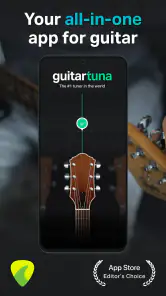


Analysis by Reviewed
I reach for a phone tuner when I want to get playing without hunting for a separate device, and GuitarTuna: Tune & Play Guitar is built for that quick, practical moment. It combines tuning with practice aids, so it can be useful before a lesson, during a short break, or when I pick up a guitar and need a reminder of a chord. The key is to treat it as a helpful practice companion, not as a substitute for listening closely to the instrument.
Where a quick tune can get stuck
The most common frustration with any microphone-based tuner is not necessarily the tuner itself: the room, nearby sounds, or the way a string is played can make the note harder to judge. I get the clearest result by plucking one string at a time and letting its sound ring while I watch the visual guide. If I strum a full chord, the overlapping notes make it less useful for checking an individual string.
That small change in technique matters when I’m tuning quietly at home or sharing a room. I also avoid turning tuning into a race: a calm, distinct note gives the app a better chance to respond than a rushed pluck. If the display seems uncertain, I pause, mute other strings, and try the note again rather than making a large adjustment based on one reading.
Using GuitarTuna in a real practice routine
I find GuitarTuna most useful when I give each short practice session a clear job instead of trying to explore every tool at once. I might tune first, then focus on one chord change that keeps interrupting a song, and finish by checking whether I can play it steadily. That simple order makes it easier to spot what needs work and keeps the app’s extra options from becoming a distraction.
First Impressions and User Interface
When I first launched GuitarTuna, I was greeted by an interface that was as inviting as it was intuitive. The app doesn’t bombard you with unnecessary frills; instead, it gets straight to the point. The design is sleek, with just the right amount of options to keep things interesting. Whether you’re a beginner or a seasoned player, navigating through the app is a breeze.
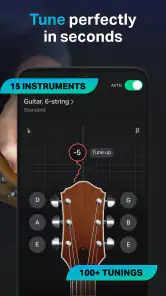
The main screen gives you easy access to the tuner, which is the heart of the app. You'll find a collection of tunings available, from standard to alternate tunings, perfect for when you want to experiment with new sounds. I also appreciated the visual feedback the app provides, which makes tuning not only accurate but also visually satisfying.
Features That Strum the Right Chord
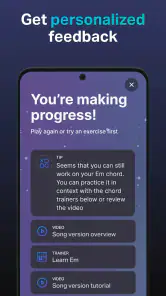
Let’s talk features, because this app is packed with them. Beyond the tuner, GuitarTuna offers a metronome, chord library, and even games to help you improve your skills. The metronome is simple yet effective, allowing you to adjust the tempo and time signature with ease. It’s a great tool for practicing and staying in rhythm.
More From Our News Desk

Weather by Xiaomi Review: Clear at a Glance, Less Clear Up Close

X Under Pressure: Can It Recover When Posting Goes Wrong?

Clash of Clans Is Won Between the Battles

Android Auto Makes the Case for Quieter Car Software

MobiOffice: Transforming Mobile Productivity with Seamless Integration

EA SPORTS FC™ Mobile Soccer: Redefining Mobile Sports Gaming
The chord library is another standout feature. It’s extensive and provides diagrams for each chord, making it a handy reference for players at any level. I found it especially useful when learning new songs or trying to break out of my usual chord progressions.
For a beginner, I’d use the chord diagrams actively rather than just glancing at them: check the fingering, form the shape, then lift your hand and try again without looking. That turns a reference into a small, repeatable exercise. For song practice, the metronome is most useful after I can already change chords slowly; setting a manageable pulse helps me notice where my transitions fall apart instead of simply rushing through the tune.
Now, for the gamers out there, the app includes fun little challenges to test your rhythm and chord recognition. It’s a clever way to make practice feel less like a chore and more like a game. I found myself getting quite competitive, trying to beat my last score!
Small setup checks that make practice easier
GuitarTuna is a free Tools app from Yousician Ltd., and it has a 4.5 average from around 2.6 million ratings. It has passed 100 million installs, is rated for Everyone, and first appeared on August 10, 2012. Version 7.93.1 requires Android 8.0 or later. Those figures suggest a well-established option, though popularity alone can’t tell you whether its approach suits your habits.
Before a session, I check that the phone is close enough to hear the guitar and that the instrument is producing a clear note. If the guitar is plugged into an amp, the phone’s microphone may not pick up the sound as clearly as it does from an acoustic instrument, depending on the setup. In that situation, moving closer to the sound source or using a quieter space is a sensible first test, rather than assuming the app is malfunctioning.
Alternate tunings are useful, but they also create a simple mistake to watch for: make sure the selected tuning matches what you intend to play. If I switch from a familiar tuning for one song and then start another, I check the setting again before adjusting strings. It’s an easy way to avoid “correcting” a string that was already right for the previous setup.
For an everyday routine, I like to decide what the phone is there to do before I pick up the instrument. If I’m only checking tuning, I keep the session focused on that rather than hopping between every available tool. If I’m learning a song, I can look up an unfamiliar chord first, practise placing it slowly, then bring in the metronome once the shape feels less awkward. Splitting the work into these small steps makes the app more useful than treating it as a catalogue to browse.
A realistic use is a short practice after dinner: I take the guitar out, tune one string at a time, check the two or three chord shapes that are slowing me down, then play the passage at a restrained tempo. The useful part is the continuity. I don’t need to reach for a separate tuner, search for a chord diagram elsewhere, and open another tool just to keep time. On the other hand, if I only have a minute to tune, I don’t need to explore the practice features at all.
Sound Quality and Performance
Let’s cut to the chase: the sound quality is top-notch. The tuner uses the microphone on your device to capture the sound of your guitar, and it does so with impressive precision. I’ve used other tuners in the past, but the accuracy of GuitarTuna really stands out. Whether you’re in a noisy environment or the quiet of your room, it gets the job done.
The app performs smoothly without hiccups, which is crucial when you’re in the middle of a jam session. I didn’t experience any lag or crashes, making it reliable for those crucial tuning moments before a performance or practice.
When a reading seems inconsistent, I treat it as a signal to check the whole setup: pluck cleanly, let the note settle, and make sure another string isn’t still ringing. If the guitar itself is drifting out of tune, an app can show that the pitch needs attention but can’t fix the underlying cause. A newly changed string, an unstable tuning peg, or a guitar that needs adjustment may call for patience or help from someone who knows the instrument.
There’s a useful distinction between a reading that jumps around and a guitar that repeatedly slips out of tune. The first is a reason to quiet the room, isolate the string, and try again; the second may point to the instrument or its setup. I wouldn’t keep turning a tuning peg simply because a noisy reading looks wrong. Check the note again under calmer conditions before making another adjustment, especially if you have already brought that string close to the target.
This is also where a phone tuner differs from a clip-on model. A phone is convenient when I’m practising alone in a reasonably calm space, and the extra reference tools make it more versatile. A clip-on tuner is often the more practical choice when the room is loud, several people are playing, or I want a device attached directly to the guitar. Neither option makes the other pointless; they suit different moments, and it’s sensible to keep a dedicated tuner if tuning in noisy settings is part of your regular routine.
Compatibility and Accessibility
One of the things I love most about GuitarTuna is its accessibility. It’s available on both Android and iOS, so no matter your device preference, you can get in on the action. The app is designed to work with a variety of string instruments, not just guitars, which is a huge bonus for multi-instrumentalists.
The app also offers in-app purchases for those who are looking to expand their toolkit, with additional tunings and features. While the free version is quite robust, these extras can be a worthwhile investment for more advanced players.
The app is a particularly good fit if you want a tuner plus a few self-guided ways to practice in one place. If all you need is a quick pitch check and you prefer a dedicated clip-on tuner, that simpler tool may be easier to use in a loud rehearsal space or when you don’t want your phone nearby. And if you learn best from a teacher, sheet music, or a structured course, the chord reference and practice games are better treated as supplements than as a complete learning plan.
There is also a sensible reason to begin with the free version: you can see whether the tuner and practice tools fit your routine before deciding whether any paid extras are worth it. In-app purchases range from $0.99 to $139.99 per item, so I’d check the specific item and its cost before confirming a purchase rather than assuming every extra is a small add-on.
That range makes it worth being selective. I’d first identify a limitation in my current routine that a particular extra would solve, then decide whether its cost makes sense for how often I play. If I’m still learning basic chord changes, the free tools may already be enough to keep practice moving. A purchase is easier to justify when I know what I want from it, not simply because an option appears in the app.
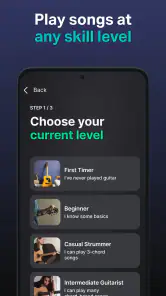
Beginners are likely to get the most out of the combination of visual tuning, chord diagrams, and short rhythm exercises, especially if they practise independently and need prompts to stay engaged. More experienced players may value the quick tuning and reference functions but find the learning games less relevant. Someone who wants detailed instruction, feedback on technique, or a complete lesson path should pair the app with a teacher or a more structured learning resource rather than expecting these tools to cover everything.
One small workflow tip is to keep the practice goal narrower than the feature set. For example, choose one chord transition to work on instead of trying to improve rhythm, learn several shapes, and explore alternate tunings in the same short session. That makes it easier to notice whether the metronome is helping or whether the chord change itself needs slower, separate practice. The app can support that structure, but the player still has to decide what to practise.
Final Thoughts
All in all, GuitarTuna: Tune & Play Guitar is a fantastic companion for guitarists and musicians alike. Whether you’re a newbie looking to learn or a pro in need of a reliable tuner, this app has got you covered. It’s user-friendly, feature-rich, and performs beautifully. So, if you’re ready to take your tuning game to the next level, give GuitarTuna a spin. Trust me, you won’t be disappointed!
My practical verdict is that it earns its place on a phone when convenience matters: tune before a quick evening practice, look up a chord while learning a song, then use a steady beat to work through a tricky change. I wouldn’t rely on it as the only tool in a noisy live setting or expect its games to replace a lesson, but for everyday guitar practice it brings several useful jobs together. If that combination matches how you play, it’s an easy one to try.
GuitarTuna: Tune & Play Guitar Frequently Asked Questions
Can GuitarTuna help me learn songs, or is it only a tuner?
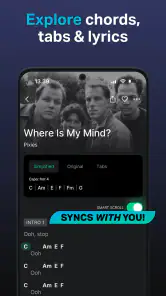
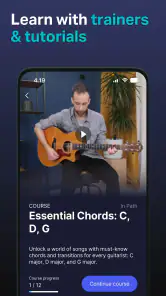
GuitarTuna is presented as more than a tuning tool: its store summary highlights tabs and tutorials for learning songs and mastering chords. That makes it worth considering if you want to tune your instrument and have learning resources in the same app. Its focus includes both practical tuning support and opportunities to practice, rather than tuning alone.
Will GuitarTuna work on my phone or tablet?
GuitarTuna is available for Android and iOS devices. For Android, the minimum requirement is version 8.0, so it is sensible to check your device’s operating system before downloading. The app is free to download, and its Everyone age rating makes it suitable for a broad audience. These points can help you decide whether it fits your device and household.
Is GuitarTuna free to download, and what might cost extra?
GuitarTuna is free to download, with in-app purchases priced from $0.99 to $139.99 per item. The published FAQ describes a free version with essential tuning features and paid options for additional tools and learning resources. If you only need basic tuning, the free offering may be enough; review purchase details in the app before paying for anything.
What is GuitarTuna, and what can I use it for?
GuitarTuna is a free Tools app from Yousician Ltd. for tuning and practicing stringed instruments. Its focus goes beyond helping you tune: the store summary also highlights tabs and tutorials for learning songs and chords. It may suit players who want tuning support and practice resources together in one app. The app is rated for Everyone.
What features does GuitarTuna offer for guitar tuning?
GuitarTuna provides a comprehensive tuning experience with its precise tuner that supports a wide range of stringed instruments, including guitars, basses, and ukuleles. It features auto mode for hands-free tuning, over 100 tunings, and a built-in metronome. The app also offers chord libraries and interactive games to improve your skills.
Pros
- Accurate tuning for various stringed instruments.
- User-friendly interface for quick access.
- Includes built-in games to improve skills.
- Supports multiple alternate tunings.
- Offline access for tuning anytime.
Cons
- Limited advanced features in free version.
- Occasional ads may disrupt usage.
- Some tunings require in-app purchases.
- Interface can be overwhelming for beginners.
- Requires microphone access for tuning.
- Category
- Tools
- Version
- 7.93.1









