Xoom: Send Money & Transfer
- 30.30K
- 4.8
- Installs
- 5.00M
- Price
- Free

Screenshots

Analysis by Reviewed
I judge an international transfer app by a few practical questions: Can I tell what I’m paying before I commit? Is the recipient’s country and preferred way to receive money supported? Can I check progress afterward without chasing someone for updates? Those details matter more to me than a polished home screen. Xoom: Send Money & Transfer is a finance app from Xoom, a PayPal Service, and it is built around sending money to friends and family, with some country-specific services alongside transfers.
A useful habit is to treat each transfer as its own decision rather than assuming the same route will always be best. Before confirming, check the recipient details, destination, amount, delivery choice and the final cost shown in the app. A small change in any of those can affect whether the transfer suits your situation. I would also confirm the recipient can actually use the selected receiving method before sending, especially if the money is needed for a particular bill or deadline.
What I’d check before choosing a transfer app
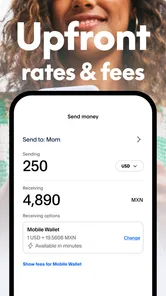
The first thing I’d compare is the amount that will actually reach the recipient, not just the fee displayed most prominently. A transfer can involve both a charge and an exchange rate, so the useful comparison is the complete offer for the same destination and amount. I’d check that total immediately before confirming, because a route or delivery choice that works well for one transfer may not be the best value for another.
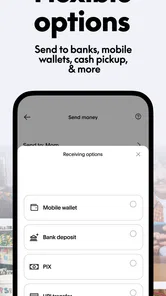
I’d also make the recipient part of the decision. Ask which receiving method they can access comfortably, whether their details are current, and whether they need the money for something time-sensitive. If they would have difficulty collecting cash or using a particular account, a seemingly convenient option for the sender may create extra work on the other end. That conversation can prevent a transfer that is technically successful but awkward to use.
Getting Started with Xoom
When I first downloaded Xoom: Send Money & Transfer, I was eager to see if it lived up to the hype. Setting up the app was a cinch. All I needed was a quick sign-up, and voilà, I was ready to start sending money. The interface is super user-friendly, which, let’s be honest, is a huge relief. No one likes getting tangled in complicated menus, especially when money is involved!
Features That Stand Out
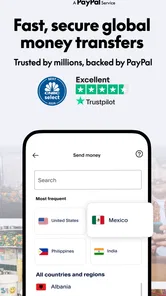
One of the coolest features of Xoom is its ability to send money to over 130 countries. Yeah, you heard me right, over 130 countries! Whether you need to send funds to your family in India or pay for a service in Mexico, Xoom has got your back. The app also lets you reload prepaid mobile phones and pay utility bills in select countries. It’s like a one-stop shop for all your international financial needs.
That range is most helpful if your financial life involves more than sending a single cash gift. A family member may need support for a household expense one month and phone credit another; when the relevant service is available for their location, handling those needs from the same app can simplify the routine. I would not assume that every biller, phone network or receiving option is available everywhere, though. I’d start by checking the recipient’s country and the exact service they need, then decide whether the app covers that specific task.
More From Our News Desk

 Bolt: Request a Ride
Bolt and the Shift from One-Tap Rides to More Legible Trips
Bolt shows how ride-hailing is shifting from a one-tap taxi request toward a more legible, choice-driven trip, while leaving the hardest questions of price and reliability unresolved.

 Farm Land - Farming life game
Farm Land Review: A Small Island Farm with a Satisfying Loop
A bright, breezy island farm turns a few quick chores into a satisfying cycle of planting, harvesting, expanding, and deciding what to build next.

 Android Auto
’s Community Takes Shape in the Passenger Seat
Its most valuable network is not a public feed but a shared set of routes, voice habits, app integrations, and advice that make driving less isolating—and sometimes more complicated.

 My Talking Angela
 Makes the Virtual Pet Feel Personal
A polished pet-raising game built on small rituals, playful customization, and a character who gives everyday screen time a surprisingly personal rhythm.

 Google Translate
 Review: A Pocket Tool for the Small Frictions of Travel
From menus and signs to quick conversations, Google Translate earns its place by cutting the little delays that make unfamiliar language feel like a barrier.

 Shazam: Find Music & Concerts
Shazam’s Best Trick Is Turning a Song Into a Night Out
A few seconds of recognition can settle an argument, rescue a half-remembered chorus, and point toward a live show. Shazam’s real trick is what happens after the match.
Latest News



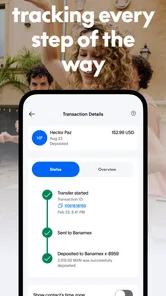
Another feature I found incredibly handy is the tracking option. You can track your transfers in real-time, which means no more sleepless nights wondering if your money made it to the right place. Plus, Xoom sends you notifications at every step of the transaction. Talk about peace of mind!
That tracking is especially useful when I’m coordinating with someone in another time zone. I can check the transfer status myself, then tell the recipient what to expect instead of asking them to keep checking their account. For a recurring household expense, I’d still leave some breathing room rather than relying on the quickest possible completion: a transfer app can make the process easier to follow, but it does not remove the need to plan around the recipient’s deadline.
Security and Reliability
Now, I know what you’re thinking—what about security? Well, Xoom doesn’t skimp on that front either. The app uses robust encryption and monitoring technology to safeguard your transactions. I felt pretty secure knowing that my financial data was in good hands.
Also, Xoom is backed by PayPal, which, as we all know, is a trusted name in the financial industry. This backing gives it an extra layer of reliability, making it a trustworthy option for sending money abroad.
Even with those safeguards, I’d treat recipient information as carefully as I would when making a bank transfer. I check names and destination details before confirming, and I avoid sending money in a rush if I have not verified who is asking. Notifications can help me follow a transaction, but they are not a substitute for checking that the request itself is genuine. That simple pause is worthwhile whenever money is crossing borders.
Using it for a real household need
Picture a relative getting in touch while I’m out, saying they need help with a bill that is due soon. I would first ask for the exact amount, destination and preferred way to receive the funds, then check whether that country’s relevant service is offered. If it is a bill payment, I’d verify the bill details with the person rather than relying on a hurried message alone. I’d review the final amount and delivery choice before authorizing anything, then use the tracking information to follow the transaction and let them know what I can see.
That workflow is more useful than simply tapping through quickly. It gives me a chance to catch a misspelled recipient detail, a mismatch between the requested amount and the amount entered, or a receiving method the relative cannot use. For a non-urgent remittance, I’d take the same steps without the pressure and compare the final recipient total with another route. The app can make coordination easier, but the sender still has to confirm that the request and details are right.
My Personal Experience
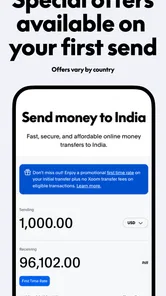
After using Xoom for a few transactions, I can say it’s been a game-changer for me. The speed of the transactions is impressive—some transfers were completed in minutes! It’s perfect for those last-minute situations where you need to send money urgently. Plus, the exchange rates are competitive, which is always a win.
However, it’s not all sunshine and rainbows. There’s a transaction fee involved, which can vary depending on the amount and destination. While this might be a bummer for some, I found the convenience and speed far outweighed the cost.
For me, the sensible comparison is not just “app versus bank.” A bank transfer may be a better fit if I already use it for the destination, prefer keeping everything in one place, or have time to compare its terms. A cash-transfer service can be more convenient when the recipient needs a supported local option, while a general payment app may be easier for someone already in the same payment network. I would compare the total amount the recipient gets, the fee, the exchange rate and the delivery method—not just the headline charge.
There is a practical trade-off between convenience and flexibility. Xoom is attractive when it can serve the recipient’s actual needs without making them learn a new process, but a bank or another service may win when both people already have a straightforward route between their accounts. A person sending money only within a familiar domestic payment network may not benefit from an international transfer app’s broader purpose. I’d choose based on the route and the person receiving the money, rather than treating one app as the default for every payment.
Who I’d Choose It For
I’d consider Xoom for a regular family remittance, an urgent one-off payment, or a supported mobile top-up or utility bill where handling the task in the same app saves effort. Imagine a relative messages that a household payment is due while you’re away from your computer: I could check whether that country and bill are supported, review the transaction details, and make the payment from my phone. The useful advantage is having the transfer and its progress in one place, not a guarantee that every destination or transaction will work the same way.
It is also a sensible candidate for someone who wants to handle occasional cross-border support from a phone and appreciates being able to follow a transfer afterward. A person who sends money regularly can benefit from having a consistent process, but should still treat every transfer as a fresh check: recipient details, destination, receiving method and total cost. That small pause matters most when a saved contact or familiar route makes it tempting to move through confirmation screens automatically.
The app is less compelling if you send money only occasionally and your bank already offers a convenient, lower-cost route, or if you need a payment method that Xoom does not support for the recipient. It may also be the wrong choice when you cannot tolerate any uncertainty about timing. I would not send at the last possible moment just because a past transfer was quick; delivery can depend on the specific transaction and destination. For a non-urgent payment, comparing options first is a sensible trade-off.
I’d skip it for a payment that must arrive by a hard deadline if I have not allowed time to check the route and understand the delivery choice. I’d also look elsewhere if the recipient cannot use the available method, if the full cost is not competitive for that particular transfer, or if I simply want to keep a domestic payment inside the bank or network I already use. Being available for many destinations does not mean every destination-specific need is a match.
Xoom is free to download, rated for Everyone, and has an average rating of 4.8 from around 352,000 ratings, with roughly 30,000 written reviews and over 5 million installs. It was released on August 8, 2012, and version 10.6.0 requires Android 10 or later. Those details give a sense of its established audience, but they do not decide whether it is right for a particular transfer; the route, recipient needs and complete cost matter more.
Before installing or switching, I’d check that the phone meets the Android requirement and think about how often I’ll use the service. It is free to download, but that does not mean every transfer is free; the transaction cost depends on the transfer details, so I’d review the amount shown for the specific route. Its broad audience and long presence make it a familiar option to consider, yet the best test is still whether it gives the recipient a useful method at a cost I’m comfortable with.
Before switching from another service, I’d make one low-pressure comparison using the same destination and amount, then look at the final recipient total and delivery choice. If the result works for both sides, saving the recipient’s details for a future transfer can make repeat use less fiddly; I would still review those details each time rather than confirming on autopilot. If Xoom does not support the recipient’s preferred method, there is little reason to force the switch.
That first comparison is also a good way to judge whether the change is worth the effort. I’d keep the old method available until the new route has worked for the recipient and the process feels clear, rather than moving every regular payment immediately. If the transfer involves a bill or a time-sensitive need, I would confirm with the recipient that the money arrived in a usable form before relying on the app for the next deadline. That is a modest check, but it helps distinguish a smooth interface from a genuinely suitable arrangement.
In conclusion, Xoom is a reliable, fast, and user-friendly app that makes international money transfers a breeze. If you’re looking for a way to send money across borders without the stress, I’d definitely recommend giving it a try. It’s an app that truly delivers on its promises.
My recommendation
I’d recommend giving Xoom a try when you need to send money internationally, the recipient can use one of its supported options, and the total cost makes sense for that route. Its appeal is the combination of a straightforward mobile process, transfer tracking and selected bill or phone services, rather than a promise that it will always beat a bank or another provider. Compare one real transfer carefully, and it can be a practical choice for helping friends and family across borders.
Xoom: Send Money & Transfer Frequently Asked Questions
Can I send money to friends and family with Xoom?
Yes. Xoom is designed to help users send money to friends and family, with transfers managed through its mobile app. Before confirming a transfer, review the recipient information and the details shown in the transaction flow so you can check that the payment is set up as intended. The app’s main purpose is sending money, rather than serving as a general budgeting tool.
What information should I have ready before making a transfer?
Before starting a transfer, it is useful to have the recipient’s details and your chosen payment method ready. Enter information carefully and review it before submitting, since errors in recipient details can complicate a payment. Xoom’s transfer process is designed to be handled in the app, and the on-screen steps help you provide the information needed for the transaction.
Can I use Xoom on my Android or iPhone?
Xoom is a finance app for mobile devices, so you can manage money transfers from a compatible phone rather than relying only on a computer. The current version is 10.6.0, and the minimum operating system requirement is version 10. Before downloading, check that your device meets that requirement and that the app is available for your device through its app store.
Is Xoom free to download, and is it suitable for everyone?
The Xoom app is free to download and is rated Everyone, making it suitable for a general audience. Keep in mind that a free app download does not mean that every money transfer is free; transaction fees may apply depending on the details of a payment. Xoom is developed by Xoom, a PayPal Service, and is intended for people who want to send money using an app.
What is Xoom and how does it work?
Xoom is a convenient digital platform, part of PayPal, designed for sending money, reloading phones, and paying bills internationally. Users can transfer funds to recipients in over 130 countries using just their mobile device or computer. The process is straightforward: sign up, link your bank account or credit card, and start sending money with just a few clicks.
Pros
- Fast international money transfers
- User-friendly interface
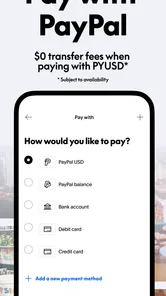
- Multiple payment methods available
- Competitive exchange rates
- Real-time tracking of transfers
Cons
- High fees for certain transfers
- Limited countries available
- Exchange rate margin can be high
- Customer service could be improved
- App requires internet connection