Writing Wizard - Learn Letters
- 353.00
- 4.1
- Installs
- 10.00M
- Price
- Free
Screenshots
Analysis by Reviewed
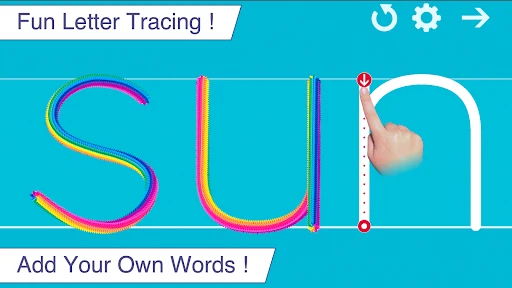
What makes a handwriting app useful is not simply putting letters on a screen; it is helping a child notice where a stroke begins and what direction it should take. That is the learning loop I focused on in Writing Wizard - Learn Letters. Its guided tracing turns a broad task—“practice writing”—into a small sequence a young learner can follow, which can make early practice feel less daunting.
Why guided tracing matters
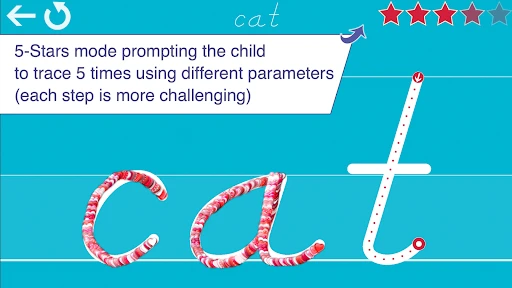
The arrows and numbered steps give children a visible route through each letter instead of asking them to guess at its shape. In practice, that can help a parent move from explaining every stroke to giving a short prompt and letting the child try. The feedback and animations make a completed attempt feel noticed, though they are encouragement rather than a substitute for an adult checking pencil grip or posture.
I would use the app in brief, supervised turns rather than treating it as a full handwriting lesson. A child can trace a few familiar letters, pause when attention dips, then return later. A stylus may feel closer to pencil practice, while finger tracing is an easy way to start; either way, the screen does not provide the same resistance or physical control as paper. For a child who needs to learn how a pencil moves across a page, I’d pair tracing with a few real-world marks on paper.
A practical routine for home
Imagine a child waiting for dinner while a parent is nearby. Instead of handing over an open-ended game, the parent can choose a small group of letters the child is currently learning and let them trace for a short stretch. Then the child can point out the letter on a book, label, or familiar object. That simple bridge from screen to surroundings gives the practice a purpose beyond completing an animation.
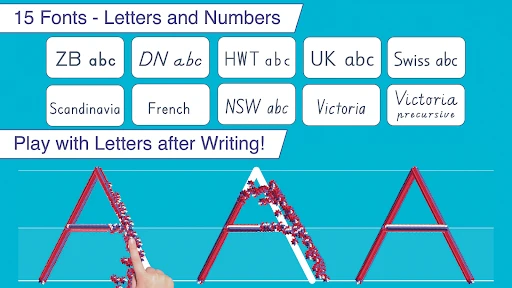
The adjustable letter selection is useful here: it lets an adult keep practice focused instead of presenting every option at once. I’d start with letters the child recognizes, then introduce a less familiar one when the routine feels comfortable. Changing the font can also be helpful, but I would avoid switching styles constantly; a young learner benefits from seeing a shape repeatedly before comparing how it can look in different typefaces.
Making the practice carry over
A useful next step is to turn a traced letter into a tiny observation task rather than simply repeating the same screen action. After practicing one shape, I might ask the child to find it in a familiar name or on packaging at home, then try drawing it once on paper. This does not need to become a test: the point is to help the child connect the screen’s stroke path with letters they encounter elsewhere. If the paper version looks different, that is a good moment to demonstrate the movement slowly rather than correct every detail at once.
It can also help to choose letters by what the child is trying to write, not only by alphabet order. A child eager to write their name may stay engaged longer when practice includes those letters, even if they have not worked through the whole alphabet. I would still keep the selection small, because jumping among many unfamiliar shapes can make it harder to remember where each stroke starts. For a shared device, setting up a short, predictable turn before handing it over is often more useful than asking a young child to decide what to practice independently.
More From Our News Desk

Clash of Clans Is Won Between the Battles

Android Auto Makes the Case for Quieter Car Software

MobiOffice: Transforming Mobile Productivity with Seamless Integration

EA SPORTS FC™ Mobile Soccer: Redefining Mobile Sports Gaming

How Microsoft OneDrive Became a Mobile Productivity Giant

How Google Translate Breaks Language Barriers Effortlessly
Where it fits among learning tools
Compared with alphabet videos, which are easy to watch but ask little of the child’s hand, guided tracing invites active practice. Compared with a blank worksheet, it supplies a clear stroke path and immediate response, but offers less tactile feedback and does not replace writing on paper. The little games can provide a change of pace, yet I would use them as a break around the tracing rather than assume that play alone builds consistent letter formation.
That distinction matters if a child is already comfortable recognizing letters but needs fluent handwriting, or if they are working on spacing and writing full sentences. In those cases, a workbook, ordinary paper, or direct help from a teacher may be a better main tool. The app is most useful for the earlier step: making letter shapes familiar and giving children a repeatable way to practice them.
For parents, a sensible approach is to keep the adult involved at the start: demonstrate one letter, watch how the child follows the route, and offer a gentle correction if they reverse or skip a stroke. Progress reports can help show what has been practiced, but I would treat them as a prompt for conversation rather than a verdict on a child’s ability. A child may need time, breaks, or a different kind of practice even when a report looks encouraging.
Choosing a session that suits the child
The most useful sessions are likely to be the ones with one clear purpose. For example, a parent could choose a couple of letters that have come up in a bedtime story, let the child trace them, and finish by spotting them on the page. If the child starts rushing, pressing hard on the screen, or tapping through just to reach the next animation, I would stop rather than insist on completing a set. Keeping the activity low-pressure matters more than filling a particular amount of time.
There is a trade-off between letting a child explore and keeping practice deliberate. The app’s choices can make it more adaptable than a fixed worksheet, but a young learner may not yet know which letters are worth working on or when to repeat one. An adult can make that decision in advance, then gradually hand over more choice as the child understands the routine. That small bit of preparation is what makes the customization practical rather than distracting.
Using the feedback thoughtfully
Immediate responses can make an attempt feel satisfying, but they can also encourage a child to focus on finishing rather than on how the hand moved. I would watch the tracing itself at first: does the child notice the arrows, begin at the intended point, and follow the route without hurrying? If not, I would model the stroke and let them try again only if they are still interested. A calm demonstration often teaches more than asking for repeated attempts while frustration is building.
The app’s progress information is most useful as a way to decide what to revisit, not as a scorecard. A child might complete an activity yet still need help transferring the shape to a pencil and paper. Conversely, a child who struggles with the on-screen movement may understand the letter in another format. I’d use what I observe alongside the reports, and change the activity when the child’s attention or comfort suggests the current approach is not working.
When it comes to teaching kids how to write, there's a sea of apps out there, but Writing Wizard - Learn Letters really caught my attention. As someone who’s always on the lookout for apps that make learning fun, this one seemed like a promising option. I decided to give it a spin and see if it truly delivers on its promise of making letter learning an enjoyable experience for the little ones.
Getting Started with Writing Wizard
The first thing that struck me about Writing Wizard was its colorful and engaging interface. As soon as you open the app, you're greeted with a vibrant menu that’s super easy to navigate, and that’s a big plus in my book. Kids are naturally drawn to bright colors, and this app seems to know that well. The initial setup is a breeze, and before you know it, you're ready to dive into the world of letters.
Features That Make Learning Fun
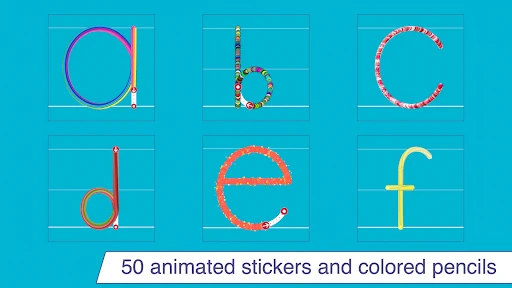
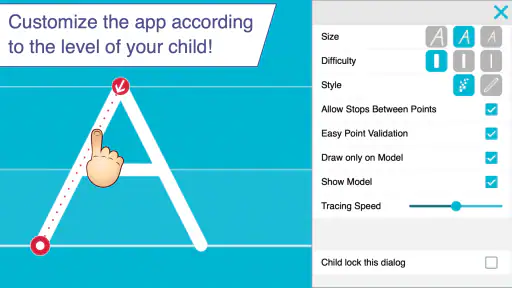
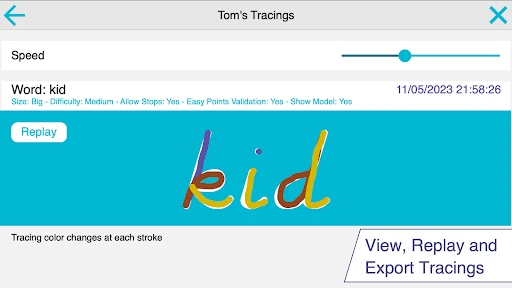
One of the standout features of Writing Wizard is its interactive tracing system. The app provides a step-by-step guide to tracing each letter, complete with arrows and numbers to follow. It’s almost like having a personal tutor on your device! Kids can trace letters with their fingers or a stylus, and the app offers instant feedback with delightful animations and sounds. This instant reward system keeps kids engaged and motivated to keep practicing.
The app doesn’t just stop at teaching kids how to write letters. It also includes a variety of games that reinforce the learning experience. These games are designed to improve a child’s fine motor skills while keeping them entertained. I found the games to be a clever way to break up the tracing exercises, offering a nice balance between learning and play.
Customization Options
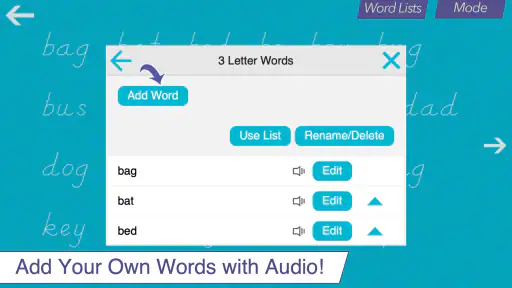
I was pleasantly surprised by the level of customization available in Writing Wizard. Parents can tailor the app to suit their child’s learning needs. You can adjust the difficulty level, choose which letters to focus on, and even change the font style. This flexibility means that whether your child is just starting to learn their ABCs or they're ready for more advanced practice, the app can grow with them.
Why It Stands Out
What really makes Writing Wizard shine is its ability to track progress. Parents can view detailed reports on their child’s performance, which is a fantastic feature for keeping tabs on their progress. It’s always reassuring to see tangible proof of improvement, and this feature adds a layer of accountability that I appreciate.
Moreover, the app supports multiple users, which is a godsend for families with more than one child. Each kid can have their own profile, complete with personalized settings and progress reports. This makes it easy to manage and track each child’s learning journey without any hassle.
Who will get the most from it
I think this is a better fit for a child who is curious about letters but needs a clear starting point than for one who already writes comfortably. It can also suit families who want a short activity an adult can guide without turning practice into a worksheet session. If a child dislikes tracing, becomes frustrated by repeated attempts, or needs help with broader reading skills, I would not make this the only learning tool.
Parents may wonder whether it is free to try and whether it is suitable for a shared family device. The app is free to download, with optional in-app purchases ranging from $0.99 to $4.99 per item, and its Everyone age rating makes it appropriate for a broad audience. L'Escapadou develops this education app, which has a 4.1 average from around 8,600 ratings and more than 10 million installs. It was released on January 8, 2015; version 4.0.0 requires Android 5.0 or later.
One practical trade-off is that customization asks the adult to make a few choices before handing the device over. That is helpful when a child needs targeted practice, but it can make a quick, unsupervised session less focused if the child jumps between letters or options. I’d set the letters in advance, keep the first session short, and ask the child to try the same shapes on paper afterward. That gives the screen activity a clear endpoint and makes it easier to notice whether the tracing is carrying over.
When another approach makes more sense
If the main goal is pencil control, pressure, or writing on ruled lines, I would reach for paper and a suitable writing tool first. Tracing on a screen can introduce a shape and its stroke order, but a finger glide does not teach exactly the same movements as holding a pencil. A simple worksheet may be less lively, yet it gives a child a chance to manage the space on a page and feel the pencil’s movement. The two approaches work best as companions, not rivals.
For a child who is mainly learning letter names and sounds, songs, books, and conversation may be a better starting point than repeated tracing. This app’s focus is the physical route through written forms, so it is not a complete reading curriculum. I would skip it as the primary tool if the child is not interested in forming letters yet, needs support with language more broadly, or is already ready to write words and sentences. In those situations, an adult-led activity or a more advanced writing resource is likely to match the need better.
A low-pressure way to try it
Because the app is free to download, a parent can see whether its tracing approach suits the child before deciding whether any optional purchase is worthwhile. I would start by setting a small selection of familiar letters and sitting beside the child for the first few attempts. That lets an adult see whether the arrows make sense to them and whether the animations motivate them or pull attention away from the movement. If the child enjoys the routine, it can become a short practice option; if not, there is little reason to turn it into a battle.
Families sharing a device can make the handoff smoother by deciding whose turn it is and what the session is for before opening the activity. Separate user profiles and progress reports can help keep each child’s practice distinct, while a parent can still guide the choice of letters. I would also avoid treating one child’s pace as a standard for another’s. The feature is there to support practice, not to rank siblings or make learning feel like a competition.
Overall, I’d recommend it as a focused introduction to forming letters, not as a replacement for handwriting practice with a pencil or a broader literacy routine. Its strongest point is the guided path through each shape; its limits are the limits of tracing on a screen. If that is the specific gap you want to address, it is a friendly tool to try, while children ready for sentences or more tactile instruction will likely benefit more from paper-based work and an adult’s direct help.
Writing Wizard - Learn Letters Frequently Asked Questions
Is Writing Wizard - Learn Letters free to download, and are there in-app purchases?
Writing Wizard - Learn Letters is free to download, so families can try the app before deciding whether to make a purchase. It also offers in-app purchases priced from $0.99 to $4.99 per item. Since young children may use the device, parents can review purchase settings and supervise any buying decisions.
What is Writing Wizard - Learn Letters?
Writing Wizard - Learn Letters is an educational app designed to help young children learn how to write letters. It offers a fun and interactive way for kids to practice handwriting skills through engaging animations and sounds. The app is suitable for toddlers and preschoolers, making learning an enjoyable experience.
How does Writing Wizard - Learn Letters help children learn?
The app uses a step-by-step approach to teach children how to write each letter of the alphabet. It provides animated demonstrations and allows kids to trace the letters on the screen. With colorful graphics and playful sounds, the app keeps children engaged while they practice their handwriting skills. Additionally, parents can customize the experience to suit their child’s learning pace.
Is Writing Wizard - Learn Letters suitable for all age groups?
While Writing Wizard - Learn Letters is primarily designed for preschoolers and young children, it can be beneficial for any beginner learning to write. The app’s user-friendly interface and adjustable difficulty levels make it adaptable for various ages. However, it’s most effective for children aged 3 to 6, who are just starting to learn the basics of writing.
Can parents track their child's progress in Writing Wizard - Learn Letters?
Yes, Writing Wizard - Learn Letters includes features that allow parents to monitor their child’s progress. The app provides detailed reports on the child’s handwriting practice, including which letters have been mastered and which need more practice. This feature enables parents to identify areas where their child may need additional support and tailor their learning accordingly.
Pros
- Interactive letter tracing feature.
- Engaging animations keep kids entertained.
- Supports multiple alphabet styles.
- Customizable skill levels and settings.
- Progress tracking for parents.
Cons
- Limited free version content.
- Requires internet for full features.
- Frequent in-app purchase prompts.
- May have ads in free version.
- Some features require subscription.
- Category
- Education
- Version
- 4.0.0