WordBit Inglés
- 4.66K
- 4.5
- Installs
- 10.00M
- Price
- Free

Screenshots
Analysis by Reviewed
Hey there, language learners! So, I recently stumbled upon an app that I think is a game-changer for anyone trying to learn English. It's called WordBit Inglés, and it's been a pretty interesting ride exploring all its features. Let me break it down for you!
What to expect from a lock-screen vocabulary app
WordBit Inglés takes a different route from a traditional course: instead of asking you to set aside a full study session, it places English learning in the small moments when you open your phone. That can make vocabulary practice feel easy to begin, especially if your day is already full. I would think of it as a repeatable prompt to notice and revisit words, not as a complete substitute for lessons in grammar, conversation, listening, or writing.
That distinction matters when deciding whether it fits. If you want a low-pressure way to add English exposure to an existing routine, this approach has a clear appeal. If you need structured teaching from the alphabet onward, detailed explanations of grammar, or conversation with a tutor, a course built around those goals is likely a better main tool. I see the strongest use for learners who already have some reason to use English and want vocabulary to stay present between other activities.
WordBit is an education app from WordBit, and it is free. It has a 4.5 average from around 43,000 ratings, with more than 10 million installs, which suggests that the lock-screen idea has found a broad audience. It is rated for Everyone, and its current version is 1.7.1.4. Those figures give useful context, but they do not tell you whether the routine will suit your own phone habits; the practical test is whether the prompts help you remember rather than simply becoming another thing to dismiss.
I would also set a modest first goal. Do not judge your English by how many words you see in a day. A more meaningful early win is recognizing a word later in a message, article, or conversation and recalling what it means without reopening the app. That small transfer from prompt to real life is what makes this style of practice worthwhile.
Unlocking Language Learning on Your Lock Screen
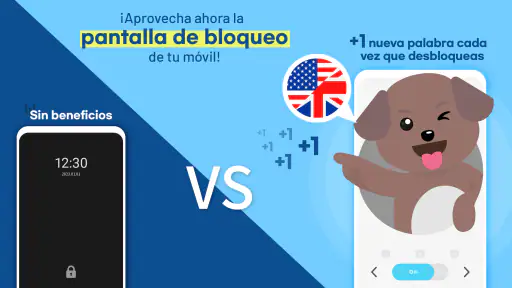
The first thing that caught my attention about WordBit Inglés is its unique approach to language learning. Imagine turning your phone into a language tutor every time you unlock it. Sounds intriguing, right? This app uses your lock screen to teach you new words and phrases, making it super convenient to learn on the go. It's like having a mini English lesson every time you check your messages!
First setup: make the habit feel manageable
When you first try a lock-screen learning app, I recommend treating setup as a chance to decide how much interruption you actually want. Keep your expectations simple: the goal is to make a short vocabulary encounter fit naturally into phone use, not to transform every unlock into a formal study session. If you are already checking your phone frequently, the extra exposure may feel effortless; if you prefer a quiet, uncluttered lock screen, it may feel intrusive instead.
More From Our News Desk

Weather by Xiaomi Review: Clear at a Glance, Less Clear Up Close

X Under Pressure: Can It Recover When Posting Goes Wrong?

Clash of Clans Is Won Between the Battles

Android Auto Makes the Case for Quieter Car Software

MobiOffice: Transforming Mobile Productivity with Seamless Integration

EA SPORTS FC™ Mobile Soccer: Redefining Mobile Sports Gaming
A useful approach is to pay attention during the first few days to whether you pause and read the material or swipe past it automatically. If you keep dismissing the prompt, that is not a failure of willpower; it is a sign that the routine needs adjusting or that this format does not match your habits. The app’s core idea depends on attention, so a smaller number of genuinely noticed encounters is more valuable than seeing a word repeatedly without processing it.
Also consider what else you use your lock screen for. People who rely on quick glances for messages, navigation, or work notifications may find an added learning prompt competes for attention. In that case, use the app as a brief pause when convenient rather than expecting yourself to study every time. The best setup is the one you can tolerate consistently, not the most ambitious routine you abandon after a busy morning.
Features that Make Learning Fun
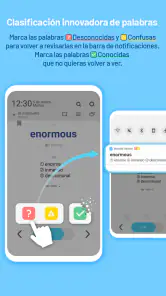
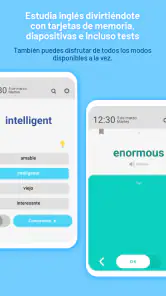
One of the standout features of this app is its interactive learning experience. It’s not just about staring at words; it engages you with quizzes and flashcards that make memorizing vocabulary a breeze. Plus, the app adjusts the difficulty level based on your progress, so you're always challenged but never overwhelmed.
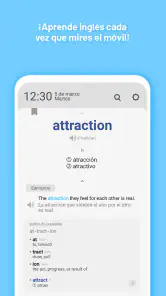
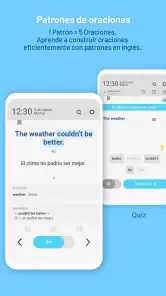
Another cool feature is the contextual learning. WordBit ensures that you understand how words are used in real-life situations, which is crucial for truly mastering a language. I found this particularly helpful because it goes beyond basic vocabulary and helps you understand the nuances of English.
For a first successful action, I would make the initial session deliberately practical. When a word appears, stop for a moment and try to recall its meaning before looking at the answer. If you already know it, think of a sentence you might genuinely say or read; if it is unfamiliar, connect it to a situation where it could come up. This takes only a little more effort than glancing at a translation, but it turns a passive encounter into a memory test.
Then look for one opportunity to recognize that word outside the app. It might show up in a message, a show, a work document, or a conversation. You do not have to force it into speech just to prove you learned it. The useful signal is being able to understand it in context, and later retrieve it when you need it. That is a more realistic first milestone than expecting a single exposure to make a word permanent.
The lock-screen format also changes how I would compare WordBit with familiar alternatives. A standard flashcard app usually asks you to open it and deliberately start a review, which can offer a more focused session but depends on remembering to begin. A textbook or structured course gives a clearer sequence and more complete instruction, though it asks for more dedicated time. WordBit’s advantage is convenience and repeated contact; its trade-off is that short prompts cannot provide the same depth as a lesson built around explanation and practice.
Common confusion: exposure is not the same as fluency
It is easy to mistake frequent vocabulary prompts for a complete language-learning plan. I would not. Knowing a word’s meaning is only one part of using English well: you may also need to know how it sounds, what words commonly appear beside it, how formal it is, and how its meaning changes in different situations. A quick encounter can introduce or reinforce vocabulary, but it cannot by itself guarantee that you can use the word naturally in a conversation.
When a word seems confusing, avoid treating a first glance as a test you have passed or failed. Ask yourself whether you recognized it, remembered it after a short pause, and understood how it fits into an example. Those are different levels of knowledge. Returning to a word you missed is useful; repeatedly tapping through familiar items without thinking is less so. I would use the prompts to identify what deserves more attention, then take difficult words into a separate reading or study session.
Another point worth keeping in mind is that the lock screen can interrupt a task. If you are using your phone in a hurry, it may be better to move on than to force a lesson into the moment. The feature works best when it meets spare attention, such as waiting for a ride or taking a short break. It is less suited to someone who needs the screen to remain purely functional and wants no learning element in that space.
For a realistic routine, imagine checking your phone while waiting for a kettle to boil. You notice a prompt, test yourself on the meaning, and move on with your morning. Later, if the same word appears in something you read, you recognize it and understand the sentence more quickly. That is a believable benefit of the app: not instant fluency, but small encounters that can make English feel more familiar without requiring you to reserve a long block of time.
Personalized Learning Journey
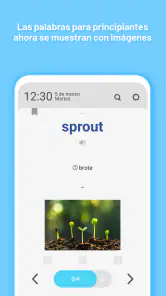
What I really appreciate about WordBit Inglés is the personalization aspect. The app tailors the learning process to your personal needs, which is perfect for busy bees like me who need to fit learning into a hectic schedule. Whether you’re a beginner or looking to polish your skills, WordBit has got you covered!
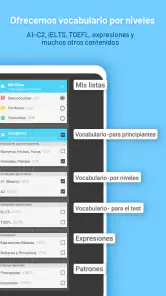
I would still be cautious about assuming that one vocabulary routine fits every level. A beginner may appreciate repeated encounters with common words, while someone already comfortable with everyday English may want more advanced material, detailed grammar feedback, or practice speaking at length. The same quick format can support both as a supplement, but it will not necessarily meet both learners’ main needs equally well. If you are preparing for a specific exam or need English for a specialized job, pair it with resources aimed directly at that purpose.
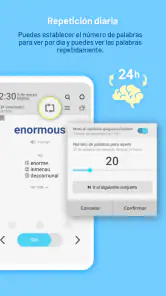
The app also keeps track of your progress and sends reminders to keep you motivated. It's like having a personal coach in your pocket. And let's be honest, who doesn't need a little nudge now and then?
For a more useful sense of progress, I would judge the habit by recall and recognition rather than reminders alone. A reminder can bring you back to the app, but learning happens when you retrieve a word and understand it later. If the nudges help you resume after a few busy days, they can be useful. If they start to feel like another obligation, take that as a cue to make the routine lighter instead of letting a streak or notification become the goal.
This is also where the app’s strengths and limits become clearest. Its prompts can help turn otherwise empty phone moments into brief review opportunities, and the interactive format gives you something to do with a word beyond simply seeing it. On the other hand, frequent phone checking is not automatically good study time. If you are distracted, tired, or rushing, a prompt may pass without leaving a memory. I would rather have a few attentive encounters than expect every unlock to count as a lesson.
Who will benefit, and when another tool is better
I can see WordBit working particularly well for someone who wants to build a vocabulary habit but struggles to sit down for a conventional study session. It may also suit a learner who already watches English-language media or reads in English and wants more chances to encounter useful words during the day. In both cases, it acts as a companion to real language use rather than the whole plan.
I would recommend a different primary option if your priority is speaking practice, pronunciation coaching, long-form listening, or a step-by-step grammar course. Those goals need sustained activities that a lock-screen prompt is not designed to replace. Someone who dislikes interruptions or keeps their phone locked away during the day may also get little benefit from this particular format. That is not a weakness for every learner; it is simply a mismatch between the app’s method and that person’s routine.
Compared with opening a dictionary whenever you meet an unfamiliar word, WordBit can make vocabulary practice more regular because it brings learning to you. But a dictionary is still better for checking a precise meaning, pronunciation, or usage when you are reading a difficult passage. I would use the two for different jobs: let the lock-screen prompts encourage repeated contact, and consult a reference or fuller lesson when a word’s meaning is unclear or important.
Wrapping Up My Experience
In conclusion, if you're on the hunt for a fun and effective way to learn English, WordBit Inglés might just be your new best friend. With its innovative lock screen feature, engaging learning tools, and personalized approach, it's a fantastic option for anyone looking to improve their language skills without dedicating hours every day.
So, why not give it a go? You might find yourself picking up new words faster than you ever thought possible. Happy learning!
My practical advice is to try it with one modest aim: notice a prompt, make an honest attempt to remember the word, and see whether it becomes easier to recognize later. If that feels natural, keep it alongside reading, listening, or conversation practice. If the lock screen becomes noise, or you need deeper instruction than quick vocabulary encounters can offer, choose a more structured course as your main resource. For me, WordBit Inglés is most convincing as a small, repeatable companion to English learning: convenient when it fits your day, but not a replacement for using the language.
WordBit Inglés Frequently Asked Questions
Can WordBit Inglés help me learn without setting aside a separate study session?
WordBit Inglés is designed to bring English vocabulary into ordinary phone use, so practice can happen in brief moments rather than only during a planned lesson. Its store summary describes the idea as learning every time you open your phone. This approach may suit learners who like frequent, short encounters with words, while those who prefer structured lessons may want to use it alongside other study methods.
Who develops WordBit Inglés, and what kind of app is it?
WordBit Inglés is an education app developed by WordBit, focused on learning English vocabulary through repeated exposure during everyday phone use. Its distinctive format makes vocabulary practice part of a routine many people already follow. If you are comparing language-learning tools, consider whether this word-focused approach matches your goals and whether short, recurring prompts fit the way you prefer to study.
What is the current version of WordBit Inglés, and when was it released?
WordBit Inglés was released on July 17, 2017, and its current version is 1.7.1.4. These details can help you identify the app and check that you are considering the version currently available for your device. It is an established vocabulary-learning option, built around the idea of turning routine phone use into opportunities to encounter English words.
Is WordBit Inglés free, and what age group can use it?
WordBit Inglés is a free education app from WordBit, designed for English vocabulary learning. Its content rating is Everyone, so it is suitable for a broad range of users. The learning approach is built around brief encounters with words during everyday phone use, which may make it an approachable option for learners who want to fit practice into their routine.
What is WordBit Inglés and how does it work?
WordBit Inglés is a language learning app designed to help users improve their English vocabulary effortlessly. The app operates by displaying new words and phrases on your phone's lock screen, turning idle moments into valuable learning opportunities. This method ensures users are consistently exposed to new vocabulary each time they unlock their phones, making language acquisition more natural and frequent.
Pros
- User-friendly interface for beginners
- Interactive learning with real-time feedback
- Offline mode available for convenience
- Diverse exercises to enhance vocabulary
- Progress tracking for personalized learning
Cons
- Ads can be intrusive at times
- Limited features in free version
- Requires internet for some features
- May not suit advanced learners
- Occasional app crashes reported
- Category
- Education
- Version
- 1.7.1.4











