Woofz - Puppy and Dog Training
- 1.43K
- 4.4
- Installs
- 1.00M
- Price
- Free

Screenshots




Analysis by Reviewed
Choosing a dog-training app is less about finding the biggest library of tricks and more about finding a routine you’ll actually follow. I’d ask whether you want a guided starting point, help keeping lessons consistent, or advice for a specific behavior that may need hands-on support. Woofz - Puppy and Dog Training is an education app from nove8 that aims to make everyday training easier to organize, especially for people still learning how to teach a dog.
Pick a routine you can keep
New owners often have the same practical questions: what should I teach first, how long should practice take, and how do I know whether my dog is making progress? A structured app can help turn those questions into small actions rather than leaving you to search through scattered videos and posts. Woofz is free to download, though it offers in-app purchases ranging from $2.99 to $99.99 per item, so I’d check the purchase options before treating every part of the experience as included.
It’s a better fit for someone who wants prompts and lessons to support their own practice than for someone expecting an app to train the dog on their behalf. A trainer can watch your timing and your dog’s body language in person; a phone cannot. If your dog’s behavior is severe, suddenly changing, or creating a safety concern, I’d seek qualified professional help rather than relying on app lessons alone.
Training Made Fun and Easy
The first thing that struck me about Woofz - Puppy and Dog Training is how user-friendly it is. The app welcomes you with an intuitive interface that even your dog might find easy to navigate (just kidding, but you get the point). It's designed to be straightforward so that you can focus more on training rather than figuring out how the app works.
A Tailored Experience
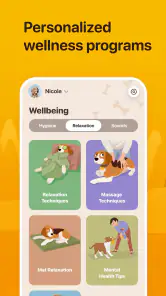
One of the standout features is the personalized training plans. When you first start, the app asks about your dog's age, breed, and any specific training goals you have in mind. This information is then used to create a customized training plan tailored specifically for your furry friend. It feels like having a personal dog trainer in your pocket!
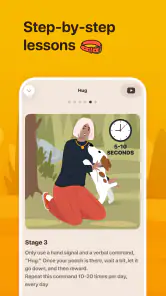
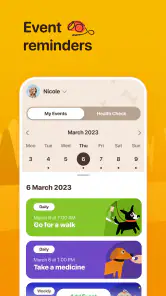
Each session is broken down into bite-sized lessons, making it easy to fit training into your busy schedule. And let me tell you, consistency is key when it comes to dog training. The app even reminds you when it's time for the next lesson, so there's no excuse for skipping!
A routine that works at home and outside
A useful way to apply short lessons is to attach them to something you already do. For example, after breakfast, I’d set aside a few calm minutes for one skill, then repeat it later in a different room. When the dog can respond in a quiet space, try the same cue near a mild distraction, such as a family member moving around. That gradual change gives you a more realistic sense of whether the behavior is sticking than simply repeating it in one familiar spot.
More From Our News Desk

Clash of Clans Is Won Between the Battles

Android Auto Makes the Case for Quieter Car Software

MobiOffice: Transforming Mobile Productivity with Seamless Integration

EA SPORTS FC™ Mobile Soccer: Redefining Mobile Sports Gaming

How Microsoft OneDrive Became a Mobile Productivity Giant

How Google Translate Breaks Language Barriers Effortlessly
For a puppy, this kind of rhythm can make practice feel manageable alongside walks, meals, and rest. For an adult dog, it can help you revisit basics without turning every interaction into a formal lesson. I’d keep treats ready and stop while the dog is still engaged; a reminder can prompt you to practise, but it can’t judge whether your dog is tired, overstimulated, or ready to move on.
Interactive Learning
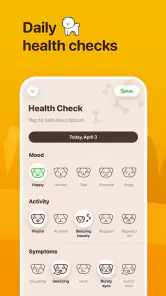
The learning process is made engaging with interactive videos and step-by-step guides. You can track your dog's progress, which adds a sense of accomplishment for both you and your pup. Plus, the positive reinforcement techniques are a win-win; your dog gets a treat, and you get a well-behaved companion.
Another cool feature is the app's soundboard, which includes various sounds to help desensitize your dog to everyday noises. This is a lifesaver for those pups who get startled easily, making the app not just about obedience but overall comfort and confidence for your dog.
Use the soundboard thoughtfully
I’d treat sound practice as a gradual exercise, not a test of how much noise a dog can tolerate. Start quietly and watch for signs of tension; if your dog retreats, freezes, or stops taking treats, pause and make the next attempt easier. The goal is to build a calm association, and rushing the volume or duration can work against that. Everyday household sounds can also be introduced naturally, so the soundboard is most useful as a controlled supplement rather than a replacement for real-world experience.
One practical way to use it is to pick a sound that has a clear connection to a daily situation, then practise when the dog is already settled rather than immediately before a stressful event. Keep the session brief and pair the sound with something pleasant if your dog remains relaxed. If you see worry building, stop instead of repeating the sound until the dog “gets used to it.” That distinction matters: exposure is useful only when it stays manageable for the animal.
Where other approaches may suit you better
Compared with free videos or general dog-care articles, Woofz’s appeal is having lessons and progress in one place rather than assembling a plan yourself. That convenience matters if you’re new to training and easily overwhelmed by contradictory advice. On the other hand, a book or a carefully chosen video series may suit you better if you prefer to learn without reminders or a subscription-style purchase menu. Group classes or one-to-one coaching are stronger options when you need feedback on leash handling, fear, reactivity, or a household problem that depends on context.
These alternatives solve different problems, so I wouldn’t treat them as an all-or-nothing choice. An app can help you remember what to practise between classes, while a trainer can spot details a screen cannot, such as whether your cue is too late or the environment is too distracting. If you already have a reliable plan from a professional, the app may be unnecessary unless its lesson structure helps you stay on track. If you mainly want a quick answer to one narrow question, searching a trusted source may be faster than following a broader routine.
There is also a practical handoff to consider if more than one person cares for the dog. Agree on the cue words and rewards before practising, then use the app as a shared reference rather than letting everyone teach a different version of the same behavior. Progress tracking is only meaningful when the people practising are reasonably consistent, and it should reflect what happens in daily life, not just a good session at home.
Community and Support
Training a dog can sometimes feel overwhelming, but with Woofz, you're never alone. The app includes a community feature where you can connect with other dog owners, share tips, and even arrange puppy playdates. It's like having a social network just for dog parents!
Also, if you ever hit a snag, there's a comprehensive FAQ section and customer support ready to help. It's reassuring to know there's support available at the tap of a button.
I’d use community advice as a source of ideas, not as a substitute for checking whether a suggestion is safe and appropriate for my own dog. Dogs differ in confidence, health, and past experience, and a tip that sounds simple may not translate well to another household. For a playdate, the people involved still need to make sensible choices about supervision and whether the dogs seem comfortable; arranging a meeting does not guarantee they will be a good match.
Make progress easier to judge
When a lesson feels successful, it is tempting to move on immediately. I find it more useful to notice the conditions under which the dog succeeded: how quiet the room was, how close I stood, and whether the cue worked only after a hand gesture. Those small observations help you decide what to repeat next time. A progress marker is a helpful record, but it cannot explain why a behavior worked or whether it will hold up on a busy pavement.
For an everyday example, imagine a puppy who gets excited when the doorbell rings. You could use a calm moment to practise a basic response from the app, then gradually test it with a family member making a mild version of the sound. I would not begin with a real visitor arriving and expect a new cue to solve everything. Keeping practice separate from the pressure of the actual event makes it easier to reward the behavior you want and notice when the setup is too difficult.
What to expect before you commit
The app is rated Everyone and has an average rating of 4.4 from around 46,000 ratings, with over 1 million installs. It was released in December 2020, and version 3.2.3 requires iOS 12 or later. Those figures suggest it has reached many dog owners, but popularity alone won’t tell you whether its teaching style suits your dog or your household. I’d try the free experience first, see whether the lesson format feels practical, and only then decide whether any paid option is worthwhile.
For someone deciding whether to pay, I’d first identify the exact gap they want the app to fill. If the free experience already provides enough structure for a simple routine, there may be no reason to spend more. If a paid option is presented, read what it covers and whether the commitment matches your needs before confirming. The range of possible in-app purchase prices is broad, so it is sensible to treat each purchase as a separate decision rather than assuming that downloading the app includes every lesson or service.
It is also worth thinking about the person who will do most of the training. If that is you, reminders and guided steps may make practice easier to remember. If several family members take turns, agree on one cue and one reward approach first, then decide who will record progress. Otherwise, a tracker can create a neat-looking history without showing a consistent training routine. The app can organize your effort; it cannot make different household habits line up by itself.
Switch without confusing your dog
If you switch from another training method, you don’t need to abandon what already works. Keep familiar cues and rewards, choose one goal to focus on, and use the app to add structure rather than restarting everything at once. That makes it easier to notice whether the routine is helping, while reducing confusion for your dog. The main cost of switching is not learning a new interface; it’s keeping your approach consistent across the app, home, and walks.
I’d also avoid changing several things at once. If you introduce a new cue, change the reward, and move practice to a distracting location in the same session, it becomes hard to tell what helped or what made the task difficult. Keep the familiar part of your routine stable while testing one adjustment. That simple approach makes the app’s guidance easier to evaluate and gives your dog a clearer experience.
Who will get the most from it
I’d recommend trying Woofz if you’re a first-time owner, have a puppy, or want a more organized way to revisit everyday skills. It is especially appealing if you learn best from short demonstrations and appreciate a nudge to practise rather than having to design every session yourself. The soundboard and progress tracking add distinct uses beyond a basic list of commands, although both work best when you pay attention to your dog’s response rather than treating a completed activity as proof of success.
I’d be less likely to choose it as my main solution if I needed direct observation, tailored help for a serious behavior concern, or a class where a trainer can correct my technique in the moment. It may also be a poor match if reminders feel intrusive or you prefer to build your own training plan from books and selected videos. In those cases, the better choice is the one that gives you the kind of feedback and learning format you’ll actually use.
In conclusion, Woofz - Puppy and Dog Training is more than just an app; it's a comprehensive guide to raising a happy, well-behaved dog. Whether you're a first-time dog owner or a seasoned pro, there's something here for everyone. So, if you're looking to make training a fun and rewarding experience, Woofz might just be your new best friend (after your dog, of course)!
Woofz - Puppy and Dog Training Frequently Asked Questions
Is Woofz suitable for owners who want to train at home?
Woofz is an education app centered on puppy and dog training, and its store summary highlights teaching pets, tracking puppies, and learning easy dog tricks. That makes it worth considering if you want to explore training guidance as part of your routine at home. The app is free to download, while some in-app purchases are available.
Who develops Woofz, and is it a well-established app?
Woofz is developed by nove8 and is listed in the Education category. It has more than one million installs and an average rating of 4.4 from around 46,000 ratings, suggesting that many users have tried it. Those figures can help you judge its reach, though an app’s usefulness will still depend on whether its approach suits you and your dog.
What is Woofz, and what can I use it for?
Woofz is an education app focused on puppy and dog training. Its store summary describes it as a way to teach your pet, with a puppy tracker and an easy dog-tricks trainer. It may suit owners looking for training guidance and a way to keep track of their dog’s progress. The app is free to download, with in-app purchases available.
What features does Woofz offer for puppy and dog training?
Woofz provides a comprehensive set of features designed to help you train your puppy or dog effectively. The app includes interactive training sessions, a variety of exercises tailored to different breeds, and positive reinforcement techniques. Additionally, it offers progress tracking and reminders to keep your training on schedule, making it a useful tool for dog owners.
Is Woofz suitable for all dog breeds and ages?
Yes, Woofz is designed to cater to a wide range of dog breeds and ages, from puppies to older dogs. The app customizes training plans based on your dog's specific needs and characteristics. Whether you have a small breed puppy or a large senior dog, Woofz provides exercises and tips to accommodate their unique requirements.
Pros
- Comprehensive training modules
- Suitable for all dog breeds
- User-friendly interface
- Engaging and interactive content
- Progress tracking for dogs
Cons
- Some features require in-app purchases
- Limited offline functionality
- Occasional app glitches
- Requires consistent internet connection
- Might not cover all behavioral issues

- Category
- Education
- Version
- 3.2.3