Whatnot: Shop, sell, connect
- 14.46K
- 4.6
- Installs
- 5.00M
- Price
- Free

Screenshots

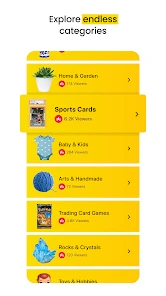



Analysis by Reviewed
Have you ever stumbled upon an app that makes you go, "Wow, where have you been all my life?" Well, let me introduce you to Whatnot: Shop, sell, connect. This app is like a virtual marketplace on steroids, and let me tell you, it's quite the game-changer for anyone who loves buying and selling unique items!
First, know what kind of shopping you’re getting into
Whatnot is a free shopping app from Whatnot Inc., built around live selling rather than the familiar browse, compare, and check out routine of a standard marketplace. That difference is the main reason I’d try it—and the main reason I wouldn’t recommend it to everyone. Its 4.6 average from around 210,000 ratings and more than 5 million installs suggest plenty of people enjoy the format, but those numbers matter less than whether you like watching a sale unfold while you decide.
The app is rated Mature 17+, so it is intended for an adult audience. It first arrived in December 2019, and version 25.49.6 supports devices running OS 9 or later. Those details are worth checking before troubleshooting: if the app cannot be installed or updated, confirming that your device meets the minimum system requirement is a sensible first step.
Get Ready to Dive into the World of Whatnot
Alright, so picture this: a vibrant community where you can shop for collectibles, discover cool items, and even connect with other enthusiasts. That's what Whatnot brings to the table. It's not just your average marketplace app; it's a social platform that combines the thrill of auctions with the camaraderie of a community.
Shopping at Its Finest
First off, let's talk about shopping. Whether you're into rare vinyl records, vintage toys, or those quirky comic books, Whatnot has got you covered. The app is designed to create an engaging shopping experience with live auctions that are as exciting as a bidding war on a coveted collector's item. You can literally feel the adrenaline rush as you bid against fellow collectors, hoping to snag that gem you've been eyeing.
Sell Like a Pro
If you're anything like me and have a stash of collectibles you want to part with, Whatnot makes selling a breeze. You can set up your own auctions, showcase your items in real-time, and even interact with potential buyers. It's like hosting your own little shop without leaving the comfort of your home. Plus, the app's intuitive interface makes the whole process feel seamless, so you can focus on what matters most—connecting with your audience.
Connect and Engage
But wait, there's more! Whatnot isn't just about buying and selling; it's about building connections. The app encourages users to engage with one another, share stories about their collections, and even offer tips on how to score the best deals. It's like being part of a community where everyone shares your passion, and trust me, it makes the whole experience a lot more enjoyable.
More From Our News Desk

Weather by Xiaomi Review: Clear at a Glance, Less Clear Up Close

X Under Pressure: Can It Recover When Posting Goes Wrong?

Clash of Clans Is Won Between the Battles

Android Auto Makes the Case for Quieter Car Software

MobiOffice: Transforming Mobile Productivity with Seamless Integration

EA SPORTS FC™ Mobile Soccer: Redefining Mobile Sports Gaming
Another neat feature is the ability to follow your favorite sellers and receive notifications when they go live. It's a great way to ensure you never miss out on those exclusive items or limited-time deals. Plus, the live chat feature allows you to communicate directly with sellers, ask questions, and get a better sense of what you're buying.
Make a live sale work around your day
A useful way to approach the live format is to treat it as an event, not background browsing. Say you collect vintage toys and have a few minutes during lunch: check which sellers you already follow, join a stream that matches your collecting interests, and decide in advance what kind of item is worth your attention. Live chat can help you ask about a detail before bidding, but it is still wise to pause and inspect what is shown rather than letting a fast-moving room set your pace.
That small routine also helps with notifications. Following many sellers can make alerts less useful, so I’d start with the handful whose inventory genuinely interests me and adjust from there. If you miss a live sale, that does not necessarily mean the whole marketplace is a poor fit; it may simply mean live viewing is not convenient at that moment. The trade-off is clear: scheduled attention can make the experience lively, while people who prefer to shop silently and at their own pace may find a conventional listing-based marketplace easier.
Where setup and selling can feel less simple
Browsing as a buyer is the low-commitment way to learn the app. Selling asks more of you: you need items worth presenting, a clear way to show them in real time, and enough time to engage with viewers while the sale is happening. I would not begin by putting an entire collection into a live event. Pick a small group of items you can describe confidently, keep their details close at hand, and work out the order you want to show them before starting. That preparation can make a live presentation feel less rushed.
If a screen seems stuck or a stream is not behaving as expected, I’d start with ordinary checks rather than assume the account or item is the problem: confirm the connection is working, close and reopen the app, and make sure the device has room to run normally. For an update or installation issue, check the operating-system requirement and try again through the relevant app store. These are basic recovery steps, not a guarantee; if the issue persists, it may be outside what a quick restart can fix.
Separate app friction from shopping decisions
Not every disappointment is a technical fault. A seller may move quickly, an item may not be shown from the angle you need, or you may simply miss the moment to bid. In those situations, I’d ask a focused question in chat when there is time, and avoid bidding if a detail that matters to me remains unclear. The social energy is part of Whatnot’s appeal, but it can also create pressure to decide quickly. Staying within a personal spending limit is a more useful safeguard than treating a lively auction as a reason to buy.
Compared with ordinary shopping apps, Whatnot puts the presenter and real-time interaction at the center. That can be a real advantage for collectibles, where seeing an item demonstrated and hearing a seller discuss it may be more engaging than scanning a static listing. On the other hand, a regular marketplace is usually better for quick price comparison, quiet browsing, and purchases where I already know the exact product I want. Whatnot suits discovery and shared enthusiasm; it is less suited to purely functional shopping.
Choose it for discovery, not every shopping errand
The strongest reason to use Whatnot is that the live presentation can make browsing feel like visiting a specialist seller rather than searching a huge catalogue. That suits someone who enjoys learning about an item as it is shown, or who wants the chance to ask a question before deciding. It is less compelling when the purchase is routine. If I need a particular household item quickly, a conventional store app with searchable listings and straightforward comparison is likely the more direct route.
There is also a useful distinction between watching for entertainment and shopping with a specific goal. I can join a stream to see what turns up, but that open-ended browsing can make it harder to notice how much time I am spending or whether an item truly fits my collection. When I have a particular collectible in mind, I’d decide beforehand what condition details matter and what I am willing to pay. That simple boundary keeps the fun of discovery from taking over the decision.
A realistic first visit
Imagine I have a short break and want to look for a vintage toy. I would open the app, focus on sellers whose interests match mine, and watch long enough to understand how they present items. If something catches my eye, I would use chat for one specific question—such as asking for a closer look at a detail—rather than firing off several vague messages while the sale moves on. If I cannot get the information I need, I would let the item pass. Missing one opportunity is better than making a rushed choice I regret.
For a first session, browsing without committing to a purchase is a practical way to learn the pace. Notice whether you enjoy listening to sellers, following the action, and deciding in real time. If you do, following a few relevant sellers can make later visits more focused. If you find the format tiring, there is no need to force it: the app’s main appeal depends on live interaction, and a static marketplace may simply match your habits better.
Buying and selling call for different preparation
As a buyer, I would keep questions concise and make sure I can see the feature that matters before bidding. A live view offers more context than a single still image, but it does not remove the need to judge an item carefully. As a seller, I would prepare a short, clear description for each piece and have the items arranged in the order I plan to show them. The more I can explain without searching for details mid-stream, the easier it is to keep the presentation understandable for viewers.
New sellers should also think about whether they genuinely want to present items live. Someone who enjoys talking through a collection may find that format rewarding. Someone who wants to photograph an item once, write a listing, and wait for a buyer may prefer a traditional marketplace. Neither approach is automatically better; the deciding factor is whether you want the interaction to be part of the work of selling.
When the experience feels off
If a stream pauses or a screen fails to respond, it can be tempting to assume that something is wrong with a particular sale. I would first separate the app’s basic operation from the shopping decision: check the connection, restart the app, and try again. If the problem continues, take a break rather than making a bid while distracted or trying to catch up in a hurry. A technical hiccup is a poor reason to make a decision under pressure.
Other frustrations may come from the format itself. Live sales move at the seller’s pace, and the item you want may not appear when it suits your schedule. Notifications can help you keep track of sellers, but too many alerts can become noise. I’d keep the list selective and treat an alert as an invitation to look, not an obligation to join or buy. That makes the app easier to fit around ordinary routines.
My practical verdict
I’d recommend giving Whatnot a try if you enjoy collectibles, like asking questions while a seller presents an item, or want selling to feel more interactive than posting a listing and waiting. I’d skip it if I want a fast, predictable checkout, dislike live auctions, or would rather compare several fixed-price offers without watching a stream. The best first step is simply to browse a little, follow only sellers whose goods fit your interests, and see whether the pace feels enjoyable before making a purchase or planning a sale.
For me, the app’s value is not that it replaces every other way to shop. It gives collectors a more social, in-the-moment option, with the practical trade-off that you need to pay attention and make decisions while a sale is unfolding. If that sounds engaging, Whatnot is worth exploring. If you prefer complete control over timing and comparison, a standard marketplace will probably serve you better.
Whatnot: Shop, sell, connect Frequently Asked Questions
Is Whatnot free to download, and are there other costs to consider?
Whatnot is free to download and is a shopping app centered on live marketplace activity. Buying and selling can involve transaction costs, so check the details shown for an item and any applicable charges before confirming a purchase or listing. The app’s free download does not mean that products on the marketplace are free.
Can I browse Whatnot without selling anything?
Yes. Whatnot is a shopping app for discovering and purchasing items, as well as connecting with other users around shared interests. You do not need to become a seller to explore the marketplace or watch live shopping activity. If you decide you want to sell later, the app has a separate application process for sellers.
What age group is Whatnot intended for?
Whatnot is rated Mature 17+, so it is intended for adults and older teens rather than younger children. Keep that age guidance in mind before installing the app or allowing someone else to use it. Because the app brings together shopping, sellers, and live streams, families may also want to consider whether its content and marketplace interactions are suitable for the intended user.
What is Whatnot and how does it work?
Whatnot is an app designed for buying, selling, and connecting with others over shared interests. It operates as a live streaming marketplace where users can auction off items or purchase them in real-time. The app combines the excitement of live auctions with the convenience of online shopping, offering a community-driven platform for enthusiasts to discover unique products and connect with like-minded individuals.
Do I need to watch a live stream to buy something on Whatnot?
Whatnot’s marketplace includes live shopping, where you can watch sellers present items and purchase them in real time. The app also supports fixed-price listings, so shopping is not limited to auctions during a live show. Whichever option you use, take time to review the listing and understand the purchase details before you commit.
Pros
- User-friendly interface for easy navigation.
- Live auctions create an engaging experience.
- Wide variety of collectible items available.
- Secure payment system ensures safe transactions.
- Community features enhance user interactions.
Cons
- Limited to specific niche markets.
- Occasional app crashes reported by users.
- High competition among sellers.
- Requires stable internet connection.
- Limited customer support options.
- Category
- Shopping
- Version
- 25.49.6











