Western Union Send Money Now
- 151.81K
- 4.7
- Installs
- 10.00M
- Price
- Free

Screenshots


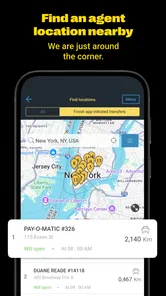
Analysis by Reviewed
I find money-transfer apps most useful when the sender and recipient need a clear, practical route for getting funds to one another, rather than another general-purpose finance dashboard. Western Union Send Money Now is built around that specific job. It comes from Western Union Apps, is free to download, and has a 4.7 average from around 333,000 ratings. That popularity is reassuring, but I would still treat each transfer as a decision to check carefully: the best option depends on where the money is going, how the recipient needs to receive it, and what the final cost and timing look like before you confirm.
Is this the right kind of money-transfer app?
I would consider this app when the person receiving the money needs a transfer service rather than a shared budgeting tool or a way to manage everyday spending. Its focus is useful if you are supporting family across borders, paying someone who prefers a familiar transfer provider, or arranging a one-off payment while away from home. It is less compelling if your main goal is to move money between your own accounts or split routine household costs; a bank app or a payment service already used by everyone involved may involve fewer steps.
Before installing it, I would think about the recipient’s side of the transaction as carefully as my own. Can they use the receiving method available for the destination, and will they know what information they need to collect or access the funds? If you cannot answer those questions, ask first. Choosing a service because it is familiar to the sender does not automatically make it convenient for the person waiting for the money.
What I check before the first send
A helpful habit is to treat the first transfer as a small rehearsal of the whole process, not just an amount-entry exercise. Confirm the recipient’s details with them through a channel you already trust, then compare those details with the form before continuing. If the recipient has used the service before, ask which receiving route worked for them rather than relying on an old message or a saved contact that might contain outdated information.
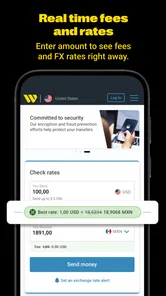
I also recommend comparing the amount you plan to send with the amount the recipient is expected to receive, alongside the total shown for your chosen payment method. A convenient payment choice can have a different overall trade-off from another choice, and timing may matter just as much as cost. I would make that comparison for the transfer in front of me instead of assuming last month’s route, amount, or conditions will carry over.
A realistic use case: helping someone from a distance
Imagine a relative calls while you are at work because an unexpected expense has come up. You can use the app to check whether a suitable destination and receiving option are available, enter the amount, and review the transaction details before committing. The key practical step is to coordinate with your relative first: confirm the name they will use, the way they intend to receive the funds, and whether they can act on the transfer when it arrives.
After submitting, I would keep the app open long enough to understand the status rather than telling the recipient that the money is already available. If progress is not immediate, I would share only the information needed for the recipient to follow the transfer and agree on when to check again. That simple coordination can prevent confusion, especially when the sender and recipient are in different places and neither can see the other person’s screen.
More From Our News Desk

 Bolt: Request a Ride
Bolt and the Shift from One-Tap Rides to More Legible Trips
Bolt shows how ride-hailing is shifting from a one-tap taxi request toward a more legible, choice-driven trip, while leaving the hardest questions of price and reliability unresolved.

 Farm Land - Farming life game
Farm Land Review: A Small Island Farm with a Satisfying Loop
A bright, breezy island farm turns a few quick chores into a satisfying cycle of planting, harvesting, expanding, and deciding what to build next.

 Android Auto
’s Community Takes Shape in the Passenger Seat
Its most valuable network is not a public feed but a shared set of routes, voice habits, app integrations, and advice that make driving less isolating—and sometimes more complicated.

 My Talking Angela
 Makes the Virtual Pet Feel Personal
A polished pet-raising game built on small rituals, playful customization, and a character who gives everyday screen time a surprisingly personal rhythm.

 Google Translate
 Review: A Pocket Tool for the Small Frictions of Travel
From menus and signs to quick conversations, Google Translate earns its place by cutting the little delays that make unfamiliar language feel like a barrier.

 Shazam: Find Music & Concerts
Shazam’s Best Trick Is Turning a Song Into a Night Out
A few seconds of recognition can settle an argument, rescue a half-remembered chorus, and point toward a live show. Shazam’s real trick is what happens after the match.
Latest News



Getting Started with Ease
The first thing you'll notice about Western Union Send Money Now is its user-friendly interface. I mean, even if you're not exactly tech-savvy, you'll find your way around this app like a pro. Setting it up was a breeze—I downloaded it from the app store, registered, and boom, I was ready to go. No unnecessary hurdles, just straightforward steps.
Where a transfer can get stuck
The simple path can feel less simple when a country, payment choice, or recipient detail does not match what you expected. Before you start, have the recipient’s name and preferred way to receive the money close at hand, and enter details exactly as they should appear. A small spelling mismatch is worth correcting before you submit anything; guessing and hoping it will be accepted is a poor way to handle a payment.
For a first transfer, I would also pause at the final review rather than tapping through quickly. Check the destination, amount, recipient information, and any displayed cost or delivery estimate. Those details can depend on the route and choices available for that transaction, so I would not assume that a previous transfer’s terms automatically apply next time.
Sending Money in a Flash
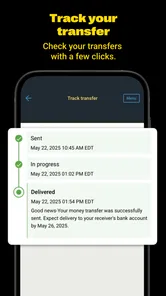
Now, let's talk about the main event—sending money. I tested it out by sending some funds overseas, and I was pleasantly surprised by how fast and efficient the process was. You just select the country, enter the amount, and choose your payment method. Within minutes, the money was on its way. It's almost like magic! Plus, you can track the transfer in real-time, which is pretty neat.
That speed is useful in an everyday situation such as helping a relative cover an urgent expense while you are in another country. Still, “on its way” is not the same as the recipient already having the funds. I would share the transfer details only after checking the status and confirming how the recipient plans to collect or receive the money. Tracking helps you follow progress; it does not remove the need to coordinate with the person on the other end.
Choosing a payment route without rushing
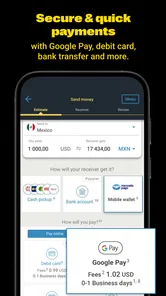
One feature I absolutely loved was the wide range of payment options. Whether you prefer using a credit card, bank transfer, or even cash, Western Union Send Money Now has got you covered. It's all about making life easier, right?
Payment flexibility is helpful, but it also creates a trade-off: the most convenient method for you may not be the best fit for the transfer as a whole. I compare the amount the recipient is expected to get, the total shown before confirmation, and the practical effort involved. If a bank transfer or another service offers a better fit for a routine payment, I would use that instead; if the recipient needs a Western Union option, this app may be more convenient than arranging the transfer in person.
For repeat payments, I would keep a simple personal note of what mattered about the last successful transfer: the recipient’s preferred receiving method and the details I needed to verify. I would not treat that note as permission to skip the review screen, because the route and terms can vary from one transaction to another. It is just a way to avoid asking the same basic questions from scratch when helping someone regularly.
Setup checks that save time
The app is a finance tool from Western Union Apps, and it has been available since 2011. It is rated for Everyone, has 10 million-plus installs, and its current version is 15.2, with Android 8.0 as the minimum operating-system requirement. Those details make it accessible to many users, but an older phone or an outdated system can still make any financial app less comfortable to use. I would check that the app and phone are up to date before troubleshooting a transfer.
It is also sensible to use a connection you trust and to make sure you can access the account details you need before starting. If the sign-in or a form does not proceed, I would first review what I entered and try again carefully rather than repeatedly submitting the same information. For a money transfer, a brief pause to verify is better than rushing through a screen just to get past it.
If the app behaves unexpectedly, I would separate a basic setup issue from a problem with the transfer itself. Check that the phone meets the Android requirement if you use Android, close and reopen the app, and make sure the connection is steady before entering payment details again. If a screen still fails, avoid creating a second transaction just to test whether the first one went through; check the account and transaction status first.
Security You Can Trust
When it comes to money matters, security is a top concern. I was relieved to find that this app takes security seriously. They use encryption and other security measures to protect your personal information and transactions. It's comforting to know that your hard-earned cash is in safe hands.
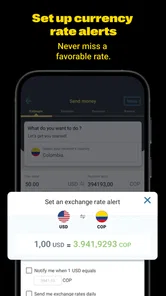
Additionally, the app has a handy feature where you can set up alerts for your transactions. This means you'll get notified instantly if anything fishy happens with your account. It's like having your own personal security guard.
I would treat alerts as a useful prompt to check the account, not as a substitute for checking the details myself. If a status seems delayed or an alert does not match what I expected, I would reopen the transaction and compare the information there before taking another action. Avoid starting a second transfer simply because the first one is not immediately clear; first establish whether the original is pending or completed.
One non-obvious safeguard is to decide in advance how you will confirm a request with the recipient. If someone messages you with changed payment details at the last minute, verify the change through a separate conversation you trust before editing the transfer. That is a sensible habit for any money-moving app, and it matters here because a correctly completed transfer can still be sent to the wrong person if the details were not checked carefully.
When the app may not be the cause
A transfer can involve more than the app screen: the sender’s payment choice, the destination, and the recipient’s ability to receive it all matter. If something does not move as expected, I would check the displayed status, confirm the recipient details, and make sure the chosen payment route still suits the situation. If the information looks right but the problem remains, use the app’s available support route rather than guessing, cancelling blindly, or sending the money again.
This is not necessarily the right choice for every payment. Someone who regularly sends money to the same person may prefer comparing a bank’s transfer service or another established money-transfer provider, especially when convenience, total cost, or delivery method matters more than using a familiar brand. I would also skip a rushed transfer if I could not verify the recipient or understand the amount shown before confirming.
It is also worth asking whether the recipient’s own circumstances are causing the delay. They may not be ready to collect or access the funds, or the details you entered may not match what they expect to use. I would confirm those points with them before assuming the app has failed. If both sides have checked the relevant information and the status still does not make sense, contacting support is more useful than repeatedly changing the transaction.
Compared with a bank transfer, this app is most appealing when you need a dedicated money-transfer route and the recipient’s options line up with it. A bank may be a better everyday choice when both people already use compatible accounts and the transfer is routine. Compared with another specialist provider, I would judge the actual route, receiving method, displayed amount, and ease for the person getting the money—not just the interface or brand name. The best option can change between recipients.
Who I would recommend it to
I see the strongest fit for someone who sends money to friends or family and wants a focused way to arrange and follow a transfer from a phone. It can also suit people who value having a recognizable transfer provider available without making a trip to arrange every payment. Western Union Apps has built a finance app with a clear central purpose, and the 4.7 average from around 333,000 ratings suggests many users find it useful. I still would not let popularity replace a careful check of the terms for my own transfer.
I would be more cautious if I were making a payment under pressure, sending to someone whose identity or details I could not verify, or choosing the service without knowing how the recipient will receive the money. Someone who needs a predictable recurring payment may also find a bank’s established transfer tools simpler, depending on the people and accounts involved. For a one-off urgent transfer, convenience is valuable, but urgency is exactly when I would slow down at the final review.
Wrapping It Up
All in all, Western Union Send Money Now is a fantastic app for anyone looking to send money quickly and securely. Its ease of use, speed, and robust security features make it a standout choice in the crowded world of money transfer apps. Whether you're helping out family abroad or settling a debt with a friend, this app has got your back.
My practical advice is to use it when its transfer route and receiving options match what the other person actually needs, then review the transaction before confirming and keep an eye on its status afterward. The app has a broad audience, with around 145,000 written reviews, and that scale makes it a familiar option; it does not mean every route will suit every sender. I would compare the final terms for the specific transfer instead of choosing on reputation alone.
So, if you're in the market for a reliable money transfer service, give this app a whirl. It's definitely earned a spot on my phone, and I bet it'll do the same for you. For me, the deciding question is simple: can I verify the recipient, understand the amount and route shown, and explain to the other person how they will receive the funds? If the answer is yes, this is a practical option to consider. If not, I would take more time or choose a method that better fits both sides.
Western Union Send Money Now Frequently Asked Questions
Who develops Western Union Send Money Now, and what is it intended for?
Western Union Send Money Now is developed by Western Union Apps and belongs to the Finance category. Its store summary describes it as a way to make money transfers easier and send money to friends and family with great rates. If that is the main task you need an app for, its purpose is straightforward; review the transfer details in the app before sending money.
Is Western Union Send Money Now suitable for someone new to money-transfer apps?
The app is intended to help people send money to friends and family from a mobile device, so it may be worth considering if you prefer handling transfers on your phone. Before downloading, think about whether you are comfortable managing financial tasks digitally and carefully checking recipient and transaction information. As with any money-transfer service, review the terms and details presented during the process.
Is Western Union Send Money Now free to download, and which devices can run it?
Western Union Send Money Now is free to download and is rated for everyone. It is a finance app from Western Union Apps, with a current version of 15.2 and a minimum operating system requirement of 8.0. Before installing, check that your device meets that requirement and that you are downloading the app from the official app store for your device.
What is Western Union Send Money Now?
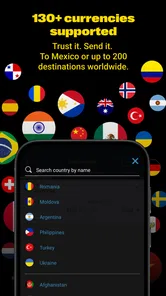
Western Union Send Money Now is a mobile application designed to facilitate international money transfers quickly and efficiently. Users can send money to friends and family across the globe directly from their smartphone, making it a convenient option for those who need to transfer funds without visiting a physical location. The app supports transactions in multiple currencies, ensuring wide accessibility and ease of use.
How secure is the Western Union Send Money Now app?
Security is a top priority for Western Union. The Send Money Now app employs advanced encryption technology to protect users' personal and financial information. Additionally, Western Union complies with all regulatory standards for financial services, providing users with peace of mind. The app also includes security features such as two-factor authentication to ensure that only authorized users can access their accounts and perform transactions.
Pros
- Fast international money transfers
- User-friendly interface
- Multiple payment options
- Real-time exchange rates,24/7 customer support
Cons
- High transaction fees
- Limited to certain countries
- Requires registration
- App crashes occasionally
- Identity verification can be slow