Wallpaper Engine
- 1.18K
- 4.0
- Installs
- 5.00M
- Price
- Free

Screenshots
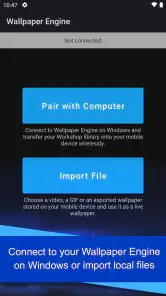
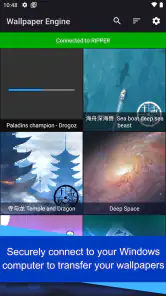
Analysis by Reviewed
I think the first decision to make with Wallpaper Engine is whether you want a phone background that moves or a way to bring a collection of PC wallpapers onto Android. Those are related, but not quite the same goal: this is a personalization app from Wallpaper Engine Team, and its particular appeal is connecting mobile wallpaper choices with the wider Wallpaper Engine experience. If you mainly want a calm image that disappears into the background, a live wallpaper may be more activity than you need.
Choosing a wallpaper that fits your routine
Before installing, I’d think about how often I actually notice my home screen. If I mostly open an app straight from notifications or use a plain layout, a moving background may not add much. If I regularly pause on the home screen, enjoy changing its look, or already collect wallpapers on Windows, the app has a clearer purpose. This is a useful distinction: the best reason to try it is not simply that animation looks impressive, but that you’ll enjoy seeing it during ordinary phone use.
I’d also consider whether the phone is shared or used in settings where a busy screen might be unwelcome. A restrained design can make more sense for a device used at work, while a detailed animated scene may suit a personal phone used mostly at home. Neither choice is inherently better. What matters is matching the background to the moments when you see it, rather than choosing solely from a dramatic preview.
Start with the kind of wallpaper you actually want
Before browsing, I’d decide whether I want an animated scene, an interactive design, or simply a still image. That small choice makes exploring less overwhelming and helps avoid picking a wallpaper that looks impressive in a preview but feels distracting on a screen I check all day. For a work phone, subtle motion can be easier to live with than a busy scene; for a device I use for entertainment, I might welcome more visual detail.
The transfer angle is especially useful if you already use Wallpaper Engine on Windows and want a mobile version of a favorite look. It gives the app a more specific role than a typical wallpaper picker, which usually focuses on choosing images directly on the phone. I’d treat it as a companion for someone invested in that desktop-to-phone workflow, rather than assuming every Android user needs it.
Customization Beyond Imagination
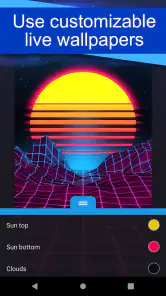
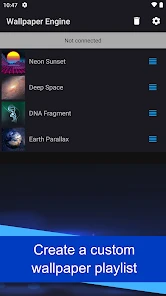
The first thing that struck me about Wallpaper Engine is the sheer variety of options available. You can choose from a plethora of pre-existing animated wallpapers or, if you're feeling creative, design your own. The app supports various types of wallpapers including 3D, 2D, and even interactive ones. I was particularly impressed by how seamlessly these wallpapers integrated with my device’s settings, adjusting to orientations and resolutions without a hitch.
Where the desktop connection earns its place
A practical use case is keeping a visual theme consistent: I might have a favorite animated background on my Windows setup, then want a related look when I pick up my phone. That continuity is the main reason I’d choose this over a standard collection of phone wallpapers. It is also handy for experimenting with a design on mobile before deciding whether it suits a smaller screen, where motion and detail can feel very different.
More From Our News Desk

Weather by Xiaomi Review: Clear at a Glance, Less Clear Up Close

X Under Pressure: Can It Recover When Posting Goes Wrong?

Clash of Clans Is Won Between the Battles

Android Auto Makes the Case for Quieter Car Software

MobiOffice: Transforming Mobile Productivity with Seamless Integration

EA SPORTS FC™ Mobile Soccer: Redefining Mobile Sports Gaming
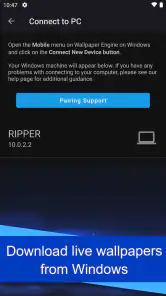
For the transfer workflow, I’d check that the phone and the Windows setup are both ready before committing to a particular wallpaper. It’s sensible to begin with one favorite rather than trying to recreate an entire desktop collection at once. That makes it easier to spot whether the mobile version fits your taste and to change course without spending a long time organizing backgrounds you may not want on your phone.
Making the PC-to-phone switch manageable
One practical question is whether moving a wallpaper over means the desktop and phone will feel identical. I wouldn’t count on that as the goal. A computer display gives an image a different shape and viewing context, and a design that looks balanced on a monitor can feel crowded on a phone. I’d treat the transfer as a way to carry a visual idea across devices, then judge the result on the handset itself rather than expecting a perfect duplicate.
My simplest workflow would be to choose a wallpaper with a clear focal point, transfer just that one, and live with it through a normal day. I’d pay attention to whether icons and widgets remain easy to read, and whether the movement competes with the information I need on screen. If the design looks great but makes the home screen harder to use, I’d pick a less detailed option rather than trying to force the first choice to work.
Performance and Usability
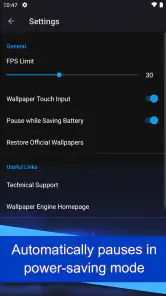
Now, I know what you’re thinking – won’t all these animations drain my battery? Surprisingly, no! The developers have optimized the app to ensure that it runs smoothly without eating up your device’s resources. I’ve been using it for a few weeks now, and I haven’t noticed any significant drop in battery life or performance. The interface is intuitive, making it easy for even the less tech-savvy among us to navigate through the myriad of options.
Still, I wouldn’t assume every animated background behaves identically on every phone. A detailed, constantly moving scene may be less comfortable than a restrained design, especially if you prefer a clean home screen or use your phone for long stretches. My practical advice is to try a wallpaper in your ordinary routine—unlocking the phone, checking notifications, and switching apps—before settling on it. If motion feels like visual clutter, a static background is the better choice.
How to judge motion and visual comfort
There’s a difference between animation that adds atmosphere and animation that keeps pulling my attention away from what I’m doing. I’d start with a wallpaper whose main visual movement is easy to ignore when I’m reading icons or checking a notification. Then I’d use the phone as usual, not just admire the preview. A background that feels pleasant for a few seconds may become tiring when it appears every time I return to the home screen.
For anyone concerned about battery or smoothness, the sensible approach is to test rather than assume. Use one wallpaper for a normal stretch of use and compare how the phone feels with your usual setup. If you notice a difference that bothers you, try a less elaborate design or return to a still image. I wouldn’t install a live wallpaper on a phone where every bit of simplicity matters, but for users who value visual character, a measured trial is more useful than rejecting the whole idea outright.
Community Creations
One of the standout features of Wallpaper Engine is its vibrant community. Users from all over the world contribute their creations to the library, giving you access to an ever-expanding gallery of wallpapers. Whether you’re into minimalist designs or something more elaborate, you’ll find something that suits your taste. And trust me, it’s easy to get lost exploring the endless possibilities.
Additionally, the app encourages sharing and collaboration, allowing you to tweak existing wallpapers and even share your own creations with fellow users. This not only fosters creativity but also builds a sense of community among users who share a passion for personalization.
Browsing with a purpose
A large community library is a strength, but it can also turn a quick choice into a long browsing session. I’d go in with a rough idea—such as a quiet landscape, a geometric look, or a theme that matches a desktop setup—then stop once I find a design that works at phone size. This avoids treating the collection like an endless feed where every new option makes the decision harder.
If I’m comparing several candidates, I’d look beyond the thumbnail. I’d ask whether the wallpaper leaves the screen readable, whether its motion suits the places I use the phone, and whether I still like it after the novelty wears off. That small checklist makes community browsing more useful and helps me choose a background for daily life rather than for a quick first impression.
When a simpler alternative is better
Compared with the usual options in personalization apps, this one is best when animation, interaction, or the Windows connection matters to you. A built-in wallpaper picker or a gallery of static images is a more straightforward fit if you only want to set a photo and forget about it. Those alternatives also avoid the extra browsing and selection that can come with a large animated collection. I’d skip this app if I rarely change my background, dislike motion, or don’t have any interest in transferring wallpapers from a PC.
There is a small cost to switching: you need to spend time finding a design that works on a phone rather than assuming a desktop favorite will automatically feel right at a different size and viewing distance. I’d save a short list of likely choices, test them one at a time, and keep a static fallback ready. That makes the change reversible and turns browsing into a practical comparison instead of an endless search.
Who should choose another route
If I wanted a photograph from my own camera roll and expected to leave it untouched for months, I’d use the phone’s built-in picker. It is a direct route with fewer choices to manage. A static wallpaper collection can also be a better fit for someone who wants to browse images without animated or interactive designs. Wallpaper Engine makes most sense when its particular mix of live backgrounds and Windows continuity is something you’ll actually use, not merely an extra feature you might explore once.
I’d be cautious about choosing it for a phone that already feels visually busy. Widgets, crowded icon layouts, and an animated background can compete for attention, even if each element looks good by itself. In that situation, a plain image may improve the overall screen more than another layer of customization. The app is not a necessary upgrade to Android’s personalization options; it is a more specialized choice for people who enjoy making the background part of the experience.
My Personal Experience
After using Wallpaper Engine for a while, I can confidently say it’s a game-changer. My device feels more like a reflection of my personality now, thanks to the dynamic backgrounds that change with my mood. I love how easy it is to switch things up whenever I want, keeping my home screen fresh and exciting.
For a realistic everyday example, I’d use a subdued animated design during a busy workday, then switch to something more expressive when I have time to enjoy the home screen. The point is not to keep changing wallpapers constantly; it is having the option to choose a background that suits how I use the phone. If the motion becomes distracting, switching back to a simpler image is a perfectly good outcome, not a failure to use the app.
Practical details before installing
The app is free, and its Everyone age rating makes it broadly suitable as a personalization option. It was released on November 21, 2021, and the current version is 2.7.4, with Android 8.1 or later required. I’d still think about the role it will play before installing: the strongest reason is a real interest in animated backgrounds or bringing a Windows wallpaper collection to a phone, not the idea that every device needs a more elaborate screen.
Its 4.0 average comes from around 17,000 ratings, and it has over 5 million installs. Those figures suggest that many Android users have tried it, but they don’t answer the personal question that matters most: will you enjoy seeing motion every time you return to your home screen? I’d use the first wallpaper as a trial, rather than treating installation as a commitment to rebuild the whole look of the phone.
People often wonder whether they need a Windows setup to get value from the app. The PC connection is a distinct reason to choose it, but it isn’t the only appeal: the community library and live-wallpaper focus can also suit someone who simply wants more animated choices on Android. If you have no interest in either, a basic wallpaper picker will likely be enough. That distinction is useful before you spend time browsing.
Another fair question is whether a desktop wallpaper will automatically make a good phone background. I’d expect to make a fresh judgment on the handset, because the shape, screen layout, and viewing habits are different. Start with a design that has a clear subject and test it behind your normal icons. If the focal point gets covered or the motion feels too prominent, choose another rather than assuming the transfer itself has gone wrong.
Wallpaper Engine is developed by Wallpaper Engine Team, and I’d recommend it most to people who already use the Windows app, enjoy animated backgrounds, or like exploring user-created designs. If you want only a quick static wallpaper, your phone’s built-in picker will probably be less effort. For me, the app is worth trying when personalization is something I actively enjoy, rather than a setting I plan to choose once and forget.
In conclusion, if you’re looking to break free from the monotony of static wallpapers and inject some life into your device, Wallpaper Engine is definitely worth a try. It’s not just an app; it’s an experience that transforms your device into a canvas of creativity. So go ahead, give it a shot, and let your imagination run wild!
Wallpaper Engine Frequently Asked Questions
Is Wallpaper Engine suitable if I only want to change my phone’s wallpaper?
Wallpaper Engine’s Android app is intended to transfer live wallpapers from Windows to an Android device, rather than serve as a general wallpaper editor. It is most useful if you already use Wallpaper Engine on a Windows PC and want to bring wallpaper choices from there to your phone. If you simply want to change your phone’s wallpaper, consider whether this transfer-focused role matches what you need.
Is Wallpaper Engine available on iPhone or iPad?
Wallpaper Engine’s mobile companion is for Android, where it helps transfer live wallpapers from Windows. The iOS experience described for this app is not a standalone mobile version, so iPhone and iPad users should not assume they can use the Android transfer workflow. If you are considering a download, check that you are choosing the version made for your device and that its purpose fits your setup.
What Android version do I need to use Wallpaper Engine?
Before downloading, check that your Android device runs version 8.1 or later. Wallpaper Engine is a personalization app for bringing live wallpapers from Windows to Android, so it is most useful if you already use Wallpaper Engine on a Windows PC and want to transfer wallpapers to your phone. The mobile app is free to download.
What is Wallpaper Engine?
Wallpaper Engine is a versatile application that allows users to animate and customize their desktop wallpapers. It supports a wide range of formats including 3D and 2D animations, websites, videos, and even certain applications. The app is designed to be user-friendly and integrates seamlessly with Windows, providing an interactive and visually appealing desktop experience. On Android, its purpose is to transfer live wallpapers from Windows to your device.
Is Wallpaper Engine available for mobile devices?
As of now, Wallpaper Engine is primarily designed for Windows PCs and does not have a standalone mobile version for iOS or Android. However, users can export wallpapers to their Android devices through a companion app, which allows some of the app’s functionalities to be used on mobile. An internet connection is required for this feature. The Android app is available for devices running version 8.1 or later.
Pros
- Extensive library of wallpapers
- High customization options
- Supports live wallpapers
- Easy to use interface
- Regular updates
Cons
- Consumes significant battery power
- Requires good hardware for smooth performance
- Limited support for certain devices
- Some wallpapers lack quality
- In-app purchases required for premium content
- Category
- Personalization
- Version
- 2.7.4











