Volvo Cars
- 2.01K
- 3.6
- Installs
- 1.00M
- Price
- Free

Screenshots
Analysis by Reviewed
For a Volvo owner, a companion app can be most useful in the ordinary moments around driving: checking in on the car before leaving, keeping track of a trip, or handling a small task without going back outside. I find that kind of convenience more persuasive than a long feature list. Volvo Cars is a free auto and vehicle app from Volvo Cars, and its 4.0 average from around 58,000 ratings suggests many people have put it to use. The key question is whether its connected-car tools match your vehicle and the way you actually use it.
Free to download, with value tied to your car
The app itself is free, so trying it does not involve an app purchase. That makes the first step easy, but free access alone does not make it useful to every driver: its main value is as a companion to a Volvo, rather than as a general-purpose driving tool. The app is rated for Everyone, has more than a million installs, and is on version 6.2.0. Volvo Cars has been available since 2014, giving it a longer history than many newer vehicle companion apps.
What makes the connection worthwhile
In practical terms, the strongest reason to keep a manufacturer’s app is having vehicle-related actions and information together. Instead of relying only on a separate parking note, a maintenance reminder in your calendar, and a trip-tracking app, a Volvo owner can use one place for the app’s vehicle functions. That can simplify a routine, especially if you already reach for your phone to check details before setting off. I would treat it as a useful companion, though, not as a replacement for the car’s own controls or for a navigation app chosen specifically for route planning.
A small habit can make a connected-car app more useful: check the vehicle information before you need it, rather than waiting until you are in a hurry. On a busy morning, a quick look at the car’s status can help you decide whether to leave extra time or deal with an issue later. Likewise, trip records are more valuable when you review them occasionally, not just when you first notice the feature. The benefit is less about collecting information and more about using it to make a familiar routine easier.
Where I would be cautious
A manufacturer app is naturally most relevant to people who own or regularly use that manufacturer’s vehicle. If you do not have a Volvo, there is little reason to choose it over a general driving app. Even for an owner, convenience depends on the particular vehicle and on the functions available in the app for that car. I would check that the actions you care about appear for your vehicle before building a routine around them. When you need a tool that works across different car makes, a general-purpose option is the more sensible choice.
There is also a difference between having a feature and relying on it. Remote actions and vehicle information can be handy, but I would still keep essential tasks in the car itself and avoid assuming that an app check replaces a proper inspection or a service visit. A phone app is best used as an extra point of access, not as the authority on every mechanical question. This distinction matters most when a warning or maintenance concern needs a real assessment rather than a quick glance.
A Closer Look
The first thing that strikes you about the Volvo Cars app is its sleek design. It's almost as if the app mirrors the elegance and simplicity that Volvo cars are known for. Navigating through the app is a breeze, with intuitive controls and a user-friendly interface that even the least tech-savvy among us can appreciate.
More From Our News Desk

 Remini - AI Photo Enhancer
Remini Is Our App of the Week for Bringing Old Photos Back to Life
A quick AI restoration tool earns its place by making faded portraits and soft, older photos feel vivid again—provided you know where its polish ends.

 PayPal - Pay, Send, Save
PayPal Reviewed: Who Benefits from Its Reach, and Who Should Skip It
PayPal is most useful when its reach and familiar checkout solve a real payment problem. These reader-by-reader recommendations show where it earns a place—and where friction wins.

 Millionaire 2026 Quiz & Trivia
 Makes Every Answer Count
A familiar quiz-show format succeeds or falters on tiny design decisions: how clearly the game guides a first answer, handles hesitation, and invites one more round.

 Decor Life - Home Design Game
Decor Life Turns Short Breaks Into Bite-Sized Decorating Jobs
A room-by-room decorating game built for quick sessions gains from modern phone habits, but its gentle pace still depends on patience, repetition, and a steady stream of design jobs.

 Sniper 3D:Gun Shooting Games
Sniper 3D’s Quick-Shot Appeal Faces the Upgrade Treadmill
The appeal is immediate: line up a target, steady your aim, and fire. The harder question is whether Sniper 3D can keep players returning after the first rush.

 Blockudoku®: Block Puzzle Game
Blockudoku vs. the Puzzle Pack: A Quick Puzzle With a Repetitive Edge
Blockudoku turns a clean grid into a quiet test of foresight. Against match-three polish and head-to-head simplicity, its lasting appeal is also its biggest limitation.
Latest News



Features That Stand Out
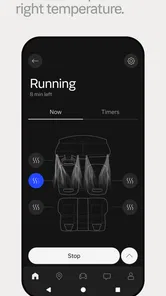
So, what makes this app a must-have for Volvo enthusiasts? For starters, the real-time tracking feature is a game-changer. Imagine being able to locate your car in a crowded parking lot without the usual hassle. Plus, the remote start function is a blessing, especially during those chilly mornings when you'd rather not freeze while waiting for your car to warm up.
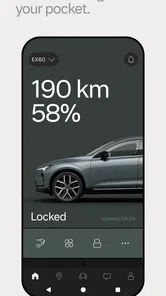
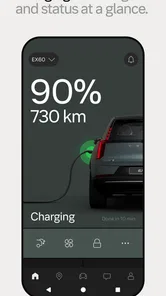
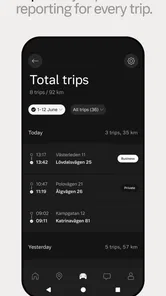
The app also lets you check your vehicle's status at any time. From fuel levels to maintenance alerts, it's like having a personal assistant dedicated to your car's well-being. And for those who have a knack for planning, the trip log feature is a fantastic addition. It keeps track of your journeys, offering insights into your driving habits and even helping you plan more efficient routes.
Beyond the Basics
But the Volvo Cars app doesn’t just stop at the basics. It goes a step further by offering a platform for community engagement. Connect with other Volvo owners, share tips, and even participate in exclusive events. It's a bit like having a social network but focused entirely on your love for Volvo.
Moreover, the app integrates seamlessly with smart home devices. Imagine this: you wake up, tell your smart assistant to start your Volvo, and by the time you're ready to leave, your car is too. It's these little touches that make the app not just functional, but truly enjoyable to use.
Final Thoughts
All in all, the Volvo Cars app is more than just a utility; it's an extension of the Volvo experience. It encapsulates the brand’s commitment to safety, innovation, and community, all within a digital space. Whether you're managing your vehicle or connecting with fellow enthusiasts, this app ensures that your Volvo journey is as smooth as the ride itself.
If you're a Volvo owner or thinking about becoming one, downloading this app is a no-brainer. It's not just about managing your car; it's about enhancing your entire driving experience. So go ahead, give it a spin – you won't be disappointed!
Making the app fit real routines
One realistic use is arriving at a large parking area after an appointment and using the location feature to find the car without retracing every row. Another is checking the car’s status before a weekend drive, then using the trip log afterward to look back at journeys. These are modest conveniences, but they explain why a Volvo-specific app can be more useful than a generic mileage tracker: it combines driving context with vehicle information, rather than asking you to enter everything yourself.
I would also make a quick test part of setup. Confirm which controls and vehicle details are actually available for your car, then try them while you are parked and have time to troubleshoot. That is a better approach than discovering at the curb that a remote action you expected is not available in your particular situation. For cold mornings, remote start sounds especially appealing, but I would regard it as a convenience to verify in practice, not a reason to assume every Volvo can be operated in the same way through the app.
Who is likely to get the most from it?
The clearest fit is a current Volvo owner who wants the car’s digital companion on the same phone they already use for daily errands. It may also suit a household where more than one person regularly uses the vehicle, provided each person’s access is set up appropriately. For someone considering a Volvo, the app can help illustrate the connected ownership experience, but it should not be the deciding factor in a vehicle purchase: the car itself, its suitability, and the features available for the specific model matter more.
Compared with a basic parking or trip app, this one has the advantage of being tied to Volvo vehicle functions and status information. A general navigation app remains the better choice when the main job is choosing a route, finding places, or getting broad traffic guidance. Likewise, drivers switching between several makes may prefer a neutral vehicle log rather than separate brand apps. I would use the Volvo app for its car-related role and keep specialist tools for tasks it is not meant to replace.
My buy-or-skip call
There is no app purchase to weigh against its benefits: Volvo Cars is free to download. The more useful decision is whether you have a compatible Volvo and will use its connected functions often enough to justify another app on your phone. If you do, the combination of vehicle status, location, remote actions, and trip records gives it a clear purpose. If you do not own or regularly use a Volvo, or you only need navigation and general driving utilities, I would skip it in favor of tools that serve those needs across cars.
My overall view is positive but conditional. I like the idea of one place for everyday Volvo-related checks, and the app’s appeal is strongest when those checks become part of a simple routine rather than a novelty. Just confirm what works with your particular vehicle and keep practical alternatives for navigation and mechanical advice. For the right owner, it is an easy free addition; for everyone else, the brand-specific focus is the reason to pass.
Set expectations before relying on connected controls
When I first add a car to a manufacturer app, I treat setup as a compatibility check rather than a quick formality. Start while parked, make sure you can see the vehicle you intend to use, and explore the available controls before you need them. This small test helps separate features that are genuinely part of your daily setup from ones that sound appealing but may not apply to your particular car. It is also a sensible way to learn where the app presents status and trip information, so you are not trying to interpret a screen while rushing out the door.
For a shared car, it is worth agreeing on who will use the app and what each person needs from it. A driver who mainly wants to find the vehicle after shopping may value location access, while another may care more about checking status before a commute. That conversation can prevent the app from becoming an extra source of confusion in a household. I would also avoid treating a phone as the only route to an important vehicle action; keep familiar ways of operating the car in mind in case you are without the phone or the connection is not convenient.
A useful companion, not a complete driving toolkit
The practical distinction between this app and broad automotive apps is its brand focus. A neutral driving tool is usually the more flexible choice if you change cars often, keep records across different vehicles, or want one place for general route planning. Volvo Cars makes more sense when you want the phone to sit alongside a Volvo and provide vehicle-specific context. Those are different jobs, so I would not judge it by whether it replaces every motoring app; I would judge it by whether it makes ownership of that car less fiddly.
That difference shows up in an everyday errand. Before leaving a shopping center, a driver may use the vehicle’s location to orient themselves in a large lot, then check the status once home rather than relying on memory. A navigation app still handles the journey to the next destination better, and a calendar or service record may remain more suitable for reminders that need to work independently of the car. The useful workflow is to let each tool do its own job, with the Volvo app handling the connected-car side.
What I would check before making it a habit
Two questions matter before I build a routine around any connected-car feature: does it appear for my vehicle, and does it behave reliably in the situations where I expect to use it? I would test the app’s location and remote functions in ordinary conditions, then decide whether they are dependable enough to save time. For trip records, I would look at whether the information is useful for my own purpose—such as reviewing regular journeys—rather than assuming that more recorded detail automatically makes driving better.
The same practical approach applies to maintenance information. An alert can be a helpful prompt to pay attention, but it is not a diagnosis and should not replace a conversation with a qualified service professional when something seems wrong. I find that boundary reassuring: the app can help me notice and organize vehicle-related details without pretending that a phone can inspect the car. Used with that understanding, it supports ownership; used as a substitute for judgment, it can encourage misplaced confidence.
Who should leave it off their phone?
I would skip it if I did not own or regularly use a Volvo, since the brand-specific connection is the reason to choose it. I would also think twice if my main need were navigation, traffic, or a cross-brand record of every trip; dedicated tools are a more direct fit for those jobs. And if I rarely use a phone for vehicle tasks, even a free app can add clutter without changing my routine. Free access is a low barrier, not a promise that every driver will get meaningful value from it.
For a prospective buyer, the app may be useful as a small preview of how connected ownership could feel, but I would not let a polished phone experience outweigh the car’s fit, comfort, and suitability for everyday life. The app’s value follows the vehicle and the available functions for it. That makes the decision straightforward: current Volvo users should explore it and keep the tools that prove useful, while everyone else can choose a more general option without missing a universal driving essential.
Volvo Cars Frequently Asked Questions
What is Volvo Cars, and is it the official app?
Volvo Cars is the official Volvo Cars app, developed by Volvo Cars. It is designed around the Volvo ownership experience, so its purpose is different from a general-purpose driving or navigation app. If you own or use a Volvo, it may be a useful place to access vehicle-related services from your phone. The app is free to download and is rated for everyone.
Who is the Volvo Cars app intended for?
Volvo Cars is mainly intended for people who own or use a Volvo and want to connect with their vehicle through a phone. Its usefulness depends on having a compatible car and access to the relevant vehicle account or services. Drivers of other makes may find little reason to install it, since it is presented as the official Volvo Cars app rather than a general motoring tool.
Is Volvo Cars free to download, and what devices can install it?
Volvo Cars is a free app in the Auto & Vehicles category, and it is designed for Volvo owners who want to manage aspects of their vehicle through a mobile device. It is listed for Android with a minimum operating system requirement of 8.0. Before downloading, check that your device meets that requirement and that the app is available for your device through its app store.
Who develops Volvo Cars, and what should I expect from the app?
Volvo Cars is developed by Volvo Cars and is presented as the official Volvo Cars App. Its focus is on connecting a Volvo vehicle with a phone, rather than providing a general-purpose driving or navigation service. The app has an average rating of 4.0 from around 58,000 ratings, with about 1.9 thousand written reviews, offering prospective users a useful snapshot of its reception.
What features does the Volvo Cars app offer?
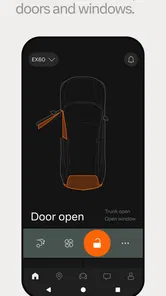
The Volvo Cars app provides a range of features designed to enhance the ownership experience. Users can remotely start their car, lock and unlock doors, and adjust climate settings. It also offers navigation assistance, service scheduling, and vehicle status updates. Additionally, the app integrates with smart home devices for seamless connectivity and convenience.
Pros
- Intuitive user interface design
- Seamless integration with Volvo vehicles
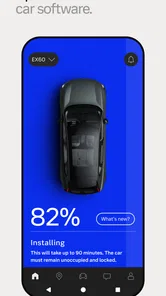
- Real-time vehicle status updates
- Comprehensive vehicle control options
- Enhanced safety features
Cons
- Limited compatibility with non-Volvo models
- Requires stable internet connection
- Some features may drain phone battery
- Occasional connectivity issues
- User data privacy concerns