Voice Changer & Sound Effects
- 581.00
- 4.2
- Installs
- 5.00M
- Price
- Free

Screenshots
Analysis by Reviewed
Before I install a voice-effects app, I ask what I want to do with the finished sound. A quick joke, a character voice for a short clip, and a carefully edited audio project call for different tools. Voice Changer & Sound Effects is best approached as a casual recording and effects app: it offers a convenient place to try a changed voice and add audio touches, rather than a substitute for a full editing studio.
Choose it for speed, not detailed production
The main decision is whether a short route from recording to a playful result matters more to you than precise control. A dedicated audio editor is usually the better choice when you need detailed trimming, layered tracks, or careful mixing. This app is more appealing when you want to record a line, try an effect, and see whether the result makes you laugh or works in a simple creative project.
It is free to download, with in-app purchases listed at $9.99 per item. BizApp Inc. develops it, and its content rating is Everyone. It has a 4.2 average from around 36,000 ratings and over 5 million installs, which makes it a well-used option, though popularity cannot tell me whether a particular effect will suit your voice. I’d record a short test before building a longer piece around it.
What to check in your first test
Rather than judging the app by its most dramatic effect, I’d start with a line that includes ordinary speech: a greeting, a question, and a few words with different sounds. That gives me a better sense of whether the treatment keeps the words understandable. I’d also leave a little space before and after the line; a clipped start or finish can make even a fun effect feel awkward when the clip is reused.
It helps to decide what the audio is for before adding decoration. A private joke can prioritize surprise, while a message meant for someone else should keep the words clear. If I’m recording a short piece for a video, I’d listen to the voice on its own first and add any extra sound only if it supports the moment. This is a small workflow choice, but it prevents effects from burying the point of the clip.
Unleashing Your Inner Voice Actor
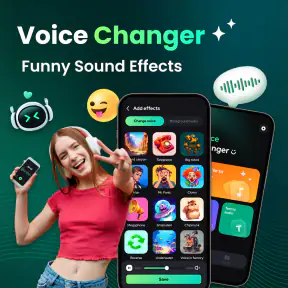
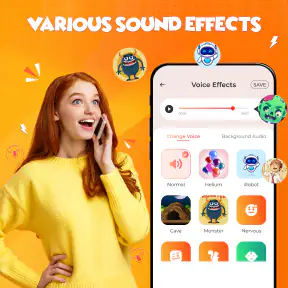
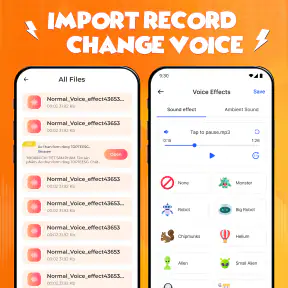
Right off the bat, the app greets you with a user-friendly interface that’s as inviting as a warm coffee on a cold morning. It’s super easy to navigate, which means you’ll be fooling your friends in no time with your newly found voice-altering powers. The app offers a plethora of voice effects—from helium-induced highs to cavernous lows. It’s like having a sound studio right in your pocket!
Features That Stand Out
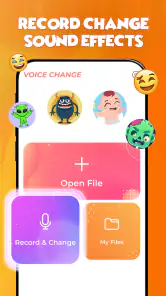
The Voice Changer & Sound Effects app is packed with features that will keep you entertained for hours. One of the coolest features is the ability to record your voice and then apply any of the dozens of effects available. Whether you’re looking to prank your friends or just have a laugh, this app has got you covered.
More From Our News Desk

Weather by Xiaomi Review: Clear at a Glance, Less Clear Up Close

X Under Pressure: Can It Recover When Posting Goes Wrong?

Clash of Clans Is Won Between the Battles

Android Auto Makes the Case for Quieter Car Software

MobiOffice: Transforming Mobile Productivity with Seamless Integration

EA SPORTS FC™ Mobile Soccer: Redefining Mobile Sports Gaming
For a better comparison, I’d use the same short recording with a few different treatments instead of making a fresh take every time. Changing the spoken performance along with the effect makes it hard to tell what actually improved the result. Keeping one clean original gives me a fairer way to decide whether a filter adds character, makes speech muddy, or simply isn’t right for that line.
There’s also a practical reason to keep the first test brief: a voice that sounds amusing for a sentence may become tiring over a longer recording. I’d listen for more than the novelty of the pitch or character. Can I follow every word? Does the effect still feel appropriate after a few seconds? If the clip is for someone who needs to understand the message, intelligibility matters more than choosing the strongest transformation.
Sound effects need a light touch
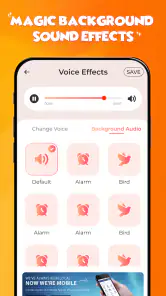
Additionally, the app doesn’t just stop at voice changing. It includes a variety of sound effects that you can add to your recordings. Imagine sending a birthday message with the sound of a roaring crowd in the background—it’s these little touches that make the app a standout.
I’d treat that extra layer as optional rather than an automatic upgrade. A background effect can make a greeting feel staged or mask a quiet word, so I’d add it only after the voice works on its own. For a playful punchline, a sound accent may help establish the mood; for an apology, invitation, or useful voice note, it may be more distracting than charming. The right choice depends on the listener, not just on what is available to add.
Make the recording easier to reuse
For a cleaner result, I’d record the spoken line before choosing an effect, then listen back with headphones. A silly filter can make words harder to understand, especially when the recording is rushed or the room is noisy. Keeping the first take short also makes it easier to compare a couple of treatments without losing track of which version sounds best.
For an everyday use, picture recording a quick birthday greeting at home: I’d capture a clear, ordinary voice first, apply a playful change, then decide whether a sound effect adds anything or simply competes with the message. That small order-of-operations choice is useful: the voice stays the focus, and the extra audio becomes an accent rather than a distraction. If the result is meant to be understood, I’d favor a modest transformation over the most extreme one.
A second useful scenario is making a temporary character voice for a personal video. I’d record a few short lines separately rather than trying to perform a long monologue in one go. Short clips are easier to replace if a word becomes unclear, and they give me more flexibility when arranging the final video in another editor. That is a sensible way to use a quick effects app without expecting it to manage an entire production.
Useful for character clips, with a workflow caveat
If you’re a budding content creator or just someone who loves to make silly videos, this app is a game-changer. You can easily export your altered recordings and use them in your projects. With its seamless integration, sharing your creations on social media is a breeze.
Voice Changer & Sound Effects also supports real-time voice changing, which means you can alter your voice during live streaming sessions. It’s like having a secret weapon up your sleeve that keeps your audience entertained and guessing.
For live use, I would separate experimentation from performance. I’d try the effect in a low-stakes test first, speak at the pace I expect to use, and check that the transformed voice remains understandable. A preset that is funny in a quiet recording may be less effective while talking quickly or reacting naturally. If an important stream depends on clear speech, an ordinary microphone setup or a familiar effect chain may be the safer choice.
When another kind of app is the better fit
For social clips and character voices, this app’s combination of recording and effects is convenient. If I needed careful noise cleanup, music balancing, or precise edits across several tracks, I’d reach for a fuller editor instead. If I only wanted a one-off soundboard gag, a simple soundboard could be quicker. The trade-off is straightforward: a focused tool may do one job with fewer steps, while this app brings voice changes and effects together for experimenting.
It also helps to distinguish a voice changer from a full audio editor. The former is useful when the transformation itself is the point; the latter is preferable when timing, arranging multiple sources, or refining a finished mix takes priority. I wouldn’t switch to a more involved editor just to make one silly greeting, but I also wouldn’t force this app into a project that depends on detailed control. Picking the narrowest tool that fits the job usually saves time.
One useful habit is to save an unaffected take before committing to a heavily changed version, especially if I plan to reuse the recording in a video. That gives me a fallback if the effect muddies the words or clashes with other audio. I’d also check the finished clip on the phone speaker as well as headphones; a sound that feels balanced in headphones can be too loud or distracting when played casually.
That listening check is particularly helpful if the recording will sit under music or other dialogue. I’d avoid making the effect so strong that it competes with the rest of the clip, and I’d keep the original separate until I know the edited version works in context. This is not about perfect studio polish; it is a simple way to avoid discovering too late that the joke or message no longer comes through.
Who will enjoy it, and who may outgrow it
I can see it suiting someone who wants amusing voice clips, casual audio experiments, or a quick character sound for a personal video. It is less suitable if reliability and fine control matter more than speed, or if the recording needs to sound natural and polished. For live use, I’d test the setup before an important stream rather than rely on an effect I have not tried in that situation.
I’d also consider how often I expect to use it. Someone who likes making occasional greetings or trying voices for fun can get value from a free app without turning the hobby into a complicated project. Someone who records regularly for work, needs consistent sound across many clips, or wants to correct room noise may be better served by a more focused recording and editing workflow. The distinction is not that one kind of user is more creative; it is that their needs reward different levels of control.
The app’s current version is 3.2.2, and it requires Android 7.0 or later. It was released on June 13, 2024. If you are weighing whether to keep it, the real cost is not only the purchase choice: it is also the time spent learning which effects preserve clear speech and which ones are best kept for a joke. Since the app is free to start, I’d try a brief recording before deciding whether any paid item is worthwhile.
For the same reason, I would not treat an in-app purchase as necessary before I know how I use the app. I’d first test the free experience on a few kinds of lines: a casual greeting, a character phrase, and something with important words that must remain clear. If a paid item seems relevant afterward, I’d judge it by whether it solves a real need in my own routine rather than by the novelty of having another option.
A straightforward recommendation
So, is the Voice Changer & Sound Effects app worth downloading? Absolutely! It’s a fun, easy-to-use app that brings a lot of joy and creativity to the table. Whether you’re using it to entertain friends, create content, or just explore the world of sound effects, this app delivers. It’s a must-have tool for anyone looking to add a bit of spice to their audio creations.
In conclusion, this app not only changes your voice but also transforms the way you interact with audio. It’s a delightful mix of technology and fun that’s hard to resist. Give it a go—you might just find yourself the next voice-acting sensation!
My recommendation is strongest for people who want a quick, playful result and are happy to judge each recording by ear. I’d skip it as a main tool for precise editing, demanding cleanup, or dependable live production, where a more specialized alternative is a better match. For everyone else, I’d start with a short clean recording, compare a couple of effects, and keep the version that makes the words fun without making them hard to follow.
Voice Changer & Sound Effects Frequently Asked Questions
Who develops Voice Changer & Sound Effects, and what is the app’s purpose?
Voice Changer & Sound Effects is a personalization app developed by BizApp Inc. Its focus is voice recording, audio editing, and funny sound effects, so it may appeal to anyone who wants to experiment with vocal effects or create playful audio. It is available for free, with optional in-app purchases, and is intended for a broad audience.
Is Voice Changer & Sound Effects suitable for children?
The app has an Everyone age rating, so it is intended for a broad audience. Its purpose is to record and edit audio with voice effects, which can make it suitable for lighthearted creative use. As with any app that records or shares audio, parents may want to discuss respectful use and check how a child plans to share recordings.
What devices and operating systems can run Voice Changer & Sound Effects?
Voice Changer & Sound Effects is available for Android devices running Android 7.0 or later. Before downloading, check your device’s operating system in its settings to make sure it meets that requirement. The app is listed as a personalization app, and its age rating is Everyone, so it is intended for a broad audience.
What is Voice Changer & Sound Effects app used for?
Voice Changer & Sound Effects is an app designed to modify and enhance your voice in real-time. It allows users to apply various sound effects and voice filters to their recordings or live conversations. This app is perfect for creating fun audio clips, pranking friends, or adding a unique twist to your voice for social media content.
Is Voice Changer & Sound Effects app free to use?
Yes, Voice Changer & Sound Effects is free to download and offers features users can try without an upfront purchase. It also includes in-app purchases priced at $9.99 per item, so review any purchase prompt carefully before confirming. The app is developed by BizApp Inc. and has an average rating of 4.2 from around 36,000 ratings.
Pros
- Wide variety of voice effects
- User-friendly interface
- Real-time voice changing
- High-quality sound output
- Easy to save and share recordings
Cons
- Contains ads
- Limited free features
- Occasional app crashes
- In-app purchases needed
- Requires microphone access
- Category
- Personalization
- Version
- 3.2.2











