VN - Video Editor & Maker
- 15.84K
- 4.7
- Installs
- 100.00M
- Price
- Free

Screenshots
Analysis by Reviewed
I often end up editing clips on a phone that other people in the household also use, and that changes what I want from an editor. I need to be able to open a project, make a quick change, and hand the device back without turning a casual family video into a complicated production. VN - Video Editor & Maker suits that sort of occasional, hands-on use: it gives me room to shape a video while keeping the basic workflow approachable.
A shared phone calls for a simple handoff
Picture a familiar situation: I record a few short clips at a family get-together, then later want to trim them into one video before sharing. VN lets me bring clips together on a timeline, adjust their order, and add music or transitions. I can make the edit in one sitting, then show the result to someone else before exporting. That is more practical for a shared device than an editor that makes every small change feel like a project of its own.
For a smoother handoff, I would decide on the intended audience and format before editing. A short group-chat clip has different needs from a video meant for a social feed, and choosing the target early helps me avoid repeatedly reworking the crop or pacing. I also keep the original footage untouched until I am happy with the finished version; that gives me a straightforward fallback if I change my mind.
The Latest on VN - Video Editor & Maker
Keep editing and account boundaries clear
VN is a video editor, not a household coordination system. I would not treat it as a shared family library or assume that one person’s drafts are automatically organized for everyone else. On a device used by several people, it helps to agree whose project is open, avoid editing someone else’s work without asking, and check which clip is selected before making a cut. Those habits matter more than any clever effect when several people take turns with the same screen.
Cloud project saving can be useful when I move between devices, but I would treat it as a personal workflow choice rather than a replacement for household file organization. Before relying on a project being available elsewhere, I would check that the devices and account setup are the ones I intend to use. If the phone belongs to someone else, or contains footage that should stay private, I would keep the project local and avoid casual account sharing.
Getting Started with VN
Jumping into VN - Video Editor & Maker was a breeze. The app is designed with a user-friendly interface that doesn’t overwhelm you with too many options right off the bat. I loved how intuitive it felt navigating through the menus. Whether you’re importing a clip from your gallery or shooting something on the spot, VN makes it super simple to get started on your next masterpiece.
Features That Stand Out
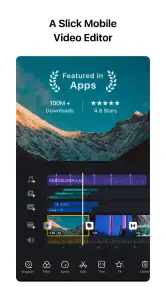
One of the first things I noticed was the app's robust set of editing tools. From trimming and splitting clips to adding music and transitions, VN provides a comprehensive suite of features. I particularly enjoyed playing around with the multi-layer timeline, which allowed me to stack videos, images, and audio tracks with ease. The precision of the editing tools is something that really stood out to me.
More From Our News Desk

Weather by Xiaomi Review: Clear at a Glance, Less Clear Up Close

X Under Pressure: Can It Recover When Posting Goes Wrong?

Clash of Clans Is Won Between the Battles

Android Auto Makes the Case for Quieter Car Software

MobiOffice: Transforming Mobile Productivity with Seamless Integration

EA SPORTS FC™ Mobile Soccer: Redefining Mobile Sports Gaming
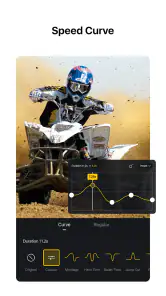
But wait, there's more! VN also offers a range of stunning filters and effects. Whether you want to give your video a cinematic feel or just add some fun effects, there's plenty to choose from. And if you're like me and love a good slow-motion shot, VN's speed adjustment feature will become your best friend.
When a quick edit becomes a household project
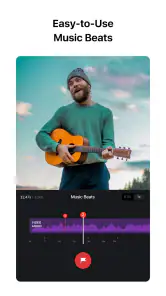
The layered timeline is especially useful when a video needs more than simple trimming. I might place a title image over a clip, then listen back to the music and adjust the sequence so the change in shot lands at a natural moment. My practical tip is to build the rough order first and add effects later. It is easier to judge whether a transition helps once the story makes sense without decoration.
That flexibility has a trade-off: a multi-layer timeline can take more attention than a one-tap template editor. If I only need an automatic montage for a quick post, a template-based option may be faster. VN makes more sense when I want control over timing, layers, and the final feel, and I am willing to make those choices myself.
Age, trust, and who should use it
VN is rated Teen, so I would still make the usual shared-device decisions about who can use the phone and what footage they are editing or sharing. The age label is a useful starting point, not a substitute for an adult’s judgement about a particular child or a household’s rules. I would show a younger family member how to review a clip before posting and remind them that editing does not make private footage appropriate to share.
Ubiquiti Labs, LLC develops this free video-editing app, though it offers in-app purchases ranging from $0.99 to $69.99 per item. It has a 4.7 average from around 4.8 million ratings and over 100 million installs, which suggests it is a familiar choice for many mobile editors. The current version is 2.9.6, and it runs on Android 7.0 or later. I would still check the purchase prompts before handing a shared device to someone else, especially if they are likely to explore every menu.
Sharing is Caring
Once you've finished editing, sharing your creation is as straightforward as it gets. VN provides multiple export options, not only allowing you to choose your preferred resolution but also making it easy to share directly to social media platforms. I found this feature particularly useful for maintaining the quality of my videos when uploading them online.
Another handy feature is the cloud project saving option. This means you can start editing on one device and continue seamlessly on another. It’s like having your editing suite in your pocket, ready to go wherever you are!
Choosing the right editor for the job
Compared with very basic phone editors, VN gives me more hands-on control through its layered timeline, speed adjustment, and range of editing tools. Compared with heavyweight desktop software, it is easier to approach when I want to finish a short video on a phone rather than sit down for a long editing session. That middle ground is its strongest fit: personal clips, short social videos, and small projects where I care about the cut but do not need a full desktop workflow.
It is less suitable if I want the app to make every creative decision for me, or if a long, intricate project is easier to manage with a keyboard and larger screen. For a household, I would also be cautious about treating cloud saving as a shared workspace: it helps continue a project across devices, but people still need to agree whose work they are opening and where finished files belong.
Editing a day out without turning it into a production
A useful everyday test is a family day out: I might have a few clips of the walk, a quick shot of lunch, and a final group moment. Instead of posting everything in the order it was filmed, I can select the moments that make sense together, trim the pauses, and use the timeline to make the sequence feel deliberate. I would keep the first pass short, then watch it from the beginning before adding music or effects. That final uninterrupted playback often shows me that a clip is too long or that a cut feels abrupt.
There is also a practical reason to avoid piling on effects early. Each extra layer can make the edit harder to inspect on a small screen, especially when someone else is waiting to use the phone. I get a cleaner result by settling the clip order and pace first, then adding only the elements that improve the story. For a quick family recap, a clear sequence usually matters more than a complicated look.
Export choices and the last review
When I reach the export stage, I think about where the video will go before choosing an output. A clip for a phone message does not need the same preparation as one intended for a social post, and checking the frame and resolution options can help avoid an export that feels mismatched to its destination. I would preview the result after saving it, not just trust the editing timeline: music levels, timing, and the final frame can feel different once the video plays as a finished file.
For shared-device use, that preview is also a privacy check. I look for a background conversation, a name on a screen, or a moment someone might not want circulated. Editing makes it easy to focus on the visual sequence and overlook incidental details. A careful final watch is a small step that can prevent an awkward share, and it is worth doing even when the edit itself took only a few minutes.
Planning a project before passing the phone along
When several people contribute footage, I find it helps to agree on a simple plan before anyone starts cutting: which clips are being used, who is making the edit, and who gets to approve the final version. This avoids the common shared-device muddle where one person changes the sequence while another assumes the project is finished. VN gives the editor room to make detailed adjustments, but it cannot settle those household decisions for you.
I also avoid trying to finish a video in the tiny gaps between other people’s use of the phone. A short edit is easy to pause, but returning later is less confusing if I remember the next task, such as trimming a long opening or checking the music against the last shot. That small note can be as simple as telling the next person the project is unfinished and asking them not to make changes.
Free to start, with purchases to consider
The app is free to download, which makes it easy to try before deciding whether its editing style suits you. In-app purchases are available, so I would not assume every item or option is included at no cost. On a household device, checking purchase settings and agreeing who can make purchases is sensible, particularly when a younger user is exploring the editor. The key point for a first-time user is that basic interest in editing does not require an immediate spending decision.
Its scale is notable: the app has around 16,000 written reviews alongside its ratings, and it has been available since May 4, 2018. Those figures give a sense of its established presence, but they do not tell me whether a particular workflow will feel right. I would judge it by trying a small project first: import a few clips, arrange them, make one adjustment, and see whether the timeline feels comfortable on your device.
Final Thoughts
In a world where video content rules, having a reliable and easy-to-use editor like VN - Video Editor & Maker is crucial. It combines powerful features with an intuitive design that makes video editing accessible to everyone. Whether you’re a content creator looking to up your game or just someone who loves making videos for fun, VN is definitely worth checking out.
So, next time you capture that perfect moment, remember that VN - Video Editor & Maker is here to help you turn it into a cinematic masterpiece. Happy editing!
My household verdict
I would recommend VN to someone who shares clips with family or friends and wants more say over the edit than a basic trim tool provides. Its timeline supports thoughtful adjustments, while the approachable starting point makes a short project feel manageable. I would skip it in favor of a template-driven editor for instant, automatic results, or a desktop program for work that needs a larger, more deliberate setup.
For shared use, the best approach is simple: keep project ownership clear, review the export before sending it, and treat cloud saving as a convenience rather than a substitute for coordination. Used that way, VN is a capable option for turning everyday footage into a video that feels intentionally put together.
VN - Video Editor & Maker Frequently Asked Questions
Can I use VN - Video Editor & Maker to combine clips into a finished video?
Yes. VN is designed for creating and refining videos, and its multi-track editing lets you bring different media into one project. You can arrange video, audio, and images together instead of treating each clip as a separate finished piece. This is useful when you want to build a sequence, add a soundtrack, or layer visual material as you shape the edit.
Is VN - Video Editor & Maker free to download?
VN is free to download, so you can get started without paying an upfront purchase price. The app also offers optional in-app purchases, with items ranging from $0.99 to $69.99. If you decide to buy anything, review the purchase details in your app store first. The free download makes it possible to explore the editor before deciding whether any paid options are relevant to your needs.
What age rating does VN - Video Editor & Maker have?
VN has a Teen content rating. This is worth checking if you are choosing apps for a younger user or setting up a device with age-appropriate content in mind. The rating is about the app’s content classification; it does not change the fact that VN is a video editing tool with features for creating and refining projects.
Can I use VN - Video Editor & Maker to edit videos for social media?
VN is a video editor for creating and refining videos, with tools such as multi-track editing, filters, transitions, music tracks, and overlays. These options can help you shape a clip for sharing online, whether you want a straightforward edit or a more layered result. Before downloading, consider what you want to make and whether you are comfortable arranging and polishing your footage in an editing app.
Can VN - Video Editor & Maker edit more than one type of media in a project?
Yes. VN supports multi-track editing, so you can combine video, audio, and images in a project rather than treating each clip as a separate finished video. This can be useful for adding music or layering visual material while you shape an edit. The range of options may suit both simple projects and edits that need several elements arranged together.
Pros
- User-friendly interface for easy editing
- Supports high-resolution video exports
- Wide range of effects and transitions
- Fast rendering times for quick results
- Includes a variety of background music options
Cons
- Limited advanced editing features
- Some features locked behind a paywall
- Occasional app crashes reported
- Large file size may require extra storage
- Ads can be intrusive during editing
- Category
- Video Players & Editors
- Version
- 2.9.6











