Vault12: Inherit Crypto Wallet
- 130.00
- 4.3
- Installs
- 100.00K
- Price
- Free

Screenshots

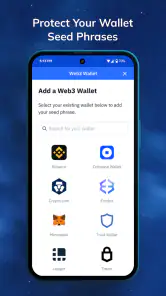

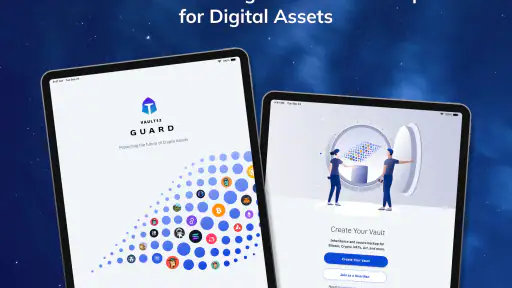
Analysis by Reviewed
Crypto inheritance is easy to postpone because it feels like a problem for the distant future. In practice, it is also a backup problem: if something happens to a phone, a wallet, or the person who normally manages the assets, someone trusted may need a clear way to recover access. Vault12: Inherit Crypto Wallet is built around that concern, covering Bitcoin, Ethereum, Solana, stablecoins, and other crypto assets in one finance app. I found its main appeal less about daily trading and more about making a difficult responsibility easier to organize.
The app comes from Vault12, Inc and is free to install, with optional in-app purchases priced from $19.99 to $29.99 per item. It is rated for Everyone, although the subject matter is naturally more suitable for adults who understand the responsibility of controlling digital assets. With a 4.3 average from around 891 ratings and more than 100K installs, it has attracted a meaningful audience without feeling like a mainstream banking replacement.
My overall impression is that this is a planning and protection tool rather than a conventional crypto exchange. If you want to buy coins, compare market prices, or trade frequently, you will probably need another service. If your concern is how to preserve access and communicate a recovery plan, the app has a more focused purpose. The most important thing is to treat it as part of a wider inheritance plan, not as a magic substitute for understanding your wallet security.
What to expect before you begin
The first thing I would tell a new user is not to rush into setup simply because the app is free. Before opening it, decide what problem you are trying to solve. Are you protecting a wallet that you rarely touch? Are you trying to make sure a partner or family member knows what to do? Or are you looking for a backup after losing confidence in a single device? Your answer affects how carefully you should prepare information and whom you trust with it.
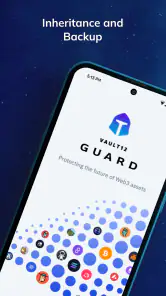
Vault12: Inherit Crypto Wallet is best understood as a structured layer around crypto ownership. The app’s store summary specifically focuses on inheritance and backup, so I approached it as a place to organize continuity rather than as a replacement for a hardware wallet, exchange account, or seed phrase. That distinction matters. A backup plan can reduce confusion, but it cannot make careless handling of recovery information safe.
For a first-time user, the reassuring part is that you do not need to begin with every asset you own. A better approach is to start with one wallet or one small, clearly understood holding. This gives you a chance to learn the app’s flow without creating a complicated inheritance arrangement before you know how you want it to work.
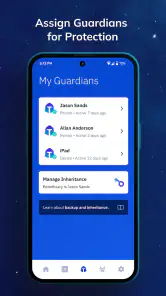
I also recommend deciding in advance who should eventually receive instructions. The right person is not automatically the person who is most interested in crypto. It may be someone dependable who can follow written steps, recognize a scam, and ask for professional help when necessary. The app can help organize the plan, but it cannot choose a trustworthy beneficiary for you.
There is another practical expectation to set: crypto recovery is not the same as recovering a forgotten banking password. Different assets and wallets can have different access methods, and a person unfamiliar with blockchain may not know the difference between a public address, a private key, a seed phrase, and an exchange login. I would therefore use the app alongside a plain-language inventory that explains what each item is for.
Why it differs from the usual crypto alternatives
Most crypto apps are designed around activity: buying, selling, swapping, sending, receiving, or checking balances. Vault12 takes a quieter approach. Its value appears when nothing is happening today but you still want a plan for tomorrow. That makes it closer to a digital continuity tool than a trading dashboard.
A hardware wallet is usually stronger for keeping signing keys offline during normal ownership. An exchange may be simpler for someone who wants account recovery and customer support. A paper instruction sheet can be inexpensive and easy to understand, but it can become outdated or expose sensitive details if stored carelessly. Vault12 sits between these choices by focusing on organized inheritance and backup, while still requiring the user to think carefully about the underlying wallet arrangement.
That trade-off is important. I would not move all my crypto into a new system without first understanding exactly what the app stores, what it helps transfer, and what remains my responsibility. For a cautious first-time user, the sensible path is to use it as a controlled test with non-critical information before relying on it for a complete estate plan.
Setting up a sensible first plan
After installing the app, I would begin by keeping the first session deliberately simple. Have the wallet or asset information you want to organize nearby, but do not paste sensitive details into random notes or messages while preparing. If you use a seed phrase, handle it as the most sensitive item in the process. Screenshots, cloud-synced notes, and copied text can create extra exposure even when the original wallet is secure.
The current version is 3.0.0 and requires iOS or Android version 12 or later. That requirement is worth checking before you plan a family setup on an older spare phone. A recovery plan is only useful if the people who may need it can access a compatible device and understand the steps. I would also avoid making the process depend on a phone that is rarely charged, shared by several people, or likely to be replaced without transferring important context.
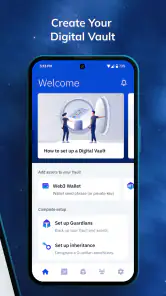
During setup, pay attention to the difference between recording an asset and giving someone control over it. Those are not the same action. An inventory can tell a beneficiary that a particular wallet exists, while actual control may depend on separate credentials or recovery material. Keeping those concepts separate helps prevent the common mistake of assuming that naming an asset automatically makes it recoverable.
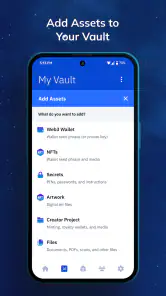
A useful workflow is to create a small inventory first. Write down the asset type, the wallet or service associated with it, the purpose of the holding, and the location of the instructions. Avoid adding unnecessary personal detail. The more information you include, the more useful the record may become, but also the more damaging it could be if exposed. I prefer concise instructions that answer the next practical question rather than a long diary of every transaction.
One non-obvious benefit of starting small is that it reveals whether your plan is understandable to another person. Crypto owners often write instructions for themselves, using abbreviations and assumptions that make perfect sense today. A beneficiary may not know whether “ETH wallet” means a mobile wallet, an exchange balance, or a hardware device. If the app helps you collect the plan in one place, use that opportunity to replace personal shorthand with ordinary language.
When the optional purchase appears, consider it in relation to your actual need rather than treating payment as proof of security. The app is free, but some items cost between $19.99 and $29.99. I would first establish whether the free experience supports the basic organization I need, then decide whether an optional item solves a specific problem. Paying for a feature without understanding the workflow can make a sensitive process more complicated, not less.
The first successful action I would aim for
Your first meaningful success should be modest: create a clear record for one asset and make sure you can understand the next step without guessing. Do not measure success by how much crypto you add or how elaborate the inheritance arrangement looks. Measure it by whether you can answer three questions: what is being protected, who may need to act, and where should that person begin?
Once the first record is in place, read it as if you had never owned crypto. That test is more valuable than simply checking that the information saved. Could a trusted person distinguish a wallet address from a recovery phrase? Would they know which device or service to open? Would they understand what not to share with a stranger claiming to offer help? If the answer is no, revise the surrounding instructions before adding more assets.
I would also perform a non-destructive review with a trusted person if the situation allows it. You do not need to reveal every secret to test clarity. You can ask whether the labels make sense, whether the sequence is easy to follow, and where the wording feels ambiguous. This is one of the strongest practical uses of an inheritance-focused app: it encourages you to design for someone who is not already inside your head.
Keep the test focused on organization, not on sending funds. A first-time user may feel pressure to verify everything through a transfer, but moving crypto introduces fees, network selection risks, and the possibility of sending assets to the wrong destination. Unless you already understand the relevant blockchain and wallet process, a written review is a safer first milestone.
Another useful habit is to record the date of your own review in your private planning notes, even if that date is not part of the app record. Crypto services change, devices fail, and people change roles in a family. A plan that was accurate when created may be confusing later. I would schedule a personal reminder to revisit it after major wallet changes, not merely at a fixed annual moment.
Where first-time users can become confused
The biggest source of confusion is the word “backup.” In ordinary apps, backup often means restoring the same account after reinstalling. In crypto, backup can mean preserving a seed phrase, keeping access to a private key, documenting an exchange account, or explaining how several networks are used. Those situations are not interchangeable. Before relying on the app, identify exactly which kind of backup your asset requires.
Network names can also cause trouble. Ethereum, Solana, Bitcoin, and stablecoins do not all follow the same technical rules. A stablecoin may exist on more than one network, and choosing the wrong network during a transfer can create serious problems. Vault12 can help you organize the inheritance context, but it does not remove the need to verify the network and wallet compatibility before anyone moves funds.
Another common misunderstanding is assuming that a beneficiary can safely receive instructions through an ordinary chat message. I would never send a seed phrase or private key through casual messaging simply because it is convenient. Instead, use the app as one part of a controlled process and decide separately how the most sensitive information will be protected, divided, or delivered. The exact arrangement depends on your circumstances, but convenience should not be the deciding factor.
Users may also wonder whether the app replaces a will. I would not treat it that way. A digital record can explain where assets are and how they work, while a legal estate document determines how property is handled under applicable law. If your holdings are significant or your family situation is complicated, professional legal and tax advice may be more appropriate than relying on an app alone.
Privacy is another reason to slow down. An inheritance record can contain information about assets, relationships, devices, and access procedures. Before adding anything, think about the consequences if the phone is lost, another person opens the app, or an account is compromised. Use the strongest device protection available to you, avoid sharing credentials, and do not assume that placing information inside a dedicated app automatically makes every detail risk-free.
Finally, do not confuse a good rating with a guarantee that the app fits your situation. The 4.3 average is encouraging, and the product has passed the attention threshold of a growing user base, but reviews cannot tell me whether its workflow matches every wallet arrangement. I would use the rating as a reason to investigate, not as a substitute for a small, careful trial.
Who should use it, and who should choose something else
I can recommend exploring Vault12 to a crypto holder who has multiple assets, a partner who does not understand wallets, or a family member who wants a clearer inheritance plan without turning the process into a spreadsheet project. It is particularly useful for people who keep postponing documentation because they do not know how to explain crypto in ordinary words.
It may also suit someone who already uses a separate wallet for security but lacks a practical continuity plan. In that case, the app can be considered as an organizational companion. The important limitation is that the companion role should remain clear: the wallet protects the assets during normal use, while the inheritance workflow helps another person understand what exists and what to do next.
I would skip it, at least for now, if you are looking primarily for a trading platform, a price-alert tool, or a simple way to buy cryptocurrency. Its inheritance and backup focus does not address those needs. I would also hesitate if you are unwilling to maintain the information over time. An outdated record can be worse than no record because it may create false confidence at the moment someone needs help.
Users with very straightforward holdings may prefer a carefully written offline plan kept with other estate documents. That option can be easier for a beneficiary who dislikes technology, although it requires disciplined updating and secure storage. On the other hand, people with several wallets and networks may appreciate a dedicated structure, provided they are willing to verify every detail and keep the surrounding security practices strong.
The next step after your first successful setup
Once one asset is documented clearly, expand gradually. Add the next holding only when you can explain why it belongs in the plan and how its recovery differs from the first. This prevents a common failure mode: building a large inventory that looks complete but contains vague labels, mixed networks, or instructions that only the owner can interpret.
I would create a short “if something happens” guide in plain English alongside the app’s records. It should explain whom to contact, which devices or services matter, what information must remain private, and when to seek legal or technical advice. Do not include sensitive recovery material in a general guide unless you have deliberately chosen a secure method for protecting it. The goal is to reduce panic and confusion, not to create one document that exposes everything.
Review beneficiary choices after major life changes. A former partner, a new spouse, a changed family relationship, or the loss of a trusted helper can make an old plan unsuitable. This is an easy detail to overlook because the crypto itself may not have changed. Inheritance planning is about people as much as assets, so the human side deserves the same attention as wallet addresses.
It is also worth testing your instructions after changing phones or wallets. A plan that works only on your current device is fragile. Make sure you know how to access your records after an upgrade and that the person who may need them will not depend on a device, account, or password that disappears with you. I would rather have a small, tested plan than a comprehensive one that has never been opened since creation.
Vault12, Inc has positioned this free finance app for a problem that many crypto owners ignore until it is too late. Its current version, 3.0.0, is aimed at users on operating systems from version 12 onward, and optional purchases give the basic download a possible paid extension rather than making the initial decision difficult. The app’s age rating is Everyone, but the financial responsibility involved means adults should still guide any family use.
My final view is cautiously positive. I like the way the app directs attention toward inheritance, backup, and communication instead of only toward transactions. I would recommend starting with one non-critical asset, creating a plain-language record, checking the result with a trusted person, and only then deciding whether to build a larger plan or purchase an optional item. If you want a trading app, this is the wrong destination. If you want to make your crypto understandable and recoverable for someone else, Vault12: Inherit Crypto Wallet is worth a careful look—provided you keep security, legal planning, and regular updates in the picture.
Pros
- Non-custodial design keeps private keys under your control.
- Inheritance planning helps address crypto access after death.
- Supports secure backup and recovery planning for digital assets.
- Useful for families managing long-term cryptocurrency ownership.
- Focuses on privacy rather than public-facing wallet activity.
Cons
- Inheritance setup may require trusted contacts to use the service.
- Lost recovery details could make assets permanently inaccessible.
- Not ideal for users seeking a simple everyday payment wallet.
- Security depends heavily on accurate beneficiary information.
- Compatibility with every cryptocurrency or exchange may be limited.

- Category
- Finance
- Version
- 3.0.0











