Varo Bank: Online Banking
- 32.96K
- 4.5
- Installs
- 5.00M
- Price
- Free

Screenshots
Analysis by Reviewed
I find Varo Bank: Online Banking most useful when I want everyday banking to fit around my pay schedule rather than planning my week around a deposit date. Varo is a free finance app from Varo Bank, N.A., and its focus is straightforward: mobile banking, early access to pay in eligible situations, and cash advances. That combination can be appealing if you manage money from your phone, but I would still treat early pay or an advance as a timing tool, not as extra income.
A useful way to judge the app is to ask what job you need it to do. If you want a mobile-first account and a clearer view of routine spending, it may suit you. If your priority is a nearby branch, specialist investing tools, or a banking relationship built around in-person help, a traditional bank or another finance app may fit better. I would also check the terms for any advance before relying on it; access and eligibility matter more than the headline idea of getting money sooner.
What Makes Varo Bank Stand Out?
The current Android app is version 4.20.0, and the product has been available since October 1, 2020. Those details tell me this is an established service with an actively versioned app, not a newly launched experiment. Varo has a 4.6 average from around 243,000 ratings, and it has been installed over 5 million times. That level of adoption can offer reassurance that many people use it, though popularity cannot tell you whether its account terms match your own needs.
Easy Access to Your Finances
First things first, let’s talk about the interface. The moment you open the app, you’re greeted with a clean and intuitive design. It’s as if the developers knew exactly what we needed and delivered it on a silver platter. Navigating through the app is a breeze, and everything is laid out in a way that even the most tech-challenged among us can handle it.
One of the standout features of Varo Bank: Mobile Banking is how effortlessly you can manage your finances. With just a few taps, you can check your account balance, track your spending, and even set up automatic savings. Yes, you heard that right! The app encourages you to save by rounding up your purchases to the nearest dollar and stashing away the difference. It’s like having a little piggy bank right in your pocket.
For a practical routine, I’d use spending tracking to notice patterns, then decide on a realistic transfer to savings after regular bills are accounted for. Round-ups can make saving feel less demanding, but they are best seen as a small supplement rather than a plan for a major goal. If your balance runs close to zero, check how automatic saving interacts with upcoming payments so that a helpful habit does not leave too little available for essentials.
Putting Pay Timing to Work
Here’s a realistic use case: imagine rent and a utility bill landing near the end of the month, while your usual pay date comes just afterward. I’d use Varo’s early-pay option as a possible cushion, but I would keep the due dates and expected deposit timing in view rather than assuming money will arrive early every time. If the timing works, the account can make that awkward stretch easier to manage; if it does not, a bill-date change or a planned buffer is more dependable than counting on an advance.
More From Our News Desk

 Bolt: Request a Ride
Bolt and the Shift from One-Tap Rides to More Legible Trips
Bolt shows how ride-hailing is shifting from a one-tap taxi request toward a more legible, choice-driven trip, while leaving the hardest questions of price and reliability unresolved.

 Farm Land - Farming life game
Farm Land Review: A Small Island Farm with a Satisfying Loop
A bright, breezy island farm turns a few quick chores into a satisfying cycle of planting, harvesting, expanding, and deciding what to build next.

 Android Auto
’s Community Takes Shape in the Passenger Seat
Its most valuable network is not a public feed but a shared set of routes, voice habits, app integrations, and advice that make driving less isolating—and sometimes more complicated.

 My Talking Angela
 Makes the Virtual Pet Feel Personal
A polished pet-raising game built on small rituals, playful customization, and a character who gives everyday screen time a surprisingly personal rhythm.

 Google Translate
 Review: A Pocket Tool for the Small Frictions of Travel
From menus and signs to quick conversations, Google Translate earns its place by cutting the little delays that make unfamiliar language feel like a barrier.

 Shazam: Find Music & Concerts
Shazam’s Best Trick Is Turning a Song Into a Night Out
A few seconds of recognition can settle an argument, rescue a half-remembered chorus, and point toward a live show. Shazam’s real trick is what happens after the match.
Latest News



That distinction matters when comparing Varo with a conventional bank account. A traditional bank may be the better fit if you often need in-person service or already have a branch-based routine that works well. A budgeting app, by contrast, can help organize spending across accounts without becoming the place where your pay arrives. Varo’s appeal is that banking and money management sit together, but that convenience is most valuable if you are comfortable handling the relationship from your phone.
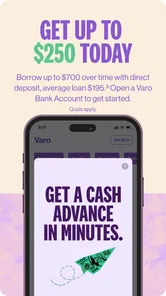
I’d also treat the advance feature as a separate decision from everyday account use. Before accepting one, I would read the amount available, eligibility conditions, and repayment details shown in the app, then compare the result with using savings or asking whether a bill can be moved. An advance may solve a short gap, but it does not increase the money available across the month. If needing one becomes a regular part of the budget, I’d pause and look at the underlying cash-flow problem instead of treating repeated borrowing as a routine.
Security You Can Trust
Now, let’s get into what really matters – security. We all want to know that our money is safe and sound, and Varo doesn’t disappoint. The app uses advanced encryption and security protocols to ensure that your data is protected. Plus, if you ever lose your phone, you can quickly disable the app remotely. It’s like having a security guard for your digital wallet.
My own sensible rule with any mobile bank is to secure the phone itself, use a strong sign-in method, and review account activity regularly. A remote app control is useful if a device goes missing, but it does not replace protecting account credentials or contacting the bank when you suspect unauthorized activity. I’d set up those habits before making this the account where a paycheck and essential bills meet.
For someone moving from another bank, I would not switch every deposit and payment on the same day. A lower-risk approach is to learn the app, confirm that the account workflow suits you, and then move one routine at a time. Keep the old account available until you have checked that incoming pay and scheduled payments are working as expected. This is less exciting than an instant full switch, but it gives you room to catch a missed detail before it affects a necessary bill.
Get Paid Early and Fee-Free Banking
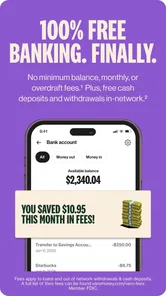
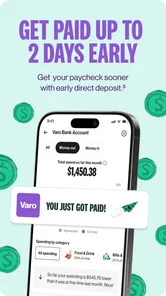
Here’s something that’ll make you smile - Varo allows you to access your paycheck up to two days early. That’s right, no more waiting around for payday. And the cherry on top? There are no monthly maintenance fees, no overdraft fees, and no foreign transaction fees. It feels almost too good to be true, but I assure you, it’s the real deal.
In everyday use, early access can help when a utility bill is due just before a usual payday, but I would not build a budget around the earliest possible arrival. Deposit timing can depend on when payroll is sent and processed, so keep a buffer if a payment has a firm deadline. The cash-advance angle may help with a short-term cash gap, yet it is worth checking the eligibility rules and any repayment details inside the app before accepting an advance. That habit helps you compare the convenience with your other options, such as moving a bill date or using savings.
“No-fee” is a useful starting point, not a reason to stop reading. I would distinguish the fees described for ordinary account use from the separate terms attached to any optional service, and check the current details before making a decision. The practical question is not only whether a familiar monthly charge is absent; it is whether the account’s full set of services, access methods, and conditions fits the way you handle money. That is especially important if you expect to rely on a feature during a tight week.
The app is free to download, but I would make my decision based on the banking arrangement rather than the download price. For a person who wants to check balances, watch spending, and keep pay and daily banking close together, it could be a sensible fit. For someone who prefers cash-first money management, needs specialist financial tools, or values face-to-face support, another provider may be a better match even if its phone app looks less streamlined.
Varo is rated for Everyone, and its audience is broad, but the age label is about content suitability rather than a promise that every person can open an account on identical terms. Account access still depends on the applicable requirements. I would check those before planning a switch, especially if the account is intended for a teenager or for someone who needs another person to help manage financial decisions.
Another useful question is whether Varo can replace the other finance tools you already use. If you mainly need an account for deposits and everyday spending, its built-in view of finances may reduce the need to check several apps. If you rely on detailed household budgeting, investment tracking, or a particular banking service elsewhere, I would keep that tool in place until I know Varo covers the specific task. A single app is convenient only when it does not force you to give up a function you actually use.
For people who regularly handle cash, I would make access logistics part of the decision before moving a paycheck. Think through how you usually get money into an account, withdraw it, and deal with a problem when you cannot visit a branch. A phone-first service can work smoothly for someone whose financial life is mostly digital, while the same setup may feel limiting to a person whose routine depends on local, face-to-face help. The right choice depends on the task, not on which app has the most polished first impression.
Compared with a conventional bank app, Varo puts the phone and pay timing at the center, rather than branch visits. Compared with a budgeting-only app, it brings banking into the same experience instead of merely organizing accounts elsewhere. That can reduce app-switching, but it also means I would think carefully before moving every financial task at once. Someone who already has a bank they trust might try Varo for a specific use, such as receiving income or separating routine spending, then decide whether the workflow actually helps.
The app is rated for Everyone, which describes its content rating rather than making it a substitute for an adult’s help with financial decisions. It is aimed at people who can open and manage an account under the applicable terms. If you depend on cash services or regular face-to-face support, check whether the ways you normally deposit, withdraw, and resolve problems work for you before switching. A smooth phone interface cannot compensate for a mismatch in how you need to access your money.
What I’d Watch as the App Evolves
As the service continues to receive app versions, the useful thing to watch is whether updates make routine tasks clearer and keep account controls easy to find. Version 4.20.0 gives a concrete snapshot of the Android app, but a version number alone does not prove that a particular feature has changed or that the banking terms have improved. I’d judge future changes by their practical effect: can I understand a transaction, manage a savings habit, and get help without confusion?
For existing users, the best way to assess a new release is to notice whether the everyday jobs feel easier, not simply to assume that a higher version number means a better banking experience. I would look for clear account activity, controls that are easy to locate, and a straightforward path to understand pay timing or savings settings. If a change alters a familiar workflow, taking a moment to review the settings can prevent an old routine from continuing on autopilot when your needs have changed.
My recommendation is strongest for people who want a phone-centered account, can manage most banking digitally, and see early pay as a helpful possibility rather than a guarantee. It is less compelling if your main need is branch access, a specialized financial service, or a system of budgeting tools that Varo does not replace for you. I would start by identifying one clear job for the account, then judge whether it makes that job easier before moving other parts of your finances.
In conclusion, Varo Bank: Mobile Banking isn’t just another banking app; it’s a revolution in how we handle our finances. Its user-friendly interface, top-notch security, and innovative features make it a must-have for anyone looking to take control of their money. So, if you’re tired of hidden fees and complicated banking processes, give Varo a try. You might just find it’s the financial companion you never knew you needed.
Varo Bank: Online Banking Frequently Asked Questions
Can I use Varo Bank if I prefer managing my money on a computer?
Varo Bank is built around mobile banking, so the app is the central way to manage your account and use its features. If you prefer doing everyday banking through a desktop website, consider whether a phone-based experience suits your habits before downloading. The app is free and is intended for users who want to handle their finances from a mobile device.
What does Varo Bank’s early-payday and cash-advance description mean?
Varo Bank’s app summary highlights early payday and cash advances alongside no-fee mobile banking. These options may appeal if you want access to banking features and cash-flow support through one app. Before relying on either, review the terms and eligibility shown in the app, since the summary alone does not explain how access works or whether a particular user qualifies.
What is Varo Bank and how does it work?
Varo Bank is a mobile-only banking platform designed to provide users with a convenient alternative to traditional banking. It offers a range of financial services including checking and savings accounts, direct deposit, and financial planning tools. Users can manage their finances entirely from their smartphone, benefiting from features like fee-free overdraft protection and high-yield savings accounts.
Is Varo Bank safe to use for mobile banking?
Yes, Varo Bank ensures the security of its users through advanced encryption and security protocols. It is FDIC insured up to $250,000, providing the same level of protection as traditional banks. The app also includes features such as biometric login and real-time alerts to keep your account secure from unauthorized access.
Are there any fees associated with Varo Bank accounts?
Varo Bank prides itself on being a fee-free banking solution. There are no monthly maintenance fees, no minimum balance requirements, and no foreign transaction fees. Additionally, users can access over 55,000 Allpoint ATMs worldwide without incurring any fees, making it a cost-effective option for everyday banking.
Pros
- No monthly fees or minimum balance requirements
- Early direct deposit access
- Over 55,000 fee-free ATMs
- User-friendly interface,24/7 customer support
Cons
- Limited physical branch access
- No joint accounts
- Foreign transaction fees apply
- Mobile check deposit limits
- Limited investment options