USCCA Concealed Carry App
- 961.00
- 3.9
- Installs
- 500.00K
- Price
- Free

Screenshots
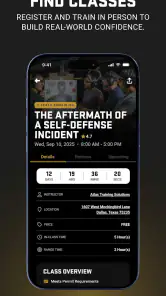
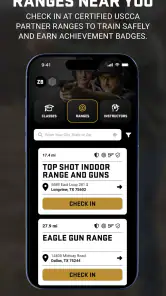
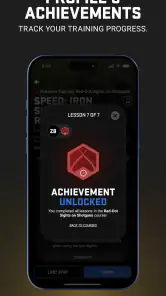
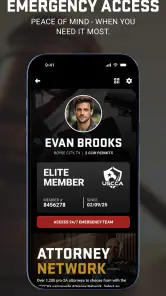
Analysis by Reviewed
I spent time with the USCCA Concealed Carry App as an education and support tool for responsible gun owners, and my overall impression is that it tries to solve a very practical problem: keeping useful carry information, training guidance, and assistance in one place. It is free to use, made by The USCCA, and aimed at users who want more than a basic reference page when they are thinking about concealed carry.
The app sits in a sensitive category, so I judge it less like a casual utility and more like a tool that should encourage careful decisions. Its strongest value is not replacing formal instruction, legal advice, or sound judgment. Instead, it can help organize the questions a gun owner should be asking before carrying, traveling, or looking for additional training.
How the app feels in its current form
The current release is version 2.0.32, and the product has been available since June 23, 2017. That history matters because this is not a brand-new experiment. It has had time to establish a recognizable purpose around reciprocity information, education, and support, while still showing the practical limitations of a mobile reference tool.
At its best, the app works as a companion for someone who wants to stay informed between classes or while planning a trip. The combination of concealed-carry information and training-related material makes more sense than treating those subjects separately. Carrying responsibly involves both knowing the rules and understanding personal readiness, and the app’s design is built around that connection.
I would not describe it as a complete replacement for a certified instructor. The word “complete” in its positioning should be understood as broad coverage rather than a substitute for hands-on practice. A screen can explain concepts and point you toward support, but it cannot correct your grip, observe your habits, or confirm that you can safely handle a stressful situation.
That distinction is important for new owners. Someone who has just purchased a firearm may find the app useful for building a learning checklist, but I would still put an in-person safety course and supervised practice ahead of relying on an app. For an experienced owner, the value is more about keeping reference material close and making training or travel preparation easier to revisit.
Reciprocity information is useful, but it deserves careful handling
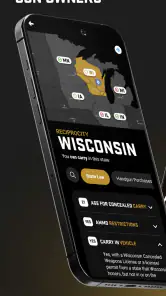
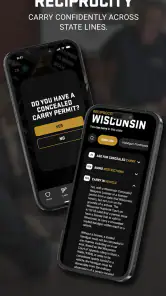
The reciprocity part is likely to attract many users. People often want a quick answer when crossing state lines, and having carry-related information available on a phone is more convenient than searching through scattered pages. In everyday use, I can imagine checking the app before a road trip, then using it to identify which questions need closer attention before leaving.
More From Our News Desk

Clash of Clans Is Won Between the Battles

Android Auto Makes the Case for Quieter Car Software

MobiOffice: Transforming Mobile Productivity with Seamless Integration

EA SPORTS FC™ Mobile Soccer: Redefining Mobile Sports Gaming

How Microsoft OneDrive Became a Mobile Productivity Giant

How Google Translate Breaks Language Barriers Effortlessly
My advice is to treat that information as a starting point, not as permission to carry. Laws can be detailed, exceptions can matter, and a general summary may not answer every situation involving location, vehicle storage, prohibited places, or identification requirements. The app is most helpful when it prompts a user to verify the details rather than encouraging false confidence.
A sensible workflow is to check the relevant state information in advance, write down the issues that affect your route, and then confirm them through an authoritative source or qualified legal professional. That extra step is not a criticism unique to this app; it is simply the responsible way to use any mobile legal reference.
Training content is more valuable when used as a plan
The training side becomes more useful when I stop treating it as something to read once and instead use it to organize improvement. A new owner could use the app to identify subjects to study, such as safe storage, handling habits, situational awareness, or the responsibilities connected with concealed carry. An experienced owner could use the same material as a reminder to refresh skills rather than assuming past experience is enough.
One practical approach is to keep a simple personal training routine outside the app. After reading a topic, I would turn it into an action: schedule a class, review storage at home, practice safe unloaded handling, or make a list of questions for an instructor. This makes the app more than passive reading and avoids the common mistake of confusing familiarity with competence.
The app is also better suited to preparation than to urgent decision-making. If I were already dealing with a stressful incident, I would not want to search through educational material while trying to determine what to do. Its support role is more valuable before problems occur, when there is time to learn, plan, and save the right contact or guidance pathway.
What changed with the current version
The confirmed current version is 2.0.32, which indicates that the app has moved beyond its original release and received ongoing version development. That is useful context for existing users: the product is not frozen in its first form, and the current experience should be judged as the maintained version rather than as a snapshot from its launch period.
At the same time, a version number alone does not tell me that every part of the experience has been transformed. I would avoid assuming that a newer release automatically means the legal material is current for every situation or that the interface will feel modern on every device. The meaningful question is whether the app remains clear, dependable, and easy to consult when a user needs it.
For someone returning after a long break, the sensible first step is to update the app before relying on it, then revisit the sections used most often. Users who have saved their own notes or routines elsewhere should keep those records available rather than assuming an app update will preserve every personal preference in exactly the same way.
The minimum operating-system requirement is Android 7.0, which makes the app accessible to many older Android phones. That can be helpful for users who keep a secondary device in a vehicle or prefer not to upgrade hardware frequently. The trade-off is that an older supported system may not provide the same smoothness, security, or screen behavior as a recent phone, so the experience can vary.
How existing users may benefit
For people already familiar with concealed carry, the main benefit is convenience. Instead of keeping separate bookmarks for training resources, state information, and support material, the app gives those subjects a shared home. That does not eliminate the need for verification, but it can reduce the friction of remembering where to begin.
I can see the app fitting naturally into a pre-trip routine. A user might review the route, check the carry rules that appear relevant, note any questions about restricted locations, and then confirm the details before traveling. The important insight is that the app works best as a preparation checklist, not as a last-second legal answer pulled up at a gas station.
It may also help an owner who has become complacent. Carrying regularly can make basic responsibilities feel routine, and a short return to training material can expose gaps that were easy to ignore. Even if the user already knows the fundamentals, revisiting them can encourage a more deliberate approach to storage, handling, and decision-making.
The app’s audience is not limited to people who carry every day. A gun owner who is still deciding whether concealed carry is appropriate may use it to understand the responsibilities involved before committing to equipment or habits. That is a healthier use than downloading it only to look for confirmation of a decision already made.
Where the experience still has friction
The biggest limitation is the danger of overconfidence. A convenient reference can feel authoritative simply because it is on a phone, especially when the subject involves state laws and personal safety. I would like every user to remember that a summary is not the same thing as a complete legal analysis, and educational reading is not the same thing as demonstrated skill.
There is also a practical difference between information that is easy to find and information that is easy to apply. A user may understand a general rule but still be unsure how it affects a particular building, vehicle, permit, or trip. That is where the app’s convenience can reach its limit. It can help frame the question, but it may not resolve the exception.
Another possible source of friction is audience fit. The app is broad: it combines education, reciprocity, and support rather than focusing on one narrow task. That breadth is useful for a beginner, but an experienced user who wants only a fast state-law lookup may prefer a dedicated reference source. Conversely, someone looking for a full interactive training course may find a specialist learning platform more structured.
The age rating of Everyone 10+ should not be mistaken for a recommendation that children use the app independently to learn about firearms. The subject still requires adult supervision, careful language, and real-world safety instruction. For families, I would use the app as a prompt for responsible conversations, not as a child’s stand-alone training system.
The average rating is 3.9 from around 1,800 ratings, with roughly 961 written reviews. That suggests a mixed but meaningful user response rather than universal approval. I read that kind of reception as a reminder to keep expectations realistic: the app clearly serves a substantial audience, but individual satisfaction will depend heavily on phone compatibility, preferred workflow, and whether the user wants education, legal reference, or immediate support most of all.
Compared with the usual alternatives
Compared with searching the web, the app’s advantage is focus. A general search can produce too many results, mix official and unofficial sources, and make it difficult to know which page deserves attention. A dedicated app gives the user a clearer starting point and keeps the subject centered on responsible ownership rather than forcing a broad search every time.
Compared with a formal class, however, the app is clearly secondary. An instructor can adapt explanations, answer specific questions, observe technique, and identify unsafe habits. The app cannot provide that personal feedback. I would use the two together: the app for preparation and review, and a qualified instructor for skills that must be demonstrated rather than merely understood.
Compared with a state government website or a legal professional, the app is more convenient but should not automatically be treated as more authoritative. Official sources and professional advice remain important when a decision has serious consequences. The app earns its place by helping users know what to investigate, not by removing the need to investigate.
Compared with a general firearm news or community app, its education-oriented focus is a strength. It is less about browsing conversation and more about practical responsibility. That makes it a better fit for someone who wants a structured starting point, although users seeking equipment reviews, local discussion, or highly specialized technical content may need another resource alongside it.
Who should install it, and who should skip it?
I would recommend trying it if you own a firearm, are considering concealed carry, travel between states, or want a single place to revisit training subjects. It is especially suitable for users who appreciate guided preparation and who understand that a mobile reference is one part of a larger safety routine.
I would be more cautious about recommending it to someone who expects instant legal certainty. If your main question is whether a very specific location or unusual circumstance is lawful, do not let a quick app lookup be the final step. Confirm the situation through an appropriate authoritative source.
I would also skip making it your only learning tool if you are completely new to firearms. Start with safe storage, qualified instruction, and supervised practice. Once those foundations are in place, the app can become a useful companion for reviewing concepts and planning the next stage of learning.
Users who dislike broad all-in-one apps may prefer separate tools. A dedicated legal reference can be faster for a narrow lookup, while a course platform may offer more depth and progression for training. The USCCA app makes the most sense when convenience across several related needs matters more than maximum specialization in one area.
What I would watch before relying on it
I would pay close attention to how clearly the app presents changing carry information and whether its explanations encourage users to verify important details. In this category, clarity is not cosmetic. A confusing label, buried qualification, or overly broad summary can affect how a user interprets a serious responsibility.
I would also watch how the current version behaves on older Android hardware. Supporting Android 7.0 broadens access, but older devices can bring slower loading, smaller displays, or less comfortable navigation. Before traveling, I would open the sections I expect to use and make sure the app is practical on my particular phone rather than assuming support guarantees a perfect experience.
Another thing worth watching is whether the app remains useful between major decisions. A tool that is opened only during a trip has limited value. I would get more from it by pairing each reading session with a concrete action, such as arranging instruction, checking storage practices, or preparing questions for a professional.
Finally, I would keep an independent backup plan. Save essential contact details through a trusted method, know where to find official state information, and never depend on a single app during a high-pressure situation. That is not a reason to avoid this product; it is the right way to use technology responsibly in a safety-sensitive area.
My recommendation is to treat the USCCA Concealed Carry App as a practical companion, not a final authority. It brings together useful education, reciprocity-oriented reference material, and support in a free package from The USCCA, which explains why it has reached more than 500,000 installs. Its strongest contribution is helping users prepare better questions and more consistent routines.
I would install it if I wanted a focused starting point for concealed-carry education and travel preparation, especially alongside formal instruction. I would not use it as a substitute for an instructor, official legal sources, or careful judgment. Used with those safeguards, USCCA Concealed Carry App can earn a place in a responsible owner’s toolkit; used alone, it asks more of a phone than a phone can safely provide.
USCCA Concealed Carry App Frequently Asked Questions
Is the USCCA Concealed Carry App suitable for beginners who are new to firearm ownership?
The app is an education resource for gun owners, so it can be a useful place for beginners to explore safety information, training-related content, and topics connected with concealed carry. It is best approached as a starting point for learning rather than a complete course. New owners should seek qualified, hands-on instruction and follow applicable laws and firearm safety guidance.
What devices and operating systems can run the USCCA Concealed Carry App?
The app is available for Android and iOS devices. On Android, it requires version 7.0 or later, so it is worth checking your phone’s software before downloading. If your device meets that requirement, you can install the app and explore its education resources and concealed-carry tools. Keeping your operating system and app updated can also help with compatibility.
What is the USCCA Concealed Carry App used for?
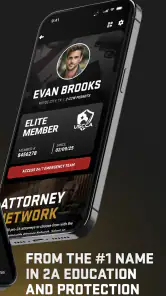
The USCCA Concealed Carry App is designed to support responsible concealed-carry owners with educational resources, safety information, training content, legal updates, and tools related to firearm ownership. It can help users review defensive concepts, understand important considerations before carrying, and access USCCA services in one place. It should be treated as a supplementary resource, not a replacement for qualified instruction or professional legal advice.
Does the USCCA Concealed Carry App provide state-specific concealed-carry laws?
The app may provide information about concealed-carry regulations and legal considerations by state, which can be useful when traveling or comparing local requirements. However, firearm laws can change frequently and may differ between cities, counties, and states. Users should always verify current rules through official government sources or a qualified attorney before carrying, transporting, or using a firearm in any jurisdiction.
Is the USCCA Concealed Carry App a substitute for firearm training?
No. Although the app can offer helpful educational material, safety guidance, and training-related resources, reading information on a phone is not equivalent to completing hands-on instruction. New and experienced firearm owners should consider professional training covering safe handling, storage, marksmanship, decision-making, and applicable laws. Always follow certified instructors, local regulations, and the manufacturer’s safety instructions.
Pros
- Quick access to concealed-carry laws by state
- Interactive tools help users review firearm safety basics
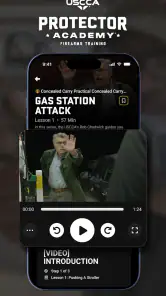
- Training resources support ongoing skills development
- Emergency information can be accessed while traveling
- Clean interface makes key resources easy to find
Cons
- Some features may require a paid USCCA membership
- State laws can change before the app database is updated
- Content may feel overwhelming for first-time gun owners
- Location and notification permissions may affect privacy preferences
- Offline access may be limited when traveling without data
- Category
- Education
- Version
- 2.0.32











