Uphold: Buy BTC, ETH and 300+
- 8.35K
- 4.4
- Installs
- 5.00M
- Price
- Free

Screenshots
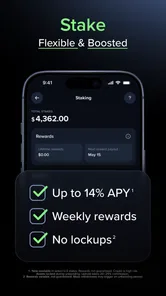
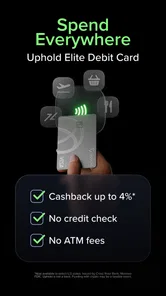
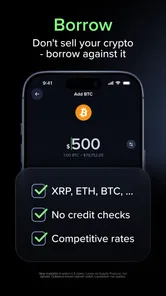
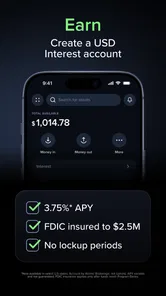
Analysis by Reviewed
My ideal use for a crypto app is practical: I want to check a price, decide whether to buy a small amount, and understand what happens to the money next. Uphold: Buy BTC, ETH and 300+ is built around moving between different kinds of assets in one account, rather than keeping the experience limited to a single coin. That makes it worth a look if you want a broad view of your holdings, though I’d still approach any crypto purchase as a risk-bearing decision, not a shortcut to easy returns.
Start with the job you need it to do
Before opening an account, I’d ask myself whether I want a straightforward way to buy familiar crypto or a place to compare and manage several asset types. Uphold is a finance app developed by Uphold, and its appeal is the second use case: it brings digital assets and other supported categories into the same environment. It is free to download, has an Everyone age rating, and includes in-app purchases listed from $4.99 to $49.99 per item, so I would check the terms shown for any purchase before proceeding.
That breadth is useful, but it can also make the first decision harder. If you only want to make an occasional Bitcoin purchase and never plan to explore other assets, a simpler single-purpose app may feel less busy. I’d treat the range as an option, not a reason to trade more often. A sensible starting workflow is to choose one asset, review the amount and transaction details, and make sure you understand the destination before confirming anything.
Who benefits from a broader account
I can see the strongest fit for someone who wants to keep a few different asset types under one roof and is comfortable making their own choices. A person who follows Bitcoin but occasionally wants to compare another supported asset can avoid switching between several services just to get a broad snapshot. That convenience is most valuable when it supports a simple plan, such as checking balances once a week or making an occasional planned purchase, rather than encouraging constant checking.
There is a practical trade-off here. A single account can make the overall picture easier to follow, but it can also place very different kinds of assets side by side and make them look more alike than they are. I would not assume that crypto, metals, or any other supported category carries the same risks, trading conditions, or purpose. Before buying something unfamiliar, I’d first learn what the asset represents and why it belongs in my plan.
A World of Cryptos at Your Fingertips
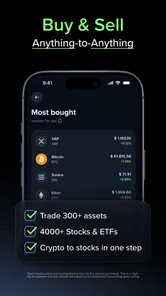
Imagine having access to over 300 digital currencies and precious metals all in one place. That's exactly what Uphold offers. It's not just about buying and selling BTC and ETH; you can also dabble in lesser-known altcoins and even trade in commodities like gold and silver. The app's interface is clean and intuitive, making it super easy to jump from one asset to another without breaking a sweat.
From a decision to a completed transaction
For a realistic everyday example, suppose I have set aside a small amount after payday and want to add some Bitcoin without turning it into an all-evening research session. I’d open the app, compare the asset I’m considering, enter an amount I can afford to risk, and pause at the final review screen to check the quoted transaction details. That last pause matters: a quick interface does not remove market volatility, and a price can move while I’m deciding.
More From Our News Desk

 Bolt: Request a Ride
Bolt and the Shift from One-Tap Rides to More Legible Trips
Bolt shows how ride-hailing is shifting from a one-tap taxi request toward a more legible, choice-driven trip, while leaving the hardest questions of price and reliability unresolved.

 Farm Land - Farming life game
Farm Land Review: A Small Island Farm with a Satisfying Loop
A bright, breezy island farm turns a few quick chores into a satisfying cycle of planting, harvesting, expanding, and deciding what to build next.

 Android Auto
’s Community Takes Shape in the Passenger Seat
Its most valuable network is not a public feed but a shared set of routes, voice habits, app integrations, and advice that make driving less isolating—and sometimes more complicated.

 My Talking Angela
 Makes the Virtual Pet Feel Personal
A polished pet-raising game built on small rituals, playful customization, and a character who gives everyday screen time a surprisingly personal rhythm.

 Google Translate
 Review: A Pocket Tool for the Small Frictions of Travel
From menus and signs to quick conversations, Google Translate earns its place by cutting the little delays that make unfamiliar language feel like a barrier.

 Shazam: Find Music & Concerts
Shazam’s Best Trick Is Turning a Song Into a Night Out
A few seconds of recognition can settle an argument, rescue a half-remembered chorus, and point toward a live show. Shazam’s real trick is what happens after the match.
Latest News



The app’s broad asset mix also changes how I’d use it after buying. Instead of treating every balance as a prompt to trade, I’d use the consolidated view to keep track of what I already hold and decide whether a new transaction serves a clear purpose. One useful habit is to write down why I made a purchase and what would make me reconsider it. That helps separate a deliberate plan from reacting to a sudden price move.
Make the review screen part of the routine
I’d use the final confirmation step as a small checklist, not a formality. Is the selected asset the one I intended? Does the amount still match my budget? Do the displayed terms make sense for the route I chose? If I cannot answer those questions calmly, I’d leave the transaction for later. This is especially useful when moving between asset types: a quick conversion can feel like tidying up a balance, even though it is still a financial decision with consequences.
For a first transaction, I’d keep the workflow deliberately narrow: choose one asset, use an amount that would not disrupt everyday expenses, and avoid making several exchanges just to explore the interface. Afterward, I’d note what I expected to happen and compare that with the completed transaction details. That gives me a grounded way to learn the app’s flow without confusing a smooth experience with a safe or profitable outcome.
Security First, Always
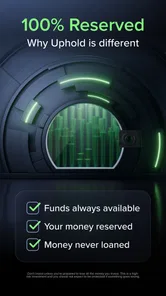
We all know how crucial security is in the crypto world. With Uphold, you get that peace of mind. The app employs top-notch security measures, including two-factor authentication and end-to-end encryption, to ensure your assets are safe. It's like having a digital fortress guarding your investments.
Even with security tools, I wouldn’t treat an app as a substitute for careful account habits. I’d use a unique password, protect access to the email account connected to the service, and avoid approving a transfer while distracted. For anyone planning to move crypto between services, I’d check the asset and destination details character by character before sending; a mistaken transfer can be much harder to fix than a mistaken tap in an ordinary shopping app.
When an asset leaves the app
A useful question to settle before buying is whether I want to keep the asset in the account or eventually move it somewhere else. Those are different workflows. If I expect to transfer crypto, I’d check the receiving service’s supported asset and network details before starting, then compare them carefully at the send stage. I would not assume that two services use compatible transfer routes just because they display the same asset name.
If I only want to track a small holding, avoiding unnecessary transfers can make the routine simpler. If I have a specific custody preference or need tools that this app does not provide, I’d compare alternatives before funding the account. The handoff matters: once an asset is sent, correcting a wrong address or incompatible route may not be as easy as cancelling a purchase that has not yet been confirmed.
Seamless Transactions
One of the standout features of Uphold is its seamless transaction process. Whether you're buying, selling, or transferring assets, the process is smooth and hassle-free. Plus, the app supports bank transfers, credit cards, and even crypto deposits, giving you plenty of options to move your money around.
Those different routes are helpful, but they are not interchangeable in practice. Before choosing a funding method, I’d compare the timing and transaction terms displayed for that specific route, then avoid assuming that a card, bank transfer, and crypto deposit will all settle in the same way. If I’m buying for a particular reason, I’d fund the account early enough to avoid making a rushed decision just because I want to act immediately.
There is also a useful handoff to think through: buying inside an app and holding there is not the same workflow as transferring an asset elsewhere. If my goal is simply to monitor a modest holding, keeping the process in one place may be convenient. If I need a particular custody setup or a specialized trading tool, I’d compare those needs before moving funds, since convenience alone does not decide which arrangement is right for me.
Choosing between an all-in-one app and a specialist
Compared with a focused exchange, Uphold’s appeal is the ability to look across supported asset categories without making each service its own separate destination. For a casual user, that can reduce account-hopping and make an occasional purchase easier to manage. A specialist exchange may be a better match if the priority is a narrow crypto workflow, more hands-on trading controls, or detailed market analysis; I would compare the actual tools and transaction terms rather than assume one style is automatically cheaper or better.
A bank or conventional investment account is a different alternative again. It may suit someone who wants familiar budgeting or investment products and does not want to manage crypto transactions. Uphold makes more sense when direct access to digital assets and the flexibility to move among supported asset types are central to the task. If that flexibility is not something I’ll use, I’d prefer the simpler tool that fits my real routine.
Transparency and Trust
Transparency is key in the financial world, and Uphold doesn't disappoint. The app provides real-time information on fees and transactions, so there are no hidden surprises. This level of transparency builds trust, making you feel more confident in your trading decisions.
My practical tip is to inspect the quoted cost at the moment I place an order, rather than relying on a remembered estimate or assuming every asset has identical terms. I’d also keep a simple record of the amount, asset, and date for my own budgeting. That makes it easier to understand what I actually did later, especially if I use the app for several kinds of transactions rather than one recurring purchase.
A simple record helps with follow-through
I would treat my own notes as part of the process, not as a substitute for the transaction history. A short entry can say what I bought, why I chose it, and whether I intended to hold it or transfer it. That is helpful if I return after a few weeks and cannot remember whether a balance changed because of a deliberate decision or because I was experimenting with the app.
For anyone using multiple funding routes, I’d record which one I chose and check the corresponding terms again before the next transaction. This avoids carrying assumptions from one method to another. It also makes the app easier to evaluate honestly: after a few planned uses, I can tell whether the broad account view saves me effort or whether I would rather use a more focused service.
Innovative Features
Another cool aspect of Uphold is its innovative features. For instance, the "Anything-to-Anything" feature allows you to trade any asset for another without needing to convert to fiat first. This flexibility is a game-changer, especially for those looking to diversify their portfolios efficiently.
That direct route can reduce steps when I already know what I want to exchange, but it doesn’t make the decision itself simpler: I still need to compare the quoted outcome and consider whether changing one exposure for another fits my plan. I would not use asset variety as a substitute for research. Someone who wants advanced charting, narrow control over order types, or a focused long-term savings tool may be better served by a specialist platform or a conventional investment account.
Where the workflow can feel less convenient
The same range that makes the app appealing can create extra choices for a newcomer. Seeing many assets in one place does not tell me which one suits my goals, and moving quickly between them can encourage activity without a clear reason. I’d limit my watchlist or attention to assets I understand instead of treating every available option as something I need to investigate or own.
There is also a difference between an easy interface and an easy financial decision. Prices can change, transaction terms can vary by asset or funding route, and transfers require careful destination checks. If I want predictable deposits, familiar savings features, or a low-effort set-and-forget routine, I would look at a conventional account designed for that purpose rather than trying to make a crypto app fill the role.
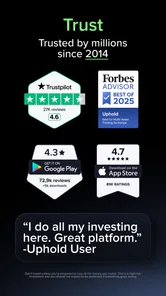
Uphold has been available since December 29, 2015, and its current version is 6.67.1, with iOS and Android support noted from version 8.0. Its average rating is 4.5 from around 70,000 ratings, with roughly 7,900 written reviews and more than 5 million installs. Those figures suggest a widely used app, but they cannot tell me whether its workflow suits my own habits; I’d judge that by trying the core actions carefully and reading the transaction terms each time.
For me, the strongest reason to try it is the ability to handle crypto and other supported assets without jumping between several apps. It is best suited to curious, self-directed users who value that flexibility and are willing to check each transaction. If you prefer a very narrow interface, need specialist trading controls, or simply don’t want exposure to volatile assets, I’d choose a different kind of financial tool. Otherwise, I’d start small, keep the goal clear, and let the app’s range serve that plan rather than drive it.
In conclusion, if you're in the market for a comprehensive app to manage your digital assets, Uphold might just be the perfect fit. Its user-friendly interface, robust security, and wide range of supported assets make it a formidable player in the crypto space. Whether you're a seasoned trader or just starting out, this app offers something for everyone. So why not give it a shot and see if it lives up to the hype? Happy trading!
Uphold: Buy BTC, ETH and 300+ Frequently Asked Questions
Is Uphold suitable for someone new to digital-asset apps?
Uphold is a Finance app from Uphold for people interested in managing digital assets through a mobile platform. Its store age rating is Everyone, and it has an average rating of 4.5 from around 70,000 ratings. Those figures can help with initial expectations, but they do not tell you whether the app’s features or approach will suit your needs, so consider what you want to do before signing up.
What does Uphold’s “From $ to Bitcoin in seconds” description mean?
Uphold’s short store summary is “From $ to Bitcoin in seconds,” reflecting its focus on moving between money and digital assets. The app is aimed at people interested in buying, selling, and holding assets such as Bitcoin and Ethereum. Before using it, think about which actions you need and review the transaction details in the app before confirming anything.
Is Uphold free to download, and are there costs after installation?
Uphold is free to download, so you can install the Finance app without paying an upfront purchase price. Some transactions may involve costs, and the app also offers in-app purchases priced from $4.99 to $49.99 per item. Before completing a transaction or purchase, review the details shown in the app so you understand what you are agreeing to pay.
Who is Uphold designed for, and what should I consider before using it?
Uphold is a Finance app from Uphold for people interested in managing digital assets through a mobile platform. Its store age rating is Everyone, and it has an average rating of 4.5 from around 70,000 ratings. Those figures can help with initial expectations, but they do not tell you whether the app’s features or approach will suit your needs, so consider what you want to do before signing up.
What is Uphold and what can I do with it?
Uphold is a versatile financial platform that allows users to buy, sell, and hold various cryptocurrencies like Bitcoin (BTC) and Ethereum (ETH), as well as over 300 other digital assets. Beyond trading, users can also utilize Uphold for sending money to others, managing their portfolio, and even spending their assets using the Uphold debit card. The app aims to cater to both beginners and experienced traders by offering a user-friendly interface and a range of features tailored to cryptocurrency enthusiasts.
Pros
- User-friendly interface, easy for beginners.
- Supports a wide range of cryptocurrencies.
- Instant transactions without delays.
- Multi-device access for convenience.
- Offers debit card for direct spending.
Cons
- High trading fees for some transactions.
- Limited customer support options.
- Occasional app performance issues.
- Verification process can be lengthy.
- Not all features available in all regions.