Turbolearn - AI Note Taker
- 603.00
- 4.7
- Installs
- 1.00M
- Price
- Free

Screenshots

Analysis by Reviewed
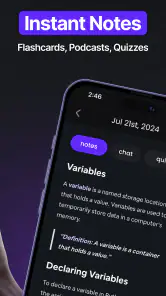
I’d treat TurboLearn as a study aid that turns learning material into several ways to review it, rather than as a general-purpose notebook. The appeal is clear: instead of leaving a lecture with one long page of notes, you can work toward notes, flashcards, and quizzes that help you revisit the material. In my experience, the useful question is not whether AI can make a tidy summary, but whether its output gives you a reliable starting point for studying.
Choosing the right first task
I would begin with a single class, meeting, or reading that I already understand reasonably well. Familiar material makes it easier to spot when a generated explanation smooths over an exception or gets a connection wrong. It also gives you a fair test of whether TurboLearn’s study output suits your habits, before you spend time building a large collection around it.
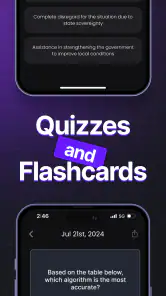
For example, after a morning lecture, I might use the notes for a quick recap, then try the quiz later that day without looking back. Any answer I hesitate over becomes a cue to reopen the original material, not a reason to memorize the app’s wording automatically. This short cycle is particularly useful when the subject has several similar terms that are easy to confuse.
Where the workflow can get stuck
AI-generated study material still needs a human check. A polished-looking note can make an unclear point seem settled, and a quiz can only be as useful as the source material behind it. I’d compare important definitions, names, and figures with the lecture or document before relying on them, especially when preparing for an exam or using technical material.
Set up for the way you actually study
Before using an output as a finished study resource, decide what you need from it: a quick recap, prompts for active recall, or a way to check what you have not learned yet. Those are different jobs. Flashcards are most useful when each prompt asks about one idea; if a card bundles several concepts together, I’d split the material mentally or make a clearer prompt during review.
For a practical routine, I’d start with one lecture or reading rather than trying to process an entire course at once. Check whether the resulting notes preserve the distinctions your instructor emphasized, then use the quiz to find gaps. This small review step can prevent a convenient summary from quietly replacing the details you will actually need.
Recovering when a result is not useful
If a generated set feels vague or misses the point, I would first revisit the material that went into it and make sure it contains the relevant explanation, not just a title or a few shorthand reminders. Then compare the questionable section with the original and use the clearest source as your authority. A study tool should help you organize learning, not decide what is true.
More From Our News Desk

Clash of Clans Is Won Between the Battles

Android Auto Makes the Case for Quieter Car Software

MobiOffice: Transforming Mobile Productivity with Seamless Integration

EA SPORTS FC™ Mobile Soccer: Redefining Mobile Sports Gaming

How Microsoft OneDrive Became a Mobile Productivity Giant

How Google Translate Breaks Language Barriers Effortlessly
It also helps to keep a simple fallback: retain your own key points separately while you evaluate the generated notes. That way, an unhelpful result does not erase the structure you already understand. For a topic where wording matters, such as a definition or a process with ordered steps, I’d verify the wording before turning it into a memory prompt.
When the app may not be the problem
Sometimes the friction is in the source rather than the study workflow. A rushed lecture, incomplete notes, or unfamiliar terminology can make any automated transformation less dependable. In that situation, I’d add context from the class material before expecting a concise review to make sense. If you need a precise, fully controlled record, writing your own notes may be a better first step.
TurboLearn is an education app from TurboLearn AI, and its focus makes it most appealing to students and people who regularly need to revisit lessons or meeting material. It is free to download, rated for Everyone, and has a 4.7 average from around 213,000 ratings, with over a million installs. The current version is 1.2.5, and in-app purchases range from $7.49 to $99.99 per item, so I’d check the purchase details in the app before committing to a paid option.
Who benefits most—and who may prefer another method
I think it suits learners who already have material to work from and want a faster bridge from listening or reading to practice. Picture reviewing a class after dinner: you skim the notes, try a few quiz questions without looking, then return to the source for any answer that feels uncertain. That is a more useful loop than simply rereading a polished summary, because it makes you test what you remember.
Compared with a conventional notes app, the draw here is the learning-oriented output rather than a blank page you organize entirely yourself. Compared with making flashcards by hand, it can reduce the initial setup work, but manual cards give you tighter control over wording and emphasis. If you mainly need a searchable archive, a flexible notebook may be simpler; if you need exact, carefully curated revision prompts, hand-built material may serve you better.
Making a study set easier to trust
One practical trade-off is speed versus precision. It can be tempting to accept a neat set of notes as complete, but a generated overview is best treated as a map back to the original lesson. I’d keep a small list of terms or examples the instructor stressed, then check that each still appears in the review material. That quick comparison is more useful than rereading every line with equal attention.
For a long course, I would also avoid mixing unrelated subjects into one review session. Keeping each batch tied to a particular lesson makes it easier to recognize where a question came from and to verify it against the right source. This is especially helpful when two units use similar vocabulary in different ways.
Practical checks before relying on it
The app was released on August 5, 2024, and requires Android 8.0 or later. Before building a routine around it, check that your device meets that requirement and that you are comfortable with any purchase choices presented during use. I’d also try a short, familiar piece of material first: you will be able to judge whether the notes and questions preserve the distinctions you care about before investing time in a larger study set.
A useful tip is to treat the first pass as a draft, not a verdict. Keep course-specific terms and exceptions visible in your own source, then use the generated study material to prompt recall. That division of labor—your source for accuracy, the app for a structured review—keeps convenience from turning into overconfidence.
A grounded recommendation
Ever found yourself buried under a mountain of notes, struggling to keep everything organized? Well, let me introduce you to Turbolearn - AI Note Taker, a nifty app that’s here to revolutionize the way you handle your notes. I’ve spent some time fiddling around with it and let me tell you, it’s a game-changer!
Getting Started with a Bang!
First off, downloading and setting up Turbolearn - AI Note Taker is a breeze. Available on both Android and iOS, you can grab it from your respective app store and be up and running in no time. The app welcomes you with a clean, intuitive interface that makes navigation a walk in the park. You know that feeling when you first open an app and everything just clicks? That’s exactly what I experienced!
A Note-Taking Experience Like No Other
Now, let’s dive into the juicy details. This app isn’t your run-of-the-mill note-taker; it’s packed with AI-driven features that are designed to make your life easier. Imagine having an assistant that understands your note-taking style and tailors the experience just for you. Sounds cool, right?
The AI feature automatically organizes your notes, creating categories and tags that are spot-on. No more endless scrolling to find that one note from last semester’s lecture. It’s like having a super-organized friend who’s always got your back!
Seamless Integration and Sync
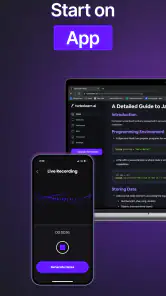
One of the things I absolutely love about this app is its ability to sync effortlessly across all my devices. I can start a note on my phone during my commute and finish it on my tablet once I get home. It’s all seamless, thanks to the cloud integration. Plus, the app supports voice notes, which is perfect for those moments when typing isn’t an option. Just speak your mind, and the app does the rest.
Security and Customization
Let’s talk security. With Turbolearn - AI Note Taker, your notes are safe and sound. The app uses top-notch encryption to ensure that your information stays private. On top of that, there’s a plethora of customization options available. From changing themes to adjusting font sizes, you can tweak it to suit your style. It’s all about making your note-taking experience as personal and enjoyable as possible.
In conclusion, if you’re on the lookout for a smart, efficient, and user-friendly app to manage your notes, I highly recommend giving Turbolearn - AI Note Taker a shot. It’s packed with features that cater to both casual users and note-taking aficionados. So, why not take it for a spin and see how it can transform your organizational skills? You might just find it to be the perfect companion for your academic or professional journey!
My practical verdict
The app’s strongest case is helping turn learning material into something you can actively revisit, rather than leaving it buried in a notebook. I’d recommend it to someone willing to check AI-generated content and use it as a first draft for study. If accuracy must be controlled line by line, or you simply want a quiet place to store notes without generated study tools, a regular notes app or handwritten cards may be a better fit.
One point I would not skip is checking sensitive material before putting it into any digital study workflow. For everyday class revision, the balance of convenience and practice can be appealing; for confidential work or notes that must remain under strict personal control, I’d choose a method whose handling you already understand. Used with that judgment, TurboLearn can make review feel more active without asking you to trust every generated answer blindly.
Deciding whether it fits your routine
For a student with lecture material in hand, the most convincing use is a two-stage review: use the generated notes to orient yourself, then answer questions from memory and revisit the source wherever the result feels shaky. For someone preparing a meeting recap, it may be more useful as a way to turn key discussion material into prompts for later recall than as a replacement for a careful record of decisions and responsibilities.
I would skip it if my main goal were a private, fully manual archive, or if I needed every sentence to remain under my control without an AI-generated layer. A conventional notebook is often better for collecting fragments throughout the day, and self-made flashcards are preferable when the exact wording of each prompt matters. TurboLearn makes most sense when the time saved on creating a first study draft is worth the review needed to check it.
What I would check after the first session
After trying one small piece of material, I’d ask three practical questions: do the notes preserve the lesson’s key distinctions, do the quiz prompts make me retrieve information rather than guess from vague wording, and can I quickly trace a doubtful answer back to my source? If the answer to any of those is no, I’d adjust how I prepare the material or keep that topic in my own notes instead of forcing it into the app’s workflow.
That first trial also helps set expectations about cost. The app is free to download, but optional purchases are offered, so I would explore the basic routine first and decide whether any paid choice solves a real problem for me. I would not pay simply because a study session feels busy; I’d want to see that the workflow genuinely helps me return to material and identify what I still need to learn.
My practical verdict
Turbolearn - AI Note Taker Frequently Asked Questions
Can Turbolearn - AI Note Taker turn a lecture into study materials?
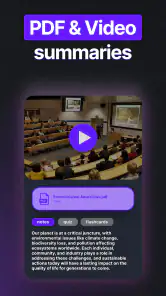
Yes. Turbolearn’s store summary describes notes, flashcards, and quizzes as materials you can leave a lecture or meeting with. That makes it worth considering if you want more than a written record to review later. You can use the generated materials as a starting point for studying, while checking that the notes and questions reflect the information you need.
What devices and operating systems can I use with Turbolearn?
Turbolearn is designed for Android and iOS devices. On Android, the listed minimum operating system is version 8.0, so check your device’s software before downloading. If you use an iPhone or iPad, confirm compatibility on its app store page before installing. Keeping your device’s operating system up to date can also help you use current app features.
Is Turbolearn - AI Note Taker free to download, and are there optional purchases?
Turbolearn - AI Note Taker is free to download, so you can try the app without paying upfront. It also offers in-app purchases, with listed items ranging from $7.49 to $99.99 each. Check the purchase details in the app before buying so you understand what each option includes and whether it suits the way you plan to use Turbolearn.
Who is Turbolearn - AI Note Taker designed for?
Turbolearn - AI Note Taker is an education app from TurboLearn AI, intended for people who want help turning lectures or meetings into study materials. Its store summary highlights notes, flashcards, and quizzes, making it relevant to students reviewing lessons as well as people who want a more organized record of spoken information. The app has an Everyone content rating.
What is Turbolearn - AI Note Taker and what does it do?
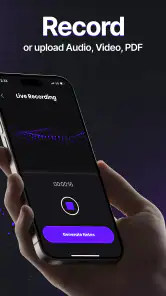
Turbolearn - AI Note Taker is an innovative application designed to streamline the process of taking notes during meetings, lectures, or personal study sessions. The app utilizes advanced AI technology to automatically transcribe spoken words into written text in real-time, allowing users to focus on the content being presented rather than on writing notes. Additionally, it organizes notes into easily accessible formats, making it a valuable tool for students and professionals alike.
Pros
- Integrates seamlessly with popular note apps.
- Real-time note transcription is accurate.
- Offers customizable templates for notes.
- Supports multiple languages for wider use.
- Secure data storage with end-to-end encryption.
Cons
- Limited offline functionality.
- Subscription required for premium features.
- Occasional lag in real-time processing.
- Interface can be overwhelming for new users.
- Limited customer support options.
- Category
- Education
- Version
- 1.2.5











