True Finance: Cash Advance
- 4.23K
- 4.4
- Installs
- 1.00M
- Price
- Free

Screenshots

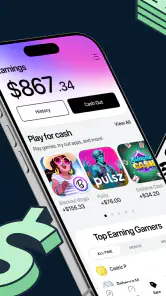
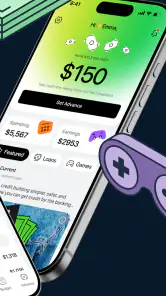
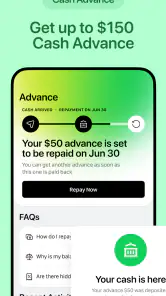
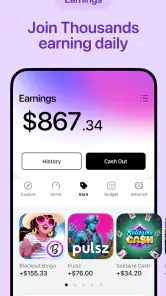
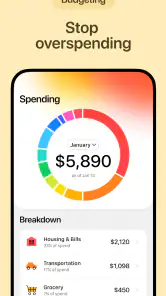
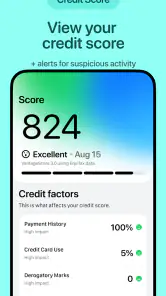

Analysis by Reviewed
I approached True Finance: Cash Advance as a practical finance app rather than a complete money-management system. Its central appeal is easy to understand: it is built around fast access to cash and does not position a credit check as the starting point. That makes it relevant to someone facing a short-term gap, especially when waiting for a conventional financial process feels too slow.
My overall impression is more measured than the short store message suggests. The app is free to install, rated for Everyone, and available on Android devices running version 7.0 or later. Those details make it approachable, but they should not be confused with a guarantee that every user will receive money, receive it immediately, or find the terms suitable. A cash advance is still a financial decision, and the useful question is not simply whether the app opens quickly. It is whether the complete process is clear enough for you to make a calm decision under pressure.
How the cash-advance experience feels in everyday use
When I think about the main use case, I picture a familiar situation: an unexpected bill arrives just before payday, a necessary purchase cannot comfortably wait, or a timing problem leaves an otherwise manageable budget temporarily short. In that moment, speed matters, but so does reducing confusion. An app that makes a user hunt through clutter or repeatedly re-enter information would be frustrating, even if its headline promise sounded attractive.
True Finance is focused enough to make that situation its main reason for existing. The developer is JoinTrueDev, and the app belongs to the finance category rather than trying to be a broad banking replacement. I would therefore approach it as a tool for evaluating a short-term cash option, not as a place to build a long-term savings plan, track every account, or replace a full-service banking app.
The first useful distinction is between fast access to an application process and fast access to approved funds. The former is what a streamlined app can reasonably help with. The latter depends on eligibility, the information requested, the review process, and the destination for any funds. I would never install it while assuming that “no credit check” means “no requirements.” Those are different ideas, and treating them as identical is one of the easiest ways to make a rushed financial choice.
What speed means here
Perceived speed begins before any money moves. It includes how quickly the app becomes usable, how clearly the next action is presented, and whether the application flow feels predictable. On a reasonably maintained Android phone, the minimum operating-system requirement is not demanding, so many older devices should at least be able to install the app. That does not tell me how quickly a request will be reviewed, but it does make the first step less intimidating for people who are not using a new handset.
I also pay attention to the difference between a fast interface and a fast financial outcome. A responsive screen can help you complete a form without unnecessary delay, yet it cannot remove the need to read repayment information or check whether the offer fits your budget. My advice is to move quickly through navigation, not through understanding. Before accepting anything, I would look at the total repayment, timing, and any conditions presented in the final offer rather than relying on the store summary.
That is especially important for a person comparing this app with a traditional bank, an employer-based advance, or a credit union. Those alternatives may involve more waiting or stricter qualification, but they can also present different costs and repayment structures. True Finance is most attractive when the immediate convenience is genuinely valuable and the user is disciplined enough to compare the complete obligation instead of focusing only on the amount available today.
Where the app can help during a busy day
The strongest everyday workflow is probably a short, deliberate session: open the app, review what it asks for, enter information carefully, inspect the resulting terms, and stop if anything is unclear. That sounds obvious, but it is a meaningful advantage when someone is standing in a supermarket queue, dealing with a repair issue, or trying to cover a bill between work commitments. A focused finance app is easier to return to than a general financial dashboard filled with unrelated features.
Heavy use is a different matter. I would not treat this as an app designed for constant monitoring, repeated refreshes, or managing several financial products at once. A cash-advance tool has a narrow purpose, and repeatedly checking it will not necessarily speed up a review. If a request seems to be waiting, the sensible response is to verify the information entered and follow the available in-app instructions, not to submit duplicate requests or keep tapping the same control.
That is one of the less obvious practical trade-offs. The app’s focused nature can reduce distraction during a one-off need, but it may feel limited for someone who wants budgeting, bill calendars, spending categories, or account aggregation in the same place. I would use it alongside a trusted budgeting method, even if that method is simply a notes file or a bank’s existing tools. The advance decision should be made with the rest of the month’s commitments visible.
Stability and recovering from interruptions
Finance apps are judged harshly when a session is interrupted, and rightly so. A phone call, weak connection, battery-saving mode, or accidental app switch can happen at exactly the wrong time. My practical approach with True Finance would be to avoid beginning an application when I am rushing through a poor signal area. I would also keep any relevant information nearby so that an interruption does not encourage guesswork when restarting.
Recovery should be treated cautiously. If the app returns to a previous step, I would review every field rather than assuming that the earlier entry was saved correctly. If it returns to the beginning, I would avoid immediately creating another submission until I could determine whether the first attempt went through. This is not a criticism of one specific screen; it is a sensible safeguard whenever a financial workflow is interrupted.
The app’s current version is 10.6.0, which suggests that it has gone through ongoing iteration rather than remaining at an untouched launch build. I still would not interpret a version number as proof of perfect reliability. Updates can improve stability, but users should keep the app updated through their normal device process and pay attention to what the app displays after reopening. In financial software, recovering accurately is more important than merely recovering quickly.
Another useful habit is taking a moment to distinguish an app problem from a decision problem. If a screen loads slowly, that is a technical inconvenience. If the offer is unclear, the repayment date is uncomfortable, or the total cost does not fit the budget, that is a reason to pause. A smooth interface should never pressure you into accepting an unsuitable advance.
Older phones, storage, and practical device limits
Because the minimum Android requirement is 7.0, True Finance is not restricted to only the newest phones. That is good news for users who keep an older device as their main handset or cannot justify upgrading just to handle a financial app. Still, operating-system compatibility is only the baseline. An older phone with very little free storage, aggressive background restrictions, or an unstable connection may provide a less comfortable experience than a newer device.
I would prepare an older phone before starting: close unrelated apps, charge the battery, use a dependable connection, and avoid switching between multiple screens while entering sensitive information. These steps do not change eligibility, but they reduce avoidable interruptions. They are particularly worthwhile when the user is under financial stress and cannot afford to repeat a process because the device became unresponsive.
Resource demands are difficult to judge from the app’s category alone, so I would not promise that it will be equally light on every handset. My expectation is that a focused finance application should feel less demanding than a media-heavy or game-oriented app, but that is an expectation, not a substitute for your own device experience. If your phone already struggles with ordinary apps, use a stable connection and give each screen time to finish before tapping again.
Privacy and safety also deserve a practical mention. A financial app should be handled with the same care as mobile banking: use a screen lock, avoid entering information while connected to an untrusted public network, and read each permission or disclosure shown during setup. I would not share login details or verification codes with another person claiming to help. These precautions are more important than whether the app feels polished.
How it compares with familiar alternatives
Compared with a normal bank app, True Finance appears more narrowly aimed at short-term cash access. A bank may offer a broader picture of balances, transfers, deposits, and recurring payments, which is better for managing an entire financial life. The trade-off is that a bank’s borrowing options may not match the urgency or eligibility needs of every user.
Compared with a budgeting app, this product serves a completely different moment. Budgeting software helps identify a shortage before it becomes urgent; True Finance is relevant after the shortage has already become a practical problem. I would not use one as a replacement for the other. The most responsible workflow is to use a cash-advance option only when necessary, then use a budget afterward to understand why the gap occurred and whether the repayment will create another one.
Compared with asking family or an employer for an advance, an app can feel more private and convenient. Yet personal arrangements may have different costs, flexibility, or consequences. Compared with a credit card, a cash advance may be easier for someone who does not want a conventional credit-based route, but the right comparison is always the full repayment obligation, not the speed of the first screen.
That comparison leads to a clear boundary. I would skip this app if I needed a complete checking account, detailed long-term planning, investment tools, or a guaranteed emergency fund. I would also skip any cash-advance service if I already knew that repayment would consume money needed for rent, food, utilities, or another essential obligation. Convenience cannot turn an unaffordable commitment into an affordable one.
Who is likely to get the most value
True Finance is best suited to an Android user who wants to explore a short-term cash option in a focused app and is prepared to inspect the details before agreeing. The free price removes an installation barrier, while the Everyone content rating makes it broadly approachable from an age-classification perspective. Neither point removes the need for financial judgment, but both make the app easy to consider as a first step.
It may also suit someone using an older compatible phone who wants a dedicated finance tool without installing a large banking suite. The app has attracted a substantial audience, with over one million installs, and its average rating is 4.4 from around forty-seven thousand ratings. Those figures indicate meaningful adoption and generally positive reception, but they are not a personal guarantee. Individual experiences can differ according to eligibility, device condition, connection quality, and the terms shown during the process.
My less obvious recommendation is to decide your maximum acceptable repayment before opening the app. Write down what you can comfortably return and when, then compare that limit with the complete offer. This reverses the usual emotional order, where a user first sees an available amount and only afterward asks whether it fits. Setting the boundary first makes the app a decision aid rather than a temptation.
I would also keep a record of the final agreement or confirmation shown to you, using the device’s normal secure method. Do not rely on memory, especially if you are handling the request during a stressful event. Note the amount, repayment timing, and any other important terms displayed. If the app provides a status or confirmation screen, revisit it later instead of assuming that closing the app means the process is complete.
My performance verdict
After considering speed, busy moments, stability, and device constraints, I see True Finance as a specialized option rather than a universal financial companion. Its strongest quality is focus: it addresses a specific short-term need and is accessible on an older Android baseline. The free installation and clear cash-advance purpose make it easy to test, while the large installed base and 4.4 average rating provide some reassurance that it is not an obscure experiment.
The main limitation is not necessarily technical. It is the risk of treating convenience as certainty. A fast application path does not promise approval, instant delivery, or a repayment arrangement that suits every budget. The app also cannot replace the broader visibility offered by a bank or budgeting service. Users who need comprehensive financial planning will be better served elsewhere, possibly using this only as a narrowly defined supplement.
My recommendation is therefore conditional but positive: try True Finance when you have a genuine short-term cash problem, a compatible Android phone, and enough discipline to read the full terms before accepting anything. Use a stable connection, avoid duplicate submissions after an interruption, and decide your repayment limit in advance. If the final obligation is unclear or uncomfortable, close the app and compare alternatives. Used that way, it can be a convenient starting point; used impulsively, its speed can become the very thing that causes trouble.
Pros
- Simple interface makes requesting an advance easy.
- May help cover urgent expenses before payday.
- Repayment details are shown before accepting an advance.
- Useful budgeting tools can help monitor upcoming cash needs.
- No traditional credit card application is required.
Cons
- Eligibility and advance limits may vary between users.
- Fees or optional tips can increase the total repayment cost.
- Repayment is often scheduled automatically from your bank account.
- Requires access to sensitive financial and personal information.
- Availability may be limited by location
- employer
- or banking provider.

- Category
- Finance
- Version
- 10.6.0











