TMCARS
- 427.00
- 4.3
- Installs
- 5.00M
- Price
- Free

Screenshots

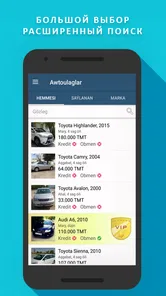


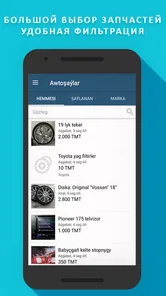
Analysis by Reviewed
Ever wondered if there's an app that can seamlessly connect you with your dream vehicle right from the comfort of your couch? Well, let me introduce you to TMCARS, a gem that I stumbled upon recently. As someone who loves to keep an eye on the latest auto trends, this app feels like a one-stop-shop for everything car-related.
Who will get the most from browsing?
I see the clearest use for people who are actively comparing vehicles, checking what is available, or keeping an eye on the local car market before deciding whether to buy or sell. Having listings in an Auto & Vehicles app makes it easier to browse in short bursts: you can look over options during a quiet break, then return to a promising vehicle when you have more time to assess it.
It can also help a seller think through how a car will appear to potential buyers. Clear photos and accurate details make a listing more useful than a vague description, so I would prepare the vehicle information and images before starting rather than rushing through the process. That small bit of preparation is especially helpful when someone is comparing several similar cars and needs a reliable basis for deciding which seller to contact.
A realistic routine might be checking listings while planning a replacement car, saving a few candidates for closer comparison, then contacting sellers only after checking the details that matter to you. I would treat an online listing as a starting point, not as proof that a vehicle is right. Arrange an in-person inspection and verify important details before making a commitment.
What is TMCARS All About?
TMCARS is a platform that brings the bustling world of car buying and selling directly to your smartphone. Imagine having an extensive marketplace at your fingertips, whether you're looking to buy a car, sell one, or just browse for fun. It's essentially a digital car bazaar, minus the haggling and the heat.
Features That Caught My Eye
First off, the user interface is incredibly intuitive. The moment you open the app, you're greeted with a sleek design that's easy on the eyes. Navigation is straightforward, making the whole process feel like a breeze. Even if tech isn't your forte, you'll find yourself maneuvering through the app with ease.
One feature that I particularly enjoyed is the filtering system. You can narrow down your search by brand, model, price range, and even mileage. It's like having a personal assistant that knows exactly what you're looking for.
More From Our News Desk

Weather by Xiaomi Review: Clear at a Glance, Less Clear Up Close

X Under Pressure: Can It Recover When Posting Goes Wrong?

Clash of Clans Is Won Between the Battles

Android Auto Makes the Case for Quieter Car Software

MobiOffice: Transforming Mobile Productivity with Seamless Integration

EA SPORTS FC™ Mobile Soccer: Redefining Mobile Sports Gaming
My practical tip is to begin with the filters that rule a car out, rather than stacking on every preference immediately. Set a sensible price range and mileage first, then compare the remaining options by brand and model. If the search becomes too narrow, relax one condition at a time; that makes it easier to see whether your requirements are excluding good candidates or simply reducing clutter.
For readability, I find a phone useful for quick checks, but a small screen is not ideal for judging every photo or weighing lots of details side by side. I would use the app to discover and shortlist vehicles, then review the strongest candidates carefully before reaching out. People who need larger text, high contrast, or a particular screen-reader experience should check how the interface works on their own device; ease of navigation can vary with personal settings and needs.
How Does It Work?
The app operates on a user-friendly model. For buyers, you simply set your preferences and browse through the listings. Each car listing comes with detailed information and high-quality images, so you know exactly what you're getting into. Sellers, on the other hand, can list their vehicles by providing essential details and uploading photos. It's that simple!
When evaluating a listing, I would read the description before letting attractive photos shape my first impression. Compare details consistently across your shortlist, and write down questions that the listing does not answer. That gives a seller a useful, specific message and helps you avoid spending time on a vehicle that does not meet your basic needs. Photos can help you decide what to investigate, but they cannot replace seeing the car in person.
Compared with general classified-ad apps, a vehicle-focused marketplace is more convenient when your main task is finding cars and narrowing the field by vehicle-related criteria. A broad marketplace may be better if you are also searching for unrelated goods, while dealer sites can be more suitable for someone who wants to browse one seller’s stock. I would choose TMCARS when I want a dedicated place to explore vehicle listings, not as a substitute for independent checks or direct conversation with a seller.
Motor, sensory, and situational access
Because browsing and comparing are phone-based activities, the app can fit into moments when opening a computer would be inconvenient. But searching while walking, driving, or managing other tasks is a poor trade-off: it takes attention away from the surroundings and makes careful comparison harder. I would browse while seated and contact a seller when I can focus, rather than trying to handle a purchase conversation on the move.
For someone with limited dexterity, the amount of tapping involved in adjusting searches and moving between listings may matter. A useful approach is to decide on the main criteria before opening the app and make changes in deliberate steps instead of repeatedly rebuilding a search. If reading long descriptions or inspecting images is tiring, take breaks and review only a small shortlist at a time. These are practical ways to reduce effort, not a guarantee that the interface will suit every access need.
The app is free, and it is rated for Everyone, which makes trying it straightforward for a broad audience. Still, the best fit depends on what you need from a vehicle marketplace. If you want extensive buying advice, financing guidance, or a formal inspection service in the same place, I would look for those resources separately rather than assume a listings app covers the whole purchase.
Personal Experience and Final Thoughts
After spending some time with TMCARS, I must say I'm impressed. It's not just about buying and selling; it's about creating a community of car enthusiasts who can share their passion for automobiles. The app feels like a breath of fresh air in the sometimes cumbersome world of car trading.
As an app from Meretniyazov A., it has a strong audience behind it: its average rating is 4.4 from around 92,000 ratings, and it has been installed over a million times. It first appeared in 2017, and version 3.7.3 supports Android 5.0 and later. Those figures suggest that many people have found it useful, though they cannot tell me whether a particular listing is accurate or whether the app will meet every individual access preference.
In my opinion, whether you're seriously looking to make a purchase or just enjoy window shopping, TMCARS is worth checking out. It's modern, efficient, and makes the whole experience enjoyable. So, if cars are your thing, give it a whirl and see how it revs up your car shopping journey!
I would recommend it most to someone who wants a practical way to browse vehicle listings, compare possibilities, or prepare a sale. I would skip it if I needed a fully guided buying service or could not comfortably use its browsing interface; in those cases, a dealer’s own site or help from someone you trust may be a better starting point. For everyone else, my advice is simple: filter with a clear purpose, ask sellers precise questions, and use the app to find options—not to make the final decision for you.
TMCARS Frequently Asked Questions
Is TMCARS available for iPhone and Android?
TMCARS is an app for browsing vehicle and other advertisements. Before downloading, check that the version offered in your device’s app store is compatible with your phone. Android users need version 5.0 or later. The app is free, so you can install it and see whether its listings fit what you are looking for.
Who develops TMCARS, and is it suitable for all ages?
TMCARS is developed by Meretniyazov A. Its content rating is Everyone, so it is broadly accessible to users of different ages. As with any listing app, younger users should involve a parent or guardian when communicating with sellers or making decisions about purchases. The app’s focus is vehicles and other advertisements.
Is TMCARS suitable for someone who wants to browse vehicle and other listings?
TMCARS is an app in the Auto & Vehicles category, and its Turkmen store summary describes a world of vehicles and other advertisements. It may be useful if you want to explore listings in one place. The app is free, and its content rating is Everyone, making it broadly accessible to users considering a vehicle-focused marketplace.
What is TMCARS and how does it work?
TMCARS is an innovative automotive marketplace platform designed to streamline the buying and selling of vehicles. Users can easily search for cars, trucks, and other vehicles, filter results based on their preferences, and directly contact sellers through the app. With its intuitive interface, TMCARS makes it simple for users to navigate listings, compare prices, and find the best deals available in their area.
Is TMCARS free to use, or are there any hidden charges?
TMCARS is free to download and use, allowing users to browse vehicle listings and connect with sellers at no cost. However, there might be premium features or services available for purchase within the app, such as advanced search filters or promotional tools for sellers. Be sure to read the terms and conditions to understand any potential charges before using these additional features.
Pros
- User-friendly interface for easy navigation.
- Wide variety of car models available.
- Detailed information on each car listing.
- Regular updates with new car listings.
- Secure payment options for transactions.
Cons
- Limited to certain geographic locations.
- Some listings lack detailed photos.
- Occasional bugs in search functionality.
- No direct contact with sellers in app.
- Requires stable internet for full features.











