Time Warp Scan Cam&Face Filter
- 402.00
- 4.4
- Installs
- 10.00M
- Price
- Free

Screenshots

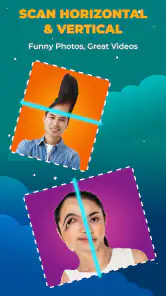






Analysis by Reviewed
Have you ever wanted to see yourself with a warp effect or add some quirky filters to your photos? Enter the world of Time Warp Scan Cam&Face Filter, an app that’s all about having fun and unleashing your creativity. Today, I'll be sharing my experience with this app, so sit back and let’s dive into it.
Getting Started with Time Warp Scan Cam&Face Filter
The first thing you’ll notice about Time Warp Scan Cam&Face Filter is how easy it is to get started. After downloading it from the app store, you’re greeted with a simple, user-friendly interface. It’s pretty straightforward, so even if you’re not tech-savvy, you’ll have no trouble navigating through the app. The main feature is the time warp effect, which creates a scanning line across the screen, capturing hilarious warped images as you move.
Features That Stand Out
One of the coolest things about this app is the sheer variety of filters available. From turning your face into a Picasso-like masterpiece to morphing it with wild animal features, the possibilities are endless. The app also allows you to adjust the speed of the scanning line, giving you more control over your creations. I spent hours experimenting with different speeds and filters, and it was a blast!
Another feature worth mentioning is the ability to share your creations directly on social media. Whether it's Instagram, Snapchat, or TikTok, you can easily show off your warped selfies and get a few laughs from friends and followers. The app integrates seamlessly with these platforms, making the sharing process a breeze.
Unleashing Creativity and Fun
The real magic of this app lies in its ability to spark creativity. Whether you’re using it for a quick laugh or diving deep into creating artistic portraits, Time Warp Scan Cam&Face Filter offers something for everyone. I found myself constantly coming back to it, trying out new ideas and seeing what kind of crazy images I could create. It’s like having a mini art studio in your pocket!
While the app is incredibly fun, it does have its quirks. Sometimes the filters can be a bit glitchy, especially if your phone is on the older side. However, these minor hiccups are far outweighed by the endless entertainment value it provides.
Final Thoughts
In conclusion, if you’re looking for an app that combines creativity, humor, and a touch of the unexpected, Time Warp Scan Cam&Face Filter is definitely worth checking out. It’s not just about taking funny pictures; it’s about exploring new ways to express yourself and share a laugh with others. So go ahead, give it a try, and see where your imagination takes you!
Pros
- Unique and fun filter effects.
- Easy to use interface.
- Regular updates with new filters.
- Supports both photo and video modes.
- Works well on most devices.
Cons
- Ads can be intrusive.
- Limited free features.
- Requires internet connection.
- Some filters need improvement.
- Occasional app crashes.

- Category
- Photography
- Version
- 1.3.0











