The Great Courses
- 1.29K
- 3.6
- Installs
- 1.00M
- Price
- Free

Screenshots
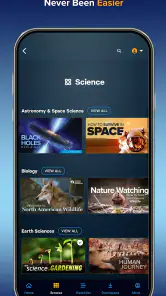
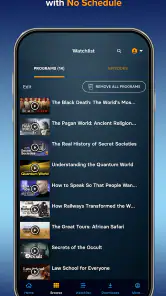
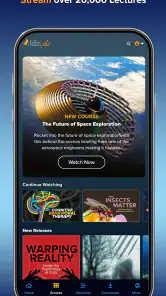
Analysis by Reviewed
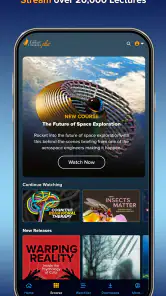
When I want to learn something substantial without committing to a classroom schedule, I find The Great Courses a more focused option than a typical entertainment app. It brings together educational video and audio lessons presented by experts, so the experience feels closer to following a carefully prepared course than casually browsing short clips. The app is free to install, and its store summary describes it as a place to stream educational videos and audio content led by engaging experts. That is a useful promise, but the real question is whether it helps a first-time user move from curiosity to a worthwhile learning session.
My answer is generally yes, with an important qualification: this is best for people who enjoy structured learning and are willing to choose a subject deliberately. It is not the ideal pick if you want quick answers, a highly social classroom, or a completely open library with every lesson immediately available. The Teaching Company has built the service around substantial educational material, and that gives it a different rhythm from ordinary video platforms.
What to expect before you begin
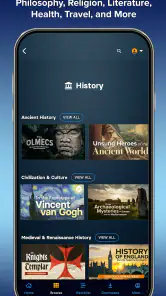
The Great Courses is an education app rather than a quiz game, language drill tool, or general video service. I would approach it expecting lectures, explanations, and longer learning paths. The main benefit is the chance to spend real time with a subject instead of jumping between disconnected snippets. That makes it suitable for history, science, arts, culture, and other areas where context matters, although the exact usefulness will depend on which course or lesson catches your interest.
The app comes from The Teaching Company, a developer associated with the Great Courses name. It has been available since August 2, 2015, and its reach is clear from more than a million installs. Its average rating is 3.6 from around 3.9 thousand ratings, with roughly 1.3 thousand written reviews. I read that combination as a sign of a service people find valuable but not universally effortless. The rating is not a reason to avoid it, yet it does suggest that the experience can depend heavily on expectations, access to content, and how comfortably someone uses the app.
Installation itself is free, but the learning library is not necessarily an entirely free experience. In-app purchases range from $19.99 to $179.99 per item, so I would not begin by assuming that every course is included at no cost. The sensible approach is to install the app, inspect the available material, and understand what can be sampled or accessed before deciding whether a particular purchase is worthwhile. That matters especially for someone comparing it with free educational videos or a subscription-based learning platform.
The content rating is Teen, which fits an education service that may cover mature historical events, serious social topics, or complex ideas. I would still use ordinary judgement when choosing material for a younger learner. The app runs on devices using Android 8.0 or later, and the current version is 9.0.1. If your phone or tablet is older than that requirement, checking compatibility before planning a study routine will save unnecessary frustration.
Choosing a course instead of browsing endlessly
On a first visit, I recommend resisting the temptation to open several interesting subjects at once. Educational catalogs can create a false sense of progress: you spend time comparing possibilities but never complete a lesson. I get better results by choosing one practical goal, such as understanding a period of history, becoming familiar with a scientific idea, or building background knowledge before reading a book.
A useful test is to ask whether you want a course or merely an explanation. If you need a five-minute definition, a search engine may be faster. If you want a guided chain of ideas that builds from one lesson to the next, this app is more appropriate. That distinction is one of its biggest strengths and also one of its main limitations. The richer format rewards patience, but it is less convenient for people who only need a quick reference.
Setting up a first learning session
After installing the app, I would keep the first setup simple. Open the catalog, look for a topic you already care about, and read the course information before pressing play. Do not choose a subject only because its title sounds impressive. A good first course should match the amount of attention you can realistically give it. If you have a busy evening, select something you can begin without feeling pressured to finish a large section.
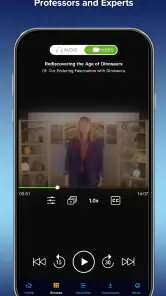
I also suggest starting with audio when your situation makes video inconvenient. The app includes both video and audio educational content, which makes it more flexible than a service designed only for watching. Audio can work during a quiet commute, while cooking, or during a walk, provided the activity does not require your full attention. Video is preferable when the instructor relies on visual material, demonstrations, maps, diagrams, or other information that would be difficult to follow by listening alone.
This choice between formats is more important than it first appears. Many learners automatically select video because it feels more complete, then lose concentration when they are not actively looking at the screen. I find audio better for review and video better for the first encounter with a difficult idea. Switching formats according to the lesson can make the app feel less demanding without reducing the seriousness of the material.
Before beginning, decide what “success” means for that session. It might be finishing one lesson, writing down three ideas, or simply understanding a concept that previously felt confusing. This small decision prevents the catalog from becoming a distraction. It also gives you a way to judge the app fairly: the goal is not to consume as much content as possible, but to retain something useful.
The first meaningful action
For me, the first successful action is not installing the app or opening a course. It is completing one lesson and being able to explain its central point in my own words. I recommend watching or listening without constantly switching between titles. When the lesson ends, pause for a moment and summarize what changed in your understanding. That habit turns passive streaming into actual study.
A realistic example would be a weekend afternoon when I want to prepare for a museum visit. Instead of reading random articles about an artist or historical period, I could select a relevant course, watch one lesson with a notebook nearby, and record the names, dates, or ideas that help me see the subject in context. Later, the museum visit becomes more meaningful because I am not encountering every object as an isolated fact. The app works particularly well in this kind of background-building role.
Another practical workflow is to use the video for the first lesson and audio for a later review. During the first pass, visual explanations can establish the structure of the topic. On a walk the next day, listening again can reinforce the main argument. I would not claim that this replaces formal study, but it is a realistic way to fit serious learning into ordinary routines.
If you are studying for a specific reason, write that reason down before starting. Someone preparing for a discussion may focus on definitions and examples. Someone exploring a new hobby may care more about broad understanding. Someone returning to education after a long break may need a gentle introduction rather than the most advanced course available. The same library can serve all three people, but they should not judge their progress by the same standard.
Where new users can become confused
The largest source of confusion is likely the difference between a free app and paid educational content. “Free” describes the installation, not a guarantee that every course or item is included without payment. Since individual in-app purchases can reach $179.99, I would inspect the access details for a course carefully and avoid tapping through quickly when a purchase screen appears. This is especially important if you are installing the app for a child or using a shared device.
A second point of confusion is the difference between streaming and owning a learning resource. The app is presented around streaming educational videos and audio, so I would think of it first as a way to access content inside the service rather than as a replacement for a physical textbook. If you need permanent offline reference material, printed notes, or a formal certificate, a book, course provider, or accredited program may suit you better.
People may also expect every course to have the same style. That is not a safe assumption with expert-led educational content. Some lessons may feel conversational and easy to follow, while others may demand more concentration or prior knowledge. If the first selection feels too dense, I would not immediately conclude that the whole app is unsuitable. Try a more introductory subject or switch from audio to video. On the other hand, if you repeatedly want short interactive exercises, this may simply be the wrong format for your learning style.
Another realistic limitation is motivation. The app can provide a well-organized path, but it cannot make a learner return after the initial enthusiasm fades. I get more from it when I connect a course to a real project: planning a trip, reading a difficult novel, understanding a scientific news story, or preparing for a conversation. Without that connection, even excellent lectures can become background noise.
How it compares with familiar alternatives
Compared with free video platforms, The Great Courses feels more intentional. Free platforms are excellent for finding a single explanation or seeing many viewpoints quickly, but their recommendations can pull you away from the original question. This app is stronger when you want an extended presentation led by an expert rather than a chain of unrelated clips. The trade-off is that free platforms usually offer more immediate variety at no direct cost.
Compared with language-learning apps and study platforms built around quizzes, this service is less interactive. You are mainly receiving explanations through video or audio, so it will not provide the same repeated practice as flashcards, exercises, or conversation tools. I would pair it with notes, a workbook, or a separate practice app when I need to test recall. It is a content-rich learning companion, not a complete system for every kind of skill development.
Compared with podcasts, the advantage is the course structure and the possibility of using video when visual teaching helps. Podcasts may be easier to discover and often fit casual listening better, but they can vary widely in organization and depth. The Great Courses makes more sense when I want a deliberate educational sequence. If I only want relaxed commentary during a commute, a regular podcast may be less demanding and more convenient.
Paid online courses can offer assignments, discussion groups, instructor feedback, or credentials. This app is more appealing when I want expert instruction without those classroom obligations. That freedom is valuable for independent learners, but it also means I must create my own accountability. The right choice depends on whether I want knowledge for personal enrichment or an externally recognized educational outcome.
Building a routine and deciding whether to pay
Once I have finished a first lesson, I would not buy a course simply because the topic is interesting. I would first ask whether I am likely to use its format and follow its sequence. A purchase makes more sense when the subject connects to a specific goal and the instructor’s approach suits the way I learn. The upper end of the listed item range is a serious commitment, so the decision deserves more thought than an ordinary entertainment purchase.
One useful method is to set a small trial routine before spending money: choose a lesson, take notes, and return to the subject later in the week. If I still remember the main ideas and want to continue, that is stronger evidence of value than excitement during the first few minutes. If I keep abandoning lessons, a cheaper or more interactive alternative may be better, even if the course itself is well made.
I would also separate “interesting” from “useful.” A fascinating subject can still be a poor purchase if I have no time to engage with it. Conversely, a course that supports a current project may repay the cost through better understanding, faster research, or greater confidence in a conversation. The app is most convincing when it becomes part of a planned learning habit rather than another library I rarely open.
For families, I would treat the Teen rating as a prompt to review course choices together. The educational purpose does not automatically make every topic suitable for every age. For older learners, the main consideration is device compatibility and comfort with the app’s presentation style. Android users need version 8.0 or later, while iOS users should check the current store requirements on their device before installing.
My practical advice is to judge the app by one completed learning outcome, not by the size of its catalog. If you can finish a lesson, explain what you learned, and see how it fits into a real interest, the service is doing something valuable. If you only browse titles or leave lectures playing while distracted, the app will feel expensive and less useful than its educational promise suggests.
Who should use it, and who should skip it?
I would recommend The Great Courses to curious adults, independent learners, lifelong students, and anyone who prefers expert-led explanations over fragmented searching. It is particularly good for someone who wants to explore a subject deeply but does not want a fixed class schedule. The combination of video and audio also helps people adapt learning to different parts of the day.
I would be more cautious about recommending it to someone who needs graded assignments, direct teacher feedback, formal accreditation, or constant interaction. It is also not my first choice for a learner who only wants rapid facts or hands-on practice. In those situations, a textbook, an interactive course, a reference tool, or a conventional class could produce better results.
My final impression is positive but measured. The free installation makes it easy to investigate, the expert-led format gives it more structure than ordinary browsing, and the audio option makes serious learning easier to fit into daily life. At the same time, paid items require careful consideration, and the app depends on self-motivation more than interactive study platforms do. For a first-time user, the best path is straightforward: choose one realistic subject, complete one lesson, summarize it, and only then decide whether the larger course deserves your time and money. If that process leaves you wanting to learn more, this is a thoughtful education app worth keeping on your device.
Pros
- High-quality lectures presented by experienced professors and subject experts.
- Wide range of subjects
- from history and science to arts and personal development.
- Courses are organized into manageable lessons for flexible
- self-paced learning.
- Audio and video formats support learning at home or while traveling.
- Many courses provide valuable depth beyond typical short online videos.
Cons
- Full access to much of the library may require a paid subscription or purchase.
- Some lectures can feel lengthy for users who prefer quick
- bite-sized lessons.
- The app may use considerable storage when downloading complete courses offline.
- Course quality and presentation style can vary between instructors and series.
- Interactive features and assessments are limited compared with formal online classes.

- Category
- Education
- Version
- 9.0.1











